Solved OneDrive Won't Sign In


Gryffin

Well-known member
Local time
2:28 AM
Posts
19
OS
Windows 11
Hello, I factory reset my Surface 7 to fix my adaptive charging issues (which turns out didn't fix the problem anyway. but that's for another thread), but now I can't sign into OneDrive. When I go to set it up, I can enter my credentials, approve my login with my authenticator, and all seems well, but the dialog gets stuck "loading" forever. I've given it at least 10 minutes, and no change.

I'm running Version 24H2 or 10.0.26100, Build 26100.4946.

Any advice? Thank you.
 
Windows Build/Version
Version 24H2 or 10.0.26100, Build 26100.4946.

My Computer

System One

  • OS
    Windows 11
    Computer type
    Laptop
    Manufacturer/Model
    Microsoft Surface Laptop 7 64-bit
    CPU
    Snapdragon X 10-core X1P64100 @ 3.40 GHz
    Memory
    16 GB
Hello, I factory reset my Surface 7 to fix my adaptive charging issues (which turns out didn't fix the problem anyway. but that's for another thread), but now I can't sign into OneDrive. When I go to set it up, I can enter my credentials, approve my login with my authenticator, and all seems well, but the dialog gets stuck "loading" forever. I've given it at least 10 minutes, and no change.

I'm running Version 24H2 or 10.0.26100, Build 26100.4946.

Any advice? Thank you.
Hi,
Are you still logged in on another device?
Have you tried looking under Settings/Accounts/Linked Devices?
 

My Computers

System One System Two

  • OS
    All Branches but Release
    Computer type
    Laptop
    Manufacturer/Model
    Acer Nitro ANV15-51
    CPU
    AMD Ryzen 7 7735HS 3200-4500 Mhz 8 cores x 2
    Motherboard
    Sportage_RBH
    Memory
    32 GB DDR5
    Graphics Card(s)
    Radeon Graphic / NVIDIA GeForce RTX 4060 8 GB GDDR6
    Sound Card
    AMD/Realtek(R) Audio
    Monitor(s) Displays
    Integrated Monitor (15.3"vis)
    Screen Resolution
    FHD 1920X1080 16:9 144Hz
    Hard Drives
    KINGSTON OM8SEP4512Q-AA 1TB
    Western Digital 256GB
    PSU
    19V DC 6.32 A 120 W
    Cooling
    Dual Fans
    Mouse
    MS Bluetooth
    Internet Speed
    Fiber 1GB Cox -us & 1GB Orange-fr
    Browser
    Edge Canary- Firefox Nightly-Chrome Dev-Chrome Dev
    Antivirus
    Windows Defender
  • Operating System
    Windows 11 Beta
    Computer type
    Laptop
    Manufacturer/Model
    Asus X751BP
    CPU
    AMD A9-9420
    Memory
    8 GB of DDR4
    Graphics card(s)
    AMD Radeon R5
    Screen Resolution
    1600x900
    Hard Drives
    Seagate 1 TB

My Computers

System One System Two

  • OS
    Windows 11 Pro 25H2 26200.8655
    Computer type
    PC/Desktop
    Manufacturer/Model
    Dell Optiplex 7080
    CPU
    i9-10900 10 core 20 threads
    Motherboard
    DELL 0J37VM
    Memory
    32 gb
    Graphics Card(s)
    none-Intel UHD Graphics 630
    Sound Card
    Integrated Realtek
    Monitor(s) Displays
    Benq 27
    Screen Resolution
    2560x1440
    Hard Drives
    2x1tb Solidigm m.2 nvme /External drives 512gb Samsung m.2 sata+2tb Kingston m2.nvme
    PSU
    500w
    Case
    MT
    Cooling
    Dell Premium
    Keyboard
    Logitech wired
    Mouse
    Logitech wireless
    Internet Speed
    so slow I'm too embarrassed to tell
    Browser
    #1 Edge #2 Firefox
    Antivirus
    Defender+MWB Premium
  • Operating System
    Windows 11 Pro 24H2 26200.8457
    Computer type
    PC/Desktop
    Manufacturer/Model
    Beelink Mini PC SER5
    CPU
    AMD Ryzen 7 6800U
    Memory
    32 gb
    Graphics card(s)
    integrated
    Sound Card
    integrated
    Monitor(s) Displays
    Benq 27
    Screen Resolution
    2560x1440
    Hard Drives
    1TB Crucial nvme
    Keyboard
    Logitech wired
    Mouse
    Logitech wireless
    Internet Speed
    still too embarrassed to tell
    Browser
    Firefox
    Antivirus
    Defender
    Other Info
    System 3 is non compliant Dell 9020 i7-4770/24gb ram Win11 PRO 26200.8457
Hi,
Are you still logged in on another device?
Have you tried looking under Settings/Accounts/Linked Devices?
Yes, I'm signed in on my older laptop and on my desktop. They are also linked.
 

My Computer

System One

  • OS
    Windows 11
    Computer type
    Laptop
    Manufacturer/Model
    Microsoft Surface Laptop 7 64-bit
    CPU
    Snapdragon X 10-core X1P64100 @ 3.40 GHz
    Memory
    16 GB
Yes, I'm signed in on my older laptop and on my desktop. They are also linked.
And you have applied all updates to OneDrive after the factory refresh?
 

My Computers

System One System Two

  • OS
    All Branches but Release
    Computer type
    Laptop
    Manufacturer/Model
    Acer Nitro ANV15-51
    CPU
    AMD Ryzen 7 7735HS 3200-4500 Mhz 8 cores x 2
    Motherboard
    Sportage_RBH
    Memory
    32 GB DDR5
    Graphics Card(s)
    Radeon Graphic / NVIDIA GeForce RTX 4060 8 GB GDDR6
    Sound Card
    AMD/Realtek(R) Audio
    Monitor(s) Displays
    Integrated Monitor (15.3"vis)
    Screen Resolution
    FHD 1920X1080 16:9 144Hz
    Hard Drives
    KINGSTON OM8SEP4512Q-AA 1TB
    Western Digital 256GB
    PSU
    19V DC 6.32 A 120 W
    Cooling
    Dual Fans
    Mouse
    MS Bluetooth
    Internet Speed
    Fiber 1GB Cox -us & 1GB Orange-fr
    Browser
    Edge Canary- Firefox Nightly-Chrome Dev-Chrome Dev
    Antivirus
    Windows Defender
  • Operating System
    Windows 11 Beta
    Computer type
    Laptop
    Manufacturer/Model
    Asus X751BP
    CPU
    AMD A9-9420
    Memory
    8 GB of DDR4
    Graphics card(s)
    AMD Radeon R5
    Screen Resolution
    1600x900
    Hard Drives
    Seagate 1 TB
And you have applied all updates to OneDrive after the factory refresh?
I believe so? I've applied every standard Windows updated except for the preview build. I've also restarted a couple of times. I'm not aware of their being an option to update OneDrive as an app seperately.
 

My Computer

System One

  • OS
    Windows 11
    Computer type
    Laptop
    Manufacturer/Model
    Microsoft Surface Laptop 7 64-bit
    CPU
    Snapdragon X 10-core X1P64100 @ 3.40 GHz
    Memory
    16 GB
I believe so? I've applied every standard Windows updated except for the preview build. I've also restarted a couple of times. I'm not aware of their being an option to update OneDrive as an app seperately.
OneDrive gets updated from the MS store, it should have done so anyway.
So, I would take out OneDrive from Apps/Startup , reboot.
When your Surface 7 is back up, go to Apps and do a Repair of OneDrive.
I would also log out of OneDrive from the older laptop, just in case of version conflicting.
We know your credentials are fine, it is just the app that is misbehaving.
 

My Computers

System One System Two

  • OS
    All Branches but Release
    Computer type
    Laptop
    Manufacturer/Model
    Acer Nitro ANV15-51
    CPU
    AMD Ryzen 7 7735HS 3200-4500 Mhz 8 cores x 2
    Motherboard
    Sportage_RBH
    Memory
    32 GB DDR5
    Graphics Card(s)
    Radeon Graphic / NVIDIA GeForce RTX 4060 8 GB GDDR6
    Sound Card
    AMD/Realtek(R) Audio
    Monitor(s) Displays
    Integrated Monitor (15.3"vis)
    Screen Resolution
    FHD 1920X1080 16:9 144Hz
    Hard Drives
    KINGSTON OM8SEP4512Q-AA 1TB
    Western Digital 256GB
    PSU
    19V DC 6.32 A 120 W
    Cooling
    Dual Fans
    Mouse
    MS Bluetooth
    Internet Speed
    Fiber 1GB Cox -us & 1GB Orange-fr
    Browser
    Edge Canary- Firefox Nightly-Chrome Dev-Chrome Dev
    Antivirus
    Windows Defender
  • Operating System
    Windows 11 Beta
    Computer type
    Laptop
    Manufacturer/Model
    Asus X751BP
    CPU
    AMD A9-9420
    Memory
    8 GB of DDR4
    Graphics card(s)
    AMD Radeon R5
    Screen Resolution
    1600x900
    Hard Drives
    Seagate 1 TB
OneDrive gets updated from the MS store, it should have done so anyway.
So, I would take out OneDrive from Apps/Startup , reboot.
When your Surface 7 is back up, go to Apps and do a Repair of OneDrive.
We know your credentials are fine, it is just the app that is misbehaving.
Oh that makes sense. Good idea. I'll try in a bit here when I get back to my computer. Thank you.
 

My Computer

System One

  • OS
    Windows 11
    Computer type
    Laptop
    Manufacturer/Model
    Microsoft Surface Laptop 7 64-bit
    CPU
    Snapdragon X 10-core X1P64100 @ 3.40 GHz
    Memory
    16 GB
  • Like
Reactions: OAT
OneDrive gets updated from the MS store, it should have done so anyway.
So, I would take out OneDrive from Apps/Startup , reboot.
When your Surface 7 is back up, go to Apps and do a Repair of OneDrive.
I would also log out of OneDrive from the older laptop, just in case of version conflicting.
We know your credentials are fine, it is just the app that is misbehaving.
The issue resolved itself. Who knows why. Somehow, I was able to finally contact offidial Microsoft support. I clicked so many links and tried so many different things, I'm not even sure how my request ultimately went through. They keep support very well hidden. As for this OneDrive issue, the only thing that changed between before and now is that I'm connected to a different network. I had been at home, but now I'm at a hospital. If you're curious, this is what the OneDrive support technician responded:

Thank you for contacting OneDrive Support Team. Hope you are doing well!

I have received your concern related to OneDrive and will assist you with the best of my knowledge.

I understand you are unable to sign in on OneDrive sync app on your Surface device. In order to isolate the issue, please confirm the following details: -

  • Are you connected to a VPN? If yes, please disconnect and try again.
  • Please try switching the network connection (Wi-Fi, mobile data or hotspot)
  • Are you able to login at OneDrive Web?
  • Are you using any third-party antivirus or applications like CC Cleaner? If yes, please disable them, restart the device and check if issue persists.
 

My Computer

System One

  • OS
    Windows 11
    Computer type
    Laptop
    Manufacturer/Model
    Microsoft Surface Laptop 7 64-bit
    CPU
    Snapdragon X 10-core X1P64100 @ 3.40 GHz
    Memory
    16 GB
Oh that makes sense. Good idea. I'll try in a bit here when I get back to my computer. Thank you.
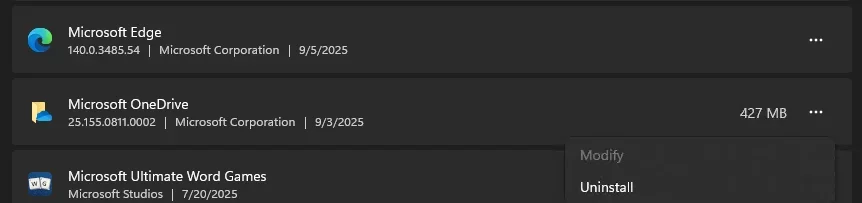
Oh I meant to get back to you about this too. The OneDrive app listing does not have any actual options. There's "modify," but it cannot be selected. There is not "advanced options" at all, which is where I believe repair would be found.
 

My Computer

System One

  • OS
    Windows 11
    Computer type
    Laptop
    Manufacturer/Model
    Microsoft Surface Laptop 7 64-bit
    CPU
    Snapdragon X 10-core X1P64100 @ 3.40 GHz
    Memory
    16 GB
  • Like
Reactions: OAT
Oh I meant to get back to you about this too. The OneDrive app listing does not have any actual options. There's "modify," but it cannot be selected. There is not "advanced options" at all, which is where I believe repair would be found.
You are correct. Thank you for taking the time to reply.
Indeed, I only have the Uninstall Option available as well.

starthi.webp
 

My Computers

System One System Two

  • OS
    All Branches but Release
    Computer type
    Laptop
    Manufacturer/Model
    Acer Nitro ANV15-51
    CPU
    AMD Ryzen 7 7735HS 3200-4500 Mhz 8 cores x 2
    Motherboard
    Sportage_RBH
    Memory
    32 GB DDR5
    Graphics Card(s)
    Radeon Graphic / NVIDIA GeForce RTX 4060 8 GB GDDR6
    Sound Card
    AMD/Realtek(R) Audio
    Monitor(s) Displays
    Integrated Monitor (15.3"vis)
    Screen Resolution
    FHD 1920X1080 16:9 144Hz
    Hard Drives
    KINGSTON OM8SEP4512Q-AA 1TB
    Western Digital 256GB
    PSU
    19V DC 6.32 A 120 W
    Cooling
    Dual Fans
    Mouse
    MS Bluetooth
    Internet Speed
    Fiber 1GB Cox -us & 1GB Orange-fr
    Browser
    Edge Canary- Firefox Nightly-Chrome Dev-Chrome Dev
    Antivirus
    Windows Defender
  • Operating System
    Windows 11 Beta
    Computer type
    Laptop
    Manufacturer/Model
    Asus X751BP
    CPU
    AMD A9-9420
    Memory
    8 GB of DDR4
    Graphics card(s)
    AMD Radeon R5
    Screen Resolution
    1600x900
    Hard Drives
    Seagate 1 TB

Latest Support Threads

Back
Top Bottom