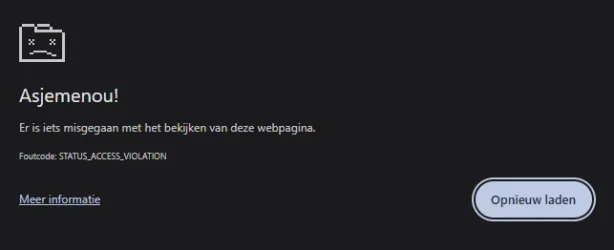
Oops message occurring inside the Google Chrome browser.


hader

Well-known member
Power User
VIP
Local time
6:20 AM
Posts
530
Location
ZH, NL
OS
Win 11 Pro "25H2" Build 26200.8524, Zorin OS Pro
This seems to be a haunting message.
At random times I'll place some text inside the URL bar to search for. And sometimes Google Chrome response with "Oops something went wrong" I look at the URL bar and Chrome has incapsulated the text inside the browser with https://www.google.com/ etc. And the strange part is; as soon as I press on the reload page button; I do get a response from google as normal with the results of my request; Search for this "text blabla" So something went wrong. It's not the Internet connection; it stays up and running all the time. Connected through a my PC (ethernet connection) directly to my modem and to my fiber distribution (by UTP CAT 6 cables.) entry point.

Tried to find this OOPS error on the internet; Yes it's a know error. Just clean cookies, temp files etc. then it will be fixed... Yeah. After that the same thing happens again. Not sure where to look for. Inside Windows? (No faults or Chrome errors inside the eventviewer, Windows is up to date till the latest build) Inside Chrome? Had 1 strange incident with my gmail account prior to this; it did during a test produced the wrong password while I did not changed it for a long time. It went wrong during the test only (outlook 2021) Password worked fine inside the online page. Did an update off Outlook 2021 but that did not solve the issue. Suddenly Outlook could also not log into my gmail account while yesterday it could. In the end deleting 2 web-references inside web-references that has something to do with gmail did the trick. Solved. (It needed an update; Must be now OAUTH2 authentication. Has been replace by: MicrosoftOffice16_Data:OAUTH2:<20 numbers>_tp_google_imap_OAuth2 that is updated every time when you use Outlook every time.)

But this OOPS error message not!.... Looked if the version of the browser was to old. No. It is the latest one.
Does anybody has this seen this issue also and solved it?...... (Deleting all browser data inside Chrome did not help)
 

My Computer

System One

  • OS
    Win 11 Pro "25H2" Build 26200.8524, Zorin OS Pro
    Computer type
    PC/Desktop
    Manufacturer/Model
    Self built
    CPU
    Intel® Core™ i7-12700KF 12th Gen.
    Motherboard
    ASUS Prime Z690-A, BIOS v4505
    Memory
    32GB DDR5 5600-36 Vengeance
    Graphics Card(s)
    PCIe4.0 Asus NVIDIA RTX3060Ti
    Sound Card
    Onboard; Realtek
    Monitor(s) Displays
    34" LG 34UC79G-B Curved 21:9 144Hz
    Screen Resolution
    2560x1080 (No HDR)
    Hard Drives
    250Gb Samsung 870PRO NVMe (Win 11 Pro)
    1Tb Samsung 980PRO NVMe
    1Tb Samsung 970EVO NVMe
    2Tb Samsung 990PRO NVMe with heatsink.
    4Tb WDC WD40EZRZ Blue SATA (Int.)
    4Tb WDC WD40EZRZ Blue SATA (Int.)
    3Tb WDC WD30EFRZ Red SATA (Int.)
    256Gb Samsung 840PRO SSD (RHEL 9,5)
    256Gb Samsung 850PRO SSD (Zorin OS Pro 18)
    PSU
    Coolermaster 850W V2 Gold with internal 12cm exaust fan
    Case
    Be-Quiet Pure Base 600.
    Cooling
    3x Be-Quiet! 12/14cm "Silent Wings 4" casefans, 1x Arctic Freezer i35 CPU towerblock with fan.
    Keyboard
    Steelseries APEX 7 keyboard.
    Mouse
    Logitech G-502 Hero
    Internet Speed
    1Gb
    Browser
    Brave
    Antivirus
    F-Secure
    Other Info
    No Noise system.
    256Gb Kingston Travler USB 3.0 drive.
    64Gb Sandisk USB 3.2 drive. (Ventoy)
    8Gb Philips USB 3.0 drive. (Win. Inst.)
    8Gb Philips USB 3.0 drive. (Rescue disk)
    2Tb WD USB 3.0 Passport drive.
    USB Ext. 500Gb WD SATA drive.
    External USB 3.0 C.A. CD/DVD* burner.
Not a big fan of GOOGLE but the missuz uses it. When I get the infamous "something went wrong" message I noticed it usually happens on websites that are notoriously snoopy. So I'm guessing the thing that went wrong is the blocker that stops them from getting a little more invasive than I would prefer. Perhaps they want you to allow third party cookies, for example, and ooops! Not happening. This is only a guess but it does seem to happen on those sorts of sites more than any others. Usually a refresh will take you to the site in question.
 

My Computer

System One

  • OS
    WIN 11, WIN 10, WIN 8.1, WIN 7 U, WIN 7 PRO, WIN 7 HOME (32 Bit), LINUX MINT
    Computer type
    PC/Desktop
    Manufacturer/Model
    DIY, ASUS, and DELL
    CPU
    Intel i7 6900K and i9-7960X / AMD 3800X (8 core)
    Motherboard
    ASUS X99E-WS USB 3.1 and ASUS X299 SAGE
    Memory
    128 GB CORSAIR DOMINATOR PLATINUM (B DIE)
    Graphics Card(s)
    NVIDIA 1070 and RTX 3070
    Sound Card
    Crystal Sound (onboard)
    Monitor(s) Displays
    single Samsung 30" 4K and 8" aux monitor
    Screen Resolution
    4K and something equally attrocious. I'll be working on this.
    Hard Drives
    A, B, C, D, E, F, G, H, I, J, K, L, M, N, O, P, Q, R, S, T, U, V, W

    Ports X, Y, and Z are reserved for USB access and removable drives.

    Drive types consist of the following: Various mechanical hard drives bearing the brand names, Seagate, Toshiba, and Western Digital. Various NVMe drives bearing the brand names Kingston, Intel, Silicon Power, Crucial, Western Digital, and Team Group. Various SATA SSDs bearing various different brand names.

    RAID arrays included:

    LSI RAID 10 (WD Velociraptors) 1115.72 GB
    LSI RAID 10 (WD SSDS) 463.80 GB

    INTEL RAID 0 (KINGSTON HYPER X) System 447.14 GB
    INTEL RAID 1 TOSHIBA ENTERPRIZE class Data 2794.52 GB
    INTEL RAID 1 SEAGATE HYBRID 931.51 GB
    PSU
    SEVERAL. I prefer my Corsair Platinum HX1000i but I also like EVGA power supplies
    Case
    ThermalTake Level 10 GT (among others)
    Cooling
    Noctua is my favorite and I use it in my main. I also own various other coolers.
    Keyboard
    all kinds.
    Mouse
    all kinds
    Internet Speed
    360 mbps - 1 gbps (depending)
    Browser
    FIREFOX
    Antivirus
    KASPERSKY (no apologies)
    Other Info
    Gave Dell touch screen with Windows 11 to daughter and got me an OTVOC. Being a PC builder I own many desktop PCs as well. I am a father of five providing PCs, laptops, and tablets for all my family, most of which I have modified, rebuilt, or simply built from scratch. I do not own a cell phone, never have, never will.
Hader, as a test, click on the three little dots top right to open the menu, choose "New Incognito Window", then try again from there. If it works fine then one of your third-party extensions is almost certainly the culprit. Close the Incognito window.

Look through your list of extensions in a normal Chrome window, and one by one, disable any ad-blockers, VPNs, or search enhancers then try again.
 

My Computer

System One

  • OS
    Windows 11
Not a big fan of GOOGLE but the missuz uses it. When I get the infamous "something went wrong" message I noticed it usually happens on websites that are notoriously snoopy. So I'm guessing the thing that went wrong is the blocker that stops them from getting a little more invasive than I would prefer. Perhaps they want you to allow third party cookies, for example, and ooops! Not happening. This is only a guess but it does seem to happen on those sorts of sites more than any others. Usually a refresh will take you to the site in question.
Strange sites. Yes. But by entering some words into the URL and hit enter means that those words are send to google itself with the assignment "Show me pages that contains these word" I never have this when I type the complete URL. Chrome also uses some sort of autocompletion function. When I start to type the URL; Chrome sees that is a familiar site that I used before and it display the startpage of the URL and complets the not finished URL. hit enter and sometimes also Oops. Reloading it a second time and the page appears. And on other moments the regular page appears with no errors. Those sites are not what I call suspicious sites. I intercepted the link during that Oops message. It is what Chrome sends to Google. Copied it and saved it. Can use the same link and I getting immediately a result. The same result as I would reload the page. I have no blockers inside Chrome except for Adblock Plus that many an many other users also uses..... No issues there otherwise it would raining complaints I think.

I have found a clue. I have F-Secure as antivirus program. I must do... a lot of things. Switching off my banking security? or exclude Chrome.exe? Are they mad? Why? Well I will download Brave first and check if it gives me also those Oops messages. That STATUS_ACCESS_VIOLATION point to a different direction. Towards firewall settings. Or reinstalling F-Secure itself and to make sure everything is clean before installing it again. It says it's up to date but maybe by patching it it is not 100% completely at the latest build. An other persons had this issue also, deinstalled it and the problem disappeared. Yeah running without an antivirus program is a good idea then...... :lmao:

The real issue is memory. Chrome can't access it's stuff inside the memory because F-secure is doing a deep scan on that part of memory and holding it while it's busy. <1 ms later it is done and free again and Chrome can access it again. It's a clash between the two. Maybe excluding Chrome.exe only isn't a bad idea..... Will try this first before anything else. Will let you know if this resolved my issue.
 

Attachments

  • Oops message.webp
    Oops message.webp
    7.4 KB · Views: 1
Last edited:

My Computer

System One

  • OS
    Win 11 Pro "25H2" Build 26200.8524, Zorin OS Pro
    Computer type
    PC/Desktop
    Manufacturer/Model
    Self built
    CPU
    Intel® Core™ i7-12700KF 12th Gen.
    Motherboard
    ASUS Prime Z690-A, BIOS v4505
    Memory
    32GB DDR5 5600-36 Vengeance
    Graphics Card(s)
    PCIe4.0 Asus NVIDIA RTX3060Ti
    Sound Card
    Onboard; Realtek
    Monitor(s) Displays
    34" LG 34UC79G-B Curved 21:9 144Hz
    Screen Resolution
    2560x1080 (No HDR)
    Hard Drives
    250Gb Samsung 870PRO NVMe (Win 11 Pro)
    1Tb Samsung 980PRO NVMe
    1Tb Samsung 970EVO NVMe
    2Tb Samsung 990PRO NVMe with heatsink.
    4Tb WDC WD40EZRZ Blue SATA (Int.)
    4Tb WDC WD40EZRZ Blue SATA (Int.)
    3Tb WDC WD30EFRZ Red SATA (Int.)
    256Gb Samsung 840PRO SSD (RHEL 9,5)
    256Gb Samsung 850PRO SSD (Zorin OS Pro 18)
    PSU
    Coolermaster 850W V2 Gold with internal 12cm exaust fan
    Case
    Be-Quiet Pure Base 600.
    Cooling
    3x Be-Quiet! 12/14cm "Silent Wings 4" casefans, 1x Arctic Freezer i35 CPU towerblock with fan.
    Keyboard
    Steelseries APEX 7 keyboard.
    Mouse
    Logitech G-502 Hero
    Internet Speed
    1Gb
    Browser
    Brave
    Antivirus
    F-Secure
    Other Info
    No Noise system.
    256Gb Kingston Travler USB 3.0 drive.
    64Gb Sandisk USB 3.2 drive. (Ventoy)
    8Gb Philips USB 3.0 drive. (Win. Inst.)
    8Gb Philips USB 3.0 drive. (Rescue disk)
    2Tb WD USB 3.0 Passport drive.
    USB Ext. 500Gb WD SATA drive.
    External USB 3.0 C.A. CD/DVD* burner.
I use FireFox with StartPage so I'm probably not much help in this regard, but I've seen that STATUS_ACCESS_VIOLATION before. One of my many daughters uses Brave also and we all use Ad Block plus. What you are describing strikes me as a permissions issue involving access which could likely be related to tracking. Of course I only speculate but I've seen similar things happen with Kaspersky. I actually telephoned them and discussed the matter. Very polite and intuitive people there, btw. We ran some tests together over the phone. I did NOT have to give them remote access to my PC. I merely followed instructions. Viola! Problem solved. I use Kaspersky for end-to-end when making payments or purchases online. Anyway, I digress. Besides, I no longer use GOOGLE and haven't used them personally for years. So glad to get away from that browser. Please note that this is not to dis Chrome.exe and I rather wonder if that is your issue because I rather doubt it. Methinks the issue is with GOOGLE and as you likely already know, INCOGNITO is a farce, a sham, and a waste of time. I suspect your security is making your browser tell on itself. Please don't blame your VS for this.
 

My Computer

System One

  • OS
    WIN 11, WIN 10, WIN 8.1, WIN 7 U, WIN 7 PRO, WIN 7 HOME (32 Bit), LINUX MINT
    Computer type
    PC/Desktop
    Manufacturer/Model
    DIY, ASUS, and DELL
    CPU
    Intel i7 6900K and i9-7960X / AMD 3800X (8 core)
    Motherboard
    ASUS X99E-WS USB 3.1 and ASUS X299 SAGE
    Memory
    128 GB CORSAIR DOMINATOR PLATINUM (B DIE)
    Graphics Card(s)
    NVIDIA 1070 and RTX 3070
    Sound Card
    Crystal Sound (onboard)
    Monitor(s) Displays
    single Samsung 30" 4K and 8" aux monitor
    Screen Resolution
    4K and something equally attrocious. I'll be working on this.
    Hard Drives
    A, B, C, D, E, F, G, H, I, J, K, L, M, N, O, P, Q, R, S, T, U, V, W

    Ports X, Y, and Z are reserved for USB access and removable drives.

    Drive types consist of the following: Various mechanical hard drives bearing the brand names, Seagate, Toshiba, and Western Digital. Various NVMe drives bearing the brand names Kingston, Intel, Silicon Power, Crucial, Western Digital, and Team Group. Various SATA SSDs bearing various different brand names.

    RAID arrays included:

    LSI RAID 10 (WD Velociraptors) 1115.72 GB
    LSI RAID 10 (WD SSDS) 463.80 GB

    INTEL RAID 0 (KINGSTON HYPER X) System 447.14 GB
    INTEL RAID 1 TOSHIBA ENTERPRIZE class Data 2794.52 GB
    INTEL RAID 1 SEAGATE HYBRID 931.51 GB
    PSU
    SEVERAL. I prefer my Corsair Platinum HX1000i but I also like EVGA power supplies
    Case
    ThermalTake Level 10 GT (among others)
    Cooling
    Noctua is my favorite and I use it in my main. I also own various other coolers.
    Keyboard
    all kinds.
    Mouse
    all kinds
    Internet Speed
    360 mbps - 1 gbps (depending)
    Browser
    FIREFOX
    Antivirus
    KASPERSKY (no apologies)
    Other Info
    Gave Dell touch screen with Windows 11 to daughter and got me an OTVOC. Being a PC builder I own many desktop PCs as well. I am a father of five providing PCs, laptops, and tablets for all my family, most of which I have modified, rebuilt, or simply built from scratch. I do not own a cell phone, never have, never will.
Your screenshot indicates that a rogue extension is still the most likely culprit. Did you see my post #3? Try that test before anything else.

It could however be your antivirus that's the culprit although that's less likely.
 

My Computer

System One

  • OS
    Windows 11
I use FireFox with StartPage so I'm probably not much help in this regard, but I've seen that STATUS_ACCESS_VIOLATION before. One of my many daughters uses Brave also and we all use Ad Block plus. What you are describing strikes me as a permissions issue involving access which could likely be related to tracking. Of course I only speculate but I've seen similar things happen with Kaspersky. I actually telephoned them and discussed the matter. Very polite and intuitive people there, btw. We ran some tests together over the phone. I did NOT have to give them remote access to my PC. I merely followed instructions. Viola! Problem solved. I use Kaspersky for end-to-end when making payments or purchases online. Anyway, I digress. Besides, I no longer use GOOGLE and haven't used them personally for years. So glad to get away from that browser. Please note that this is not to dis Chrome.exe and I rather wonder if that is your issue because I rather doubt it. Methinks the issue is with GOOGLE and as you likely already know, INCOGNITO is a farce, a sham, and a waste of time. I suspect your security is making your browser tell on itself. Please don't blame your VS for this.
Interesting.... I excluded chrome.exe from my Antivirus program and... I still see those Oops errors so that did not help. Strange, the error is pointing out some conflict in the memory is taking place. And yes if I start Chrome it's not 1 proces starting but 18 processes (ridiculous) along side it. I can also see 1 antivirus proces in the main chrome.exe tree that is watching for suspicious traffic. All eating memory as it does.

Will reinstall the Antivirus program and after a while install and use Brave.
 

My Computer

System One

  • OS
    Win 11 Pro "25H2" Build 26200.8524, Zorin OS Pro
    Computer type
    PC/Desktop
    Manufacturer/Model
    Self built
    CPU
    Intel® Core™ i7-12700KF 12th Gen.
    Motherboard
    ASUS Prime Z690-A, BIOS v4505
    Memory
    32GB DDR5 5600-36 Vengeance
    Graphics Card(s)
    PCIe4.0 Asus NVIDIA RTX3060Ti
    Sound Card
    Onboard; Realtek
    Monitor(s) Displays
    34" LG 34UC79G-B Curved 21:9 144Hz
    Screen Resolution
    2560x1080 (No HDR)
    Hard Drives
    250Gb Samsung 870PRO NVMe (Win 11 Pro)
    1Tb Samsung 980PRO NVMe
    1Tb Samsung 970EVO NVMe
    2Tb Samsung 990PRO NVMe with heatsink.
    4Tb WDC WD40EZRZ Blue SATA (Int.)
    4Tb WDC WD40EZRZ Blue SATA (Int.)
    3Tb WDC WD30EFRZ Red SATA (Int.)
    256Gb Samsung 840PRO SSD (RHEL 9,5)
    256Gb Samsung 850PRO SSD (Zorin OS Pro 18)
    PSU
    Coolermaster 850W V2 Gold with internal 12cm exaust fan
    Case
    Be-Quiet Pure Base 600.
    Cooling
    3x Be-Quiet! 12/14cm "Silent Wings 4" casefans, 1x Arctic Freezer i35 CPU towerblock with fan.
    Keyboard
    Steelseries APEX 7 keyboard.
    Mouse
    Logitech G-502 Hero
    Internet Speed
    1Gb
    Browser
    Brave
    Antivirus
    F-Secure
    Other Info
    No Noise system.
    256Gb Kingston Travler USB 3.0 drive.
    64Gb Sandisk USB 3.2 drive. (Ventoy)
    8Gb Philips USB 3.0 drive. (Win. Inst.)
    8Gb Philips USB 3.0 drive. (Rescue disk)
    2Tb WD USB 3.0 Passport drive.
    USB Ext. 500Gb WD SATA drive.
    External USB 3.0 C.A. CD/DVD* burner.
I've never used F-Secure but I've heard it is very good. I have no qualms about Chrome.exe but GOOGLE is an entirely different matter and I refuse to use that browser on my PC. If you feel brave you could try seeing if you could create same scenario with Edge. I suspect you'll get the access violation message but who knows? I just don't think your AV is the issue. Call it intuition. More like your AV is telling on PUPs on your browser or, as Secret Squirrel suggested, it could be a rogue nasty. My wild and crazy daughter uses Brave and loves it but I only use it on the upstairs bed room PC on an intensely butchered version of Win 10. (I really should put that PC back on X-LITE 11.)
 

My Computer

System One

  • OS
    WIN 11, WIN 10, WIN 8.1, WIN 7 U, WIN 7 PRO, WIN 7 HOME (32 Bit), LINUX MINT
    Computer type
    PC/Desktop
    Manufacturer/Model
    DIY, ASUS, and DELL
    CPU
    Intel i7 6900K and i9-7960X / AMD 3800X (8 core)
    Motherboard
    ASUS X99E-WS USB 3.1 and ASUS X299 SAGE
    Memory
    128 GB CORSAIR DOMINATOR PLATINUM (B DIE)
    Graphics Card(s)
    NVIDIA 1070 and RTX 3070
    Sound Card
    Crystal Sound (onboard)
    Monitor(s) Displays
    single Samsung 30" 4K and 8" aux monitor
    Screen Resolution
    4K and something equally attrocious. I'll be working on this.
    Hard Drives
    A, B, C, D, E, F, G, H, I, J, K, L, M, N, O, P, Q, R, S, T, U, V, W

    Ports X, Y, and Z are reserved for USB access and removable drives.

    Drive types consist of the following: Various mechanical hard drives bearing the brand names, Seagate, Toshiba, and Western Digital. Various NVMe drives bearing the brand names Kingston, Intel, Silicon Power, Crucial, Western Digital, and Team Group. Various SATA SSDs bearing various different brand names.

    RAID arrays included:

    LSI RAID 10 (WD Velociraptors) 1115.72 GB
    LSI RAID 10 (WD SSDS) 463.80 GB

    INTEL RAID 0 (KINGSTON HYPER X) System 447.14 GB
    INTEL RAID 1 TOSHIBA ENTERPRIZE class Data 2794.52 GB
    INTEL RAID 1 SEAGATE HYBRID 931.51 GB
    PSU
    SEVERAL. I prefer my Corsair Platinum HX1000i but I also like EVGA power supplies
    Case
    ThermalTake Level 10 GT (among others)
    Cooling
    Noctua is my favorite and I use it in my main. I also own various other coolers.
    Keyboard
    all kinds.
    Mouse
    all kinds
    Internet Speed
    360 mbps - 1 gbps (depending)
    Browser
    FIREFOX
    Antivirus
    KASPERSKY (no apologies)
    Other Info
    Gave Dell touch screen with Windows 11 to daughter and got me an OTVOC. Being a PC builder I own many desktop PCs as well. I am a father of five providing PCs, laptops, and tablets for all my family, most of which I have modified, rebuilt, or simply built from scratch. I do not own a cell phone, never have, never will.
Back
Top Bottom