- Local time
- 5:13 AM
- Posts
- 595
- Location
- Zuid-Holland, NL
- OS
- Win 11 Pro 25H2 Build 26200.8894, Zorin OS Pro
This seems to be a haunting message.
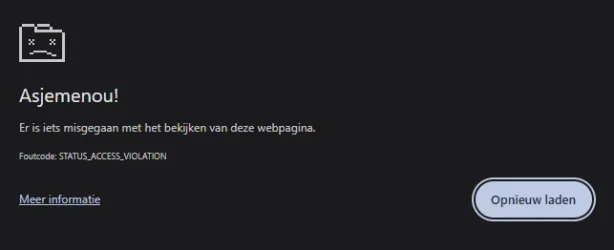
At random times I'll place some text inside the URL bar to search for. And sometimes Google Chrome response with "Oops something went wrong" I look at the URL bar and Chrome has incapsulated the text inside the browser with https://www.google.com/ etc. And the strange part is; as soon as I press on the reload page button; I do get a response from google as normal with the results of my request; Search for this "text blabla" So something went wrong. It's not the Internet connection; it stays up and running all the time. Connected through a my PC (ethernet connection) directly to my modem and to my fiber distribution (by UTP CAT 6 cables.) entry point.
Tried to find this OOPS error on the internet; Yes it's a know error. Just clean cookies, temp files etc. then it will be fixed... Yeah. After that the same thing happens again. Not sure where to look for. Inside Windows? (No faults or Chrome errors inside the eventviewer, Windows is up to date till the latest build) Inside Chrome? Had 1 strange incident with my gmail account prior to this; it did during a test produced the wrong password while I did not changed it for a long time. It went wrong during the test only (outlook 2021) Password worked fine inside the online page. Did an update off Outlook 2021 but that did not solve the issue. Suddenly Outlook could also not log into my gmail account while yesterday it could. In the end deleting 2 web-references inside web-references that has something to do with gmail did the trick. Solved. (It needed an update; Must be now OAUTH2 authentication. Has been replace by: MicrosoftOffice16_Data:OAUTH2:<20 numbers>_tp_google_imap_OAuth2 that is updated every time when you use Outlook every time.)
But this OOPS error message not!.... Looked if the version of the browser was to old. No. It is the latest one.
Does anybody has this seen this issue also and solved it?...... (Deleting all browser data inside Chrome did not help)
At random times I'll place some text inside the URL bar to search for. And sometimes Google Chrome response with "Oops something went wrong" I look at the URL bar and Chrome has incapsulated the text inside the browser with https://www.google.com/ etc. And the strange part is; as soon as I press on the reload page button; I do get a response from google as normal with the results of my request; Search for this "text blabla" So something went wrong. It's not the Internet connection; it stays up and running all the time. Connected through a my PC (ethernet connection) directly to my modem and to my fiber distribution (by UTP CAT 6 cables.) entry point.
Tried to find this OOPS error on the internet; Yes it's a know error. Just clean cookies, temp files etc. then it will be fixed... Yeah. After that the same thing happens again. Not sure where to look for. Inside Windows? (No faults or Chrome errors inside the eventviewer, Windows is up to date till the latest build) Inside Chrome? Had 1 strange incident with my gmail account prior to this; it did during a test produced the wrong password while I did not changed it for a long time. It went wrong during the test only (outlook 2021) Password worked fine inside the online page. Did an update off Outlook 2021 but that did not solve the issue. Suddenly Outlook could also not log into my gmail account while yesterday it could. In the end deleting 2 web-references inside web-references that has something to do with gmail did the trick. Solved. (It needed an update; Must be now OAUTH2 authentication. Has been replace by: MicrosoftOffice16_Data:OAUTH2:<20 numbers>_tp_google_imap_OAuth2 that is updated every time when you use Outlook every time.)
But this OOPS error message not!.... Looked if the version of the browser was to old. No. It is the latest one.
Does anybody has this seen this issue also and solved it?...... (Deleting all browser data inside Chrome did not help)
My Computers
-
At a glance
Win 11 Pro 25H2 Build 26200.8894, Zorin OS ProIntel® Core™ i7-12700KF 12th Gen. (S1700)32GB DDR5 5600-36 Vengeance (2x16)PCIe4.0 Asus NVIDIA RTX3060Ti- OS
- Win 11 Pro 25H2 Build 26200.8894, Zorin OS Pro
- Computer type
- PC/Desktop
- Manufacturer/Model
- Self built
- CPU
- Intel® Core™ i7-12700KF 12th Gen. (S1700)
- Motherboard
- ASUS Prime Z690-A, BIOS v4505 (Z690 Intel Chipset)
- Memory
- 32GB DDR5 5600-36 Vengeance (2x16)
- Graphics Card(s)
- PCIe4.0 Asus NVIDIA RTX3060Ti
- Sound Card
- Onboard; Realtek
- Monitor(s) Displays
- 34" LG 34UC79G-B Curved 21:9 144Hz
- Screen Resolution
- 2560x1080 (No HDR)
- Hard Drives
- 250Gb Samsung 870PRO NVMe (Win 11 Pro)
1Tb Samsung 980PRO NVMe
1Tb Samsung 970EVO NVMe
2Tb Samsung 990PRO NVMe with heatsink.
4Tb WDC WD40EZRZ Blue SATA (Int.)
4Tb WDC WD40EZRZ Blue SATA (Int.)
3Tb WDC WD30EFRZ Red SATA (Int.)
256Gb Samsung 840PRO SSD (RHEL 9,5)
256Gb Samsung 850PRO SSD (Zorin OS Pro 18)
- PSU
- Coolermaster 850W V2 Gold with internal 12cm exaust fan
- Case
- Be-Quiet Pure Base 600.
- Cooling
- 3x Be-Quiet! 12/14cm "Silent Wings 4" casefans, 1x Arctic Freezer i35 CPU towerblock with fan.
- Keyboard
- Steelseries APEX 7 keyboard.
- Mouse
- Logitech G-502 Hero
- Internet Speed
- 1Gb
- Browser
- Brave
- Antivirus
- F-Secure
- Other Info
- No Noise system.
256Gb Kingston Travler USB 3.0 drive.
64Gb Sandisk USB 3.2 drive. (Ventoy)
8Gb Philips USB 3.0 drive. (Win. Inst.)
8Gb Philips USB 3.0 drive. (Rescue disk)
2Tb WD USB 3.0 Passport drive.
USB Ext. 500Gb WD SATA drive.
External USB 3.0 C.A. CD/DVD* burner.
-
At a glance
Windows 11 Pro 25H2Intel® Core™ i7-6700K 6th Gen. (S1151)32Gb DDR4 2400 Corsair Vengeance (4x8)ASUS GeForce GTX1080- Operating System
- Windows 11 Pro 25H2
- Computer type
- PC/Desktop
- Manufacturer/Model
- Selfbuild
- CPU
- Intel® Core™ i7-6700K 6th Gen. (S1151)
- Motherboard
- ASUS Maximus VIII Ranger (Intel Chipset Z170)
- Memory
- 32Gb DDR4 2400 Corsair Vengeance (4x8)
- Graphics card(s)
- ASUS GeForce GTX1080
- Sound Card
- Onboard; Realtek
- Monitor(s) Displays
- LG IPS277L 27" WideLED, IPS
- Screen Resolution
- 1920x1080
- Hard Drives
- Samsung 850 Pro SSD
- PSU
- Zalman ZM600-HP with internal exhaust fan. Heatpipes & Modular cables.
- Case
- Cooler Master Aero
- Cooling
- Scythe Mugen 4 dual fan towerblock.
- Keyboard
- Red Dragon
- Mouse
- Red Dragon
- Internet Speed
- 1Gb
- Browser
- Chrome
- Antivirus
- F-Secure