
Solved Open with fails to open


bonky

Member
Local time
2:12 PM
Posts
24
OS
win10
Hi all

Im using windows 11 - 25H2

I have an issue with associating file types

so what I do is

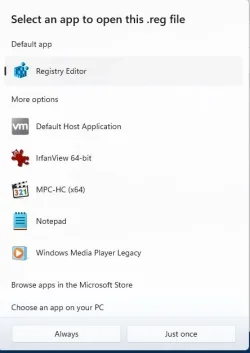
right click (for an example) on a .docx and left click on "Choose and App"

as soon as I "Choose and App" (im expecting the "Select an app to open this .docx file") the dialogue box pops up and then promptly disappears

I went to the default apps and tried to do the same and the dialogue box pops up and promptly disappears also as the right click...

anyone come up with this issue before?
 

Attachments
  • Capture.webp
    Capture.webp
    17.5 KB · Views: 1

My Computer My Computer

At a glance

win10
OS
win10
Computer type
PC/Desktop
Hi all

Im using windows 11 - 25H2

I have an issue with associating file types

so what I do is

right click (for an example) on a .docx and left click on "Choose and App"

as soon as I "Choose and App" (im expecting the "Select an app to open this .docx file") the dialogue box pops up and then promptly disappears

I went to the default apps and tried to do the same and the dialogue box pops up and promptly disappears also as the right click...

anyone come up with this issue before?
I am still running 2H24, but I often run into a very close issue. After I have opened and closed a program several time, let's say Outlook, I can't get outlook to start again, even if I double-click on Outlook.exe in the MS Office folder. If I reboot my system, the problem goes away.
 

My Computer My Computer

At a glance

Windows 11 2H25AMD 9900X64 GBAMD 9070 XT
OS
Windows 11 2H25
Computer type
PC/Desktop
Manufacturer/Model
DIY
CPU
AMD 9900X
Motherboard
MSI X870E Carbon
Memory
64 GB
Graphics Card(s)
AMD 9070 XT
Sound Card
built-in
Monitor(s) Displays
Dell 24"
Hard Drives
Sabrent 1 TB NVMe, 4 x SSD (need to check models), 4 x 3.5" HDD, 8-16 TB, all WD
PSU
Seasonic 850
Case
Fractal Design North XL (which I likw)
Cooling
Corsair AIO for CPU, fans for case
Keyboard
Das Keyboard 4
Mouse
Corsair M65 (white)
Internet Speed
1 TB download
Browser
Firefox
Antivirus
Bitdefender
Other Info
Also have Lenovo T14S laptop (me) and Lenovo Slim 71 (wife)
I have opened and closed a program several time, let's say Outlook, I can't get outlook to start again, even if I double-click on Outlook.exe in the MS Office folder. If I reboot my system, the problem goes away.
This means the app didn't close properly on the last attempt because of the amount of times you started it and closed it.
Right click the Taskbar select Task Manager. Under Processes,
Find the app, Right click it and choose End Task.
You can now click the app to Start it again.
 

My Computer My Computer

At a glance

Windows 11 Pro Insider 64 bit 25H2 26200.5742Intel Core i7 9700K 3.6016 GBnVidia GEForce RTX 2060 Super
OS
Windows 11 Pro Insider 64 bit 25H2 26200.5742
Computer type
PC/Desktop
Manufacturer/Model
Gigabyte Z390 UD
CPU
Intel Core i7 9700K 3.60
Motherboard
Gigabyte Z390 UD
Memory
16 GB
Graphics Card(s)
nVidia GEForce RTX 2060 Super
Sound Card
onboard
Monitor(s) Displays
Two 27" Dell 4K monitors
Screen Resolution
3840 x 2160
Hard Drives
M.2 NVME SSD, 500 GB; Two 2TB Mechanical HDD's
PSU
850w PSU
Case
Cyberpower PC
Cooling
Water cooled
Keyboard
Backlit Cyberpower gaming keyboard
Mouse
Backlit Cyberpower gaming mouse
Internet Speed
1 GB mbps
Browser
Brave
Antivirus
Windows Security
Hi all

Im using windows 11 - 25H2

I have an issue with associating file types

so what I do is

right click (for an example) on a .docx and left click on "Choose and App"

as soon as I "Choose and App" (im expecting the "Select an app to open this .docx file") the dialogue box pops up and then promptly disappears

I went to the default apps and tried to do the same and the dialogue box pops up and promptly disappears also as the right click...

anyone come up with this issue before?
try clearing icon cache to see if that fixes it. save this as a .bat and run it


Code:
@echo off

echo.
taskkill /f /im explorer.exe
timeout 2 /nobreak>nul
echo.

DEL /F /Q /A %LocalAppData%\IconCache.db
DEL /F /S /Q /A %LocalAppData%\Microsoft\Windows\Explorer\iconcache_*.db
DEL /F /S /Q /A %LocalAppData%\Microsoft\Windows\Explorer\thumbcache_*.db

timeout 2 /nobreak>nul
start explorer.exe

you can also use nirsoft's openwithview to see all entries that are there. maybe a corrupt one is causing the issue:


My Computer My Computer

At a glance

Windows 11 Pro
OS
Windows 11 Pro
try clearing icon cache to see if that fixes it. save this as a .bat and run it


Code:
@echo off

echo.
taskkill /f /im explorer.exe
timeout 2 /nobreak>nul
echo.

DEL /F /Q /A %LocalAppData%\IconCache.db
DEL /F /S /Q /A %LocalAppData%\Microsoft\Windows\Explorer\iconcache_*.db
DEL /F /S /Q /A %LocalAppData%\Microsoft\Windows\Explorer\thumbcache_*.db

timeout 2 /nobreak>nul
start explorer.exe

you can also use nirsoft's openwithview to see all entries that are there. maybe a corrupt one is causing the issue:

unfort this didnt work
 

My Computer My Computer

At a glance

win10
OS
win10
Computer type
PC/Desktop
did you use openwithview to see all the entries?
 

My Computer My Computer

At a glance

Windows 11 Pro
OS
Windows 11 Pro
did you use openwithview to see all the entries?
yes I did..... but unsure what im looking at in terms of corruptions
 

My Computer My Computer

At a glance

win10
OS
win10
Computer type
PC/Desktop
post a screen shot of what all is listed there
 

My Computer My Computer

At a glance

Windows 11 Pro
OS
Windows 11 Pro
wordpad looks a little odd. missing some info. you can right click any and disable them and try. go through them and see if any are the culprit
 

My Computer My Computer

At a glance

Windows 11 Pro
OS
Windows 11 Pro
I found the issue... there is a program that's preventing the box popping up
 

My Computer My Computer

At a glance

win10
OS
win10
Computer type
PC/Desktop
if you want to list it so others that may have the same issue find it. if not... either way please mark as solved
 

My Computer My Computer

At a glance

Windows 11 Pro
OS
Windows 11 Pro
thank you for your help..... I guess the moral of the story is..... close any running third party apps......
 

My Computer My Computer

At a glance

win10
OS
win10
Computer type
PC/Desktop

Latest Support Threads

Back
Top Bottom





