
Outlook 2007 requires Personal Folders.pst be on desktop or throws an error message


Ranchhand

Member
Local time
7:38 PM
Posts
4
OS
Windows 11 Pro
Greetings...newbie here.
I have been using M/Soft Office 2007 Outlook email / POP3 (don't laugh) for years, never had a hiccup from it. Works great in W11 Pro. When booting it, I now get the message as follows:
"C:\ users\rober\Desktop\Personal Folders(1).pst cannot be found.

This started when I made an Outlook 2007 backup of the address book and I think I saved the backup file to my desktop, thinking I would properly file it later. IF I remember right.
I later moved this .pst backup file into my backup drive (off computer) and now Outlook is complaining with the above message whenever I start it. Long as that file is located on my desktop Outlook is happy. Outlook still works fine, but it takes about 4 mouse-clicks to shut it up and that gets annoying fast.
Any suggestions?
I tried web-searching but everything was unhelpful.
Thanks in advance....
 

My Computer

System One

  • OS
    Windows 11 Pro
    Computer type
    PC/Desktop
    Manufacturer/Model
    Home Built
    CPU
    AMD Ryzen7 5700G 4GHz
    Motherboard
    Asus ROG STRIX b550-f Gaming
    Memory
    32 Gig RAM
    Graphics Card(s)
    Integrated
    Sound Card
    Integrated
    Monitor(s) Displays
    Dell 21"
    Screen Resolution
    1920x1080
    Hard Drives
    SSD Crucial 500gig
    PSU
    500W
    Case
    Rosewill Star Preditor
    Keyboard
    Logitech wireless
    Mouse
    Logitech wireless
    Internet Speed
    fast...
    Browser
    Firefox
    Antivirus
    Windows Defender
    Other Info
    Running Mailwasher Pro for email security
    Running NoScript for internet security
    Isobar Command Consol for connection convenience
    4000 joule surge protector (for obvious reasons)
    Wavelink Docking Station for system backups / data storage
    Macrium Reflect for system backup
Hey, thanks John, I'll check it out.
 

My Computer

System One

  • OS
    Windows 11 Pro
    Computer type
    PC/Desktop
    Manufacturer/Model
    Home Built
    CPU
    AMD Ryzen7 5700G 4GHz
    Motherboard
    Asus ROG STRIX b550-f Gaming
    Memory
    32 Gig RAM
    Graphics Card(s)
    Integrated
    Sound Card
    Integrated
    Monitor(s) Displays
    Dell 21"
    Screen Resolution
    1920x1080
    Hard Drives
    SSD Crucial 500gig
    PSU
    500W
    Case
    Rosewill Star Preditor
    Keyboard
    Logitech wireless
    Mouse
    Logitech wireless
    Internet Speed
    fast...
    Browser
    Firefox
    Antivirus
    Windows Defender
    Other Info
    Running Mailwasher Pro for email security
    Running NoScript for internet security
    Isobar Command Consol for connection convenience
    4000 joule surge protector (for obvious reasons)
    Wavelink Docking Station for system backups / data storage
    Macrium Reflect for system backup
"C:\ users\rober\Desktop\Personal Folders(1).pst cannot be found.

Robert,

I also use MSOffice Outlook 2007 with pop3 email.
All you have to do is tell it to close that Personal Folders(1).pst file that you had open when doing your backup.
You'll need to do the same whenever you have had a pst file open temporarily.

It's only two steps but I've laboured each point on the assumption that you have not done a similar task before.

1 Go to the Navigation pane [the left hand pane], click on the Folder list view [using the icons shown at the bottom of the Nav pane].
Each of the open pst files will be shown as a top level item [just like a File explorer folder hierarchy - you can see the +/- boxes of my four pst files just poking out on the left of my first diagram].
Right click on each one in turn, select Properties, select Advanced.
The Filename box will tell you the path & filename of that pst file - as shown in my first diagram.
Then press Escape a couple of times to get rid of those Properties dialog boxes so you can check the next one.

2 When you've found the right one & escaped out of its dialog boxes, right-click on it again and choose Close ... - this is shown in my second diagram.

Job done.
You can now set the Navigation pane back to however you normally like to see it [personally, I always set it to 'Shortcut view'].

OL-pst, Properties, Advanced.webp

OL-pst, context menu.webp


Any questions? Or any more-detailed guidance required?


Denis
 
Last edited:

My Computer

System One

  • OS
    Windows 11 Home x64 Version 25H2 Build 26200.8037
Thanks Denis, haven't had time to deal with it yet, but will this week. I will let you know what happens.
 

My Computer

System One

  • OS
    Windows 11 Pro
    Computer type
    PC/Desktop
    Manufacturer/Model
    Home Built
    CPU
    AMD Ryzen7 5700G 4GHz
    Motherboard
    Asus ROG STRIX b550-f Gaming
    Memory
    32 Gig RAM
    Graphics Card(s)
    Integrated
    Sound Card
    Integrated
    Monitor(s) Displays
    Dell 21"
    Screen Resolution
    1920x1080
    Hard Drives
    SSD Crucial 500gig
    PSU
    500W
    Case
    Rosewill Star Preditor
    Keyboard
    Logitech wireless
    Mouse
    Logitech wireless
    Internet Speed
    fast...
    Browser
    Firefox
    Antivirus
    Windows Defender
    Other Info
    Running Mailwasher Pro for email security
    Running NoScript for internet security
    Isobar Command Consol for connection convenience
    4000 joule surge protector (for obvious reasons)
    Wavelink Docking Station for system backups / data storage
    Macrium Reflect for system backup
I will let you know what happens
Great.

While we're talking, you might not know that it's easy to relocate your pst file(s) to wherever you wish. Mine, just for example, is within my Documents folders so it gets included in all my routine backups. I can explain how to do it if you are interested.


Denis


Welcome to ElevenForum.

It's really worth making time to browse through the ElevenForum Tutorial index - there's a shortcut to it at the top of every ElevenForum page [within the Tutorials dropdown list].
- At the foot of the ElevenForum Tutorial index is a shortcut to download it as a spreadsheet.
- I download a new copy each month.
- By downloading it as a spreadsheet I can benefit from Excel's excellent filtering capabilities when I search for topics of interest.
- ElevenForum tutorials are also listed at Tutorials and there's a shortcut to that at the top of every page.

You can search ElevenForum using the search box in the top-right corner of all ElevenForum webpages or using Advanced Search - ElevenForum
- You can also search ElevenForum threads in many general search engines, such as Google, by adding site:elevenforum.com after your search term. For example,
Taskbar setup site:elevenforum.com
- [This is what the search box in the top-right corner of ElevenForum webpages does automatically]
 

My Computer

System One

  • OS
    Windows 11 Home x64 Version 25H2 Build 26200.8037
Hello Denis/Try3, my sincere apologies for the late response, family emergency happened.
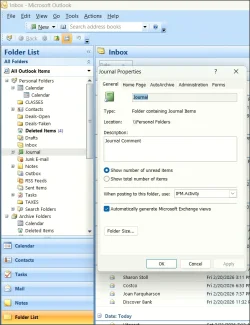
Unfortunately, I can't find the same screens you have. I randomly selected a file with the + sign ("journel") and that is where I draw a blank, nothing resembles your pictures. At this point, I have a folder on my desktop, personal folders (1).pst and Outlook seems happy with that, but I would like to get things back to normal.
I tried creating a new .pst folder saved to the path as follows, but that didn't help, nothing changed.
c>Users>rober>AppData>Local\Microsoft>Outlook>Outlook.pst
I am probably not understanding correctly, sorry…
 

Attachments

  • Outlook 2007.webp
    Outlook 2007.webp
    58.4 KB · Views: 2

My Computer

System One

  • OS
    Windows 11 Pro
    Computer type
    PC/Desktop
    Manufacturer/Model
    Home Built
    CPU
    AMD Ryzen7 5700G 4GHz
    Motherboard
    Asus ROG STRIX b550-f Gaming
    Memory
    32 Gig RAM
    Graphics Card(s)
    Integrated
    Sound Card
    Integrated
    Monitor(s) Displays
    Dell 21"
    Screen Resolution
    1920x1080
    Hard Drives
    SSD Crucial 500gig
    PSU
    500W
    Case
    Rosewill Star Preditor
    Keyboard
    Logitech wireless
    Mouse
    Logitech wireless
    Internet Speed
    fast...
    Browser
    Firefox
    Antivirus
    Windows Defender
    Other Info
    Running Mailwasher Pro for email security
    Running NoScript for internet security
    Isobar Command Consol for connection convenience
    4000 joule surge protector (for obvious reasons)
    Wavelink Docking Station for system backups / data storage
    Macrium Reflect for system backup
I randomly selected a file
No, you selected a folder. You were supposed to select each top-level folder [so that you were, in effect, selecting the whole file].
Yours is shown in your diagram as Personal folders.
Personal folders.webp

You can see the folders within this file are indented, just like subfolders in File explorer.

You also have a second pst file open, the Archive folders shown at the bottom of your list.

I think you will have to scroll further down your nav pane, the scrollbar shows that you are only about halfway down. I think the unwanted one is down in the area we cannot see in your diagram.

I tried creating a new .pst folder
No, you tried creating a new pst file.
We might have to talk about that later. The file you tried creating is the default location & name of the pst file Outlook creates when you start using it.

A delay in replying is never a problem.


Denis
 
Last edited:

My Computer

System One

  • OS
    Windows 11 Home x64 Version 25H2 Build 26200.8037

Latest Support Threads

Back
Top Bottom




