
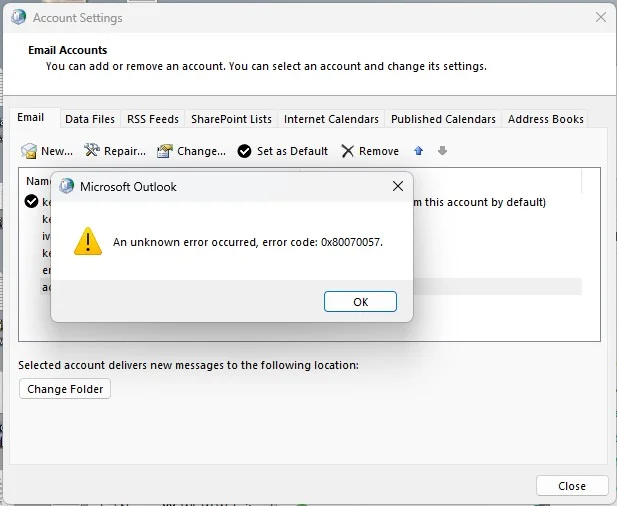
Outlook error on trying to change default email account


kevinboardley

Well-known member
Member
Local time
3:25 AM
Posts
202
OS
Windows 11 Pro (retail) 23H2 / 26100.4946
I have completed uninstalled office 365 and cleared left behind files from appdata and program files and restarted before reinstalling Office 365 incl classic outlook.

Does anyone have any more ideas on how to proceed. I didn't go as far as deleting all left over registry entries related to Office365. And somewhere along the line I must have agreed to storing of outlook setting on my microsoft account as all the email accounts were reinstated on the reinstallation. The only think I can think of is to turn that off and do the clean down and reinstallation again.
1780922963051.webp
 

My Computers My Computers

  • At a glance

    Windows 11 Pro (retail) 23H2 / 26100.4946AMD Ryzen 7 5700G 3.8GHz 8C/16T 65w AM4Corsair Vengeance LPX 64GB (2x32GB) DDR4 3200MHzIntegrated AMD Radeon
    OS
    Windows 11 Pro (retail) 23H2 / 26100.4946
    Computer type
    PC/Desktop
    Manufacturer/Model
    Custom (Quiet PC)
    CPU
    AMD Ryzen 7 5700G 3.8GHz 8C/16T 65w AM4
    Motherboard
    ASUSTeK TUF gaming B550M (WI-FI) AM4 Micro-ATX Motherboard
    Memory
    Corsair Vengeance LPX 64GB (2x32GB) DDR4 3200MHz
    Graphics Card(s)
    Integrated AMD Radeon
    Sound Card
    Integrated
    Monitor(s) Displays
    NEC 2470WNX
    Screen Resolution
    1920 x 1200
    Hard Drives
    Samsung 970 EVOPlus 500GB M.2 NVMe SSD (3500/3200) [operating system]
    Samsung 970 EVOPlus 1TB M.2 NVMe SSD (3500/3200) [Data]
    Samsung 870 EVOPlus 1TB SATA/600 [Data]
    Plus external Samsung 1TB for additional data copies and for Sonos stream
    PSU
    Pure Power 11 400w Quiet PSU PLUS Gold
    Case
    S400 Silencio mATX Quiet PC
    Cooling
    Noctua NF-P12 Redux 12v 900RPM 120mm x2
    Keyboard
    Dell corded usb
    Mouse
    Logitech corded optical
    Internet Speed
    35 Mbps / 9 Mbps
    Browser
    Firefox, Opera, Edge
    Antivirus
    Windows Security with Malware Bytes
    Other Info
    FTTC 35 Mbps / 9 Mbps
  • At a glance

    Windows 10 Pro (standalone licence)Intel Core 5 120U 1.4GHz16GBIntel Integrated
    Operating System
    Windows 10 Pro (standalone licence)
    Computer type
    Laptop
    Manufacturer/Model
    Dell DC16250
    CPU
    Intel Core 5 120U 1.4GHz
    Memory
    16GB
    Graphics card(s)
    Intel Integrated
    Sound Card
    Intel Integrated
    Monitor(s) Displays
    External Philips 230C
    Screen Resolution
    1920 x 1200
    Hard Drives
    Storage 2TB Crucial SSD
    PSU
    -
    Case
    -
    Cooling
    -
    Keyboard
    -
    Mouse
    -
I must have agreed to storing of outlook setting on my microsoft account
You mean this setting?
Information about Store my Outlook settings in the cloud - Microsoft Support

But it's probably because an uninstall doesn't erase your Outlook Profiles.

Are you trying to change the Default to:

Control the "From"?
Change the account used to send email messages - Microsoft Support

Consolidate POP accounts?
Deliver All POP3 Accounts to One Outlook Inbox | Slipstick Systems

Control where your IMAP account Calendar and Contacts are stored?
Using IMAP Accounts in Outlook | Slipstick Systems

You might want to do a test with a new Profile. Add just two accounts and see if you can do whatever it is you are trying to do.
Create an Outlook profile - Microsoft Support

Do NOT delete your old Profiles. There could be data in OST files connected to those accounts that will be lost.
 
Last edited:

My Computer My Computer

At a glance

Windows 10, Windows 11
OS
Windows 10, Windows 11
Computer type
PC/Desktop
Hi, I'm just trying to reorder mail accounts in the account list and change the default. To either action, that error message is the response.
 

My Computers My Computers

  • At a glance

    Windows 11 Pro (retail) 23H2 / 26100.4946AMD Ryzen 7 5700G 3.8GHz 8C/16T 65w AM4Corsair Vengeance LPX 64GB (2x32GB) DDR4 3200MHzIntegrated AMD Radeon
    OS
    Windows 11 Pro (retail) 23H2 / 26100.4946
    Computer type
    PC/Desktop
    Manufacturer/Model
    Custom (Quiet PC)
    CPU
    AMD Ryzen 7 5700G 3.8GHz 8C/16T 65w AM4
    Motherboard
    ASUSTeK TUF gaming B550M (WI-FI) AM4 Micro-ATX Motherboard
    Memory
    Corsair Vengeance LPX 64GB (2x32GB) DDR4 3200MHz
    Graphics Card(s)
    Integrated AMD Radeon
    Sound Card
    Integrated
    Monitor(s) Displays
    NEC 2470WNX
    Screen Resolution
    1920 x 1200
    Hard Drives
    Samsung 970 EVOPlus 500GB M.2 NVMe SSD (3500/3200) [operating system]
    Samsung 970 EVOPlus 1TB M.2 NVMe SSD (3500/3200) [Data]
    Samsung 870 EVOPlus 1TB SATA/600 [Data]
    Plus external Samsung 1TB for additional data copies and for Sonos stream
    PSU
    Pure Power 11 400w Quiet PSU PLUS Gold
    Case
    S400 Silencio mATX Quiet PC
    Cooling
    Noctua NF-P12 Redux 12v 900RPM 120mm x2
    Keyboard
    Dell corded usb
    Mouse
    Logitech corded optical
    Internet Speed
    35 Mbps / 9 Mbps
    Browser
    Firefox, Opera, Edge
    Antivirus
    Windows Security with Malware Bytes
    Other Info
    FTTC 35 Mbps / 9 Mbps
  • At a glance

    Windows 10 Pro (standalone licence)Intel Core 5 120U 1.4GHz16GBIntel Integrated
    Operating System
    Windows 10 Pro (standalone licence)
    Computer type
    Laptop
    Manufacturer/Model
    Dell DC16250
    CPU
    Intel Core 5 120U 1.4GHz
    Memory
    16GB
    Graphics card(s)
    Intel Integrated
    Sound Card
    Intel Integrated
    Monitor(s) Displays
    External Philips 230C
    Screen Resolution
    1920 x 1200
    Hard Drives
    Storage 2TB Crucial SSD
    PSU
    -
    Case
    -
    Cooling
    -
    Keyboard
    -
    Mouse
    -
trying to reorder mail accounts in the account list
Not sure I understand. You should be able to just drag-and-drop email accounts in the Navigation Bar.

1781010017982.webp 1781010031109.webp 1781010042125.webp
 

My Computer My Computer

At a glance

Windows 10, Windows 11
OS
Windows 10, Windows 11
Computer type
PC/Desktop

My Computer My Computer

At a glance

Windows 10, Windows 11
OS
Windows 10, Windows 11
Computer type
PC/Desktop

Latest Support Threads

Back
Top Bottom




