Overwhelmed - Macrium Reflect


... there should ALWAYS be mechanisms within the regular OS for facilities to perform these basic requirements.
Still works for me..., Canary Build! 🤷‍♂️

13005.webp
 

My Computers

System One System Two

  • OS
    Windows 11 Pro
    Computer type
    PC/Desktop
    Manufacturer/Model
    ASUS ROG Strix
  • Operating System
    Windows 11 Pro
    Computer type
    Laptop
    Manufacturer/Model
    ASUS VivoBook
Statistics show that well over half of all computer users don't even do backups.
 

My Computers

System One System Two

  • OS
    Windows 11 Pro
    Computer type
    Laptop
    Manufacturer/Model
    Dell XPS 16 DA16260
    CPU
    Intel Series 3 Core Ultra X9 388H
    Memory
    64GB LPDDR5x 9600 MT/s
    Graphics Card(s)
    Intel Arc graphics B390 Panther Lake
    Monitor(s) Displays
    16" 3.2K Tandem OLED Infinity Edge
    Screen Resolution
    3200 x 2000 16:10 236 PPI
    Hard Drives
    1 Terabyte M.2 PCIe NVMe SSD
    Case
    Black Anodized Aluminum
    Cooling
    Vapor Chamber Cooling
    Mouse
    None
    Internet Speed
    942 Mbps Netgear Mesh + 2 Satellites
    Browser
    Microsoft Edge (Chromium)
    Antivirus
    Windows Security (Defender)
    Other Info
    NPU delivering 67 TOPS
    Microsoft 365 subscription
    Microsoft OneDrive 1TB Cloud
    Microsoft Visual Studio
    Microsoft Visual Studio Code
    Microsoft Sysinternals Suite
    Microsoft BitLocker
    Microsoft Copilot
    Dell Support Assist
    Dell Command | Update
    Macrium Reflect X subscription
    1Password Password Manager
    Amazon Kindle for PC
    Lightroom/Photoshop subscription
    Interactive Brokers Trader Workstation
  • Operating System
    Windows 11 Pro
    Computer type
    Laptop
    Manufacturer/Model
    Microsoft Surface Laptop 7
    CPU
    Snapdragon® X Elite (12 Core) with Hexagon NPU delivering 45 TOPS
    Memory
    32GB LPDDR5x 8448 MT/s
    Graphics card(s)
    Integrated Adreno GPU
    Sound Card
    Omnisonic speakers with Dolby Atmos spatial sound
    Monitor(s) Displays
    13.8″ PixelSense Flow touchscreen 120 Hz 600 NIT
    Screen Resolution
    2304 × 1536 (201 PPI), 3:2 aspect ratio
    Hard Drives
    1 TB PCIe NVMe Gen 4 SSD
    Case
    Black Anodized Aluminum
    Cooling
    Vapor Chamber Cooling
    Mouse
    None
    Internet Speed
    942 Mbps Netgear Mesh + 2 Satellites
    Browser
    Microsoft Edge (Chromium)
    Antivirus
    Windows Security (Defender)
    Other Info
    Microsoft 365 subscription (Office)
    Microsoft OneDrive 1TB Cloud
    Microsoft Visual Studio 2026
    Microsoft Visual Studio Code
    Interactive Brokers Trader Workstation
    Lightroom/Photoshop subscription
    1Password Password Manager
    Microsoft Sysinternals
    Amazon Kindle for PC
    Microsoft BitLocker
    Microsoft Copilot
Large market potential
 

My Computers

System One System Two

  • OS
    Win7,Win11
    Computer type
    PC/Desktop
    CPU
    i7-9700
    Motherboard
    gigabyte b365m ds3h
    Memory
    2x16gb 3600mhz
    Monitor(s) Displays
    benq gw2480
    PSU
    bequiet pure power 11 400CM
    Cooling
    cryorig m9i
  • Operating System
    win7,win11
    Computer type
    PC/Desktop
    CPU
    i5-8400
    Motherboard
    gigabyte b365m ds3h
    Memory
    2x8gb 3200
    PSU
    xfx pro 450
Still can't make this work :(

Background - clean install of 25H2 26200.8037; KB5089549 applied; Windows now 26200.8457.

Checked WinSxS for driversipolicy.p7b, 2x found :
\amd64_microsoft-windows-c..egrity-driverpolicy_31bf3856ad364e35_10.0.26100.8036_none_5025a1cd93f54e0a\file driversipolicy.p7b, date 6 Mar 2026, size 229,162 bytes
and
\amd64_microsoft-windows-c..egrity-driverpolicy_31bf3856ad364e35_10.0.26100.8457_none_4ffc4be994140a1d\file driversipolicy.p7b, date 9 Jun 2026, size 242,130 bytes

Reflect 8 mount image fails due to psmounterx.sys blocked (as expected).

Ran Rollback-VulnerableDriverPolicy.bat. This completed RESTART WINDOWS NOW.

Rebooted - Windows failed to load, going instead to Performing Automatic Repair > Diagnosing your device > Your device ran into a problem and couldn't be repaired.

I eventually went via a Start-up Settings reboot to select 7 Disable Driver Signature Enforcement which did allow Windows to boot okay and Desktop Reflect 8 was then able to mount images.

The problem is that the next reboot re-enables Driver Signature Enforcement and I'm back to square one with Automatic Repair etc etc.

Am I doing something wrong ...?

@S1lent_Azrael, post #138
After running the bat file the computer had to go through 2-stage (automatic) repair
after I pressed F8 just before the final repair stage. After the second stage repair
we ran the bat again and it said it is on previous (older) version of
driversipolicy.p7b (1301)

This sounds like what I should be doing, but I don't understand step-by-step exactly what he is doing.
Can you / @S1lent_Azrael / anyone explain his method more clearly please? Thanks

 

My Computers

System One System Two

  • OS
    Win 11 Pro for Workstations
    Computer type
    PC/Desktop
    Manufacturer/Model
    (own build)
    CPU
    AMD Ryzen 7 7700
    Motherboard
    Asus ROG Strix X670E-A
    Memory
    64Gb DDR5 Corsair Vengeance
    Graphics Card(s)
    GeForce GTX570
    Sound Card
    (none)
    Monitor(s) Displays
    Asus 23"
    Screen Resolution
    1920 x 1080
    Hard Drives
    C: 2Tb NVMe Crucial T705 CT2000T705SSD5 Gen5
    D: 2x 4Tb NVMe Lexar NM790 Gen4 (RAID 1)
    E: 2Tb NVMe Crucial T705 CT2000T705SSD3 Gen5
    F: 2x 12Tb Seagate IronWolf HDD (RAID 1)
    G: 12Tb Seagate IronWolf HDD
    PSU
    Gigabyte UD1000GM PG5 V2
    Case
    Antec P10C
    Cooling
    AMD-supplied (air-cooler)
  • Operating System
    Win 11 Pro (Retail) / Win 7 Pro / Ubuntu (3x SSD, select at boot)
    Computer type
    PC/Desktop
    Manufacturer/Model
    (own build)
    CPU
    Intel i7 3770K
    Motherboard
    Asus P8Z68 Pro-Gen3
    Memory
    32Gb DDR3
    Graphics card(s)
    MSI GeForce RTX 3050
    Sound Card
    (none)
    Monitor(s) Displays
    Panasonic
    Screen Resolution
    1920 x 1080
    Hard Drives
    C: 3x SSD (1 per OS)
    7x SATA HDDs
    PSU
    Gigabyte 850W
    Case
    Antex
    Cooling
    Noctua air-cooler
    Other Info
    Glotrends SA3234-C 4-port PCIe x4 SATA expansion card
    Optiarc AD-7200S DVD R-W
Thank you @psyclopse. I've never tried anything viBoot / vhdx / Hyper-V so I'm completely in the dark - for now - I'll sit down, learn 🤞 , and give it a try.
That said, the ideal state would be 'it just works' so if anyone can enlighten me on how @AzRaEL does what he does, that also would be a great help !
 
Last edited:

My Computers

System One System Two

  • OS
    Win 11 Pro for Workstations
    Computer type
    PC/Desktop
    Manufacturer/Model
    (own build)
    CPU
    AMD Ryzen 7 7700
    Motherboard
    Asus ROG Strix X670E-A
    Memory
    64Gb DDR5 Corsair Vengeance
    Graphics Card(s)
    GeForce GTX570
    Sound Card
    (none)
    Monitor(s) Displays
    Asus 23"
    Screen Resolution
    1920 x 1080
    Hard Drives
    C: 2Tb NVMe Crucial T705 CT2000T705SSD5 Gen5
    D: 2x 4Tb NVMe Lexar NM790 Gen4 (RAID 1)
    E: 2Tb NVMe Crucial T705 CT2000T705SSD3 Gen5
    F: 2x 12Tb Seagate IronWolf HDD (RAID 1)
    G: 12Tb Seagate IronWolf HDD
    PSU
    Gigabyte UD1000GM PG5 V2
    Case
    Antec P10C
    Cooling
    AMD-supplied (air-cooler)
  • Operating System
    Win 11 Pro (Retail) / Win 7 Pro / Ubuntu (3x SSD, select at boot)
    Computer type
    PC/Desktop
    Manufacturer/Model
    (own build)
    CPU
    Intel i7 3770K
    Motherboard
    Asus P8Z68 Pro-Gen3
    Memory
    32Gb DDR3
    Graphics card(s)
    MSI GeForce RTX 3050
    Sound Card
    (none)
    Monitor(s) Displays
    Panasonic
    Screen Resolution
    1920 x 1080
    Hard Drives
    C: 3x SSD (1 per OS)
    7x SATA HDDs
    PSU
    Gigabyte 850W
    Case
    Antex
    Cooling
    Noctua air-cooler
    Other Info
    Glotrends SA3234-C 4-port PCIe x4 SATA expansion card
    Optiarc AD-7200S DVD R-W
Still can't make this work :(

Background - clean install of 25H2 26200.8037; KB5089549 applied; Windows now 26200.8457.

Checked WinSxS for driversipolicy.p7b, 2x found :
\amd64_microsoft-windows-c..egrity-driverpolicy_31bf3856ad364e35_10.0.26100.8036_none_5025a1cd93f54e0a\file driversipolicy.p7b, date 6 Mar 2026, size 229,162 bytes
and
\amd64_microsoft-windows-c..egrity-driverpolicy_31bf3856ad364e35_10.0.26100.8457_none_4ffc4be994140a1d\file driversipolicy.p7b, date 9 Jun 2026, size 242,130 bytes

Reflect 8 mount image fails due to psmounterx.sys blocked (as expected).

Ran Rollback-VulnerableDriverPolicy.bat. This completed RESTART WINDOWS NOW.

Rebooted - Windows failed to load, going instead to Performing Automatic Repair > Diagnosing your device > Your device ran into a problem and couldn't be repaired.

I eventually went via a Start-up Settings reboot to select 7 Disable Driver Signature Enforcement which did allow Windows to boot okay and Desktop Reflect 8 was then able to mount images.

The problem is that the next reboot re-enables Driver Signature Enforcement and I'm back to square one with Automatic Repair etc etc.

Am I doing something wrong ...?


This sounds like what I should be doing, but I don't understand step-by-step exactly what he is doing.
Can you / @S1lent_Azrael / anyone explain his method more clearly please? Thanks
I'm not sure if it helps you or not, but I just tried running the Rollback-VulnerableDriverPolicy.bat in a Windows 11 25H2 virtual machine with the June MS updates applied.

It seemed to work o.k., at least superficially. (I didn't actually have Reflect installed to fully test things).

I ran it from an command prompt (launched with 'run as administrator') and it reported going back to version .8115. Did a normal 'restart' reboot and things seemed to boot normally.

I then repeated the procedure except using the "-restore" option. It reported going back to version .8655. A normal 'restart' again seemed to come up without issue.

Have you tried to check for system file corruption (from an administrator command line prompt when things are 'normal') with

Dism /Online /Cleanup-Image /CheckHealth

Dism /Online /Cleanup-Image /ScanHealth

and

sfc /scannow

to see if it reports any issues?

Some of this is mentioned in the MS article at


(Note that if sounds as though running sfc would likely undo the psmounter change if it was in effect at the time).
 

My Computer

System One

  • OS
    Windows 11
    Computer type
    PC/Desktop
    Manufacturer/Model
    Asus
    CPU
    9950X3D
    Motherboard
    X870E
Still can't make this work :(

Background - clean install of 25H2 26200.8037; KB5089549 applied; Windows now 26200.8457.

Checked WinSxS for driversipolicy.p7b, 2x found :
\amd64_microsoft-windows-c..egrity-driverpolicy_31bf3856ad364e35_10.0.26100.8036_none_5025a1cd93f54e0a\file driversipolicy.p7b, date 6 Mar 2026, size 229,162 bytes
and
\amd64_microsoft-windows-c..egrity-driverpolicy_31bf3856ad364e35_10.0.26100.8457_none_4ffc4be994140a1d\file driversipolicy.p7b, date 9 Jun 2026, size 242,130 bytes

Reflect 8 mount image fails due to psmounterx.sys blocked (as expected).

Ran Rollback-VulnerableDriverPolicy.bat. This completed RESTART WINDOWS NOW.

Rebooted - Windows failed to load, going instead to Performing Automatic Repair > Diagnosing your device > Your device ran into a problem and couldn't be repaired.

I eventually went via a Start-up Settings reboot to select 7 Disable Driver Signature Enforcement which did allow Windows to boot okay and Desktop Reflect 8 was then able to mount images.

The problem is that the next reboot re-enables Driver Signature Enforcement and I'm back to square one with Automatic Repair etc etc.

Am I doing something wrong ...?


This sounds like what I should be doing, but I don't understand step-by-step exactly what he is doing.
Can you / @S1lent_Azrael / anyone explain his method more clearly please? Thanks
you need to re-run the .bat since after performing automatic repair you will end up with the latest driversipolicy.p7b file.
Difference fom re-running will be, this time you will not have problem booting up and can then start a back-up with the previous driversipolicy.p7b file
 

My Computer

System One

  • OS
    Windows 11
    Computer type
    Laptop
    Manufacturer/Model
    Dell
Thank you @MysteryGuy and @S1lent_Azrael (and again @psyclopse)

Azrael said:

you need to re-run the .bat since after performing automatic repair you will end up with the latest driversipolicy.p7b file.
Difference fom re-running will be, this time you will not have problem booting up and can then start a back-up with the previous driversipolicy.p7b file

As I said, my problem is that Automatic Repair does not complete; Diagnosing your PC fails "..couldn't be repaired."

Further to my post at #264, this could well be because the hardware is quite old, so I did a Rufus boot USB to remove TPM2 and Secure Boot requirements for the Win11 25H2 build 8037 install (perhaps I should have said so earlier... :oops:). The install has the older driversipolicy.p7b in WinSxS but, as the PC is now at build 8457, I'm guessing that's why Automatic Repair fails...?

MysteryGuy said:

I'm not sure if it helps you or not, but I just tried running the Rollback-VulnerableDriverPolicy.bat in a Windows 11 25H2 virtual machine with the June MS updates applied.

It seemed to work o.k., at least superficially. (I didn't actually have Reflect installed to fully test things).

I ran it from an command prompt (launched with 'run as administrator') and it reported going back to version .8115. Did a normal 'restart' reboot and things seemed to boot normally.

In the end, I decided to create a 25H2 8037 VM using Hyper-V (so as to avoid any need for the rollback batch) and then installed Macrium Reflect 8 into that VM. Mounts images without any problem. Win11 VM create/install on old hardware needed a bit of back-and-forth plus a smidge of Regedit + CMD, but it worked. VM has no network BTW ( so Windows Update can't mess it up for me ! )

Makes me wonder - if I only want a VM to mount Reflect images, would a Win7 VM work just as well ? It would be smaller and maybe quicker too. :unsure:

@psyclopse - I watched your video Macrium reflect free - cannot mount image after upgrade a few times before I got it. I don't yet know how to see other hard drives (physical, not virtual) from a ViBoot VM, but I'll give it a try when I get a chance.

My thanks to you all
 
Last edited:

My Computers

System One System Two

  • OS
    Win 11 Pro for Workstations
    Computer type
    PC/Desktop
    Manufacturer/Model
    (own build)
    CPU
    AMD Ryzen 7 7700
    Motherboard
    Asus ROG Strix X670E-A
    Memory
    64Gb DDR5 Corsair Vengeance
    Graphics Card(s)
    GeForce GTX570
    Sound Card
    (none)
    Monitor(s) Displays
    Asus 23"
    Screen Resolution
    1920 x 1080
    Hard Drives
    C: 2Tb NVMe Crucial T705 CT2000T705SSD5 Gen5
    D: 2x 4Tb NVMe Lexar NM790 Gen4 (RAID 1)
    E: 2Tb NVMe Crucial T705 CT2000T705SSD3 Gen5
    F: 2x 12Tb Seagate IronWolf HDD (RAID 1)
    G: 12Tb Seagate IronWolf HDD
    PSU
    Gigabyte UD1000GM PG5 V2
    Case
    Antec P10C
    Cooling
    AMD-supplied (air-cooler)
  • Operating System
    Win 11 Pro (Retail) / Win 7 Pro / Ubuntu (3x SSD, select at boot)
    Computer type
    PC/Desktop
    Manufacturer/Model
    (own build)
    CPU
    Intel i7 3770K
    Motherboard
    Asus P8Z68 Pro-Gen3
    Memory
    32Gb DDR3
    Graphics card(s)
    MSI GeForce RTX 3050
    Sound Card
    (none)
    Monitor(s) Displays
    Panasonic
    Screen Resolution
    1920 x 1080
    Hard Drives
    C: 3x SSD (1 per OS)
    7x SATA HDDs
    PSU
    Gigabyte 850W
    Case
    Antex
    Cooling
    Noctua air-cooler
    Other Info
    Glotrends SA3234-C 4-port PCIe x4 SATA expansion card
    Optiarc AD-7200S DVD R-W
Makes me wonder - if I only want a VM to mount Reflect images, would a Win7 VM work just as well ? It would be smaller and maybe quicker too. :unsure:
Many other users have taken this approach to circumvent the problem and it works well... not sure about quicker :unsure:
 

My Computer

System One

  • OS
    Windows 10, Linux MINT (Guests 7, 11, ZorinOS)
    Computer type
    PC/Desktop
    Manufacturer/Model
    HP Z2 G5 Workstation
    CPU
    Intel Core i7-10700
    Motherboard
    HP Model# 8751
    Memory
    32gB (DDR4)
    Graphics Card(s)
    Intel UHD Graphics 630
    Sound Card
    Realtek basic audio
    Monitor(s) Displays
    32" (Viewsonic) UHD
    Screen Resolution
    3840 x 2160
    Hard Drives
    2-NvME (mainboard), 1-NvME (PCIe), 1-SATA3 SSD
I was tinkering and discovered something that may be obvious to others but was a surprise to me. I never realized I could simply turn off Memory Intergity in Windows Security which then allowed me to switch off Microsoft Vulnerable Driver Blocklist. Off course that come with it's own implications and requires a reboot for it to apply, but seems like an easy way to gain access to browsing saved images. Turning Memory Integrity back on is one click and a reboot which turns on the Microsoft Vulnerable Driver Blocklist on its own and locks it by greying out the switch.
 

My Computer

System One

  • OS
    Windows 11
Thanks @Dirtyflash . I had also seen that somewhere but forgot it until now. I now also recall another member posting about the potential security risk, but if you switch off Core Isolation, then reboot offline, would that avoid any risk? (I'm not clear on the implications, but if you don't use any other programs until you turn it back on and reboot, is there actually a potential/credible risk?)
 

My Computers

System One System Two

  • OS
    Win 11 Pro for Workstations
    Computer type
    PC/Desktop
    Manufacturer/Model
    (own build)
    CPU
    AMD Ryzen 7 7700
    Motherboard
    Asus ROG Strix X670E-A
    Memory
    64Gb DDR5 Corsair Vengeance
    Graphics Card(s)
    GeForce GTX570
    Sound Card
    (none)
    Monitor(s) Displays
    Asus 23"
    Screen Resolution
    1920 x 1080
    Hard Drives
    C: 2Tb NVMe Crucial T705 CT2000T705SSD5 Gen5
    D: 2x 4Tb NVMe Lexar NM790 Gen4 (RAID 1)
    E: 2Tb NVMe Crucial T705 CT2000T705SSD3 Gen5
    F: 2x 12Tb Seagate IronWolf HDD (RAID 1)
    G: 12Tb Seagate IronWolf HDD
    PSU
    Gigabyte UD1000GM PG5 V2
    Case
    Antec P10C
    Cooling
    AMD-supplied (air-cooler)
  • Operating System
    Win 11 Pro (Retail) / Win 7 Pro / Ubuntu (3x SSD, select at boot)
    Computer type
    PC/Desktop
    Manufacturer/Model
    (own build)
    CPU
    Intel i7 3770K
    Motherboard
    Asus P8Z68 Pro-Gen3
    Memory
    32Gb DDR3
    Graphics card(s)
    MSI GeForce RTX 3050
    Sound Card
    (none)
    Monitor(s) Displays
    Panasonic
    Screen Resolution
    1920 x 1080
    Hard Drives
    C: 3x SSD (1 per OS)
    7x SATA HDDs
    PSU
    Gigabyte 850W
    Case
    Antex
    Cooling
    Noctua air-cooler
    Other Info
    Glotrends SA3234-C 4-port PCIe x4 SATA expansion card
    Optiarc AD-7200S DVD R-W
Thanks @Dirtyflash . I had also seen that somewhere but forgot it until now. I now also recall another member posting about the potential security risk, but if you switch off Core Isolation, then reboot offline, would that avoid any risk? (I'm not clear on the implications, but if you don't use any other programs until you turn it back on and reboot, is there actually a potential/credible risk?)

I'll have to admit it has always been turned off on one of my devices, just thought it odd that I could browse images on one device but not the other. To your question, I guess everyone's situation is different, but looking at mine where I've always had one device with Core Isolation off and not suffered any consequences might suggest it's okay. It's like a lot of stuff that you read online, if you're paranoid you turn every security feature on.
 

My Computer

System One

  • OS
    Windows 11
I restored older image with secure boot off, when I tried to reboot, it was a no go..
Thought maybe the image went bad so I tried another one it failed too. Glad I had a image
I made today handy, restored it computer booted fine with secure boot enabled
 

My Computer

System One

  • OS
    windows 11
    Computer type
    PC/Desktop
    Manufacturer/Model
    Antec/Case
    CPU
    Intel i5-10600kf
    Motherboard
    GIGABYTE Z590 UD AC
    Memory
    32gb corsair vengerance pro
    Graphics Card(s)
    AMD RX 6500XT
    Sound Card
    onboard
    Monitor(s) Displays
    40" Hisense
    Hard Drives
    Samsung 850
    Samsung 870
    Seagate 2TB
    PSU
    EVGA GQ 750
I restored older image with secure boot off, when I tried to reboot, it was a no go..
Thought maybe the image went bad so I tried another one it failed too. Glad I had a image
I made today handy, restored it computer booted fine with secure boot enabled
Do you mean the fails were images made when secure boot was off, or secure boot was off when you tried the restores? I'm guessing the latter - or am I just confused...?
 

My Computers

System One System Two

  • OS
    Win 11 Pro for Workstations
    Computer type
    PC/Desktop
    Manufacturer/Model
    (own build)
    CPU
    AMD Ryzen 7 7700
    Motherboard
    Asus ROG Strix X670E-A
    Memory
    64Gb DDR5 Corsair Vengeance
    Graphics Card(s)
    GeForce GTX570
    Sound Card
    (none)
    Monitor(s) Displays
    Asus 23"
    Screen Resolution
    1920 x 1080
    Hard Drives
    C: 2Tb NVMe Crucial T705 CT2000T705SSD5 Gen5
    D: 2x 4Tb NVMe Lexar NM790 Gen4 (RAID 1)
    E: 2Tb NVMe Crucial T705 CT2000T705SSD3 Gen5
    F: 2x 12Tb Seagate IronWolf HDD (RAID 1)
    G: 12Tb Seagate IronWolf HDD
    PSU
    Gigabyte UD1000GM PG5 V2
    Case
    Antec P10C
    Cooling
    AMD-supplied (air-cooler)
  • Operating System
    Win 11 Pro (Retail) / Win 7 Pro / Ubuntu (3x SSD, select at boot)
    Computer type
    PC/Desktop
    Manufacturer/Model
    (own build)
    CPU
    Intel i7 3770K
    Motherboard
    Asus P8Z68 Pro-Gen3
    Memory
    32Gb DDR3
    Graphics card(s)
    MSI GeForce RTX 3050
    Sound Card
    (none)
    Monitor(s) Displays
    Panasonic
    Screen Resolution
    1920 x 1080
    Hard Drives
    C: 3x SSD (1 per OS)
    7x SATA HDDs
    PSU
    Gigabyte 850W
    Case
    Antex
    Cooling
    Noctua air-cooler
    Other Info
    Glotrends SA3234-C 4-port PCIe x4 SATA expansion card
    Optiarc AD-7200S DVD R-W
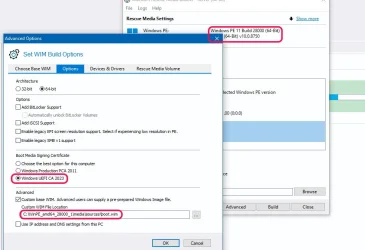
If you restored an older backup, the image may be using the older CA 2011 boot files. In that case, keep Secure Boot disabled and boot normally.

1. Run the following commands to replace the boot manager:
Code:
reg add HKEY_LOCAL_MACHINE\SYSTEM\CurrentControlSet\Control\Secureboot /v AvailableUpdates /t REG_DWORD /d 0x100 /f
powershell Start-ScheduledTask -TaskName "\Microsoft\Windows\PI\Secure-Boot-Update"

2. Now re-enable Secure Boot mode.

There are possibly two separate problems to solve with Secure Boot:
- Your recovery media is using the wrong boot manager​
- Your captured image is using the wrong boot manager​

Depending on your circumstances, both, one, or none of those conditions apply to you.
 

My Computer

System One

  • OS
    Windows 7
Back
Top Bottom