Percentage of RAM usage much higher than that of the individual programs added together?


Donk

Well-known member
Local time
2:13 AM
Posts
152
OS
Win 11
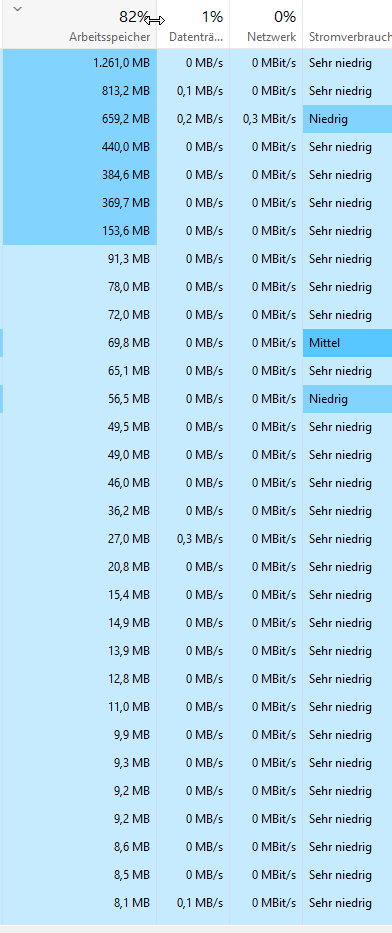
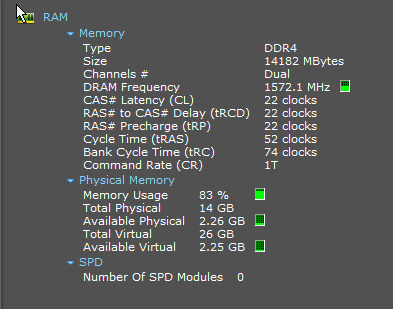
Why does the percentage of memory usage in the column title not nearly match the result of the added memory usage in the column for the individual programs, but is always apparently much higher?

E.g.: How do 82% of RAM come together in the corresponding column name in the Task Manager, even though adding the memory usage of the individual programs in this column would obviously not come close to this 82%?

C1UN87c.png


HMihQ3T.png
 

My Computer My Computer

At a glance

Win 1116 GB
OS
Win 11
Computer type
Laptop
Manufacturer/Model
Lenovo IdeaPad 3 17ABA7 Laptop - Type 82RQ (Lenovo IdeaPad 3 82RQ003EGE)
Memory
16 GB

My Computers My Computers

  • At a glance

    Windows 11 ProAMD Ryzen 9 8945HS32GB DDR5 SO-DIMMIntegrated AMD Radeon 780M (4.00 GHz)
    OS
    Windows 11 Pro
    Computer type
    PC/Desktop
    Manufacturer/Model
    GMKtec K11
    CPU
    AMD Ryzen 9 8945HS
    Memory
    32GB DDR5 SO-DIMM
    Graphics Card(s)
    Integrated AMD Radeon 780M (4.00 GHz)
    Monitor(s) Displays
    Benq 2250HM
    Screen Resolution
    1920 x 1080
    Hard Drives
    1 TB PCIe 4.0 NVMe M.2 SSD
  • At a glance

    Windows 11 HomeIntel® Core™ Ultra 7 - 255H processor16 GB LPDDR5 SDRAMIntel Arc 140T onboard graphics
    Operating System
    Windows 11 Home
    Computer type
    Laptop
    Manufacturer/Model
    ASUS Zenbook 14 OLED 14" Laptop - UX3405CA-QL192W
    CPU
    Intel® Core™ Ultra 7 - 255H processor
    Memory
    16 GB LPDDR5 SDRAM
    Graphics card(s)
    Intel Arc 140T onboard graphics
    Screen Resolution
    1920 x 1200 (16:10 WUXGA resolution) OLED Touchscreen
    Hard Drives
    1TB SSD
Thank you for the link.

The drivers should all be up to date. I think I've had the "problem" of this display on all computers so far (I use the same programs always).
 

My Computer My Computer

At a glance

Win 1116 GB
OS
Win 11
Computer type
Laptop
Manufacturer/Model
Lenovo IdeaPad 3 17ABA7 Laptop - Type 82RQ (Lenovo IdeaPad 3 82RQ003EGE)
Memory
16 GB
I wouldn't rely on Task Manager to look at RAM usage, take a look at Resource Monitor or RAMMap from Sysinternals.
 

My Computer My Computer

At a glance

Windows 11, Windows 10, Linux Fedora Cinnamon
OS
Windows 11, Windows 10, Linux Fedora Cinnamon
Just found this: Resource Monitor

I assume it is not the right one, updated in 2013 the last time.

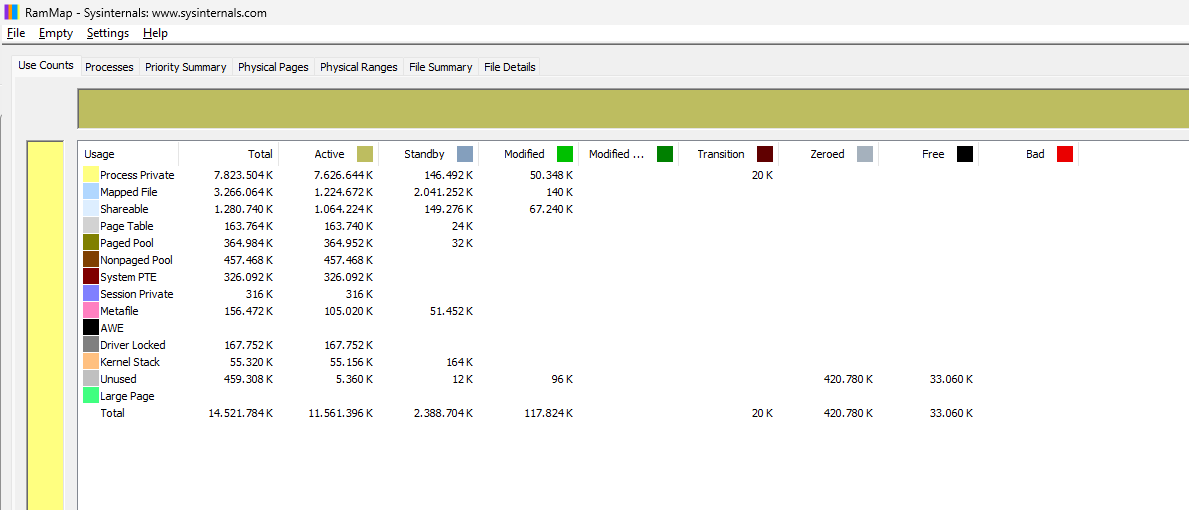
RAMMap shows this:
1WF9BZH.png
 

My Computer My Computer

At a glance

Win 1116 GB
OS
Win 11
Computer type
Laptop
Manufacturer/Model
Lenovo IdeaPad 3 17ABA7 Laptop - Type 82RQ (Lenovo IdeaPad 3 82RQ003EGE)
Memory
16 GB
Why does the percentage of memory usage in the column title not nearly match the result of the added memory usage in the column for the individual programs, but is always apparently much higher?
Because memory is not used by programs only, it is also used by Windows and drivers, however those won't be shown in task manager.
If you run task manager as Administrator more stuff will be shown but still not all system use.
 

My Computer My Computer

At a glance

Windows 11 Pro 23H2Intel i3 8100 @3.6Ghz1 x 16GB DDR4 @2400 MHzNvidia GeForce GT 1030 2GB SDDR4
OS
Windows 11 Pro 23H2
Computer type
PC/Desktop
Manufacturer/Model
MSI / MS-7B29
CPU
Intel i3 8100 @3.6Ghz
Motherboard
H310M PRO-VDH (MS-7B29)
Memory
1 x 16GB DDR4 @2400 MHz
Graphics Card(s)
Nvidia GeForce GT 1030 2GB SDDR4
Sound Card
Realtek VEN_10EC&DEV_0887 / NVIDIA VEN_10DE&DEV_0081
Monitor(s) Displays
Acer V226HQL
Screen Resolution
1920 x 1080
Hard Drives
SSD 500 GB Crucial MX500 / HDD 1 TB TOSHIBA DT01ACA100
PSU
ATX, details unknown
Case
Everest 551B
Cooling
details unknown
Keyboard
Mechanical Gaming Hydra R7 - Rampage
Mouse
Logitech G703
Internet Speed
Down: 28Mbps / Up: 19Mbps
Browser
Microsoft Edge
Antivirus
Microsoft Defender Antivirus
Other Info
Bluetooth: TP Link 5.0 Nano USB adapter UB500
WLAN: D-Link 150 Pico USB adapter, N standard
Web camera: Logitech C270 HD 720p @30fps
Microphone: Trust MICO, model 23790
If you run task manager as Administrator more stuff will be shown but still not all system use.
If it were only a small difference, I could understand it, but the difference is huge. This apparently also means that Win seems to constantly be using 8 - 10 GB of RAM, so there isn't enough left for the programs.

No, Resource Monitor is part of the operating system, there is no need to download anything: Open Resource Monitor in Windows 11 Tutorial
Oops, OK, thank you. I seem to remember always downloading the program in the past.
 

My Computer My Computer

At a glance

Win 1116 GB
OS
Win 11
Computer type
Laptop
Manufacturer/Model
Lenovo IdeaPad 3 17ABA7 Laptop - Type 82RQ (Lenovo IdeaPad 3 82RQ003EGE)
Memory
16 GB
This apparently also means that Win seems to constantly be using 8 - 10 GB of RAM, so there isn't enough left for the programs.
Note that Windows might reserve a portion of memory without using it, this is then shows are "used" but is in fact unused.
I suggest you to read "Pushing the limits of Windows memory" MSDN article to have a firm grasp of Windows memory.
 

My Computer My Computer

At a glance

Windows 11 Pro 23H2Intel i3 8100 @3.6Ghz1 x 16GB DDR4 @2400 MHzNvidia GeForce GT 1030 2GB SDDR4
OS
Windows 11 Pro 23H2
Computer type
PC/Desktop
Manufacturer/Model
MSI / MS-7B29
CPU
Intel i3 8100 @3.6Ghz
Motherboard
H310M PRO-VDH (MS-7B29)
Memory
1 x 16GB DDR4 @2400 MHz
Graphics Card(s)
Nvidia GeForce GT 1030 2GB SDDR4
Sound Card
Realtek VEN_10EC&DEV_0887 / NVIDIA VEN_10DE&DEV_0081
Monitor(s) Displays
Acer V226HQL
Screen Resolution
1920 x 1080
Hard Drives
SSD 500 GB Crucial MX500 / HDD 1 TB TOSHIBA DT01ACA100
PSU
ATX, details unknown
Case
Everest 551B
Cooling
details unknown
Keyboard
Mechanical Gaming Hydra R7 - Rampage
Mouse
Logitech G703
Internet Speed
Down: 28Mbps / Up: 19Mbps
Browser
Microsoft Edge
Antivirus
Microsoft Defender Antivirus
Other Info
Bluetooth: TP Link 5.0 Nano USB adapter UB500
WLAN: D-Link 150 Pico USB adapter, N standard
Web camera: Logitech C270 HD 720p @30fps
Microphone: Trust MICO, model 23790
Also put dxdiag in the Start, Run box to see what video is using, seems to always take some of the system RAM even with a video card with its own memory being used instead of the onboard adapter.

 

My Computers My Computers

  • At a glance

    Win11 Pro RTM Version 24H2 Build 26100.4202Intel Core i5 11th Gen. 2.40GHz12GB
    OS
    Win11 Pro RTM Version 24H2 Build 26100.4202
    Computer type
    Laptop
    Manufacturer/Model
    Dell Vostro 3400
    CPU
    Intel Core i5 11th Gen. 2.40GHz
    Memory
    12GB
    Hard Drives
    256GB SSD NVMe M.2
  • At a glance

    Win11 Pro RTM Version 24H2 Build 26100.4202Intel Core i5 10th Gen. 2.90GHz16GBOnboard, no VGA, using a DisplayPort-to-VGA a...
    Operating System
    Win11 Pro RTM Version 24H2 Build 26100.4202
    Computer type
    PC/Desktop
    Manufacturer/Model
    Dell Vostro 5890
    CPU
    Intel Core i5 10th Gen. 2.90GHz
    Memory
    16GB
    Graphics card(s)
    Onboard, no VGA, using a DisplayPort-to-VGA adapter
    Monitor(s) Displays
    24" Dell
    Hard Drives
    512GB SSD NVMe, 4TB Seagate HDD
    Browser
    Firefox, Edge
    Antivirus
    Windows Defender/Microsoft Security
Okey, thank you very much!
 

My Computer My Computer

At a glance

Win 1116 GB
OS
Win 11
Computer type
Laptop
Manufacturer/Model
Lenovo IdeaPad 3 17ABA7 Laptop - Type 82RQ (Lenovo IdeaPad 3 82RQ003EGE)
Memory
16 GB

Latest Support Threads

Back
Top Bottom