Picking the right air cooler


The NH-D15 is Noctua's largest retail model, I think. It uses nonstandard 140mm fans with a 120mm hole pattern.
Fan compatibility:
140x150x25 (with 120mm mounting holes), 140x140x25 (with 120mm mounting holes), 120x120x25 (optional NA-SFC12 fan clips required)
FAN Specification:

Model2x NF-A14x25r G2 PWM
BearingSSO2
Max. rotational speed (+/- 10%)1500 RPM
Max. rotational speed with L.N.A. (+/- 10%)1250 RPM
Max. airflow155.6 m³/h
Max. airflow with L.N.A.127.1 m³/h
Max. acoustical noise24.8 dB(A)
Max. acoustical noise with L.N.A.19.7 dB(A)
Blade geometryProgressive-Bend impeller
Acoustical noise24.8 dB(A)
Input power (max.)2.28 W
Voltage range12 V
MTTF> 150.000 h

Probably more than needed for a Ryzen 5 7600X.
Yes and no. It depends. If you are pulling ~250 W frequently and for prolonged periods of time, then no, it definitely won't be overkill. Even if your case has washable dust filters and all, even if you don't mind the loud, high-pitched noise (some call reminiscinent of "whining") of fans running at significantly faster speeds than ~1,100 rpm, the rate at which dust clings to and accumulates on the cooler's surfaces and fans is still going to be, to a very large degree, determined by the rotation speed of the fans—with emphasis on "degree".

No matter the CPU cooler you choose to buy, maintenance is compulsory. A lot also boils down to how thick will be the cloud of dust that emanates from the computer when you turn it on, and how much dust you can tolerate before it makes you start to sneeze or clear your throat. If you don't care about that nor about things like reaching higher noise levels under very heavy load, don't buy the NH-D15 G2 LBC. Similarly, if you don't care about what might happen if the pump of an AIO liquid cooler fails, don't buy the NH-D15 G2 LBC, as something like the Arctic Liquid Freezer III 360 will knock it out of the water... literally.
The NH-U12S may fit, but it's spec'd at 158mm tall with fan. There is probably a little adjustment possible in the fan height.

Shorter towers with 120mm fans may raise concerns about RAM clearance. However, the Silicon Power XPOWER Zenith 32GB don't look tall.
In my view, these types of CPU coolers all underperform for a CPU that has the potential to pull ~250 W. The Ryzen 5 7600X is still a far distance away from being a medium-high power CPU. It's gob smack in the middle of the very high power ballpark unless of course you really want to wing clip it in this manner. Undervolting while at the same time also lowering the power draw further by deliberately putting a limit on it with settings CAN make logical sense, though. (E.g., if you want to build a near-silent HTPC with certain, specific, added capabilities like real-time upscaling in madVR.)
 
Last edited:

My Computers My Computers

  • At a glance

    11 Homei7 13650HX16GB DDR5GeForce RTX 4060 Mobile
    OS
    11 Home
    Computer type
    Laptop
    Manufacturer/Model
    Asus TUF Gaming F16 (2024)
    CPU
    i7 13650HX
    Memory
    16GB DDR5
    Graphics Card(s)
    GeForce RTX 4060 Mobile
    Sound Card
    Eastern Electric MiniMax DAC Supreme; Emotiva UMC-200; Astell & Kern AK240
    Monitor(s) Displays
    Sony Bravia XR-55X90J
    Screen Resolution
    3840×2160
    Hard Drives
    512GB SSD internal
    37TB external
    PSU
    Li-ion
    Cooling
    2× Arc Flow Fans, 4× exhaust vents, 5× heatpipes
    Keyboard
    Logitech K800
    Mouse
    Logitech G402
    Internet Speed
    30Mbit/s up, 500Mbit/s down
    Browser
    FF
    Antivirus
    What's an antivirus?
  • At a glance

    11 Homei5 1135G716GB DDR4Intel Iris Xe
    Operating System
    11 Home
    Computer type
    Laptop
    Manufacturer/Model
    Medion S15450
    CPU
    i5 1135G7
    Memory
    16GB DDR4
    Graphics card(s)
    Intel Iris Xe
    Sound Card
    Eastern Electric MiniMax DAC Supreme; Emotiva UMC-200; Astell & Kern AK240
    Monitor(s) Displays
    Sony Bravia XR-55X90J
    Screen Resolution
    3840×2160
    Hard Drives
    2TB SSD internal
    37TB external
    PSU
    Li-ion
    Keyboard
    Logitech K800
    Mouse
    Logitech G402
    Internet Speed
    30Mbit/s up, 500Mbit/s down
    Browser
    FF
I don't own a 7600X.

It's spec'd with a nominal TPD of 105W, with a PPT (package power tracking ) of 142W.

Noctua chooses to not specify their coolers for maximum power dissipation. They do, however, have a compatibility list:


The NH-U12S redux looks good, if it fits.
 

My Computers My Computers

  • At a glance

    Windows 11 26200.8728Amd Threadripper 7970X128GB (4 X 32) G.Skill DDR5 6400 (RDIMM)Gigabyte RTX 4090 OC
    OS
    Windows 11 26200.8728
    Computer type
    PC/Desktop
    Manufacturer/Model
    homebuilt
    CPU
    Amd Threadripper 7970X
    Motherboard
    Gigabyte TRX50 Aero D Rev. 1.0
    Memory
    128GB (4 X 32) G.Skill DDR5 6400 (RDIMM)
    Graphics Card(s)
    Gigabyte RTX 4090 OC
    Sound Card
    none (USB to speakers), Realtek
    Monitor(s) Displays
    Innocn 32" OLED
    Screen Resolution
    3840 X 2160 @ 60Hz
    Hard Drives
    Crucial T700 2TB M.2 NVME SSD
    WD 4TB Blue SATA SSD
    Seagate 18TB IronWolf Pro
    PSU
    BeQuiet! Straight Power 12 1500W
    Case
    Lian Li 011 Dynamic Evo XL
    Cooling
    SilverStone Technology XE360-TR5, with 3 Phanteks T30 fans
    Keyboard
    Cherry KC 500 MX LP (mechanical)
    Mouse
    Logitech M500s (wired)
    Internet Speed
    2000/250 Mbps (down/up)
    Other Info
    xFinity gateway
  • At a glance

    windows 11 26200.8728Intel I9-13900K64GB G.Skill DDR5-6000Gigabyte RTX 3090 ti
    Operating System
    windows 11 26200.8728
    Computer type
    PC/Desktop
    Manufacturer/Model
    homebuilt
    CPU
    Intel I9-13900K
    Motherboard
    Asus RoG Strix Z690-E
    Memory
    64GB G.Skill DDR5-6000
    Graphics card(s)
    Gigabyte RTX 3090 ti
    Sound Card
    built in Realtek
    Monitor(s) Displays
    Philips 27E1N8900 27" OLED
    Screen Resolution
    3840 X 2160 @60Hz
    Hard Drives
    WDC SN850 1TB
    8TB Seagate Ironwolf
    4TB Seagate Ironwolf
    PSU
    eVGA SuperNOVA 1300 GT
    Case
    Lian Li 011 Dynamic Evo
    Cooling
    Corsair iCUE H150i ELITE CAPELLIX Liquid CPU Cooler
    Keyboard
    Cherry Streaming (wired)
    Mouse
    Logitech M500s (wired)

My Computers My Computers

  • At a glance

    Windows 11 Pro 25H2 Build 26200.8655Intel(R) Core(TM) i7-4770K CPU @ 3.50GHz32.0 GB of I forget and the box is in storage.Gigabyte nVidia GeForce GTX 1660 Super OC 6GB
    OS
    Windows 11 Pro 25H2 Build 26200.8655
    Computer type
    PC/Desktop
    Manufacturer/Model
    Sin-built 2013
    CPU
    Intel(R) Core(TM) i7-4770K CPU @ 3.50GHz
    Motherboard
    ASUS ROG Maximus VI Formula
    Memory
    32.0 GB of I forget and the box is in storage.
    Graphics Card(s)
    Gigabyte nVidia GeForce GTX 1660 Super OC 6GB
    Sound Card
    ROG SupremeFX Formula 8-Channel High Definition Audio
    Monitor(s) Displays
    5 x LG 25MS500-B - 1 x 24MK430H-B - 1 x Wacom Pro 22" Touch Screen Tablet
    Screen Resolution
    All over the place
    Hard Drives
    Too many to list. OS on Samsung 1TB 870 QVO SATA
    PSU
    Silverstone 1500
    Case
    NZXT Phantom 820 Full-Tower Case
    Cooling
    Noctua NH-D15 Elite Class Dual Tower CPU Cooler / 6 x EziDIY 120mm / 2 x Corsair 140mm somethings / 1 x 140mm Thermaltake something / 2 x 200mm Corsair.
    Keyboard
    Corsair K95 / Logitech diNovo Edge Wireless
    Mouse
    Logitech: G402 / G502 / Mx Masters / Mx Air Cordless
    Internet Speed
    2000/500Mbps
    Browser
    All sorts
    Antivirus
    Kaspersky Premium
    Other Info
    ㅤㅤㅤㅤㅤㅤㅤㅤㅤㅤㅤㅤㅤㅤㅤㅤㅤㅤㅤㅤㅤㅤㅤㅤㅤㅤㅤㅤㅤㅤㅤㅤㅤㅤㅤㅤㅤㅤㅤㅤ⠀⠀⠀⠀⠀⠀⠀⠀⠀⠀
    TP-Link BE9300 WiFi 7 Bluetooth 5.4 (Archer TBE550E)
    TP-Link TX201 V1 2.5GB Lan

    Grandstream HT812 - VoIP
    ASUS DSL-AX82U - Mesh
    ASUS RT-AC68U - Mesh
    ASUS RT-BE88U Router

    Brother MFC-L2880DW Printer

    I’m on a horse.
  • At a glance

    Windows 11 Pro 25H2 Build 26200.8655 (Wifes)13th Generation Intel® Core™ i5-1340P Process...16GB LPDDR5-52001x Intel® Iris® Xe Graphics
    Operating System
    Windows 11 Pro 25H2 Build 26200.8655 (Wifes)
    Computer type
    Laptop
    Manufacturer/Model
    LENOVO Yoga 7 14IRL8 - Type 82YL
    CPU
    13th Generation Intel® Core™ i5-1340P Processor(Core™ i5-1340P)
    Memory
    16GB LPDDR5-5200
    Graphics card(s)
    1x Intel® Iris® Xe Graphics
    Sound Card
    Optimized with Dolby Atmos®
    Screen Resolution
    QHD 2880 x 1800 OLED
    Hard Drives
    M.2 512 GB SSD PCIe
    Mouse
    Logiteck MX Master 3S
    Internet Speed
    2000/500
    Antivirus
    Defender / Malwarebytes
    Other Info
    …still on a horse.


    Wireless Network: Wi-Fi 6E 2x2 AX; Bluetooth® 5.1 or above
    Ports: 1x 1 Novo button; 2 in 1 Audio Combo jack; Micro SD Card Reader; HDMI 1.4b; 2 x USB Type-C (TBT4)
    USB 3.2 Gen 2 DP 1.4a
    PD 3.0); 1 x USB 3.2 Gen1 Type A
    Camera
    1x 1080P FHD IR/RGB Hybrid with Privacy Shutter and Dual Array Microphone
    Graphics
    1x Intel® Iris® Xe Graphics
    Monitor
    14" WUXGA
    Form Factor
    Convertible Notebook
  • Windows 11 Pro 25H2 Build 26200.8655 (Wifes)

    Yoga 7 2-in-1 14IML9 - Type 83DJ

    Processor: Intel® Core™ Ultra 7 155H Processor(Core™ Ultra 7 155H)

    Memory: 32GB LPD5X-7467

    Hard Drive: 1 TB SSD PCIe

    Wireless Network: 1x Wi-Fi 6E 2x2 AX; Bluetooth® 5.1 or above

    Ports: 1 x HDMI 2.1 TMDS; 1 x Novo Button; 1 x Combo Audio Jack
    2 x USB-C (USB 4.0)
    1 x USB-A 3.2 Gen 1

    Camera: 1080P FHD IR Hybrid with Dual Microphone

    Graphics: Intel® Arc™ Graphics

    Monitor: 14" 2.8K

    ...Where's my horse?
I don't own a 7600X.

It's spec'd with a nominal TPD of 105W, with a PPT (package power tracking ) of 142W.
Yeah, I meant ~150 W, not ~250 W. Sorry for the confusion, but anyway. In Cinebench R23 (multi-threaded) the Ryzen 5 7600X still reaches easily above 90 degrees Celsius. (Even, with the kind of entry-level 360mm AIO liquid cooler that offers slighlty better cooling performance than the Noctua NH-D15 G2 LBC with the fans maxed out.)

Multi-threaded Cinebench R23 is still reasonably representative of "very high load" in the real world IMO, as "ultra high load" IMO would translate to something like running Blender cycles (or Prime95 with 128k FFT). So, with this CPU under sustained very high load, the Peerless Assassin 120 SE most definitely will get rather loud.

However, immediately I will add that "how loud is too loud" isn't for me to decide. Personally, I, wouldn't want to sit right next to a computer that generates THAT much noise for very long. (But then, noise cancelling headphones irritate my skin.)
 

My Computers My Computers

  • At a glance

    11 Homei7 13650HX16GB DDR5GeForce RTX 4060 Mobile
    OS
    11 Home
    Computer type
    Laptop
    Manufacturer/Model
    Asus TUF Gaming F16 (2024)
    CPU
    i7 13650HX
    Memory
    16GB DDR5
    Graphics Card(s)
    GeForce RTX 4060 Mobile
    Sound Card
    Eastern Electric MiniMax DAC Supreme; Emotiva UMC-200; Astell & Kern AK240
    Monitor(s) Displays
    Sony Bravia XR-55X90J
    Screen Resolution
    3840×2160
    Hard Drives
    512GB SSD internal
    37TB external
    PSU
    Li-ion
    Cooling
    2× Arc Flow Fans, 4× exhaust vents, 5× heatpipes
    Keyboard
    Logitech K800
    Mouse
    Logitech G402
    Internet Speed
    30Mbit/s up, 500Mbit/s down
    Browser
    FF
    Antivirus
    What's an antivirus?
  • At a glance

    11 Homei5 1135G716GB DDR4Intel Iris Xe
    Operating System
    11 Home
    Computer type
    Laptop
    Manufacturer/Model
    Medion S15450
    CPU
    i5 1135G7
    Memory
    16GB DDR4
    Graphics card(s)
    Intel Iris Xe
    Sound Card
    Eastern Electric MiniMax DAC Supreme; Emotiva UMC-200; Astell & Kern AK240
    Monitor(s) Displays
    Sony Bravia XR-55X90J
    Screen Resolution
    3840×2160
    Hard Drives
    2TB SSD internal
    37TB external
    PSU
    Li-ion
    Keyboard
    Logitech K800
    Mouse
    Logitech G402
    Internet Speed
    30Mbit/s up, 500Mbit/s down
    Browser
    FF
I've purchased a Dark Rock Pro 4 for my Ryzen 5800x and it's been fantastic for me and much nicer looking than the Noctua colors. However, it does require 163mm of space, so it won't fit in this application.
 

My Computers My Computers

  • At a glance

    Windows 11 ProIntel Core i5-8279u32GB DDR4 2666MhzIntel Iris Plus 655
    OS
    Windows 11 Pro
    Computer type
    PC/Desktop
    Manufacturer/Model
    Beelink SEI8
    CPU
    Intel Core i5-8279u
    Motherboard
    AZW SEI
    Memory
    32GB DDR4 2666Mhz
    Graphics Card(s)
    Intel Iris Plus 655
    Sound Card
    Intel SST
    Monitor(s) Displays
    Asus ProArt PA278QV
    Screen Resolution
    2560x1440
    Hard Drives
    512GB NVMe
    PSU
    NA
    Case
    NA
    Cooling
    NA
    Keyboard
    NA
    Mouse
    NA
    Internet Speed
    500/50
    Browser
    Edge
    Antivirus
    Defender
    Other Info
    Mini PC used for testing Windows 11.
  • At a glance

    Windows 10 ProRyzen 9 5900x64GB DDR4-3600EVGA GeForce 3080 FT3 Ultra
    Operating System
    Windows 10 Pro
    Computer type
    PC/Desktop
    Manufacturer/Model
    Custom
    CPU
    Ryzen 9 5900x
    Motherboard
    Asus Rog Strix X570-E Gaming
    Memory
    64GB DDR4-3600
    Graphics card(s)
    EVGA GeForce 3080 FT3 Ultra
    Sound Card
    Onboard
    Monitor(s) Displays
    ASUS TUF Gaming VG27AQ. ASUS ProArt Display PA278QV 27” WQHD
    Screen Resolution
    2560x1440
    Hard Drives
    2TB WD SN850 PCI-E Gen 4 NVMe
    2TB Sandisk Ultra 2.5" SATA SSD
    PSU
    Seasonic Focus 850
    Case
    Fractal Meshify S2 in White
    Cooling
    Dark Rock Pro CPU cooler, 3 x 140mm case fans
    Keyboard
    Corsiar K65 RGB Lux
    Mouse
    Logitech G9 Laser Mouse
    Internet Speed
    500/50
    Browser
    Chrome
    Antivirus
    Defender.
I installed the cooler and, once I got an ARGB splitter, have all of the light and fan cables connected.

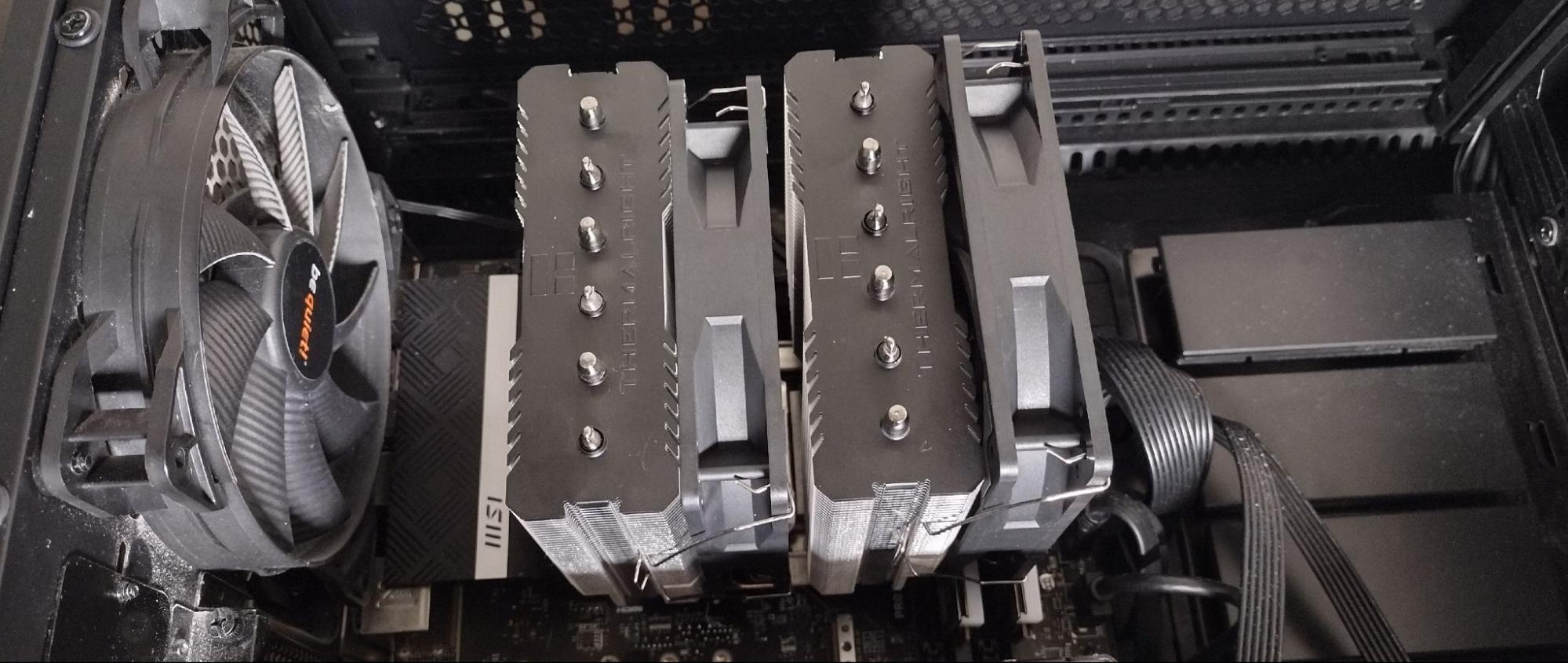
But the cpu fans and the back case fan seem to be spinning in opposite directions. I watched some YouTube videos on installing case fans. One video shows the case and cpu fans spinning the same directions as mine . Then I re-watched the video on installing the Thermalright Peerless Assassin. Everything seems right. I've attached 2 videos of a tour inside my computer case. Am I missing something?
 

Attachments

My Computer My Computer

At a glance

Windows 11 Pro - version 24H2AMD Ryzen 5 7600X 6 Core AM5 5.3GHz CPUSilicon Power XPOWER Zenith 32GB (16GBx2) CL3...MSI GeForce RTX 4060 Ventus 2X Black 8G OC Gr...
OS
Windows 11 Pro - version 24H2
Computer type
PC/Desktop
CPU
AMD Ryzen 5 7600X 6 Core AM5 5.3GHz CPU
Motherboard
2024 MSI MAG B650 GAMING PLUS WIFI
Memory
Silicon Power XPOWER Zenith 32GB (16GBx2) CL30,1.35V UDIMM 6000MHz DDR5 RAM
Graphics Card(s)
MSI GeForce RTX 4060 Ventus 2X Black 8G OC Graphics Card
Monitor(s) Displays
Asus ROG Strix XG32WCS - 32in HDR VA 180Hz USB Type-C FreeSync Curved Gaming Monitor
Screen Resolution
2560 x 1440
Hard Drives
1) Silicon Power 1TB P34A60 Gen3x4 TLC R/W up to 2,200/1,600 MB/s PCIe M.2 NVMe SSD

2) Crucial 1TB E100 CT1000E100SSD8 Gen4 M.2 NVMe SSD
PSU
MSI 750W MAG A750GL 80+ Gold PCIe 5 ATX 3.0 Modular Power Supply
Case
SilverStone Fara R1 Pro V2 Tempered Glass ATX Case - Black
Cooling
Thermalright Peerless Assassin 120 SE ARGB Dual Loop CPU Cooler, 120mm Fan
Antivirus
Microsoft Defender
I installed the cooler and, once I got an ARGB splitter, have all of the light and fan cables connected.

But the cpu fans and the back case fan seem to be spinning in opposite directions. I watched some YouTube videos on installing case fans. One video shows the case and cpu fans spinning the same directions as mine . Then I re-watched the video on installing the Thermalright Peerless Assassin. Everything seems right. I've attached 2 videos of a tour inside my computer case. Am I missing something?
I'm not certain, but I believe that you have the front fans oriented to blow out of the case. They should be blowing in. I suggest that you check that.

The fan on the cooler and the rear fan are oriented as I'd suggest.
 

My Computers My Computers

  • At a glance

    Windows 11 26200.8728Amd Threadripper 7970X128GB (4 X 32) G.Skill DDR5 6400 (RDIMM)Gigabyte RTX 4090 OC
    OS
    Windows 11 26200.8728
    Computer type
    PC/Desktop
    Manufacturer/Model
    homebuilt
    CPU
    Amd Threadripper 7970X
    Motherboard
    Gigabyte TRX50 Aero D Rev. 1.0
    Memory
    128GB (4 X 32) G.Skill DDR5 6400 (RDIMM)
    Graphics Card(s)
    Gigabyte RTX 4090 OC
    Sound Card
    none (USB to speakers), Realtek
    Monitor(s) Displays
    Innocn 32" OLED
    Screen Resolution
    3840 X 2160 @ 60Hz
    Hard Drives
    Crucial T700 2TB M.2 NVME SSD
    WD 4TB Blue SATA SSD
    Seagate 18TB IronWolf Pro
    PSU
    BeQuiet! Straight Power 12 1500W
    Case
    Lian Li 011 Dynamic Evo XL
    Cooling
    SilverStone Technology XE360-TR5, with 3 Phanteks T30 fans
    Keyboard
    Cherry KC 500 MX LP (mechanical)
    Mouse
    Logitech M500s (wired)
    Internet Speed
    2000/250 Mbps (down/up)
    Other Info
    xFinity gateway
  • At a glance

    windows 11 26200.8728Intel I9-13900K64GB G.Skill DDR5-6000Gigabyte RTX 3090 ti
    Operating System
    windows 11 26200.8728
    Computer type
    PC/Desktop
    Manufacturer/Model
    homebuilt
    CPU
    Intel I9-13900K
    Motherboard
    Asus RoG Strix Z690-E
    Memory
    64GB G.Skill DDR5-6000
    Graphics card(s)
    Gigabyte RTX 3090 ti
    Sound Card
    built in Realtek
    Monitor(s) Displays
    Philips 27E1N8900 27" OLED
    Screen Resolution
    3840 X 2160 @60Hz
    Hard Drives
    WDC SN850 1TB
    8TB Seagate Ironwolf
    4TB Seagate Ironwolf
    PSU
    eVGA SuperNOVA 1300 GT
    Case
    Lian Li 011 Dynamic Evo
    Cooling
    Corsair iCUE H150i ELITE CAPELLIX Liquid CPU Cooler
    Keyboard
    Cherry Streaming (wired)
    Mouse
    Logitech M500s (wired)
surprise for those that do not know how to work on computers, often, with some coolers for the cpu, you have to take motherboard out of case to access the back of the motherboard to attach the cooler hardware mounts. Lots of pc cases do not have access the area near the cpu on the motherboard to do this while it is in the pc case. If you build your own pc's you already know this. so, make sure you get the cpu cooler that you know how to install. FYI.
 

My Computer My Computer

At a glance

Win11i9-1390064 GBNvidia RTX 5070 TI OC
OS
Win11
Computer type
PC/Desktop
Manufacturer/Model
Asus Home built
CPU
i9-13900
Motherboard
ASUS Strix Z790-H
Memory
64 GB
Graphics Card(s)
Nvidia RTX 5070 TI OC
Monitor(s) Displays
Sony 55"
Hard Drives
SSD
PSU
850 watt EVGA
Case
Cooler Master Haf 932
Cooling
CoolerMaster
Keyboard
RedDragon
Mouse
CoolerMaster
Internet Speed
300/300
Antivirus
Defender
Other Info
VR, Virtual Reality
But the cpu fans and the back case fan seem to be spinning in opposite directions. I watched some YouTube videos on installing case fans. One video shows the case and cpu fans spinning the same directions as mine . Then I re-watched the video on installing the Thermalright Peerless Assassin. Everything seems right. I've attached 2 videos of a tour inside my computer case. Am I missing something?
You have them all oriented correctly. The confusion comes from the fact that the Thermalright fans spin clockwise whereas your case fans spin counterclockwise. If in doubt, look at the curvature of the fan blades.

The convex side is the intake.

fanfront-jpg.273807


The concave side is the exhaust.

fanorientation-jpg.273809


The fan in the example pictures above spins counterclockwise, i.e., when you look at the front side of the fan, which is the side with the label that spins when the fan spins (the first picture in this specific example). So, in this specific example, the fan blows air from its front side to its back side. (A fan that blows air from its back side to its front side is called a reverse blade fan—which you do not have.)

To compare, this is the (clockwise-spinning) Thermalright fan:

tr-pa120mm-argb-luefter-jpg.1334865
 

My Computers My Computers

  • At a glance

    11 Homei7 13650HX16GB DDR5GeForce RTX 4060 Mobile
    OS
    11 Home
    Computer type
    Laptop
    Manufacturer/Model
    Asus TUF Gaming F16 (2024)
    CPU
    i7 13650HX
    Memory
    16GB DDR5
    Graphics Card(s)
    GeForce RTX 4060 Mobile
    Sound Card
    Eastern Electric MiniMax DAC Supreme; Emotiva UMC-200; Astell & Kern AK240
    Monitor(s) Displays
    Sony Bravia XR-55X90J
    Screen Resolution
    3840×2160
    Hard Drives
    512GB SSD internal
    37TB external
    PSU
    Li-ion
    Cooling
    2× Arc Flow Fans, 4× exhaust vents, 5× heatpipes
    Keyboard
    Logitech K800
    Mouse
    Logitech G402
    Internet Speed
    30Mbit/s up, 500Mbit/s down
    Browser
    FF
    Antivirus
    What's an antivirus?
  • At a glance

    11 Homei5 1135G716GB DDR4Intel Iris Xe
    Operating System
    11 Home
    Computer type
    Laptop
    Manufacturer/Model
    Medion S15450
    CPU
    i5 1135G7
    Memory
    16GB DDR4
    Graphics card(s)
    Intel Iris Xe
    Sound Card
    Eastern Electric MiniMax DAC Supreme; Emotiva UMC-200; Astell & Kern AK240
    Monitor(s) Displays
    Sony Bravia XR-55X90J
    Screen Resolution
    3840×2160
    Hard Drives
    2TB SSD internal
    37TB external
    PSU
    Li-ion
    Keyboard
    Logitech K800
    Mouse
    Logitech G402
    Internet Speed
    30Mbit/s up, 500Mbit/s down
    Browser
    FF
You have them all oriented correctly. The confusion comes from the fact that the Thermalright fans spin clockwise whereas your case fans spin counterclockwise. If in doubt, look at the curvature of the fan blades.

The convex side is the intake.

fanfront-jpg.273807


The concave side is the exhaust.

fanorientation-jpg.273809


The fan in the example pictures above spins counterclockwise, i.e., when you look at the front side of the fan, which is the side with the label that spins when the fan spins (the first picture in this specific example). So, in this specific example, the fan blows air from its front side to its back side. (A fan that blows air from its back side to its front side is called a reverse blade fan—which you do not have.)

To compare, this is the (clockwise-spinning) Thermalright fan:

tr-pa120mm-argb-luefter-jpg.1334865
Thanks HDMI. That's a very thorough explanation and I appreciate it.

I took my computer down to a repair shop and the guy also said that I had installed everything correctly. And when he learned that this is the first computer I've built, he gave me a compliment by saying that I had done a good job. That was nice to hear. :-)

Now this is over I can just have fun with my computer. Yay! (y)
 

My Computer My Computer

At a glance

Windows 11 Pro - version 24H2AMD Ryzen 5 7600X 6 Core AM5 5.3GHz CPUSilicon Power XPOWER Zenith 32GB (16GBx2) CL3...MSI GeForce RTX 4060 Ventus 2X Black 8G OC Gr...
OS
Windows 11 Pro - version 24H2
Computer type
PC/Desktop
CPU
AMD Ryzen 5 7600X 6 Core AM5 5.3GHz CPU
Motherboard
2024 MSI MAG B650 GAMING PLUS WIFI
Memory
Silicon Power XPOWER Zenith 32GB (16GBx2) CL30,1.35V UDIMM 6000MHz DDR5 RAM
Graphics Card(s)
MSI GeForce RTX 4060 Ventus 2X Black 8G OC Graphics Card
Monitor(s) Displays
Asus ROG Strix XG32WCS - 32in HDR VA 180Hz USB Type-C FreeSync Curved Gaming Monitor
Screen Resolution
2560 x 1440
Hard Drives
1) Silicon Power 1TB P34A60 Gen3x4 TLC R/W up to 2,200/1,600 MB/s PCIe M.2 NVMe SSD

2) Crucial 1TB E100 CT1000E100SSD8 Gen4 M.2 NVMe SSD
PSU
MSI 750W MAG A750GL 80+ Gold PCIe 5 ATX 3.0 Modular Power Supply
Case
SilverStone Fara R1 Pro V2 Tempered Glass ATX Case - Black
Cooling
Thermalright Peerless Assassin 120 SE ARGB Dual Loop CPU Cooler, 120mm Fan
Antivirus
Microsoft Defender
You have them all oriented correctly. The confusion comes from the fact that the Thermalright fans spin clockwise whereas your case fans spin counterclockwise. If in doubt, look at the curvature of the fan blades.

The convex side is the intake.

fanfront-jpg.273807


The concave side is the exhaust.

fanorientation-jpg.273809


The fan in the example pictures above spins counterclockwise, i.e., when you look at the front side of the fan, which is the side with the label that spins when the fan spins (the first picture in this specific example). So, in this specific example, the fan blows air from its front side to its back side. (A fan that blows air from its back side to its front side is called a reverse blade fan—which you do not have.)

To compare, this is the (clockwise-spinning) Thermalright fan:

tr-pa120mm-argb-luefter-jpg.1334865
That's well done.

I misjudged the view of the front fans. I didn't care which direction they spun; I was looking for the intake/output sides.

If I had the PC in front of me, I would have started it up and noticed the direction of the airflow.

Also, some fans are marked to show the airflow direction. Not all are.
 

My Computers My Computers

  • At a glance

    Windows 11 26200.8728Amd Threadripper 7970X128GB (4 X 32) G.Skill DDR5 6400 (RDIMM)Gigabyte RTX 4090 OC
    OS
    Windows 11 26200.8728
    Computer type
    PC/Desktop
    Manufacturer/Model
    homebuilt
    CPU
    Amd Threadripper 7970X
    Motherboard
    Gigabyte TRX50 Aero D Rev. 1.0
    Memory
    128GB (4 X 32) G.Skill DDR5 6400 (RDIMM)
    Graphics Card(s)
    Gigabyte RTX 4090 OC
    Sound Card
    none (USB to speakers), Realtek
    Monitor(s) Displays
    Innocn 32" OLED
    Screen Resolution
    3840 X 2160 @ 60Hz
    Hard Drives
    Crucial T700 2TB M.2 NVME SSD
    WD 4TB Blue SATA SSD
    Seagate 18TB IronWolf Pro
    PSU
    BeQuiet! Straight Power 12 1500W
    Case
    Lian Li 011 Dynamic Evo XL
    Cooling
    SilverStone Technology XE360-TR5, with 3 Phanteks T30 fans
    Keyboard
    Cherry KC 500 MX LP (mechanical)
    Mouse
    Logitech M500s (wired)
    Internet Speed
    2000/250 Mbps (down/up)
    Other Info
    xFinity gateway
  • At a glance

    windows 11 26200.8728Intel I9-13900K64GB G.Skill DDR5-6000Gigabyte RTX 3090 ti
    Operating System
    windows 11 26200.8728
    Computer type
    PC/Desktop
    Manufacturer/Model
    homebuilt
    CPU
    Intel I9-13900K
    Motherboard
    Asus RoG Strix Z690-E
    Memory
    64GB G.Skill DDR5-6000
    Graphics card(s)
    Gigabyte RTX 3090 ti
    Sound Card
    built in Realtek
    Monitor(s) Displays
    Philips 27E1N8900 27" OLED
    Screen Resolution
    3840 X 2160 @60Hz
    Hard Drives
    WDC SN850 1TB
    8TB Seagate Ironwolf
    4TB Seagate Ironwolf
    PSU
    eVGA SuperNOVA 1300 GT
    Case
    Lian Li 011 Dynamic Evo
    Cooling
    Corsair iCUE H150i ELITE CAPELLIX Liquid CPU Cooler
    Keyboard
    Cherry Streaming (wired)
    Mouse
    Logitech M500s (wired)
The side with the braces between hub and frame is normally (always AFAIK) the exhaust side.
 

My Computer My Computer

At a glance

Windows 11
OS
Windows 11
The side with the braces between hub and frame is normally (always AFAIK) the exhaust side.
Now that you mention it...

That would be the simplest way to spot the goes_outa side.

I learn something new every day. While forgetting two old things.
 

My Computers My Computers

  • At a glance

    Windows 11 26200.8728Amd Threadripper 7970X128GB (4 X 32) G.Skill DDR5 6400 (RDIMM)Gigabyte RTX 4090 OC
    OS
    Windows 11 26200.8728
    Computer type
    PC/Desktop
    Manufacturer/Model
    homebuilt
    CPU
    Amd Threadripper 7970X
    Motherboard
    Gigabyte TRX50 Aero D Rev. 1.0
    Memory
    128GB (4 X 32) G.Skill DDR5 6400 (RDIMM)
    Graphics Card(s)
    Gigabyte RTX 4090 OC
    Sound Card
    none (USB to speakers), Realtek
    Monitor(s) Displays
    Innocn 32" OLED
    Screen Resolution
    3840 X 2160 @ 60Hz
    Hard Drives
    Crucial T700 2TB M.2 NVME SSD
    WD 4TB Blue SATA SSD
    Seagate 18TB IronWolf Pro
    PSU
    BeQuiet! Straight Power 12 1500W
    Case
    Lian Li 011 Dynamic Evo XL
    Cooling
    SilverStone Technology XE360-TR5, with 3 Phanteks T30 fans
    Keyboard
    Cherry KC 500 MX LP (mechanical)
    Mouse
    Logitech M500s (wired)
    Internet Speed
    2000/250 Mbps (down/up)
    Other Info
    xFinity gateway
  • At a glance

    windows 11 26200.8728Intel I9-13900K64GB G.Skill DDR5-6000Gigabyte RTX 3090 ti
    Operating System
    windows 11 26200.8728
    Computer type
    PC/Desktop
    Manufacturer/Model
    homebuilt
    CPU
    Intel I9-13900K
    Motherboard
    Asus RoG Strix Z690-E
    Memory
    64GB G.Skill DDR5-6000
    Graphics card(s)
    Gigabyte RTX 3090 ti
    Sound Card
    built in Realtek
    Monitor(s) Displays
    Philips 27E1N8900 27" OLED
    Screen Resolution
    3840 X 2160 @60Hz
    Hard Drives
    WDC SN850 1TB
    8TB Seagate Ironwolf
    4TB Seagate Ironwolf
    PSU
    eVGA SuperNOVA 1300 GT
    Case
    Lian Li 011 Dynamic Evo
    Cooling
    Corsair iCUE H150i ELITE CAPELLIX Liquid CPU Cooler
    Keyboard
    Cherry Streaming (wired)
    Mouse
    Logitech M500s (wired)

My Computers My Computers

  • At a glance

    11 Homei7 13650HX16GB DDR5GeForce RTX 4060 Mobile
    OS
    11 Home
    Computer type
    Laptop
    Manufacturer/Model
    Asus TUF Gaming F16 (2024)
    CPU
    i7 13650HX
    Memory
    16GB DDR5
    Graphics Card(s)
    GeForce RTX 4060 Mobile
    Sound Card
    Eastern Electric MiniMax DAC Supreme; Emotiva UMC-200; Astell & Kern AK240
    Monitor(s) Displays
    Sony Bravia XR-55X90J
    Screen Resolution
    3840×2160
    Hard Drives
    512GB SSD internal
    37TB external
    PSU
    Li-ion
    Cooling
    2× Arc Flow Fans, 4× exhaust vents, 5× heatpipes
    Keyboard
    Logitech K800
    Mouse
    Logitech G402
    Internet Speed
    30Mbit/s up, 500Mbit/s down
    Browser
    FF
    Antivirus
    What's an antivirus?
  • At a glance

    11 Homei5 1135G716GB DDR4Intel Iris Xe
    Operating System
    11 Home
    Computer type
    Laptop
    Manufacturer/Model
    Medion S15450
    CPU
    i5 1135G7
    Memory
    16GB DDR4
    Graphics card(s)
    Intel Iris Xe
    Sound Card
    Eastern Electric MiniMax DAC Supreme; Emotiva UMC-200; Astell & Kern AK240
    Monitor(s) Displays
    Sony Bravia XR-55X90J
    Screen Resolution
    3840×2160
    Hard Drives
    2TB SSD internal
    37TB external
    PSU
    Li-ion
    Keyboard
    Logitech K800
    Mouse
    Logitech G402
    Internet Speed
    30Mbit/s up, 500Mbit/s down
    Browser
    FF
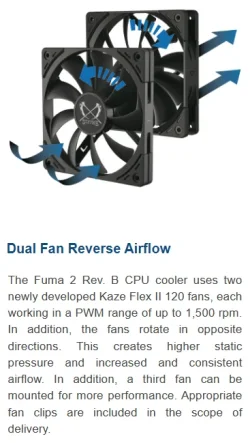
Makes sense for people into RGB fans and see-through cases, but that's not me. I skimmed the posts that appeared before mine before posting, and they seemed concerned with the orientation of the fan blades, and I would never be able to remember convex/concave given I can go months to years without thinking about fans at all. I would hope a fan that deviates from the standard would be marked with the airflow direction. This made me think of the Scythe Fuma 2 cooler I used a few years ago, which has fans that spin in opposite directions, but the braces are still on the exit sides of both. This gives a different effect than you would get by simply turning a standard fan around or taking a standard fan and putting the brace on the other side for aesthetic purposes.


1754765560356.webp
 

My Computer My Computer

At a glance

Windows 11
OS
Windows 11

Latest Support Threads

Back
Top Bottom