Solved PNG thumbnails won't show on the open dialog?


formingus

Well-known member
Member
Local time
4:46 AM
Posts
80
OS
Microsoft Windows [Version 10.0.26100.4349]
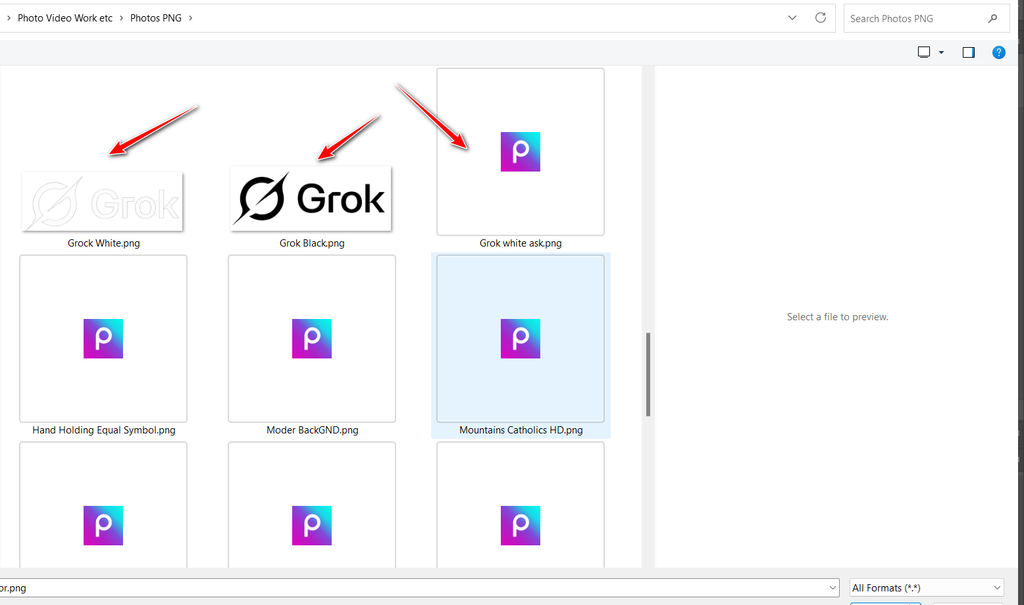
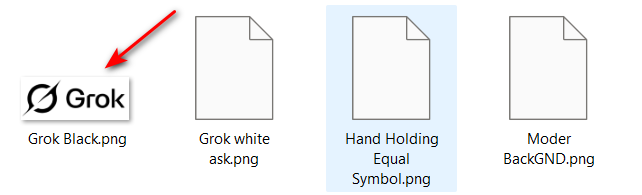
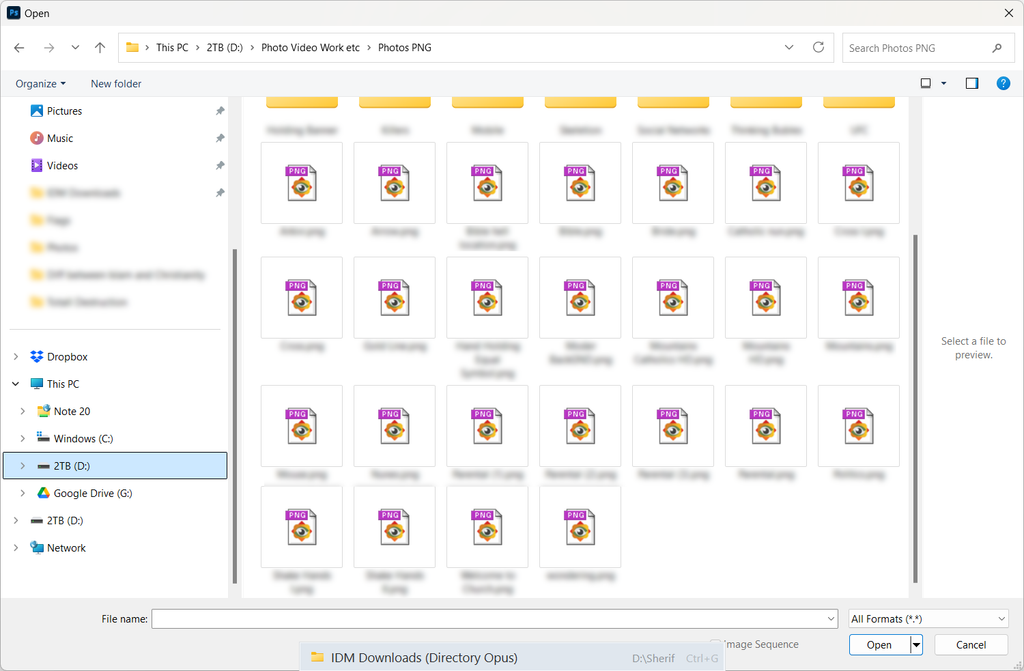
PNG thumbnails won't show on the open dialog?
Shows thumbnails instead of icons checkbox activated
Cleared icon cache etc, but i am still unable to solve it
Windows 11
Microsoft Windows [Version 10.0.22631.6199]
Fast-Stone-Editor2.png
 
Windows Build/Version
Microsoft Windows [Version 10.0.22631.6199]

My Computer My Computer

At a glance

Microsoft Windows [Version 10.0.26100.4349]Intel(R) Core(TM) i5-4590 CPU @ 3.30GHz, 3301Installed Physical Memory (RAM) 12.0 GBNVIDIA GeForce GTX 1050 Ti
OS
Microsoft Windows [Version 10.0.26100.4349]
Computer type
PC/Desktop
Manufacturer/Model
System Model HP EliteDesk 800 G1 SFF
CPU
Intel(R) Core(TM) i5-4590 CPU @ 3.30GHz, 3301
Motherboard
Hewlett-Packard
Memory
Installed Physical Memory (RAM) 12.0 GB
Graphics Card(s)
NVIDIA GeForce GTX 1050 Ti
Sound Card
Realtek High Definition Audio
Monitor(s) Displays
1 Monitor 32 inch Hyundai
Screen Resolution
1920x1080
Hard Drives
SSD 120 + HDD 1TB + HDD 4TB
PSU
Crosair CX 450
Case
HP
Keyboard
HP KU 0316
Mouse
A4 Tech
Internet Speed
100 Mbs
Browser
Chrome
Antivirus
ESET Smart Security
Do you have PNG files associated with any graphics program such as paint?

Right click any PNG file, select Properties and select "Open With" select Paint or your preferred application, after that you should get thumbnails displayed.
 

My Computers My Computers

  • At a glance

    Windows 11 Enterprise 25H2 26200 7462Intel XEON E5-2699 v364GB Teamgroup UD4-3600NVIDIA GeForce GTX 1080 Ti
    OS
    Windows 11 Enterprise 25H2 26200 7462
    Computer type
    PC/Desktop
    Manufacturer/Model
    Custom Build
    CPU
    Intel XEON E5-2699 v3
    Motherboard
    ASUS X99-A
    Memory
    64GB Teamgroup UD4-3600
    Graphics Card(s)
    NVIDIA GeForce GTX 1080 Ti
    Sound Card
    Integrated
    Monitor(s) Displays
    ACER X34 Predator
    Screen Resolution
    3440 x 1440
    Hard Drives
    Crucial CT1000P 3P SSD8 1TB
    Crucial CT1000 BX500 SSD 1TB
    PSU
    GameMax Pro
    Case
    Fractal Design
    Cooling
    Corsair H110iGT + 6 140mm Fans
    Keyboard
    Corsair K4
    Mouse
    G-Skill G502
    Internet Speed
    300MBs
    Browser
    Chrome
    Antivirus
    OEM
    Other Info
    ASUS RT-AC87U Router
  • At a glance

    25H2 26200.50748GB
    Operating System
    25H2 26200.5074
    Computer type
    Laptop
    Manufacturer/Model
    ASUS X555LA
    Memory
    8GB
    Browser
    Chrome
    Antivirus
    OEM
You have .png associated with the FastStone Image Viewer, that's its icon you're seeing. Try removing the file association, maybe changing it to Photos.
 

My Computers My Computers

  • At a glance

    Windows 11 HomeAMD Athlon Silver 3050U8GBRadeon Graphics
    OS
    Windows 11 Home
    Computer type
    Laptop
    Manufacturer/Model
    Acer Aspire 3 A315-23-R9VY
    CPU
    AMD Athlon Silver 3050U
    Memory
    8GB
    Graphics Card(s)
    Radeon Graphics
    Monitor(s) Displays
    laptop screen
    Screen Resolution
    1366x768 native resolution, up to 2560x1440 with Radeon Virtual Super Resolution
    Hard Drives
    1TB Samsung EVO 870 SSD (from April 2026: 250GB EVO 850)
    Internet Speed
    150 Mbps
    Browser
    Edge, Firefox
    Antivirus
    Defender
    Other Info
    fully 'Windows 11 ready' laptop. Windows 10 C: partition migrated from my old unsupported 'main machine' then upgraded to 11. A test migration ran Insider builds for 2 months. When 11 was released on 5th October 2021 it was re-imaged back to 10 and was offered the upgrade in Windows Update on 20th October. Windows Update offered the 22H2 Feature Update on 20th September 2022. It got the 23H2 Feature Update on 4th November 2023 through Windows Update, 24H2 on 3rd October 2024 through Windows Update by setting the Target Release Version for 24H2, and 25H2 on 30th September 2025 through Windows Update by setting the Target Release Version for 25H2.

    UPDATE - 11 April 2026: due to mechanical deterioration this PC has been retired from active duty. The OS with all software and files has been migrated to my System Seven in 'Other systems' to carry on as my general purpose 'main machine'.
  • At a glance

    Windows 11 ProIntel® Core™ i5-520M8GB(integrated graphics) Intel HD Graphics
    Operating System
    Windows 11 Pro
    Computer type
    Laptop
    Manufacturer/Model
    Dell Latitude E4310
    CPU
    Intel® Core™ i5-520M
    Motherboard
    0T6M8G
    Memory
    8GB
    Graphics card(s)
    (integrated graphics) Intel HD Graphics
    Screen Resolution
    1366x768
    Hard Drives
    500GB Crucial MX500 SSD
    Browser
    Firefox, Edge
    Antivirus
    Defender
    Other Info
    unsupported machine: Legacy bios, MBR, TPM 1.2, upgraded from W10 to W11 using W10/W11 hybrid install media workaround.

    In-place upgrade to 22H2 using ISO and a workaround.
    Feature Update to 23H2 by manually installing the Enablement Package.
    In-place upgrade to 24H2 using hybrid 23H2/24H2 install media.
    Upgraded to 25H2 by Enablement Package.

    Also running Insider Dev, and Canary builds and Windows 10 as native boot .vhdx.
  • My SYSTEM THREE is a Dell Latitude 5410, i7-10610U, 32GB RAM, 512GB NVMe ssd, supported device running Windows 11 Pro.

    My SYSTEM FOUR is a 2-in-1 convertible Lenovo Yoga 11e 20DA, Celeron N2930, 8GB RAM, 256GB ssd. Unsupported device: currently running Win10 Pro, plus Win11 Pro RTM and Insider Dev, Beta, and RP 24H2 as native boot vhdx.

    My SYSTEM FIVE is a Dell Latitude 3190 2-in-1, Pentium Silver N5030, 8GB RAM, 1TB NVMe ssd, supported device running Windows 11 Pro, plus Insider Beta, Dev, and Canary builds (and a few others) as a native boot .vhdx.

    My SYSTEM SIX is a Dell Latitude 5550, Core Ultra 7 165H, 64GB RAM, 1TB NVMe SSD, supported device, Windows 11 Pro 24H2, Hyper-V host machine. Updated to 25H2 on 30th September 2025.

    My SYSTEM SEVEN is a Lenovo Thinkpad T580, Intel Core i7-8650U, 16GB RAM, 512GB NVMe SSD + 2nd 512GB NVMe SSD, a supported device for Windows 11. This is my current general purpose 'main machine'. The installed Windows 11 Home from my System One has been migrated to this machine.

12089.webp
 

My Computers My Computers

  • At a glance

    Windows 11 Pro
    OS
    Windows 11 Pro
    Computer type
    PC/Desktop
    Manufacturer/Model
    ASUS ROG Strix
  • At a glance

    Windows 11 Pro
    Operating System
    Windows 11 Pro
    Computer type
    Laptop
    Manufacturer/Model
    ASUS VivoBook
  • ASUS VivoBook 'Lite' ~ Windows 11 Home
Cleared icon cache etc
Did you reset the thumbnail cache using the batch file?
 

My Computer My Computer

At a glance

Windows 10/11
OS
Windows 10/11
Computer type
Laptop
Manufacturer/Model
Acer
Do you have PNG files associated with any graphics program such as paint?

Right click any PNG file, select Properties and select "Open With" select Paint or your preferred application, after that you should get thumbnails displayed.
I have associated with FastStone Viewer. I try switching application but still same
 

My Computer My Computer

At a glance

Microsoft Windows [Version 10.0.26100.4349]Intel(R) Core(TM) i5-4590 CPU @ 3.30GHz, 3301Installed Physical Memory (RAM) 12.0 GBNVIDIA GeForce GTX 1050 Ti
OS
Microsoft Windows [Version 10.0.26100.4349]
Computer type
PC/Desktop
Manufacturer/Model
System Model HP EliteDesk 800 G1 SFF
CPU
Intel(R) Core(TM) i5-4590 CPU @ 3.30GHz, 3301
Motherboard
Hewlett-Packard
Memory
Installed Physical Memory (RAM) 12.0 GB
Graphics Card(s)
NVIDIA GeForce GTX 1050 Ti
Sound Card
Realtek High Definition Audio
Monitor(s) Displays
1 Monitor 32 inch Hyundai
Screen Resolution
1920x1080
Hard Drives
SSD 120 + HDD 1TB + HDD 4TB
PSU
Crosair CX 450
Case
HP
Keyboard
HP KU 0316
Mouse
A4 Tech
Internet Speed
100 Mbs
Browser
Chrome
Antivirus
ESET Smart Security
Did you reset the thumbnail cache using the batch file?
Yes i did that too, but still same
 

My Computer My Computer

At a glance

Microsoft Windows [Version 10.0.26100.4349]Intel(R) Core(TM) i5-4590 CPU @ 3.30GHz, 3301Installed Physical Memory (RAM) 12.0 GBNVIDIA GeForce GTX 1050 Ti
OS
Microsoft Windows [Version 10.0.26100.4349]
Computer type
PC/Desktop
Manufacturer/Model
System Model HP EliteDesk 800 G1 SFF
CPU
Intel(R) Core(TM) i5-4590 CPU @ 3.30GHz, 3301
Motherboard
Hewlett-Packard
Memory
Installed Physical Memory (RAM) 12.0 GB
Graphics Card(s)
NVIDIA GeForce GTX 1050 Ti
Sound Card
Realtek High Definition Audio
Monitor(s) Displays
1 Monitor 32 inch Hyundai
Screen Resolution
1920x1080
Hard Drives
SSD 120 + HDD 1TB + HDD 4TB
PSU
Crosair CX 450
Case
HP
Keyboard
HP KU 0316
Mouse
A4 Tech
Internet Speed
100 Mbs
Browser
Chrome
Antivirus
ESET Smart Security

My Computer My Computer

At a glance

Microsoft Windows [Version 10.0.26100.4349]Intel(R) Core(TM) i5-4590 CPU @ 3.30GHz, 3301Installed Physical Memory (RAM) 12.0 GBNVIDIA GeForce GTX 1050 Ti
OS
Microsoft Windows [Version 10.0.26100.4349]
Computer type
PC/Desktop
Manufacturer/Model
System Model HP EliteDesk 800 G1 SFF
CPU
Intel(R) Core(TM) i5-4590 CPU @ 3.30GHz, 3301
Motherboard
Hewlett-Packard
Memory
Installed Physical Memory (RAM) 12.0 GB
Graphics Card(s)
NVIDIA GeForce GTX 1050 Ti
Sound Card
Realtek High Definition Audio
Monitor(s) Displays
1 Monitor 32 inch Hyundai
Screen Resolution
1920x1080
Hard Drives
SSD 120 + HDD 1TB + HDD 4TB
PSU
Crosair CX 450
Case
HP
Keyboard
HP KU 0316
Mouse
A4 Tech
Internet Speed
100 Mbs
Browser
Chrome
Antivirus
ESET Smart Security
You have .png associated with the FastStone Image Viewer, that's its icon you're seeing. Try removing the file association, maybe changing it to Photos.
I tried switching to multiple different programs of pictures, but the results are still the same. But PNG thumbnails are shown in Explorer; only open dialogs are like icons.
 

My Computer My Computer

At a glance

Microsoft Windows [Version 10.0.26100.4349]Intel(R) Core(TM) i5-4590 CPU @ 3.30GHz, 3301Installed Physical Memory (RAM) 12.0 GBNVIDIA GeForce GTX 1050 Ti
OS
Microsoft Windows [Version 10.0.26100.4349]
Computer type
PC/Desktop
Manufacturer/Model
System Model HP EliteDesk 800 G1 SFF
CPU
Intel(R) Core(TM) i5-4590 CPU @ 3.30GHz, 3301
Motherboard
Hewlett-Packard
Memory
Installed Physical Memory (RAM) 12.0 GB
Graphics Card(s)
NVIDIA GeForce GTX 1050 Ti
Sound Card
Realtek High Definition Audio
Monitor(s) Displays
1 Monitor 32 inch Hyundai
Screen Resolution
1920x1080
Hard Drives
SSD 120 + HDD 1TB + HDD 4TB
PSU
Crosair CX 450
Case
HP
Keyboard
HP KU 0316
Mouse
A4 Tech
Internet Speed
100 Mbs
Browser
Chrome
Antivirus
ESET Smart Security
Have you tested with another local user account? Assuming it's okay with another account, it may help to reset your folder views. You can start by trying the Reset Folders button in Folder Properties.

If that makes no difference, then I would completely clear all saved views. You can do that by deleting the following registry keys and restarting Explorer (or sign out/in):

HKCU\Software\Classes\Local Settings\Software\Microsoft\Windows\Shell\BagMRU
HKCU\Software\Classes\Local Settings\Software\Microsoft\Windows\Shell\Bags

Or you use WinSetView to set your preferred default views. When you click Submit in WinSetView, it also completely clears out the current saved views.
 

My Computer My Computer

At a glance

Windows 10/11
OS
Windows 10/11
Computer type
Laptop
Manufacturer/Model
Acer
Have you tested with another local user account? Assuming it's okay with another account, it may help to reset your folder views. You can start by trying the Reset Folders button in Folder Properties.

If that makes no difference, then I would completely clear all saved views. You can do that by deleting the following registry keys and restarting Explorer (or sign out/in):

HKCU\Software\Classes\Local Settings\Software\Microsoft\Windows\Shell\BagMRU
HKCU\Software\Classes\Local Settings\Software\Microsoft\Windows\Shell\Bags

Or you use WinSetView to set your preferred default views. When you click Submit in WinSetView, it also completely clears out the current saved viewdsdfs.I will
I will try, but before I notice 1 difference. After I made 3 PNGs with PHOTOSHOP, 2 of 3 PNGs appeared. Now if all 3 appear, it will solve my problem, but why only 2, and 3rd one didnt even export was same, maybe those PNGs that I downloaded from Freepik are missing some info? What do you guys think ? Thanks.
Fast-Stone-Editor1.png
 

My Computer My Computer

At a glance

Microsoft Windows [Version 10.0.26100.4349]Intel(R) Core(TM) i5-4590 CPU @ 3.30GHz, 3301Installed Physical Memory (RAM) 12.0 GBNVIDIA GeForce GTX 1050 Ti
OS
Microsoft Windows [Version 10.0.26100.4349]
Computer type
PC/Desktop
Manufacturer/Model
System Model HP EliteDesk 800 G1 SFF
CPU
Intel(R) Core(TM) i5-4590 CPU @ 3.30GHz, 3301
Motherboard
Hewlett-Packard
Memory
Installed Physical Memory (RAM) 12.0 GB
Graphics Card(s)
NVIDIA GeForce GTX 1050 Ti
Sound Card
Realtek High Definition Audio
Monitor(s) Displays
1 Monitor 32 inch Hyundai
Screen Resolution
1920x1080
Hard Drives
SSD 120 + HDD 1TB + HDD 4TB
PSU
Crosair CX 450
Case
HP
Keyboard
HP KU 0316
Mouse
A4 Tech
Internet Speed
100 Mbs
Browser
Chrome
Antivirus
ESET Smart Security
Maybe Photoshop is providing the shell extension for PNG thumbnails on your computer and that's just not working correctly. I'm thinking my previous instructions might not help. If it were me, I'd verify that I get thumbnails with those PNG files on another computer (or VM) to try to determine if Photoshop is the problem.
 
Last edited:

My Computer My Computer

At a glance

Windows 10/11
OS
Windows 10/11
Computer type
Laptop
Manufacturer/Model
Acer
Do the thumbnails work if you move the files to a folder that's not within your user folders? For example, try creating a folder off the root of drive C: such as C:\PNG and move them there.
 

My Computer My Computer

At a glance

Windows 10/11
OS
Windows 10/11
Computer type
Laptop
Manufacturer/Model
Acer
Do the thumbnails work if you move the files to a folder that's not within your user folders? For example, try creating a folder off the root of drive C: such as C:\PNG and move them there.
I try on C:\PNG and it's the same.
I try on another PC, and PNG thumbnails are shown there; only difference is that my other PC is Windows 10, the one where i have problem is 11
And I'm trying your previous solution and will let you know. Thanks. What was strange for me is why 2 of 3 created PNGs show thumbnails—a very strange problem!
 

My Computer My Computer

At a glance

Microsoft Windows [Version 10.0.26100.4349]Intel(R) Core(TM) i5-4590 CPU @ 3.30GHz, 3301Installed Physical Memory (RAM) 12.0 GBNVIDIA GeForce GTX 1050 Ti
OS
Microsoft Windows [Version 10.0.26100.4349]
Computer type
PC/Desktop
Manufacturer/Model
System Model HP EliteDesk 800 G1 SFF
CPU
Intel(R) Core(TM) i5-4590 CPU @ 3.30GHz, 3301
Motherboard
Hewlett-Packard
Memory
Installed Physical Memory (RAM) 12.0 GB
Graphics Card(s)
NVIDIA GeForce GTX 1050 Ti
Sound Card
Realtek High Definition Audio
Monitor(s) Displays
1 Monitor 32 inch Hyundai
Screen Resolution
1920x1080
Hard Drives
SSD 120 + HDD 1TB + HDD 4TB
PSU
Crosair CX 450
Case
HP
Keyboard
HP KU 0316
Mouse
A4 Tech
Internet Speed
100 Mbs
Browser
Chrome
Antivirus
ESET Smart Security
Have you tested with another local user account? Assuming it's okay with another account, it may help to reset your folder views. You can start by trying the Reset Folders button in Folder Properties.

If that makes no difference, then I would completely clear all saved views. You can do that by deleting the following registry keys and restarting Explorer (or sign out/in):

HKCU\Software\Classes\Local Settings\Software\Microsoft\Windows\Shell\BagMRU
HKCU\Software\Classes\Local Settings\Software\Microsoft\Windows\Shell\Bags

Or you use WinSetView to set your preferred default views. When you click Submit in WinSetView, it also completely clears out the current saved views.
Answer to all your suggestions
I try all of your suggestions but unfortunately it is still the same
Try on C:\PNG—no thumbnails
On another PC those PNG thumbnails are ok , so PNG structure seems to be ok
Reset folders via explorer dialog
Reset all via WinSetView
Deleted the registry BAGMRU and BAGs , but there was 1 other remain called MuiCache that I didnt touch
Now, only another local account worked and has PNG thumbnails, so it's something related to the system or registry.
Changing to another local user will take me tons of time for PC configurations due to my type of profession and work.
Is there any other option that yo
Fast-Stone-Editor1.png
u can suggest? How is possible 1 thumbnail to be shown and others not!?
 

My Computer My Computer

At a glance

Microsoft Windows [Version 10.0.26100.4349]Intel(R) Core(TM) i5-4590 CPU @ 3.30GHz, 3301Installed Physical Memory (RAM) 12.0 GBNVIDIA GeForce GTX 1050 Ti
OS
Microsoft Windows [Version 10.0.26100.4349]
Computer type
PC/Desktop
Manufacturer/Model
System Model HP EliteDesk 800 G1 SFF
CPU
Intel(R) Core(TM) i5-4590 CPU @ 3.30GHz, 3301
Motherboard
Hewlett-Packard
Memory
Installed Physical Memory (RAM) 12.0 GB
Graphics Card(s)
NVIDIA GeForce GTX 1050 Ti
Sound Card
Realtek High Definition Audio
Monitor(s) Displays
1 Monitor 32 inch Hyundai
Screen Resolution
1920x1080
Hard Drives
SSD 120 + HDD 1TB + HDD 4TB
PSU
Crosair CX 450
Case
HP
Keyboard
HP KU 0316
Mouse
A4 Tech
Internet Speed
100 Mbs
Browser
Chrome
Antivirus
ESET Smart Security
Ok, I finally found the problem. I start uninstalling software according to the last installed date, and after I uninstall Google Drive, thumbnails come back. I just decide to share so we can help others in this case and say thanks to all that participate in this thread. Regards,

PS To be more precise, uninstalled Google Drive with Revo Uninstaller that will delete leftovers also, then installed again bcz i use it alot , and still working fine, thumbnails are shown, so for future users, do this with Google Drive or One Drive. All the best
 
Last edited:

My Computer My Computer

At a glance

Microsoft Windows [Version 10.0.26100.4349]Intel(R) Core(TM) i5-4590 CPU @ 3.30GHz, 3301Installed Physical Memory (RAM) 12.0 GBNVIDIA GeForce GTX 1050 Ti
OS
Microsoft Windows [Version 10.0.26100.4349]
Computer type
PC/Desktop
Manufacturer/Model
System Model HP EliteDesk 800 G1 SFF
CPU
Intel(R) Core(TM) i5-4590 CPU @ 3.30GHz, 3301
Motherboard
Hewlett-Packard
Memory
Installed Physical Memory (RAM) 12.0 GB
Graphics Card(s)
NVIDIA GeForce GTX 1050 Ti
Sound Card
Realtek High Definition Audio
Monitor(s) Displays
1 Monitor 32 inch Hyundai
Screen Resolution
1920x1080
Hard Drives
SSD 120 + HDD 1TB + HDD 4TB
PSU
Crosair CX 450
Case
HP
Keyboard
HP KU 0316
Mouse
A4 Tech
Internet Speed
100 Mbs
Browser
Chrome
Antivirus
ESET Smart Security
Back
Top Bottom