
JavaScript is disabled. For a better experience, please enable JavaScript in your browser before proceeding.
You are using an out of date browser. It may not display this or other websites correctly.
You should upgrade or use an
alternative browser .
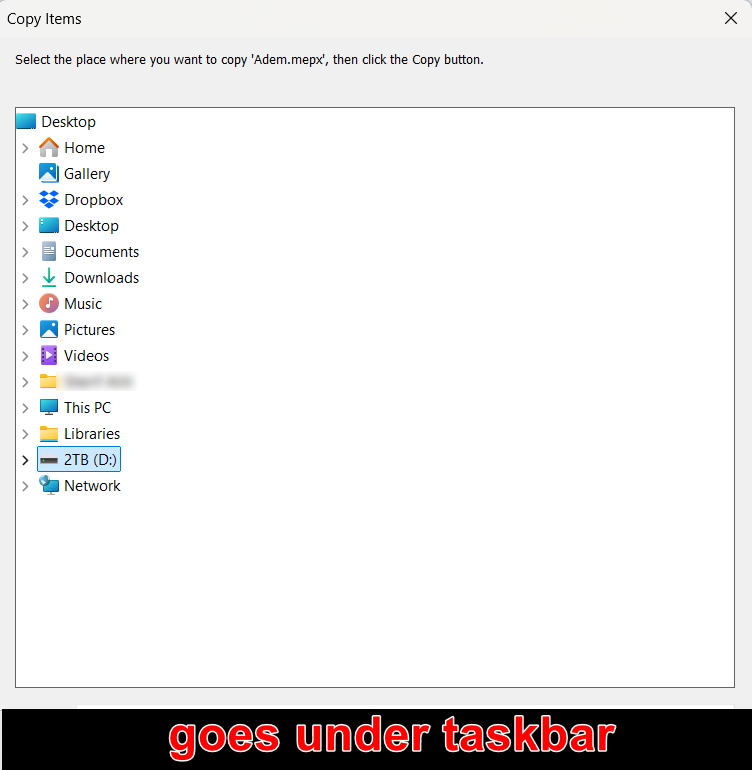
Windows 11 will not save the open dialog position, it's really frustrating!!!
Microsoft Windows [Version 10.0.22631.5039]
Windows 11 will not save the open dialog position, it's frustrating!!!
Microsoft Windows [Version 10.0.26100.4349] Intel(R) Core(TM) i5-4590 CPU @ 3.30GHz, 3301 Installed Physical Memory (RAM) 12.0 GB NVIDIA GeForce GTX 1050 Ti OSMicrosoft Windows [Version 10.0.26100.4349] Computer typePC/Desktop Manufacturer/ModelSystem Model HP EliteDesk 800 G1 SFF CPUIntel(R) Core(TM) i5-4590 CPU @ 3.30GHz, 3301 MotherboardHewlett-Packard MemoryInstalled Physical Memory (RAM) 12.0 GB Graphics Card(s)NVIDIA GeForce GTX 1050 Ti Sound CardRealtek High Definition Audio Monitor(s) Displays1 Monitor 32 inch Hyundai Screen Resolution1920x1080 Hard DrivesSSD 120 + HDD 1TB + HDD 4TB PSUCrosair CX 450 CaseHP KeyboardHP KU 0316 MouseA4 Tech Internet Speed100 Mbs BrowserChrome AntivirusESET Smart Security
Windows 11 will not save the open dialog position, it's frustrating!!!
It's been like that since I can remember!
Same with a Run box, and many others, it's hardcoded into the OS.
Just resize it.
OSWindows 11 Pro Computer typePC/Desktop Manufacturer/ModelASUS ROG Strix
Operating SystemWindows 11 Pro Computer typeLaptop Manufacturer/ModelASUS VivoBook
ASUS VivoBook 'Lite' ~ Windows 11 Home
Well-known member
Pro User
VIP
Try holding SHIFT as you click on the X.
Windows 11 Pro 25H2 26200.8655 AMD Ryzen 7 5825U with Radeon Graphics 16GB
OSWindows 11 Pro 25H2 26200.8655 Computer typeLaptop Manufacturer/ModelAcemagic LX15PRO CPUAMD Ryzen 7 5825U with Radeon Graphics Memory16GB Screen Resolution1920 x 1080 Hard DrivesSSD 2TB Internet Speed30 Mbps BrowserBrave AntivirusWebroot Secure Anywhere Other InfoSystem 3
Acer Swift SF114-34 laptop
OS Windows 11 Pro 26200.8524
CPU Pentium Silver N6000
RAM 4GB
SSD Samsung 970 EVO Plus SSD 2TB (an upgrade)
Windows 11 Pro 23H2 22631.2506 Atom N450 1.66GHz 2GB
Operating SystemWindows 11 Pro 23H2 22631.2506 Computer typeLaptop Manufacturer/ModelHP Mini 210-1090NR PC (bought in late 2009!) CPUAtom N450 1.66GHz Memory2GB BrowserBrave AntivirusWebroot
Try holding SHIFT as you click on the X.
Nope!
Windows will remember the
size of the dialog box, but,
the Title Bar will
always open at a predefined position...
OSWindows 11 Pro Computer typePC/Desktop Manufacturer/ModelASUS ROG Strix
Operating SystemWindows 11 Pro Computer typeLaptop Manufacturer/ModelASUS VivoBook
ASUS VivoBook 'Lite' ~ Windows 11 Home
Well-known member
Member
Thread Starter
Try holding SHIFT as you click on the X.
Thanks, friend but didn't work
Microsoft Windows [Version 10.0.26100.4349] Intel(R) Core(TM) i5-4590 CPU @ 3.30GHz, 3301 Installed Physical Memory (RAM) 12.0 GB NVIDIA GeForce GTX 1050 Ti OSMicrosoft Windows [Version 10.0.26100.4349] Computer typePC/Desktop Manufacturer/ModelSystem Model HP EliteDesk 800 G1 SFF CPUIntel(R) Core(TM) i5-4590 CPU @ 3.30GHz, 3301 MotherboardHewlett-Packard MemoryInstalled Physical Memory (RAM) 12.0 GB Graphics Card(s)NVIDIA GeForce GTX 1050 Ti Sound CardRealtek High Definition Audio Monitor(s) Displays1 Monitor 32 inch Hyundai Screen Resolution1920x1080 Hard DrivesSSD 120 + HDD 1TB + HDD 4TB PSUCrosair CX 450 CaseHP KeyboardHP KU 0316 MouseA4 Tech Internet Speed100 Mbs BrowserChrome AntivirusESET Smart Security
Well-known member
Member
Thread Starter
It's been like that since I can remember!
Same with a Run box, and many others, it's hardcoded into the OS.
Just resize it.
This did the Job, thank for replay. Problem solved
Microsoft Windows [Version 10.0.26100.4349] Intel(R) Core(TM) i5-4590 CPU @ 3.30GHz, 3301 Installed Physical Memory (RAM) 12.0 GB NVIDIA GeForce GTX 1050 Ti OSMicrosoft Windows [Version 10.0.26100.4349] Computer typePC/Desktop Manufacturer/ModelSystem Model HP EliteDesk 800 G1 SFF CPUIntel(R) Core(TM) i5-4590 CPU @ 3.30GHz, 3301 MotherboardHewlett-Packard MemoryInstalled Physical Memory (RAM) 12.0 GB Graphics Card(s)NVIDIA GeForce GTX 1050 Ti Sound CardRealtek High Definition Audio Monitor(s) Displays1 Monitor 32 inch Hyundai Screen Resolution1920x1080 Hard DrivesSSD 120 + HDD 1TB + HDD 4TB PSUCrosair CX 450 CaseHP KeyboardHP KU 0316 MouseA4 Tech Internet Speed100 Mbs BrowserChrome AntivirusESET Smart Security
It's annoyed me for ages, but, there's nothing you can do about it!
Just resize it
down to the max and be done with it...
OSWindows 11 Pro Computer typePC/Desktop Manufacturer/ModelASUS ROG Strix
Operating SystemWindows 11 Pro Computer typeLaptop Manufacturer/ModelASUS VivoBook
ASUS VivoBook 'Lite' ~ Windows 11 Home
Well-known member
Member
Thread Starter
It's annoyed me for ages, but, there's nothing you can do about it!
Just resize it
down to the max and be done with it...
View attachment 130671
I did friend and it solved problem, it was very annoying to move it up so we could press OK or do another job. Thanks once more
Microsoft Windows [Version 10.0.26100.4349] Intel(R) Core(TM) i5-4590 CPU @ 3.30GHz, 3301 Installed Physical Memory (RAM) 12.0 GB NVIDIA GeForce GTX 1050 Ti OSMicrosoft Windows [Version 10.0.26100.4349] Computer typePC/Desktop Manufacturer/ModelSystem Model HP EliteDesk 800 G1 SFF CPUIntel(R) Core(TM) i5-4590 CPU @ 3.30GHz, 3301 MotherboardHewlett-Packard MemoryInstalled Physical Memory (RAM) 12.0 GB Graphics Card(s)NVIDIA GeForce GTX 1050 Ti Sound CardRealtek High Definition Audio Monitor(s) Displays1 Monitor 32 inch Hyundai Screen Resolution1920x1080 Hard DrivesSSD 120 + HDD 1TB + HDD 4TB PSUCrosair CX 450 CaseHP KeyboardHP KU 0316 MouseA4 Tech Internet Speed100 Mbs BrowserChrome AntivirusESET Smart Security




