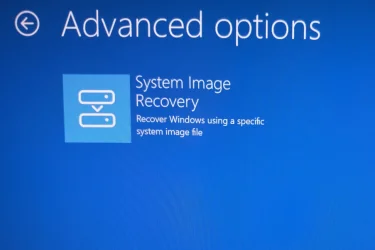
Point-in-time restore is missing when starting computer i advanced startup


CLS

Well-known member
Member
Local time
11:01 PM
Posts
172
Location
Malmo
OS
Windows 11 Pro 25H2
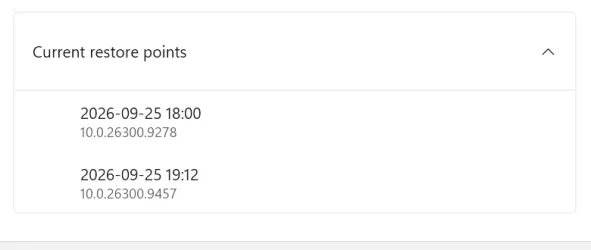
When I start my computer in Advanced Startup, the “Point-in-time restore” option is missing there. However, when I go back to Windows 11, I can see that there are several snapshots available under “Point-in-time restore.”

What could be causing this? I’m running version 26H2. Could this be a bug?
 

My Computer My Computer

At a glance

Windows 11 Pro 25H2Ryzen 7 6800HKingston Fury Impact DDR5 32GBAMD Radeon 680M (AMD Rembrandt)
OS
Windows 11 Pro 25H2
Computer type
PC/Desktop
Manufacturer/Model
ASUS ExpertCenter PN53
CPU
Ryzen 7 6800H
Motherboard
ASUS PN53
Memory
Kingston Fury Impact DDR5 32GB
Graphics Card(s)
AMD Radeon 680M (AMD Rembrandt)
Sound Card
AMD audio
Monitor(s) Displays
Dell U3223QE (32")
Screen Resolution
4K (3840x2160)
Hard Drives
Samsung NVMe SSD 990 Pro 1 TB (internal)
Samsung NVMe SSD 980 Pro 1 TB (internal)
Western Digital Black SN7100 2 TB (External)
PSU
External power supply 150W
Case
Mini PC
Cooling
Build-in fan (speed 1600 RPM Normal mode)
Keyboard
Logitech MX Keys Mini (graphite)
Mouse
Logitech M705
Internet Speed
1000/1000 Mbit
Browser
Microsoft Edge
Antivirus
Windows Defender

From Advanced Startup > select Troubleshoot sub-menu > Point-in-time restore should now be visible

Otherwise,

Start Menu > CMD or PowerShell > type vssadmin list shadows, and press <Enter>
check shadow copies are either ClientAccessible type or ClientAccessibleWriters type

You want shadow copies to be ClientAccessible.

Note that Volume Shadow Service is limited to 64TB volumes or smaller.
 

My Computers My Computers

  • At a glance

    Windows 11AMD Ryzen 5 560016 GBSapphire Radeon RX 6500XT (8 GB version)
    OS
    Windows 11
    Computer type
    PC/Desktop
    CPU
    AMD Ryzen 5 5600
    Motherboard
    MSI B550-A Pro
    Memory
    16 GB
    Graphics Card(s)
    Sapphire Radeon RX 6500XT (8 GB version)
    Monitor(s) Displays
    BenQ Mobuiz EX2710Q QHD, Iiyama ProLite X23377HDS
    Hard Drives
    MSI Spatium M461 4TB
  • At a glance

    Windows 11Intel Celeron N4020
    Operating System
    Windows 11
    Computer type
    Laptop
    Manufacturer/Model
    Acer A114
    CPU
    Intel Celeron N4020
From Advanced Startup > select Troubleshoot sub-menu > Point-in-time restore should now be visible

Otherwise,

Start Menu > CMD or PowerShell > type vssadmin list shadows, and press <Enter>
check shadow copies are either ClientAccessible type or ClientAccessibleWriters type

You want shadow copies to be ClientAccessible.

Note that Volume Shadow Service is limited to 64TB volumes or smaller.
I run the command "vssadmin list shadows", and it list two shadow copys. Both says ClientAccessible.

1.webp
2.webp


Screenshot 2026-09-26 090557.webp

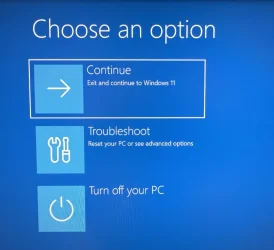
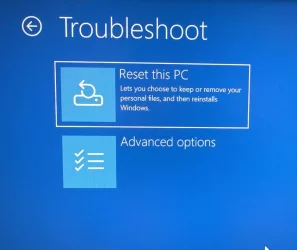
But when I going in to advanced startup, the Point-in-time restore option does not show up.
Screenshot 2026-09-26 090104_1.webp

Screenshot 2026-09-26 090230_2.webp

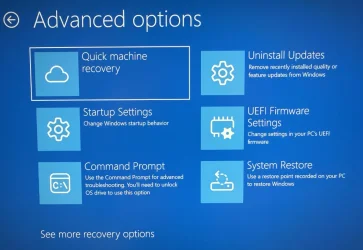
When I go into advanced option I could not find it there either.
Screenshot 2026-09-26 090313_3.webp

I also click on "See more recovery options" but could not find the point in time restore there either

Screenshot 2026-09-26 090356_4.webp
 

My Computer My Computer

At a glance

Windows 11 Pro 25H2Ryzen 7 6800HKingston Fury Impact DDR5 32GBAMD Radeon 680M (AMD Rembrandt)
OS
Windows 11 Pro 25H2
Computer type
PC/Desktop
Manufacturer/Model
ASUS ExpertCenter PN53
CPU
Ryzen 7 6800H
Motherboard
ASUS PN53
Memory
Kingston Fury Impact DDR5 32GB
Graphics Card(s)
AMD Radeon 680M (AMD Rembrandt)
Sound Card
AMD audio
Monitor(s) Displays
Dell U3223QE (32")
Screen Resolution
4K (3840x2160)
Hard Drives
Samsung NVMe SSD 990 Pro 1 TB (internal)
Samsung NVMe SSD 980 Pro 1 TB (internal)
Western Digital Black SN7100 2 TB (External)
PSU
External power supply 150W
Case
Mini PC
Cooling
Build-in fan (speed 1600 RPM Normal mode)
Keyboard
Logitech MX Keys Mini (graphite)
Mouse
Logitech M705
Internet Speed
1000/1000 Mbit
Browser
Microsoft Edge
Antivirus
Windows Defender

system restore can overwrite point in time restore points if system restore is enabled
i have system restore disabled but point in time restore enabled
this is the way i have found it works.

i also use this program to adjust point in time restore

i have it configured to the defaults of every 24hrs and retain for 72hrs
with 50GB of available space. its using about 6.5GB at the moment
but i have also set it to create a point in time restore point every restart.

i am not sure if this is the problem as point in time is relatively new.
best of luck Steve ..
 

My Computers My Computers

  • At a glance

    Windows 11 HomeRyzen 7 5825u64GB DDR4 3200Ryzen 7 5825u
    OS
    Windows 11 Home
    Computer type
    PC/Desktop
    Manufacturer/Model
    HP 24" AiO
    CPU
    Ryzen 7 5825u
    Motherboard
    HP
    Memory
    64GB DDR4 3200
    Graphics Card(s)
    Ryzen 7 5825u
    Sound Card
    Realtek External 5w speaker bar.
    Monitor(s) Displays
    24" HP AiO
    Screen Resolution
    1920 x 1080 @60 Hz
    Hard Drives
    1TB WD Blue SN580 M2 SSD Partitioned C:/D: drives.
    2x 1TB USB HDD External Backup/Storage.
    all VeraCrypt encrypted.
    PSU
    90W external power brick
    Case
    24" All in One
    Cooling
    Default Air Cooling
    Keyboard
    Dell WiFi UK extended
    Mouse
    Dell WiFi 3 Button
    Internet Speed
    1GB full fibre
    Browser
    Vivaldi Browser/Email/Calendar
    Antivirus
    AVG Internet Security/Windows Defender

    Other Info
    Mainly Open Source Software
  • At a glance

    Ubuntu 22.04.5 LTSi5 7200u16GB DDR4Intel
    Operating System
    Ubuntu 22.04.5 LTS
    Computer type
    Laptop
    Manufacturer/Model
    Dell 13" Latitude 2017
    CPU
    i5 7200u
    Motherboard
    Dell
    Memory
    16GB DDR4
    Graphics card(s)
    Intel
    Sound Card
    Intel
    Monitor(s) Displays
    13" Dell Laptop
    Hard Drives
    250GB Crucial 2.5" SSD
    Mouse
    Generic WiFi 3 button
    Internet Speed
    WiFi only
    Browser
    Firefox
    Antivirus
    ClamAV TK
    Other Info
    Mainly Open Source Software
I have system restore disabled and point in time restore enabled (by default)

By now, I will use Macrium Reflect to create a image, until I have solved the issue with point in time restore. Please help :)
 

My Computer My Computer

At a glance

Windows 11 Pro 25H2Ryzen 7 6800HKingston Fury Impact DDR5 32GBAMD Radeon 680M (AMD Rembrandt)
OS
Windows 11 Pro 25H2
Computer type
PC/Desktop
Manufacturer/Model
ASUS ExpertCenter PN53
CPU
Ryzen 7 6800H
Motherboard
ASUS PN53
Memory
Kingston Fury Impact DDR5 32GB
Graphics Card(s)
AMD Radeon 680M (AMD Rembrandt)
Sound Card
AMD audio
Monitor(s) Displays
Dell U3223QE (32")
Screen Resolution
4K (3840x2160)
Hard Drives
Samsung NVMe SSD 990 Pro 1 TB (internal)
Samsung NVMe SSD 980 Pro 1 TB (internal)
Western Digital Black SN7100 2 TB (External)
PSU
External power supply 150W
Case
Mini PC
Cooling
Build-in fan (speed 1600 RPM Normal mode)
Keyboard
Logitech MX Keys Mini (graphite)
Mouse
Logitech M705
Internet Speed
1000/1000 Mbit
Browser
Microsoft Edge
Antivirus
Windows Defender

I run the command "vssadmin list shadows", and it list two shadow copys. Both says ClientAccessible.

View attachment 184190
View attachment 184191


View attachment 184192

But when I going in to advanced startup, the Point-in-time restore option does not show up.
View attachment 184193

View attachment 184194

When I go into advanced option I could not find it there either.
View attachment 184195

I also click on "See more recovery options" but could not find the point in time restore there either

View attachment 184196
Okay.

Go back to WinRE > Troubleshoot > Advanced Options and select Command Prompt

from the cmd prompt window, type:
cd /d C:\Windows\System32

Note: above command assumes your operating system is on the C: drive. If different, use your OS drive letter instead.​

Next, type:
vssadmin.exe list shadows, and press <Enter>

do you still see your Shadow Copies, from the WinRE environment?
 

My Computers My Computers

  • At a glance

    Windows 11AMD Ryzen 5 560016 GBSapphire Radeon RX 6500XT (8 GB version)
    OS
    Windows 11
    Computer type
    PC/Desktop
    CPU
    AMD Ryzen 5 5600
    Motherboard
    MSI B550-A Pro
    Memory
    16 GB
    Graphics Card(s)
    Sapphire Radeon RX 6500XT (8 GB version)
    Monitor(s) Displays
    BenQ Mobuiz EX2710Q QHD, Iiyama ProLite X23377HDS
    Hard Drives
    MSI Spatium M461 4TB
  • At a glance

    Windows 11Intel Celeron N4020
    Operating System
    Windows 11
    Computer type
    Laptop
    Manufacturer/Model
    Acer A114
    CPU
    Intel Celeron N4020
Okay.

Go back to WinRE > Troubleshoot > Advanced Options and select Command Prompt

from the cmd prompt window, type:
cd /d C:\Windows\System32

Note: above command assumes your operating system is on the C: drive. If different, use your OS drive letter instead.​

Next, type:
vssadmin.exe list shadows, and press <Enter>

do you still see your Shadow Copies, from the WinRE environment?
Yes, I do
 

My Computer My Computer

At a glance

Windows 11 Pro 25H2Ryzen 7 6800HKingston Fury Impact DDR5 32GBAMD Radeon 680M (AMD Rembrandt)
OS
Windows 11 Pro 25H2
Computer type
PC/Desktop
Manufacturer/Model
ASUS ExpertCenter PN53
CPU
Ryzen 7 6800H
Motherboard
ASUS PN53
Memory
Kingston Fury Impact DDR5 32GB
Graphics Card(s)
AMD Radeon 680M (AMD Rembrandt)
Sound Card
AMD audio
Monitor(s) Displays
Dell U3223QE (32")
Screen Resolution
4K (3840x2160)
Hard Drives
Samsung NVMe SSD 990 Pro 1 TB (internal)
Samsung NVMe SSD 980 Pro 1 TB (internal)
Western Digital Black SN7100 2 TB (External)
PSU
External power supply 150W
Case
Mini PC
Cooling
Build-in fan (speed 1600 RPM Normal mode)
Keyboard
Logitech MX Keys Mini (graphite)
Mouse
Logitech M705
Internet Speed
1000/1000 Mbit
Browser
Microsoft Edge
Antivirus
Windows Defender
I also had this same issue and tried a heap of different "solutions." I think it may have had something to do with there being 2 recovery partitions on my C drive.
Anyhow I did a reinstall from windows update and all was resolved. Pretty quick and all apps, settings and programs remained unaltered. Now only one recovery partition and a few other little niggles resolved plus point in time option now appears on recovery screen.
 

My Computer My Computer

At a glance

Windows 11 25H2 Home EditionIntel(R) Core(TM) i5-6600 CPU @ 3.30GHz16 GBIntel 530 On Board
OS
Windows 11 25H2 Home Edition
Computer type
PC/Desktop
Manufacturer/Model
Self Built
CPU
Intel(R) Core(TM) i5-6600 CPU @ 3.30GHz
Motherboard
Gigabyte B150
Memory
16 GB
Graphics Card(s)
Intel 530 On Board
Sound Card
Realtek On Board
Monitor(s) Displays
Samsung
Hard Drives
Samsung 850 SSD
PSU
be quite Straight Power 11
Case
be quite Pure Base 600
Keyboard
MS USB
Mouse
Logitech Wireless
Internet Speed
550 m/b/s
Browser
Edge
Antivirus
Windows Security
Back
Top Bottom