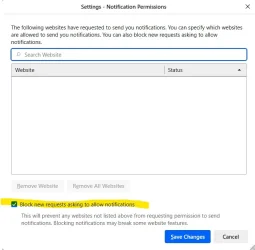
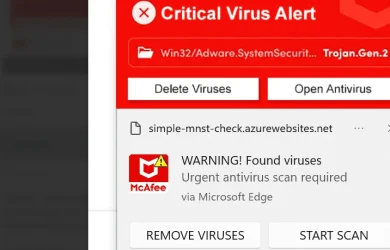
Exactly we see so many posts from the windows notification center coming from browsers, the computer is almost never infected, its always just needs to be turned off in the notification center which is so easy to do. Despite what the notification looks like, it will always have the application name as seen here. Notice the "via microsoft edge." Click the three dots next to the x and turn them off. If you want notifications from your browser, go the web browsers settings and remove any websites you do not recognize listed there.
At least the current crop of scareware doesn't come with drive-by downloads. Maybe turn off notifications. They're just another way in for some hacker to exploit.
My Computer
At a glance
Windows 11 22H2 Pro (X-lite Micro 11 version)i7 13850HX (20 cores, 28 threads)32GB DDR5Intel UHD/ RTX 1000 ADA
OS
Windows 11 22H2 Pro (X-lite Micro 11 version)
Computer type
Laptop
Manufacturer/Model
Dell/ Precision 7680
CPU
i7 13850HX (20 cores, 28 threads)
Motherboard
Dell
Memory
32GB DDR5
Graphics Card(s)
Intel UHD/ RTX 1000 ADA
Sound Card
Realtek
Monitor(s) Displays
4K UHD Touchscreen
Screen Resolution
3840 x 2400
Hard Drives
Samsung 512GB system drive
WD Blue 1TB game drive
PSU
240W AC adapter
Internet Speed
1 gigabit symmetrical
Browser
Firefox, Librewolf
Antivirus
None. Manully configured so nobody except me can change any critical system files. (Don't ask how, it's probably against some rule somewhere)
Which anti virus / anti malware program are you using? Or are you relying on Windows Security or Windows Defender (two names for the same thing really).
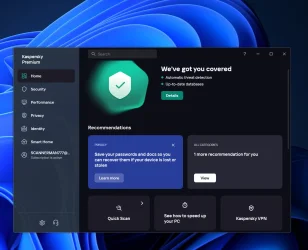
Despite the assurances of the purists, I never rely on anything Microsoft, I much prefer the Russians </sarcasm mode OFF>. To that end, I have Kaspersky Premium anti-malware, as well as UBlock Origin, AdGuard Adblocker and Duckduckgo Search and Tracker Prevention plugins/addons installed on all my browsers (Brave, Opera, Firefox, Chrome ... oh yeh, and I suppose that other one that came with Windows)
I have found MS anti-virus to be effective and reliable. I still use Kaspersky Premium with my work stations. The last time any PCs on the home front got hit with a virus it was a zero day and it was actually on one of my daughter's computers. About a week later a virus definition was found for it but by that time the damage was done and I had to write over quite a number of files for her just to get the OS to restore itself well enough to rescue her personal files and folders. Not even Kaspersky could have prevented this. I did manage to isolate the virus in a hidden file but after getting it to show itself it rendered all the files in that folder completely untouchable. After rescuing the rest of her files I simply wiped that drive and replaced it with a new hard drive and a fresh copy of Windows 8.1. That was some time ago and she no longer uses that OS. ironically, she still uses Win 7 Pro because of some of the games she plays will only work on Win 7. Internet on that OS is disabled.
WIN 11, WIN 10, WIN 8.1, WIN 7 U, WIN 7 PRO, WIN 7 HOME (32 Bit), LINUX MINT
Computer type
PC/Desktop
Manufacturer/Model
DIY, ASUS, and DELL
CPU
Intel i7 6900K and i9-7960X / AMD 3800X (8 core)
Motherboard
ASUS X99E-WS USB 3.1 and ASUS X299 SAGE
Memory
128 GB CORSAIR DOMINATOR PLATINUM (B DIE)
Graphics Card(s)
NVIDIA 1070 and RTX 3070
Sound Card
Crystal Sound (onboard)
Monitor(s) Displays
single Samsung 30" 4K and 8" aux monitor
Screen Resolution
4K and something equally attrocious. I'll be working on this.
Hard Drives
A, B, C, D, E, F, G, H, I, J, K, L, M, N, O, P, Q, R, S, T, U, V, W
Ports X, Y, and Z are reserved for USB access and removable drives.
Drive types consist of the following: Various mechanical hard drives bearing the brand names, Seagate, Toshiba, and Western Digital. Various NVMe drives bearing the brand names Kingston, Intel, Silicon Power, Crucial, Western Digital, and Team Group. Various SATA SSDs bearing various different brand names.
INTEL RAID 0 (KINGSTON HYPER X) System 447.14 GB
INTEL RAID 1 TOSHIBA ENTERPRIZE class Data 2794.52 GB
INTEL RAID 1 SEAGATE HYBRID 931.51 GB
PSU
SEVERAL. I prefer my Corsair Platinum HX1000i but I also like EVGA power supplies
Case
ThermalTake Level 10 GT (among others)
Cooling
Noctua is my favorite and I use it in my main. I also own various other coolers.
Keyboard
all kinds.
Mouse
all kinds
Internet Speed
360 mbps - 1 gbps (depending)
Browser
FIREFOX
Antivirus
KASPERSKY (no apologies)
Other Info
Gave Dell touch screen with Windows 11 to daughter and got me an OTVOC. Being a PC builder I own many desktop PCs as well. I am a father of five providing PCs, laptops, and tablets for all my family, most of which I have modified, rebuilt, or simply built from scratch. I do not own a cell phone, never have, never will.