Printer cable to computer or USB to modem?


Markg2

Well-known member
Local time
2:51 PM
Posts
79
Location
Evergreen, CO
OS
Windows 10
Win 11 Home, Version 21H2, OS build 22000.97800

Brother printer replacing HP. Wireless with 4 computers. CenturyLink DSL modem & Google MESH base all in the same room.

Persistent wireless problems with the HP 8740 (the HP 8710 just fine).

I want to protect against the Brother losing wireless connection at the worst moment so I'm going to connect the Brother with cable just to be sure.

I've got a choice. Run a printer cable from the Brother to the primary, desktop computer or connect the Brother with a USB ethernet to the modem.

Is there an obvious preference, aside from the Brother then being device on the home network, between the two wired (in addition to wireless) connections?

Mark
 
Windows Build/Version
22000.97800

My Computer My Computer

At a glance

Windows 1012th Gen Intel(R) Core(TM) i7-12700H 2.30 GHz32.0 GB (31.7 GB usable)
OS
Windows 10
Computer type
Laptop
Manufacturer/Model
Lenovo Win11 laptop Slim 7 evo i7
CPU
12th Gen Intel(R) Core(TM) i7-12700H 2.30 GHz
Memory
32.0 GB (31.7 GB usable)
Sound Card
Realtek High Definition Audio
Hard Drives
SAMSUNG MZNLN512HCJH-000L1 (SSD)
Browser
Firefox
Antivirus
Bitdefender
Other Info
NORD_VPN -- The previous OS, Win10 will not allow the new Win11 to save.
Using a USB to Ethernet adapter? Haven't tried it except for a Notebook with a failed wireless adapter. I have an HP LaserJet Pro and an HP OfficeJet Pro connected directly to my Wireless Router via Ethernet cable. Any computer I install the printers on can use them whether Wired or Wireless/Wi-Fi. Most times Win10, Win11 and Linux pick them up automatically for the basics, even Windows Fax and Scan. There are printers that have Wireless Direct and I've only had to set up one client with 2 computers to use it.
 

My Computers My Computers

  • At a glance

    Win11 Pro RTM Version 24H2 Build 26100.4202Intel Core i5 11th Gen. 2.40GHz12GB
    OS
    Win11 Pro RTM Version 24H2 Build 26100.4202
    Computer type
    Laptop
    Manufacturer/Model
    Dell Vostro 3400
    CPU
    Intel Core i5 11th Gen. 2.40GHz
    Memory
    12GB
    Hard Drives
    256GB SSD NVMe M.2
  • At a glance

    Win11 Pro RTM Version 24H2 Build 26100.4202Intel Core i5 10th Gen. 2.90GHz16GBOnboard, no VGA, using a DisplayPort-to-VGA a...
    Operating System
    Win11 Pro RTM Version 24H2 Build 26100.4202
    Computer type
    PC/Desktop
    Manufacturer/Model
    Dell Vostro 5890
    CPU
    Intel Core i5 10th Gen. 2.90GHz
    Memory
    16GB
    Graphics card(s)
    Onboard, no VGA, using a DisplayPort-to-VGA adapter
    Monitor(s) Displays
    24" Dell
    Hard Drives
    512GB SSD NVMe, 4TB Seagate HDD
    Browser
    Firefox, Edge
    Antivirus
    Windows Defender/Microsoft Security
Win 11 Home, Version 21H2, OS build 22000.97800

Brother printer replacing HP. Wireless with 4 computers. CenturyLink DSL modem & Google MESH base all in the same room.

Persistent wireless problems with the HP 8740 (the HP 8710 just fine).

I want to protect against the Brother losing wireless connection at the worst moment so I'm going to connect the Brother with cable just to be sure.

I've got a choice. Run a printer cable from the Brother to the primary, desktop computer or connect the Brother with a USB ethernet to the modem.

Is there an obvious preference, aside from the Brother then being device on the home network, between the two wired (in addition to wireless) connections?

Mark
Hi there

another solution - but it means at least 1 machine needs to be on while printer is attached is to connect the printer to 1 machine and then share the printer. That will normally work -- but the disadvantage again is that if the computer hosting the printer is disconnected the printer will become unavailable to the rest of the network.

Change names etc to reflect current OS's.

Here's basically an OLD (really old) OLD post I made with XP and W7 on sharing a printer across a network when printer attached to a physical computer

(Networking from Printer attached to Win XP PC to Win 7 - Windows 7 Help Forums)

still works today.

....Old Old post from me on W7 Forums ---- as above link.

I've posted on this before but to share Printers attached to XP computers with either X-64 or X-32 versions of W7 is SIMPLE. These instructions are for the Printer attached to the XP machine (but works in reverse as well).

("Stand alone" Network printers can be done slightly similarly BTW).

assume the computers are call XPMACHINE and W7MACHINE.

1) Ensure Printer on XP machine is shared - assume it's called SHAREDPRINTER.

2) On the Network Browsing on your W7 machine ensure you can "See" the Printer share.

Now on the W7 machine do the following (doesn't matter if it's X-86 or x-64).

3) Control Panel==> add LOCAL (Yes LOCAL) printer. I know it's on a Network but hold your horses -- what we are actually doing is "Poodlefaking" the W7 machine into thinking it's running the printer.

4) Create NEW port==>Local port

5) Portname is \\XPMACHINE\SHAREDPRINTER

6) Now W7 will load a driver and you'll be able to print on the XP machine.

Simple


(For a "Network stand alone printer") at 4) chose TCPIP port
and at 5) enter the IP address.


If the printer is on the W7 machine and you want to print on the XP machine then do the same instructions on the XP machine --
port name in this case will be \\W7MACHINE\SHAREDPRINTER

Cheers
jimbo
 
Last edited:

My Computer My Computer

At a glance

Windows XP,11 Linux Fedora Rawhide pre-releas...2 X Intel i7
OS
Windows XP,11 Linux Fedora Rawhide pre-release 45
Computer type
PC/Desktop
CPU
2 X Intel i7
Screen Resolution
4KUHD X 2
Thanks but needing the one computer on is a deal killer - Mr. Murphy vs. my wife.

Just to be certain, I run the Ethernet cable from the computer to one of the open, yellow Ethernet ports in the image?

Mark
 

Attachments

  • Modem.jpg
    Modem.jpg
    829.9 KB · Views: 2

My Computer My Computer

At a glance

Windows 1012th Gen Intel(R) Core(TM) i7-12700H 2.30 GHz32.0 GB (31.7 GB usable)
OS
Windows 10
Computer type
Laptop
Manufacturer/Model
Lenovo Win11 laptop Slim 7 evo i7
CPU
12th Gen Intel(R) Core(TM) i7-12700H 2.30 GHz
Memory
32.0 GB (31.7 GB usable)
Sound Card
Realtek High Definition Audio
Hard Drives
SAMSUNG MZNLN512HCJH-000L1 (SSD)
Browser
Firefox
Antivirus
Bitdefender
Other Info
NORD_VPN -- The previous OS, Win10 will not allow the new Win11 to save.
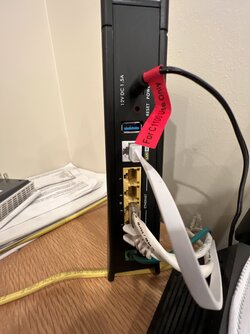
Yes.
 

My Computers My Computers

  • At a glance

    Win11 Pro RTM Version 24H2 Build 26100.4202Intel Core i5 11th Gen. 2.40GHz12GB
    OS
    Win11 Pro RTM Version 24H2 Build 26100.4202
    Computer type
    Laptop
    Manufacturer/Model
    Dell Vostro 3400
    CPU
    Intel Core i5 11th Gen. 2.40GHz
    Memory
    12GB
    Hard Drives
    256GB SSD NVMe M.2
  • At a glance

    Win11 Pro RTM Version 24H2 Build 26100.4202Intel Core i5 10th Gen. 2.90GHz16GBOnboard, no VGA, using a DisplayPort-to-VGA a...
    Operating System
    Win11 Pro RTM Version 24H2 Build 26100.4202
    Computer type
    PC/Desktop
    Manufacturer/Model
    Dell Vostro 5890
    CPU
    Intel Core i5 10th Gen. 2.90GHz
    Memory
    16GB
    Graphics card(s)
    Onboard, no VGA, using a DisplayPort-to-VGA adapter
    Monitor(s) Displays
    24" Dell
    Hard Drives
    512GB SSD NVMe, 4TB Seagate HDD
    Browser
    Firefox, Edge
    Antivirus
    Windows Defender/Microsoft Security
I have a couple of Brother laser printers connected via Ethernet to my gateway, which is Motorola MT8733. (That serves as a modem, wireless router, and VoIP device.) The Ethernet connections aren't via USB adapters. You Brother printer has no Ethernet port? What model is it?

I can access the printers from devices on the wireless network. No PC need to remain active.
 

My Computers My Computers

  • At a glance

    Windows 11 26200.8728Amd Threadripper 7970X128GB (4 X 32) G.Skill DDR5 6400 (RDIMM)Gigabyte RTX 4090 OC
    OS
    Windows 11 26200.8728
    Computer type
    PC/Desktop
    Manufacturer/Model
    homebuilt
    CPU
    Amd Threadripper 7970X
    Motherboard
    Gigabyte TRX50 Aero D Rev. 1.0
    Memory
    128GB (4 X 32) G.Skill DDR5 6400 (RDIMM)
    Graphics Card(s)
    Gigabyte RTX 4090 OC
    Sound Card
    none (USB to speakers), Realtek
    Monitor(s) Displays
    Innocn 32" OLED
    Screen Resolution
    3840 X 2160 @ 60Hz
    Hard Drives
    Crucial T700 2TB M.2 NVME SSD
    WD 4TB Blue SATA SSD
    Seagate 18TB IronWolf Pro
    PSU
    BeQuiet! Straight Power 12 1500W
    Case
    Lian Li 011 Dynamic Evo XL
    Cooling
    SilverStone Technology XE360-TR5, with 3 Phanteks T30 fans
    Keyboard
    Cherry KC 500 MX LP (mechanical)
    Mouse
    Logitech M500s (wired)
    Internet Speed
    2000/250 Mbps (down/up)
    Other Info
    xFinity gateway
  • At a glance

    windows 11 26200.8728Intel I9-13900K64GB G.Skill DDR5-6000Gigabyte RTX 3090 ti
    Operating System
    windows 11 26200.8728
    Computer type
    PC/Desktop
    Manufacturer/Model
    homebuilt
    CPU
    Intel I9-13900K
    Motherboard
    Asus RoG Strix Z690-E
    Memory
    64GB G.Skill DDR5-6000
    Graphics card(s)
    Gigabyte RTX 3090 ti
    Sound Card
    built in Realtek
    Monitor(s) Displays
    Philips 27E1N8900 27" OLED
    Screen Resolution
    3840 X 2160 @60Hz
    Hard Drives
    WDC SN850 1TB
    8TB Seagate Ironwolf
    4TB Seagate Ironwolf
    PSU
    eVGA SuperNOVA 1300 GT
    Case
    Lian Li 011 Dynamic Evo
    Cooling
    Corsair iCUE H150i ELITE CAPELLIX Liquid CPU Cooler
    Keyboard
    Cherry Streaming (wired)
    Mouse
    Logitech M500s (wired)
I used to connect my printers using a USB cable to my main desktop computer. I am glad I am now using a wireless connection for the printer because sometime I would forget to turn that computer on. Note that even this does not work sometimes because I still have to remember to turn the printer on. :oops:

BTW, my printer can also be hooked up with either a USB or Ethernet cable but wireless works so well I figure why bother.
 

My Computers My Computers

  • At a glance

    Windows 11 Pro 25H2 (26200.6901)AMD Ryzen 7 6800H with Radeon 680M GPU (486MB...Crucial DDR5-4800 (2400MHz) 32GB (2 x 16GB)NVIDIA RTX 3060 Laptop (6GB RAM)
    OS
    Windows 11 Pro 25H2 (26200.6901)
    Computer type
    Laptop
    Manufacturer/Model
    ASUS TUF Gaming A15 (2022)
    CPU
    AMD Ryzen 7 6800H with Radeon 680M GPU (486MB RAM)
    Memory
    Crucial DDR5-4800 (2400MHz) 32GB (2 x 16GB)
    Graphics Card(s)
    NVIDIA RTX 3060 Laptop (6GB RAM)
    Sound Card
    n/a
    Monitor(s) Displays
    15.6-inch
    Screen Resolution
    1920x1080 300Hz
    Hard Drives
    2 x Samsung 990 Evo Plus (2TB M.2 NVME SSD)
    PSU
    n/a
    Mouse
    Wireless Mouse M510
    Internet Speed
    2100Mbps/300Mbps
    Browser
    Firefox
    Antivirus
    Malwarebytes
  • At a glance

    Windows 11 Pro 25H2 (26200.8246)AMD Ryzen 7 5700X3DG.SKILL Flare X 32GB (2x16GB) DDR4ASUS ROG-STRIX-RTX3060TI-08G-V2-GAMING (RTX 3...
    Operating System
    Windows 11 Pro 25H2 (26200.8246)
    Computer type
    PC/Desktop
    Manufacturer/Model
    Custom build
    CPU
    AMD Ryzen 7 5700X3D
    Motherboard
    ASUS ROG Strix B550-F Gaming WiFi II
    Memory
    G.SKILL Flare X 32GB (2x16GB) DDR4
    Graphics card(s)
    ASUS ROG-STRIX-RTX3060TI-08G-V2-GAMING (RTX 3060-Ti, 8GB RAM)
    Monitor(s) Displays
    Samsung G50D IPS 27"
    Screen Resolution
    1440p/180Hz
    Hard Drives
    SAMSUNG 990 EVO Plus (2TB] M.2 NVME SSD
    SAMSUNG 990 EVO Plus (4TB) M.2 NVME SSD
    PSU
    Corsair RM750x (750 watts)
    Case
    Cooler Master MasterCase 5
    Cooling
    Scythe Mugen 6
    Keyboard
    Logitech K520 (MK540 keyboard/mouse combo)
    Mouse
    Logitech M310 (MK540 keyboard/mouse combo)
    Internet Speed
    2100 Mbps down / 300 Mbps up
    Browser
    Firefox, Edge, Chrome
    Antivirus
    Malwarebytes (Premium)
    Other Info
    ASUS Blu-ray Burner BW-16D1HT (SATA) || Western Digital Easystore 20TB USB 3.0 external hard drive used with Acronis True Image 2025 backup software || HP OfficeJet Pro 6975 Printer/Scanner
As @bobkn states, It's not USB - it is Ethernet.

The good thing about this method is that all computers (and other devices, frankly, that have access to your network) can print at any time to the printer. I've used this method with an older HP LaserJet as well as 3 Brother Laser printers, 2 of which are AIO type devices.

Go with the wired network, skip the wireless. You'll be much happier in the long run.

Some advice:

  1. Make sure to use a static IP address (either directly on the device, or else statically assigned from your Google Mesh via the app on your mobile device).
  2. Remove all instances of the drivers for the printer that you're taking out of the equation
  3. Remove any instances of the drivers for the replacement printer and start the installation from scratch after using the wired Ethernet connection. With Windows 11 trying to auto-manage your devices, if there ever comes a time that it cannot find the wired printer, it may decide to do something stupid and try to use an older printer that is no longer there, and will gum up the print queue something fierce sometimes.
  4. With the new drivers for the Brother printer, you can use either the driver only package, or else the full driver package, both available from Brother's website. Be sure to follow the instructions during the installation to get a good setup.
HTH
 

My Computers My Computers

  • At a glance

    Windows 11 23H2 Current buildAMD Ryzen 9 3950X4 * 32 GB - Corsair Vengeance 3600 MHzEVGA GeForce RTX 3080 Ti XC3 ULTRA GAMING (12...
    OS
    Windows 11 23H2 Current build
    Computer type
    PC/Desktop
    Manufacturer/Model
    HomeBrew
    CPU
    AMD Ryzen 9 3950X
    Motherboard
    MSI MEG X570 GODLIKE
    Memory
    4 * 32 GB - Corsair Vengeance 3600 MHz
    Graphics Card(s)
    EVGA GeForce RTX 3080 Ti XC3 ULTRA GAMING (12G-P5-3955-KR)
    Sound Card
    Realtek® ALC1220 Codec
    Monitor(s) Displays
    2x Eve Spectrum ES07D03 4K Gaming Monitor (Matte) | Eve Spectrum ES07DC9 4K Gaming Monitor (Glossy)
    Screen Resolution
    3x 3840 x 2160
    Hard Drives
    3x Samsung 980 Pro NVMe PCIe 4 M.2 2 TB SSD (MZ-V8P2T0B/AM) } 3x Sabrent Rocket NVMe 4.0 1 TB SSD (USB)
    PSU
    PC Power & Cooling’s Silencer Series 1050 Watt, 80 Plus Platinum
    Case
    Fractal Design Define 7 XL Dark ATX Full Tower Case
    Cooling
    Arctic Liquid Freezer III 420 RGB + Air 3x 140mm case fans (pull front) + 1x 120 mm (push back) and 1 x 120 mm (pull bottom)
    Keyboard
    SteelSeries Apex Pro Wired Gaming Keyboard
    Mouse
    Logitech MX Master 3S | MX Master 3 for Business
    Internet Speed
    AT&T LightSpeed Gigabit Duplex Ftth
    Browser
    Nightly (default) + Firefox (stable), Chrome, Edge , Arc
    Antivirus
    Defender + MB 5 Beta
  • At a glance

    ChromeOS Flex Dev Channel (current)Intel(R) Core(TM) i5-6300U CPU @ 2.40GHz, 250...16 GBIntel(R) HD Graphics 520
    Operating System
    ChromeOS Flex Dev Channel (current)
    Computer type
    Laptop
    Manufacturer/Model
    Dell Latitude E5470
    CPU
    Intel(R) Core(TM) i5-6300U CPU @ 2.40GHz, 2501 Mhz, 2 Core(s), 4 Logical Processor(s)
    Motherboard
    Dell
    Memory
    16 GB
    Graphics card(s)
    Intel(R) HD Graphics 520
    Sound Card
    Intel(R) HD Graphics 520 + RealTek Audio
    Monitor(s) Displays
    Dell laptop display 15"
    Screen Resolution
    1920 * 1080
    Hard Drives
    Toshiba 128GB M.2 22300 drive
    INTEL Cherryville 520 Series SSDSC2CW180A 180 GB SATA III SSD
    PSU
    Dell
    Case
    Dell
    Cooling
    Dell
    Keyboard
    Dell
    Mouse
    Logitech MX Master 3S (shared w. Sys 1) | Dell TouchPad
    Internet Speed
    AT&T LightSpeed Gigabit Duplex Ftth
If all these printers are network capable and close to each other, I would assume they all have a LAN port.
If this is the case, I would connect all the printers over LAN to a small network switch. and then connect the switch to your router. And then completely disable Wireless for the printers. All printing traffic would go through the router, and you would decrease WiFi interference by a huge factor at your home.
 

My Computers My Computers

  • At a glance

    Win 11 Pro 25H2 26200.8457 / Linux Mint 22.3Ryzen 7 2700U Pro32GBiGPU Vega 10
    OS
    Win 11 Pro 25H2 26200.8457 / Linux Mint 22.3
    Computer type
    Laptop
    Manufacturer/Model
    Lenovo A485
    CPU
    Ryzen 7 2700U Pro
    Motherboard
    Lenovo (WiFi/BT module upgraded to Intel Wireless-AC-9260)
    Memory
    32GB
    Graphics Card(s)
    iGPU Vega 10
    Sound Card
    Realtek
    Monitor(s) Displays
    14" FHD (built-in) + 14" Lenovo Thinkvision M14t (touch+pen) + 32" Asus PB328
    Screen Resolution
    FHD + FHD + 1440p
    Hard Drives
    Intel 660p m.2 nVME PCIe3.0 x2 512GB
    PSU
    125W(Dock)/65W(Travel Adapter)
    Keyboard
    Thinkpad / Logitech MX Keys
    Mouse
    Logitech MX Master 2S
    Internet Speed
    1/1Gbit
    Browser
    Firefox
    Antivirus
    Windows Defender
    Other Info
    SecureBoot: Enabled
    TPM2.0: Enabled
    AMD-V: Enabled
  • At a glance

    Win 11 Pro 25H2 26200.8521(RP)i7-7700k @4.8GHz32GB 2x16GB 2133MHz CL15EVGA GTX1080Ti FTW 11GB
    Operating System
    Win 11 Pro 25H2 26200.8521(RP)
    Computer type
    PC/Desktop
    Manufacturer/Model
    Custom
    CPU
    i7-7700k @4.8GHz
    Motherboard
    Asus PRIME Z270-A
    Memory
    32GB 2x16GB 2133MHz CL15
    Graphics card(s)
    EVGA GTX1080Ti FTW 11GB
    Sound Card
    Integrated
    Monitor(s) Displays
    32" 10-bit Asus PB328Q
    Screen Resolution
    WQHD 2560x1440
    Hard Drives
    512GB ADATA SX8000NP NVMe PCIe Gen 3 x4
    PSU
    850W
    Case
    Fractal Design Define 7
    Cooling
    Noctua NH-D15 chromax.black
    Keyboard
    Logitech MX Keys
    Mouse
    Logitech MX Master 2S
    Internet Speed
    1/1Gbit
    Browser
    Firefox
    Antivirus
    Windows Defender
    Other Info
    AC WiFi Card
Also another note: Since you have a DSL Router and a Google Mesh in same room. Make sure each of the wireless Access Point devices are locked to separate WiFi channels. If all the APs are on same or parallel channels, they will all interfere with each other, and you get a lot of dropouts. Same happens if you let the APs automatically adjust the channels. The channels will eventually overlap and you get dropouts.
 

My Computers My Computers

  • At a glance

    Win 11 Pro 25H2 26200.8457 / Linux Mint 22.3Ryzen 7 2700U Pro32GBiGPU Vega 10
    OS
    Win 11 Pro 25H2 26200.8457 / Linux Mint 22.3
    Computer type
    Laptop
    Manufacturer/Model
    Lenovo A485
    CPU
    Ryzen 7 2700U Pro
    Motherboard
    Lenovo (WiFi/BT module upgraded to Intel Wireless-AC-9260)
    Memory
    32GB
    Graphics Card(s)
    iGPU Vega 10
    Sound Card
    Realtek
    Monitor(s) Displays
    14" FHD (built-in) + 14" Lenovo Thinkvision M14t (touch+pen) + 32" Asus PB328
    Screen Resolution
    FHD + FHD + 1440p
    Hard Drives
    Intel 660p m.2 nVME PCIe3.0 x2 512GB
    PSU
    125W(Dock)/65W(Travel Adapter)
    Keyboard
    Thinkpad / Logitech MX Keys
    Mouse
    Logitech MX Master 2S
    Internet Speed
    1/1Gbit
    Browser
    Firefox
    Antivirus
    Windows Defender
    Other Info
    SecureBoot: Enabled
    TPM2.0: Enabled
    AMD-V: Enabled
  • At a glance

    Win 11 Pro 25H2 26200.8521(RP)i7-7700k @4.8GHz32GB 2x16GB 2133MHz CL15EVGA GTX1080Ti FTW 11GB
    Operating System
    Win 11 Pro 25H2 26200.8521(RP)
    Computer type
    PC/Desktop
    Manufacturer/Model
    Custom
    CPU
    i7-7700k @4.8GHz
    Motherboard
    Asus PRIME Z270-A
    Memory
    32GB 2x16GB 2133MHz CL15
    Graphics card(s)
    EVGA GTX1080Ti FTW 11GB
    Sound Card
    Integrated
    Monitor(s) Displays
    32" 10-bit Asus PB328Q
    Screen Resolution
    WQHD 2560x1440
    Hard Drives
    512GB ADATA SX8000NP NVMe PCIe Gen 3 x4
    PSU
    850W
    Case
    Fractal Design Define 7
    Cooling
    Noctua NH-D15 chromax.black
    Keyboard
    Logitech MX Keys
    Mouse
    Logitech MX Master 2S
    Internet Speed
    1/1Gbit
    Browser
    Firefox
    Antivirus
    Windows Defender
    Other Info
    AC WiFi Card
Bobkn--

It's a Model: MFCJ5855DW. It has an Ethernet port. I connected a cable from the printer port to the CL modem. No matter what I tried during setup, it could not find the printer. That's when I threw the towel in and connected each computer separately using WiFi.

johnlgalt--

All your suggestions 1-4 were in effect.

End of Story--

I've used HP printers for at least 30 years. This Brother printer prints, copies and scans quicker than even the 8740.

More importantly, setting up with WiFi was simple and straightforward. Everything that the instructions said to do worked.

And then there's scanning. Oh boy what a relief. Whereas, as far as I'm concerned, HP engineers must sit up at night trying to out do each other making the scan install a 'process'. The Brother's scan app doesn't try and sell you ink or supplies, isn't cluttered with useless garbage and makes scanning a straight forward process. Just like HP's ScanEtended used to be but is not (for Win11) wrapped up in HP Smart.

Mark
 

My Computer My Computer

At a glance

Windows 1012th Gen Intel(R) Core(TM) i7-12700H 2.30 GHz32.0 GB (31.7 GB usable)
OS
Windows 10
Computer type
Laptop
Manufacturer/Model
Lenovo Win11 laptop Slim 7 evo i7
CPU
12th Gen Intel(R) Core(TM) i7-12700H 2.30 GHz
Memory
32.0 GB (31.7 GB usable)
Sound Card
Realtek High Definition Audio
Hard Drives
SAMSUNG MZNLN512HCJH-000L1 (SSD)
Browser
Firefox
Antivirus
Bitdefender
Other Info
NORD_VPN -- The previous OS, Win10 will not allow the new Win11 to save.
I've used HP printers for at least 30 years. This Brother printer prints, copies and scans quicker than even the 8740.

More importantly, setting up with WiFi was simple and straightforward. Everything that the instructions said to do worked.

And then there's scanning. Oh boy what a relief. Whereas, as far as I'm concerned, HP engineers must sit up at night trying to out do each other making the scan install a 'process'. The Brother's scan app doesn't try and sell you ink or supplies, isn't cluttered with useless garbage and makes scanning a straight forward process. Just like HP's ScanEtended used to be but is not (for Win11) wrapped up in HP Smart.

Mark
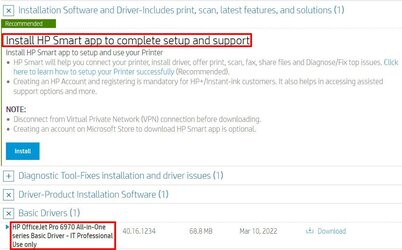
I agree that HP tried hard to get you to sign up for an ink subscription. I don't have that problem anymore because I simply don't install the HP Smart app like they want me to. Instead, I install the Basic Driver. They label it for "Professional Use only". That is an insult because it really means it is only for people that are smart enough to ignore their BS. BTW, at the end of the basic driver installation HP tries one last time to get you to install the HP Smart app. You are then forced to abort the process to avoid that. That is OK because the driver installation has already finished.

I just checked and see that the HP Smart app has somehow been installed. That is OK because I never use it anyways.

HP OfficeJet Pro 6975 All-in-One Printer Software.jpg
 

My Computers My Computers

  • At a glance

    Windows 11 Pro 25H2 (26200.6901)AMD Ryzen 7 6800H with Radeon 680M GPU (486MB...Crucial DDR5-4800 (2400MHz) 32GB (2 x 16GB)NVIDIA RTX 3060 Laptop (6GB RAM)
    OS
    Windows 11 Pro 25H2 (26200.6901)
    Computer type
    Laptop
    Manufacturer/Model
    ASUS TUF Gaming A15 (2022)
    CPU
    AMD Ryzen 7 6800H with Radeon 680M GPU (486MB RAM)
    Memory
    Crucial DDR5-4800 (2400MHz) 32GB (2 x 16GB)
    Graphics Card(s)
    NVIDIA RTX 3060 Laptop (6GB RAM)
    Sound Card
    n/a
    Monitor(s) Displays
    15.6-inch
    Screen Resolution
    1920x1080 300Hz
    Hard Drives
    2 x Samsung 990 Evo Plus (2TB M.2 NVME SSD)
    PSU
    n/a
    Mouse
    Wireless Mouse M510
    Internet Speed
    2100Mbps/300Mbps
    Browser
    Firefox
    Antivirus
    Malwarebytes
  • At a glance

    Windows 11 Pro 25H2 (26200.8246)AMD Ryzen 7 5700X3DG.SKILL Flare X 32GB (2x16GB) DDR4ASUS ROG-STRIX-RTX3060TI-08G-V2-GAMING (RTX 3...
    Operating System
    Windows 11 Pro 25H2 (26200.8246)
    Computer type
    PC/Desktop
    Manufacturer/Model
    Custom build
    CPU
    AMD Ryzen 7 5700X3D
    Motherboard
    ASUS ROG Strix B550-F Gaming WiFi II
    Memory
    G.SKILL Flare X 32GB (2x16GB) DDR4
    Graphics card(s)
    ASUS ROG-STRIX-RTX3060TI-08G-V2-GAMING (RTX 3060-Ti, 8GB RAM)
    Monitor(s) Displays
    Samsung G50D IPS 27"
    Screen Resolution
    1440p/180Hz
    Hard Drives
    SAMSUNG 990 EVO Plus (2TB] M.2 NVME SSD
    SAMSUNG 990 EVO Plus (4TB) M.2 NVME SSD
    PSU
    Corsair RM750x (750 watts)
    Case
    Cooler Master MasterCase 5
    Cooling
    Scythe Mugen 6
    Keyboard
    Logitech K520 (MK540 keyboard/mouse combo)
    Mouse
    Logitech M310 (MK540 keyboard/mouse combo)
    Internet Speed
    2100 Mbps down / 300 Mbps up
    Browser
    Firefox, Edge, Chrome
    Antivirus
    Malwarebytes (Premium)
    Other Info
    ASUS Blu-ray Burner BW-16D1HT (SATA) || Western Digital Easystore 20TB USB 3.0 external hard drive used with Acronis True Image 2025 backup software || HP OfficeJet Pro 6975 Printer/Scanner
Interesting. But... as they say, I have so had it with the company. I'm delighted to have now donated the machine to others and now have a Brother that is indeed brotherly ;-).
 

My Computer My Computer

At a glance

Windows 1012th Gen Intel(R) Core(TM) i7-12700H 2.30 GHz32.0 GB (31.7 GB usable)
OS
Windows 10
Computer type
Laptop
Manufacturer/Model
Lenovo Win11 laptop Slim 7 evo i7
CPU
12th Gen Intel(R) Core(TM) i7-12700H 2.30 GHz
Memory
32.0 GB (31.7 GB usable)
Sound Card
Realtek High Definition Audio
Hard Drives
SAMSUNG MZNLN512HCJH-000L1 (SSD)
Browser
Firefox
Antivirus
Bitdefender
Other Info
NORD_VPN -- The previous OS, Win10 will not allow the new Win11 to save.
Another nice thing about Brother printers is you can access a maintenance/settings page from any browser by entering the printers local IP address into any browser,

1669942487310.png
 

My Computer My Computer

At a glance

Windows 11Ryzen 5 5600T-Force Vulcan Z - 32 GB (2x16) @ 3600 MHzSapphire RX 7600
OS
Windows 11
Computer type
PC/Desktop
CPU
Ryzen 5 5600
Motherboard
MSI B550 Tomahawk
Memory
T-Force Vulcan Z - 32 GB (2x16) @ 3600 MHz
Graphics Card(s)
Sapphire RX 7600
Monitor(s) Displays
Sansui ES-G27F2Q
Screen Resolution
2560 x 1440P
Hard Drives
XPG SX8200 240GB M.2 PCIe Gen3x4 NVMe
Samsung 850 EVO 250 GB
Adata SU800 1 TB
WD Black SN750 500GB
PSU
EVGA SuperNOVA 650 G3
Case
Deepcool CK500WH
Cooling
Thermalright Frozen Warframe 240 SE, plus 3 140 MM case fans (2 in front, 1 in rear)
Keyboard
Logitech G213 Prodigy
Mouse
Logitech ERGO M575
Back
Top Bottom