Private Network Broken after Win 11 24H2 update.


suparoo

Well-known member
Member
Local time
3:38 AM
Posts
51
Location
S.E. Queensland
OS
Windows 11 Home Version 25H2 26200.8328
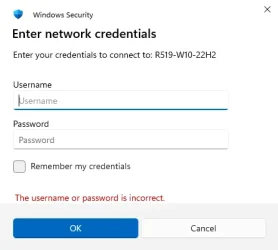
I recently upgraded our 2 x Win 11 PC's to v24H2 26100.6584, now windows security on both PC's keeps asking for Network Credentials when trying to view files/folders on either PC.
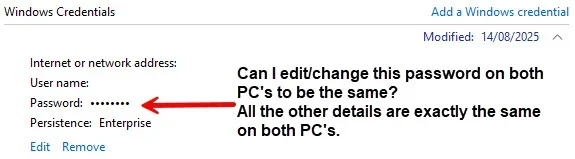
I have no clue as to what the password is for the credentials on either PC, everything is the same for both PC's except that one PC's credentials were changed recently on 14/08/2025.

Any help would be appreciated.
2025-10-09_22-11-07.webp
 
Windows Build/Version
Windows 11 Home 24H2 26100.6584

My Computer

System One

  • OS
    Windows 11 Home Version 25H2 26200.8328
    Computer type
    PC/Desktop
    Manufacturer/Model
    Centre Com Karuza Taurus Core i5 12400F RTX 4060 Ti Gaming PC
    CPU
    Intel Core i5-12400F 2.5GHZ 18M LGA1700 Processor
    Motherboard
    MSI B660M-A PRO WIFI DDR4 DDR4 LGA1700 mATX
    Memory
    Corsair Vengeance RGB RS 16GB (2x8GB) DDR4 3200MHz C16 RAM
    Graphics Card(s)
    Gigabyte GeForce RTX 4060 Ti EAGLE 8G Graphics Card
    Sound Card
    Realtek High Definition Audio
    Monitor(s) Displays
    27" Benq GW2760
    Screen Resolution
    1920 x 1080
    Hard Drives
    Kingston SNV2S/1000G NV2 1TB PCIe 4.0 NVMe M.2 2280 SSD
    PSU
    Corsair RM750e 80+ Gold 750W Power Supply
    Case
    Cooler Master MasterBox K501L ARGB Tempered Glass Side Panel MCB-K501L-KGNN-SR3
    Cooling
    Cooler Master Hyper 212 Spectrum V3 CPU Cooler - Cooler Master MasterFan MF120 Halo ARGB 120mm Fan
    Keyboard
    Logitech G213
    Mouse
    Razor Basilik V3 35K
    Internet Speed
    Download Mbps 940.00 Upload Mbps 96.00
    Browser
    Firefox 151.0.1 (64-bit)
    Antivirus
    Eset Smart Security Premium v19.0.14.0
    Other Info
    Canon iX6860 Inkjet Printer
    Brother MFC-L2880DW Laser Printer
    Mercusys MR90X AX6000 8-Stream Wi-Fi 6 Router
    Logitech 5.1 Speakers
Use same credentials as your user on either PC. Assuming they are the same.
 

My Computers

System One System Two

  • OS
    Win 11 Pro 25H2 26200.8457 / Linux Mint 22.3
    Computer type
    Laptop
    Manufacturer/Model
    Lenovo A485
    CPU
    Ryzen 7 2700U Pro
    Motherboard
    Lenovo (WiFi/BT module upgraded to Intel Wireless-AC-9260)
    Memory
    32GB
    Graphics Card(s)
    iGPU Vega 10
    Sound Card
    Realtek
    Monitor(s) Displays
    14" FHD (built-in) + 14" Lenovo Thinkvision M14t (touch+pen) + 32" Asus PB328
    Screen Resolution
    FHD + FHD + 1440p
    Hard Drives
    Intel 660p m.2 nVME PCIe3.0 x2 512GB
    PSU
    125W(Dock)/65W(Travel Adapter)
    Keyboard
    Thinkpad / Logitech MX Keys
    Mouse
    Logitech MX Master 2S
    Internet Speed
    1/1Gbit
    Browser
    Firefox
    Antivirus
    Windows Defender
    Other Info
    SecureBoot: Enabled
    TPM2.0: Enabled
    AMD-V: Enabled
  • Operating System
    Win 11 Pro 25H2 26200.8521(RP)
    Computer type
    PC/Desktop
    Manufacturer/Model
    Custom
    CPU
    i7-7700k @4.8GHz
    Motherboard
    Asus PRIME Z270-A
    Memory
    32GB 2x16GB 2133MHz CL15
    Graphics card(s)
    EVGA GTX1080Ti FTW 11GB
    Sound Card
    Integrated
    Monitor(s) Displays
    32" 10-bit Asus PB328Q
    Screen Resolution
    WQHD 2560x1440
    Hard Drives
    512GB ADATA SX8000NP NVMe PCIe Gen 3 x4
    PSU
    850W
    Case
    Fractal Design Define 7
    Cooling
    Noctua NH-D15 chromax.black
    Keyboard
    Logitech MX Keys
    Mouse
    Logitech MX Master 2S
    Internet Speed
    1/1Gbit
    Browser
    Firefox
    Antivirus
    Windows Defender
    Other Info
    AC WiFi Card
I recently upgraded our 2 x Win 11 PC's to v24H2 26100.6584, now windows security on both PC's keeps asking for Network Credentials when trying to view files/folders on either PC.
Starting with 24H2 network security has been tightened up. Insecure guest logons are now disabled by default. This caught a lot of people out, particularly those who had been connecting in 23H2 with local accounts that had no password.


By default Windows will try to connect with the username and password that you are signed in with on this PC. If that account exists on the remote computer and has the same password then you will connect. If not, then you will be asked for credentials. The account you use to connect must have a password, an account with no password is treated as an insecure connection and will be rejected.

There are two ways to cope with this in 24H2.

The first is to connect to the remote computer using the name and password of a user account that exists on that computer.

When connecting as another user you will have the opportunity to remember these credentials for the next time you connect. You can, if you wish, create a new local account on that remote computer specifically for this purpose. When connected you will have the permissions of that remote account, so you may need to grant it access to those folder you wish it to see.

1760015100061.webp


The second way it to enable insecure logons in 24H2. You will need to do this both on the remote computer (for incoming connections) and the computer that's trying to connect (allow outgoing insecure connections).

See my post here for more details:
Copying executable files from a network drive? - post #12


For myself, I used the first method when I first upgraded to 24H2 and found I could no longer connect to some of my shares.
 
Last edited:

My Computers

System One System Two

  • OS
    Windows 11 Home
    Computer type
    Laptop
    Manufacturer/Model
    Acer Aspire 3 A315-23-R9VY
    CPU
    AMD Athlon Silver 3050U
    Memory
    8GB
    Graphics Card(s)
    Radeon Graphics
    Monitor(s) Displays
    laptop screen
    Screen Resolution
    1366x768 native resolution, up to 2560x1440 with Radeon Virtual Super Resolution
    Hard Drives
    1TB Samsung EVO 870 SSD (from April 2026: 250GB EVO 850)
    Internet Speed
    150 Mbps
    Browser
    Edge, Firefox
    Antivirus
    Defender
    Other Info
    fully 'Windows 11 ready' laptop. Windows 10 C: partition migrated from my old unsupported 'main machine' then upgraded to 11. A test migration ran Insider builds for 2 months. When 11 was released on 5th October 2021 it was re-imaged back to 10 and was offered the upgrade in Windows Update on 20th October. Windows Update offered the 22H2 Feature Update on 20th September 2022. It got the 23H2 Feature Update on 4th November 2023 through Windows Update, 24H2 on 3rd October 2024 through Windows Update by setting the Target Release Version for 24H2, and 25H2 on 30th September 2025 through Windows Update by setting the Target Release Version for 25H2.

    UPDATE - 11 April 2026: due to mechanical deterioration this PC has been retired from active duty. The OS with all software and files has been migrated to my System Seven below to carry on as my general purpose 'main machine'.

    My SYSTEM THREE is a Dell Latitude 5410, i7-10610U, 32GB RAM, 512GB NVMe ssd, supported device running Windows 11 Pro.

    My SYSTEM FOUR is a 2-in-1 convertible Lenovo Yoga 11e 20DA, Celeron N2930, 8GB RAM, 256GB ssd. Unsupported device: currently running Win10 Pro, plus Win11 Pro RTM and Insider Dev, Beta, and RP 24H2 as native boot vhdx.

    My SYSTEM FIVE is a Dell Latitude 3190 2-in-1, Pentium Silver N5030, 8GB RAM, 1TB NVMe ssd, supported device running Windows 11 Pro, plus Insider Beta, Dev, and Canary builds (and a few others) as a native boot .vhdx.

    My SYSTEM SIX is a Dell Latitude 5550, Core Ultra 7 165H, 64GB RAM, 1TB NVMe SSD, supported device, Windows 11 Pro 24H2, Hyper-V host machine. Updated to 25H2 on 30th September 2025.

    My SYSTEM SEVEN is a Lenovo Thinkpad T580, Intel Core i7-8650U, 16GB RAM, 512GB NVMe SSD + 2nd 512GB NVMe SSD, a supported device for Windows 11. This is my current general purpose 'main machine'. The installed Windows 11 Home from my System One has been migrated to this machine.
  • Operating System
    Windows 11 Pro
    Computer type
    Laptop
    Manufacturer/Model
    Dell Latitude E4310
    CPU
    Intel® Core™ i5-520M
    Motherboard
    0T6M8G
    Memory
    8GB
    Graphics card(s)
    (integrated graphics) Intel HD Graphics
    Screen Resolution
    1366x768
    Hard Drives
    500GB Crucial MX500 SSD
    Browser
    Firefox, Edge
    Antivirus
    Defender
    Other Info
    unsupported machine: Legacy bios, MBR, TPM 1.2, upgraded from W10 to W11 using W10/W11 hybrid install media workaround. In-place upgrade to 22H2 using ISO and a workaround. Feature Update to 23H2 by manually installing the Enablement Package. In-place upgrade to 24H2 using hybrid 23H2/24H2 install media. Upgraded to 25H2 by Enablement Package. Also running Insider Dev, and Canary builds and Windows 10 as native boot .vhdx.

    My SYSTEM THREE is a Dell Latitude 5410, i7-10610U, 32GB RAM, 512GB NVMe ssd, supported device running Windows 11 Pro.

    My SYSTEM FOUR is a 2-in-1 convertible Lenovo Yoga 11e 20DA, Celeron N2930, 8GB RAM, 256GB ssd. Unsupported device: currently running Win10 Pro, plus Win11 Pro RTM and Insider Dev, Beta, and RP 24H2 as native boot vhdx.

    My SYSTEM FIVE is a Dell Latitude 3190 2-in-1, Pentium Silver N5030, 8GB RAM, 1TB NVMe ssd, supported device running Windows 11 Pro, plus Insider Beta, Dev, and Canary builds (and a few others) as a native boot .vhdx.

    My SYSTEM SIX is a Dell Latitude 5550, Core Ultra 7 165H, 64GB RAM, 1TB NVMe SSD, supported device, Windows 11 Pro 24H2, Hyper-V host machine. Updated to 25H2 on 30th September 2025.

    My SYSTEM SEVEN is a Lenovo Thinkpad T580, Intel Core i7-8650U, 16GB RAM, 512GB NVMe SSD + 2nd 512GB NVMe SSD, a supported device for Windows 11. This is my current general purpose 'main machine'. The installed Windows 11 Home from my System One has been migrated to this machine.
Go to Control Panel>Credentials> Windows Credentials>add a windows credential

In the "Internet or network address" box, type the name of the other computer on the network that you want to access.
In the User name and Password boxes, type the user name and password that you use for that computer, and then click OK.
Note: It must be a password, not a pin.

Note:Each computer should have a credential for each of the other computers it wants to share files from/to...even if the same username and password is used on them all. This includes even if the same MS account is used on them all.


My Computers

System One System Two

  • OS
    Windows 11 Pro 25H2
    Computer type
    PC/Desktop
    Manufacturer/Model
    Dell Optiplex 7080
    CPU
    i9-10900 10 core 20 threads
    Motherboard
    DELL 0J37VM
    Memory
    32 gb
    Graphics Card(s)
    none-Intel UHD Graphics 630
    Sound Card
    Integrated Realtek
    Monitor(s) Displays
    Benq 27
    Screen Resolution
    2560x1440
    Hard Drives
    2x1tb Solidigm m.2 nvme /External drives 512gb Samsung m.2 sata+2tb Kingston m2.nvme
    PSU
    500w
    Case
    MT
    Cooling
    Dell Premium
    Keyboard
    Logitech wired
    Mouse
    Logitech wireless
    Internet Speed
    so slow I'm too embarrassed to tell
    Browser
    #1 Edge #2 Firefox
    Antivirus
    Defender+MWB Premium
  • Operating System
    Windows 11 Pro 24H2 26200.8457
    Computer type
    PC/Desktop
    Manufacturer/Model
    Beelink Mini PC SER5
    CPU
    AMD Ryzen 7 6800U
    Memory
    32 gb
    Graphics card(s)
    integrated
    Sound Card
    integrated
    Monitor(s) Displays
    Benq 27
    Screen Resolution
    2560x1440
    Hard Drives
    1TB Crucial nvme
    Keyboard
    Logitech wired
    Mouse
    Logitech wireless
    Internet Speed
    still too embarrassed to tell
    Browser
    Firefox
    Antivirus
    Defender
    Other Info
    System 3 is non compliant Dell 9020 i7-4770/24gb ram Win11 PRO 26200.8457
Back
Top Bottom