Solved problem System Restore Points


OK
 

My Computers My Computers

  • At a glance

    Windows 11 Pro 24H2 (Build 26100.4770)Intel Core 9 Ultra 285K64G (4x16) DDR5 Corsair RGB Dominator Platinu...Radeon (XFX Mercury) RX 9070XT OC (with Magne...
    OS
    Windows 11 Pro 24H2 (Build 26100.4770)
    Computer type
    PC/Desktop
    Manufacturer/Model
    Custom built
    CPU
    Intel Core 9 Ultra 285K
    Motherboard
    Gigabyte Aorus Z890 Xtreme AI Top
    Memory
    64G (4x16) DDR5 Corsair RGB Dominator Platinum (6400Mhz)
    Graphics Card(s)
    Radeon (XFX Mercury) RX 9070XT OC (with Magnetic Fans)
    Sound Card
    Onboard (DTS:X® Ultra Audio: ESS ES9280A DAC)
    Monitor(s) Displays
    27-inch Eizo Color Edge - CG2700X
    Screen Resolution
    3840 x 2160
    Hard Drives
    4 Samsung NVM 990 Pro drives: 1TB (OS), 2TB, 2 X 4TB.
    PSU
    Seasonic TX-1300 (1300 Watts)
    Case
    Cooler Master H500M
    Cooling
    Corsair Link Titan 280 RX RGB
    Keyboard
    Logitech Craft
    Mouse
    Logitech MX Master 3S
    Internet Speed
    1TB Download. 512mb Upload
    Browser
    Microsoft Edge Chromium
    Antivirus
    Windows Security
    Other Info
    System used for gaming, photography, music, school.
  • At a glance

    Windows 11 Pro 24H2 (Build 26100.4061)Intel Core i9-9900K32gig (4 x 8) Corsair Dominator Platinum DDR4...Radeon XFX Merc 7900XT (20gig)
    Operating System
    Windows 11 Pro 24H2 (Build 26100.4061)
    Computer type
    PC/Desktop
    Manufacturer/Model
    Custom built
    CPU
    Intel Core i9-9900K
    Motherboard
    Gigabyte Z390 Aorus Xtreme
    Memory
    32gig (4 x 8) Corsair Dominator Platinum DDR4 3600Mhz (B-Die)
    Graphics card(s)
    Radeon XFX Merc 7900XT (20gig)
    Sound Card
    Onboard
    Monitor(s) Displays
    24-Inch NEC PA242W
    Screen Resolution
    2880 x 1800
    Hard Drives
    2 X NVME, 1 X SATA SSD
    PSU
    EVGA Super Nova 1000 P2 (1000 Watt)
    Case
    Phantek Enthoo Luxe
    Cooling
    Corsair H115i Elite AIO Cooler
    Keyboard
    Logitech Keys
    Mouse
    Logitech MX Master 3
    Internet Speed
    1TB Download. 512mb Upload
    Browser
    Microsoft Edge Chromium
    Antivirus
    Windows Security
    Other Info
    Backup System
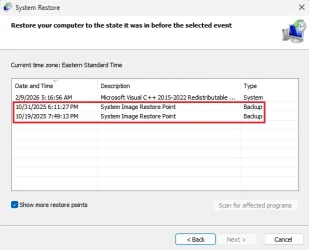
Those are all 'System Image Restore Points' of type 'Backup'. These are a special type of restore point recorded whenever you make a system image using 'Backup & Restore (Windows 7)'. To use one of these you need access to the system image that you made back then. They are only deleted if you use 'Backup & Restore' again to manage the space used for image backups and to delete the original system image. Manually deleting the system image in any other way leaves these restore points orphaned and impossible to delete by normal methods.

This tutorial tells you how to delete them.


Yes, it seems someone has created one, probably on an external drive. I have tried to create 1 backup system image and I tried to see the restore list, only 1 can be detected and restored, which is the one I just created myself. I don't know who created it before, and what they created it for.
If so, is it safe? Do i need to reinstall windows and change MS email?
 
Last edited:

My Computer My Computer

At a glance

Windows 11 HomeAlder Lake HX Series
OS
Windows 11 Home
Computer type
Laptop
Manufacturer/Model
Lenovo Legion
CPU
Alder Lake HX Series
Restore Points are created automatically. The "Backup and restore (Windows 7)" under Control panel has nothing to do with System Restore and it's Restore Points. And the Backup and Restore would NOT place those images under System Restore, so what you are seeing in System Restore has nothing to do with Backup and Restore. Those are completely two different programs with completely different functions. Period.

The Restore Points under System Restore has to do with the Registry and System files. NOT anything to do with System Images of the entire drive. Windows creates Restore Points at certain intervals as a matter of registry and system files backups

All that said, why those restore points are named System Images, I've no idea. If I had to guess, I'm thinking they were created by a user and named that way because of a misunderstanding of what System Restore is. Yes, you can manually create Restore Points. I do it all the time when I'm updating drivers. This way if something goes wrong, I can restore the registry back to before the driver update.

Not sure what else I can say but one has nothing to do with the other.

Anyway, as a side note, not a fan of that avatar, as I find it offensive to African Americans as images like those were used to denigrate a race of people.

Movin on.
thank you for all the sharing :thumbsup:
Anyway, as a side note, not a fan of that avatar, as I find it offensive to African Americans as images like those were used to denigrate a race of people.
Sorry I don't know about that, I got this image on G**gle. But I really don't know what it means. I don't mean any harm, I will change it, thank you for letting me know 🙂
 

My Computer My Computer

At a glance

Windows 11 HomeAlder Lake HX Series
OS
Windows 11 Home
Computer type
Laptop
Manufacturer/Model
Lenovo Legion
CPU
Alder Lake HX Series
Yes, it seems someone has created one, probably on an external drive. I have tried to create 1 backup system image and I tried to see the restore list, only 1 can be detected and restored, which is the one I just created myself. I don't know who created it before, and what they created it for.
If so, is it safe? Do i need to reinstall windows and change MS email?
Someone would have to have physical possession of your PC to create a system image. It's more likely down to your attempts to backup a system image. The dates/times of the system image restore points in your first post were:
21/04/2025 12:37:34
21/04/2025 11:57:51
21/04/2025 01:15:42
20/04/2025 11:34:22
Do they correspond with you attempts at making an image?

If they do, then I don't think a reinstall is called for.
 

My Computers My Computers

  • At a glance

    Windows 11 HomeAMD Athlon Silver 3050U8GBRadeon Graphics
    OS
    Windows 11 Home
    Computer type
    Laptop
    Manufacturer/Model
    Acer Aspire 3 A315-23-R9VY
    CPU
    AMD Athlon Silver 3050U
    Memory
    8GB
    Graphics Card(s)
    Radeon Graphics
    Monitor(s) Displays
    laptop screen
    Screen Resolution
    1366x768 native resolution, up to 2560x1440 with Radeon Virtual Super Resolution
    Hard Drives
    1TB Samsung EVO 870 SSD (from April 2026: 250GB EVO 850)
    Internet Speed
    150 Mbps
    Browser
    Edge, Firefox
    Antivirus
    Defender
    Other Info
    fully 'Windows 11 ready' laptop. Windows 10 C: partition migrated from my old unsupported 'main machine' then upgraded to 11. A test migration ran Insider builds for 2 months. When 11 was released on 5th October 2021 it was re-imaged back to 10 and was offered the upgrade in Windows Update on 20th October. Windows Update offered the 22H2 Feature Update on 20th September 2022. It got the 23H2 Feature Update on 4th November 2023 through Windows Update, 24H2 on 3rd October 2024 through Windows Update by setting the Target Release Version for 24H2, and 25H2 on 30th September 2025 through Windows Update by setting the Target Release Version for 25H2.

    UPDATE - 11 April 2026: due to mechanical deterioration this PC has been retired from active duty. The OS with all software and files has been migrated to my System Seven in 'Other systems' to carry on as my general purpose 'main machine'.
  • At a glance

    Windows 11 ProIntel® Core™ i5-520M8GB(integrated graphics) Intel HD Graphics
    Operating System
    Windows 11 Pro
    Computer type
    Laptop
    Manufacturer/Model
    Dell Latitude E4310
    CPU
    Intel® Core™ i5-520M
    Motherboard
    0T6M8G
    Memory
    8GB
    Graphics card(s)
    (integrated graphics) Intel HD Graphics
    Screen Resolution
    1366x768
    Hard Drives
    500GB Crucial MX500 SSD
    Browser
    Firefox, Edge
    Antivirus
    Defender
    Other Info
    unsupported machine: Legacy bios, MBR, TPM 1.2, upgraded from W10 to W11 using W10/W11 hybrid install media workaround.

    In-place upgrade to 22H2 using ISO and a workaround.
    Feature Update to 23H2 by manually installing the Enablement Package.
    In-place upgrade to 24H2 using hybrid 23H2/24H2 install media.
    Upgraded to 25H2 by Enablement Package.

    Also running Insider Dev, and Canary builds and Windows 10 as native boot .vhdx.
  • My SYSTEM THREE is a Dell Latitude 5410, i7-10610U, 32GB RAM, 512GB NVMe ssd, supported device running Windows 11 Pro.

    My SYSTEM FOUR is a 2-in-1 convertible Lenovo Yoga 11e 20DA, Celeron N2930, 8GB RAM, 256GB ssd. Unsupported device: currently running Win10 Pro, plus Win11 Pro RTM and Insider Dev, Beta, and RP 24H2 as native boot vhdx.

    My SYSTEM FIVE is a Dell Latitude 3190 2-in-1, Pentium Silver N5030, 8GB RAM, 1TB NVMe ssd, supported device running Windows 11 Pro, plus Insider Beta, Dev, and Canary builds (and a few others) as a native boot .vhdx.

    My SYSTEM SIX is a Dell Latitude 5550, Core Ultra 7 165H, 64GB RAM, 1TB NVMe SSD, supported device, Windows 11 Pro 24H2, Hyper-V host machine. Updated to 25H2 on 30th September 2025.

    My SYSTEM SEVEN is a Lenovo Thinkpad T580, Intel Core i7-8650U, 16GB RAM, 512GB NVMe SSD + 2nd 512GB NVMe SSD, a supported device for Windows 11. This is my current general purpose 'main machine'. The installed Windows 11 Home from my System One has been migrated to this machine.
Someone would have to have physical possession of your PC to create a system image. It's more likely down to your attempts to backup a system image. The dates/times of the system image restore points in your first post were:
21/04/2025 12:37:34
21/04/2025 11:57:51
21/04/2025 01:15:42
20/04/2025 11:34:22
Do they correspond with you attempts at making an image?

If they do, then I don't think a reinstall is called for.
Previously, I took this laptop to Len*vo service just to be checked and cleaned, with the account still connected, because it was still under warranty.
Just yesterday I found out, there were traces of 4 backups (20/21/21/21) that were done without my knowledge.
Because the 4 backups cannot be restored, it seems they are on another drive, maybe external
 

My Computer My Computer

At a glance

Windows 11 HomeAlder Lake HX Series
OS
Windows 11 Home
Computer type
Laptop
Manufacturer/Model
Lenovo Legion
CPU
Alder Lake HX Series
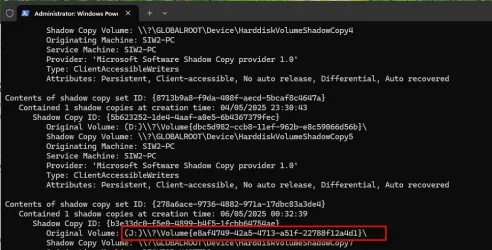
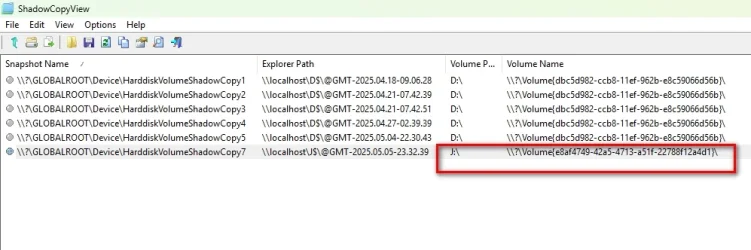
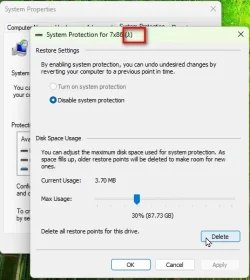
An example:

Here is the system image shadow copy

shadowcopy-ayaimage1jpg.webp


shadowcopy-ayaimage2pg.webp


shadowcopy-ayaimage3pg.webp
 

My Computers My Computers

  • At a glance

    Win7,Win11i7-97002x16gb 3600mhz
    OS
    Win7,Win11
    Computer type
    PC/Desktop
    CPU
    i7-9700
    Motherboard
    gigabyte b365m ds3h
    Memory
    2x16gb 3600mhz
    Monitor(s) Displays
    benq gw2480
    PSU
    bequiet pure power 11 400CM
    Cooling
    cryorig m9i
  • At a glance

    win7,win11i5-84002x8gb 3200
    Operating System
    win7,win11
    Computer type
    PC/Desktop
    CPU
    i5-8400
    Motherboard
    gigabyte b365m ds3h
    Memory
    2x8gb 3200
    PSU
    xfx pro 450
Thank you all for your help, sorry if I ask a lot of questions. Because I don't really understand about computer systems
 

My Computer My Computer

At a glance

Windows 11 HomeAlder Lake HX Series
OS
Windows 11 Home
Computer type
Laptop
Manufacturer/Model
Lenovo Legion
CPU
Alder Lake HX Series
Thank you all for your help, sorry if I ask a lot of questions. Because I don't really understand about computer systems
Don't be sorry. Asking is the only way to learn.
 

My Computers My Computers

  • At a glance

    Windows 11 HomeAMD Athlon Silver 3050U8GBRadeon Graphics
    OS
    Windows 11 Home
    Computer type
    Laptop
    Manufacturer/Model
    Acer Aspire 3 A315-23-R9VY
    CPU
    AMD Athlon Silver 3050U
    Memory
    8GB
    Graphics Card(s)
    Radeon Graphics
    Monitor(s) Displays
    laptop screen
    Screen Resolution
    1366x768 native resolution, up to 2560x1440 with Radeon Virtual Super Resolution
    Hard Drives
    1TB Samsung EVO 870 SSD (from April 2026: 250GB EVO 850)
    Internet Speed
    150 Mbps
    Browser
    Edge, Firefox
    Antivirus
    Defender
    Other Info
    fully 'Windows 11 ready' laptop. Windows 10 C: partition migrated from my old unsupported 'main machine' then upgraded to 11. A test migration ran Insider builds for 2 months. When 11 was released on 5th October 2021 it was re-imaged back to 10 and was offered the upgrade in Windows Update on 20th October. Windows Update offered the 22H2 Feature Update on 20th September 2022. It got the 23H2 Feature Update on 4th November 2023 through Windows Update, 24H2 on 3rd October 2024 through Windows Update by setting the Target Release Version for 24H2, and 25H2 on 30th September 2025 through Windows Update by setting the Target Release Version for 25H2.

    UPDATE - 11 April 2026: due to mechanical deterioration this PC has been retired from active duty. The OS with all software and files has been migrated to my System Seven in 'Other systems' to carry on as my general purpose 'main machine'.
  • At a glance

    Windows 11 ProIntel® Core™ i5-520M8GB(integrated graphics) Intel HD Graphics
    Operating System
    Windows 11 Pro
    Computer type
    Laptop
    Manufacturer/Model
    Dell Latitude E4310
    CPU
    Intel® Core™ i5-520M
    Motherboard
    0T6M8G
    Memory
    8GB
    Graphics card(s)
    (integrated graphics) Intel HD Graphics
    Screen Resolution
    1366x768
    Hard Drives
    500GB Crucial MX500 SSD
    Browser
    Firefox, Edge
    Antivirus
    Defender
    Other Info
    unsupported machine: Legacy bios, MBR, TPM 1.2, upgraded from W10 to W11 using W10/W11 hybrid install media workaround.

    In-place upgrade to 22H2 using ISO and a workaround.
    Feature Update to 23H2 by manually installing the Enablement Package.
    In-place upgrade to 24H2 using hybrid 23H2/24H2 install media.
    Upgraded to 25H2 by Enablement Package.

    Also running Insider Dev, and Canary builds and Windows 10 as native boot .vhdx.
  • My SYSTEM THREE is a Dell Latitude 5410, i7-10610U, 32GB RAM, 512GB NVMe ssd, supported device running Windows 11 Pro.

    My SYSTEM FOUR is a 2-in-1 convertible Lenovo Yoga 11e 20DA, Celeron N2930, 8GB RAM, 256GB ssd. Unsupported device: currently running Win10 Pro, plus Win11 Pro RTM and Insider Dev, Beta, and RP 24H2 as native boot vhdx.

    My SYSTEM FIVE is a Dell Latitude 3190 2-in-1, Pentium Silver N5030, 8GB RAM, 1TB NVMe ssd, supported device running Windows 11 Pro, plus Insider Beta, Dev, and Canary builds (and a few others) as a native boot .vhdx.

    My SYSTEM SIX is a Dell Latitude 5550, Core Ultra 7 165H, 64GB RAM, 1TB NVMe SSD, supported device, Windows 11 Pro 24H2, Hyper-V host machine. Updated to 25H2 on 30th September 2025.

    My SYSTEM SEVEN is a Lenovo Thinkpad T580, Intel Core i7-8650U, 16GB RAM, 512GB NVMe SSD + 2nd 512GB NVMe SSD, a supported device for Windows 11. This is my current general purpose 'main machine'. The installed Windows 11 Home from my System One has been migrated to this machine.
Anyway, as a side note, not a fan of that avatar, as I find it offensive to African Americans as images like those were used to denigrate a race of people.
Sorry I don't know about that, I got this image on G**gle. But I really don't know what it means. I don't mean any harm, I will change it, thank you for letting me know 🙂
@braaphub, as I made the above public statement, I also make the public statement in saying thank you for removing that avatar.
 

My Computers My Computers

  • At a glance

    Windows 11 Pro 24H2 (Build 26100.4770)Intel Core 9 Ultra 285K64G (4x16) DDR5 Corsair RGB Dominator Platinu...Radeon (XFX Mercury) RX 9070XT OC (with Magne...
    OS
    Windows 11 Pro 24H2 (Build 26100.4770)
    Computer type
    PC/Desktop
    Manufacturer/Model
    Custom built
    CPU
    Intel Core 9 Ultra 285K
    Motherboard
    Gigabyte Aorus Z890 Xtreme AI Top
    Memory
    64G (4x16) DDR5 Corsair RGB Dominator Platinum (6400Mhz)
    Graphics Card(s)
    Radeon (XFX Mercury) RX 9070XT OC (with Magnetic Fans)
    Sound Card
    Onboard (DTS:X® Ultra Audio: ESS ES9280A DAC)
    Monitor(s) Displays
    27-inch Eizo Color Edge - CG2700X
    Screen Resolution
    3840 x 2160
    Hard Drives
    4 Samsung NVM 990 Pro drives: 1TB (OS), 2TB, 2 X 4TB.
    PSU
    Seasonic TX-1300 (1300 Watts)
    Case
    Cooler Master H500M
    Cooling
    Corsair Link Titan 280 RX RGB
    Keyboard
    Logitech Craft
    Mouse
    Logitech MX Master 3S
    Internet Speed
    1TB Download. 512mb Upload
    Browser
    Microsoft Edge Chromium
    Antivirus
    Windows Security
    Other Info
    System used for gaming, photography, music, school.
  • At a glance

    Windows 11 Pro 24H2 (Build 26100.4061)Intel Core i9-9900K32gig (4 x 8) Corsair Dominator Platinum DDR4...Radeon XFX Merc 7900XT (20gig)
    Operating System
    Windows 11 Pro 24H2 (Build 26100.4061)
    Computer type
    PC/Desktop
    Manufacturer/Model
    Custom built
    CPU
    Intel Core i9-9900K
    Motherboard
    Gigabyte Z390 Aorus Xtreme
    Memory
    32gig (4 x 8) Corsair Dominator Platinum DDR4 3600Mhz (B-Die)
    Graphics card(s)
    Radeon XFX Merc 7900XT (20gig)
    Sound Card
    Onboard
    Monitor(s) Displays
    24-Inch NEC PA242W
    Screen Resolution
    2880 x 1800
    Hard Drives
    2 X NVME, 1 X SATA SSD
    PSU
    EVGA Super Nova 1000 P2 (1000 Watt)
    Case
    Phantek Enthoo Luxe
    Cooling
    Corsair H115i Elite AIO Cooler
    Keyboard
    Logitech Keys
    Mouse
    Logitech MX Master 3
    Internet Speed
    1TB Download. 512mb Upload
    Browser
    Microsoft Edge Chromium
    Antivirus
    Windows Security
    Other Info
    Backup System
Those are all 'System Image Restore Points' of type 'Backup'. These are a special type of restore point recorded whenever you make a system image using 'Backup & Restore (Windows 7)'. To use one of these you need access to the system image that you made back then. They are only deleted if you use 'Backup & Restore' again to manage the space used for image backups and to delete the original system image. Manually deleting the system image in any other way leaves these restore points orphaned and impossible to delete by normal methods.

This tutorial tells you how to delete them.


Old post, ya, I know....but hey, Bree, your solutions always work!......Thanks!

Timbo

Screenshot 2026-02-09 072404.webp
 

My Computers My Computers

  • At a glance

    Windows 11 Pro 25H2 OS Build 26200.7705Gen 5 Haswell i7-477032 GB G. SKILL DDR-3 Ripjaws X- 8GB x 4Integrated Intel 4600 (112MB)
    OS
    Windows 11 Pro 25H2 OS Build 26200.7705
    Computer type
    PC/Desktop
    Manufacturer/Model
    HP ENVY 700-515xt CTO (mATX platform)
    CPU
    Gen 5 Haswell i7-4770
    Motherboard
    OEM (Asus)
    Memory
    32 GB G. SKILL DDR-3 Ripjaws X- 8GB x 4
    Graphics Card(s)
    Integrated Intel 4600 (112MB)
    Sound Card
    OEM
    Monitor(s) Displays
    HP 27eb
    Screen Resolution
    1920 x 1080
    Hard Drives
    Samsung 860 PRO 256GB, SG ST1000DM003-1CH162, Barracuda 7200.14 Series, 1 TB storage, 64MB cache and a SATA 6Gb/s interface (Hard drive is used for Storage only)
    PSU
    OEM 350W
    Case
    OEM
    Cooling
    OEM (ACPI fans)
    Keyboard
    Logitech K120
    Mouse
    Logitech M100
    Internet Speed
    440.1 Down/ 11.2 Up, 13 ms latency, server based in Chicago, IP- Spectrum in Midland, MI
    Browser
    Google Chrome
    Antivirus
    MS Defender
  • At a glance

    Android 15Qualcomm Snapdragon 8 Gen 28GB LPDDR5X (ramped to 12GB, borrowed from 51...Integrated Adreno 740 GPU
    Operating System
    Android 15
    Manufacturer/Model
    Motorola Edge+ 2023
    CPU
    Qualcomm Snapdragon 8 Gen 2
    Motherboard
    What's that???.....
    Memory
    8GB LPDDR5X (ramped to 12GB, borrowed from 512GB UFS 4.0 storage)
    Graphics card(s)
    Integrated Adreno 740 GPU
    Sound Card
    Dolby Atmos
    Monitor(s) Displays
    Display Technology - pOLED, HDR10+, 10-bit; Over a billion shades of color, DCI-P3 color space, Dolby Vision®, 165Hz refresh rate, Touch rate: 360Hz, Peak Brightness: 1300 nits
    Screen Resolution
    Resolution - FHD+ (2400 x 1080) | 394ppi
    Hard Drives
    UFS 4.0 internal storage, which is the standard type of high-speed flash storage for modern flagship smartphones.
    PSU
    5100mAh Li-Ion, Charging - 68W TurboPower™ charging | 15W wireless charging | 5W wireless power sharing
    Case
    Sandblasted aluminum
    Keyboard
    GBoard and Google Voice typing
    Mouse
    Yep.....primarily rt. index finger
    Internet Speed
    499.23 down, 11.53 up, 12 ms latency
    Browser
    Chrome
    Antivirus
    Nah......built in Motorola Security
    Other Info
    This device smokes the Samsung Galaxy S25 Ultra, for $400-$500 less, except the Camera specs. My eyes can't tell the difference!

Latest Support Threads

Back
Top Bottom