Problem with latest Cumulative Update Preview for Windows 11.


Are you going to try a repair install? If so, I'd be interested if it fixes the problem.
No I am not as I do not see it as a problem for me. I have no errors and the sfc scan comes back clean.
 

My Computers My Computers

  • At a glance

    Windows11 Pro 26200.9168Intel Core i9 14900F (24 -Core, 68 MB Total C...32GB DDR5RTX 4080 Super w/610.74
    OS
    Windows11 Pro 26200.9168
    Computer type
    PC/Desktop
    Manufacturer/Model
    Dell Alienware Aurora R16
    CPU
    Intel Core i9 14900F (24 -Core, 68 MB Total Cache)
    Motherboard
    Dell Alienware
    Memory
    32GB DDR5
    Graphics Card(s)
    RTX 4080 Super w/610.74
    Sound Card
    Realtec
    Monitor(s) Displays
    Corsair XENEON 32QHD165
    Screen Resolution
    2560 X 1440
    Hard Drives
    1-2TB Samsung 990 Pro PCIe NVMe M2 SSD
    1-4TB Samsung 990 Pro PCIe NVMe M2 SSD
    PSU
    1000 Watt Platinum Dell
    Case
    Alienware
    Cooling
    Liquid Closed Loop
    Keyboard
    Corsair Strafe RGB
    Mouse
    Logitech MK270 Wireless
    Internet Speed
    100Gb's Down-20 Up
    Browser
    Firefox 153.0.1
    Antivirus
    Defender
    Other Info
    Very Quiet And Fast
    CyberPower UPS CP1500PFCLCD
  • At a glance

    PClinuxOS Mate (2025.7)13th Gen Inter(R) Core(TM) i3-1315U64 GB DDR4 @3200 MHz.Internal
    Operating System
    PClinuxOS Mate (2025.7)
    Computer type
    PC/Desktop
    Manufacturer/Model
    Intel
    CPU
    13th Gen Inter(R) Core(TM) i3-1315U
    Motherboard
    Intel
    Memory
    64 GB DDR4 @3200 MHz.
    Graphics card(s)
    Internal
    Sound Card
    None
    Monitor(s) Displays
    Dell 2419HGCF
    Screen Resolution
    1920 X 1080
    Hard Drives
    SAMSUNG 980 PRO SSD 2TB, PCIe 4.0 M.2 2280
    PSU
    Chicony 30 Watt
    Case
    Small
    Keyboard
    Dell
    Mouse
    Razor
    Internet Speed
    1GB
    Browser
    Slimjet
well i did a clean install a couple days ago and i still have it . not sure if this helps
Wow. I'm doing a repair update at this moment using Windows Update. Of course I created an image of the whole disk just in case. Let's see what I get.
 

My Computer My Computer

At a glance

Windows 1113th Gen Intel(R) Core(TM) i9-13900KCorsair 2x32GB @ 6600PNY RTX3080 TI
OS
Windows 11
Computer type
PC/Desktop
Manufacturer/Model
Home Built
CPU
13th Gen Intel(R) Core(TM) i9-13900K
Motherboard
ASUS Maximus Hero Z790
Memory
Corsair 2x32GB @ 6600
Graphics Card(s)
PNY RTX3080 TI
Sound Card
Realtek on motherboard.
Monitor(s) Displays
Corsair 4k, BenQ 4k.
Screen Resolution
3840x2160
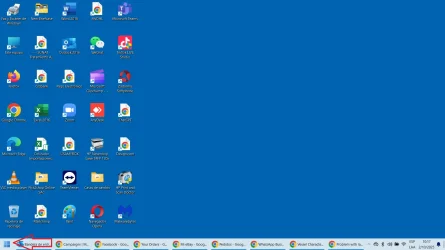
Just installed the Windows update KB5065789 in my laptop with Windows 11 pro; and the Star Menu is not working now; I was reading here some possible solutions; however all of them are very technical; please any Microsoft engineer can explain for me an easier solution?
 

My Computer My Computer

At a glance

Windows 11 pro
OS
Windows 11 pro
Computer type
Laptop
Manufacturer/Model
Asus VivoBook
A repair install did absolutely nothing in fixing my problem. It also didn't fix another minor problem I had. Guess it's in Microsoft's court to fix it. I restored the image I took before the repair and all is back to where it was before.

BTW.. the repair install wipes out many tweaks I had made so it's not a "Set it and forget it" operation.
 

My Computer My Computer

At a glance

Windows 1113th Gen Intel(R) Core(TM) i9-13900KCorsair 2x32GB @ 6600PNY RTX3080 TI
OS
Windows 11
Computer type
PC/Desktop
Manufacturer/Model
Home Built
CPU
13th Gen Intel(R) Core(TM) i9-13900K
Motherboard
ASUS Maximus Hero Z790
Memory
Corsair 2x32GB @ 6600
Graphics Card(s)
PNY RTX3080 TI
Sound Card
Realtek on motherboard.
Monitor(s) Displays
Corsair 4k, BenQ 4k.
Screen Resolution
3840x2160
Just installed the Windows update KB5065789 in my laptop with Windows 11 pro; and the Star Menu is not working now; I was reading here some possible solutions; however all of them are very technical; please any Microsoft engineer can explain for me an easier sol
can u explain what you mean ? like the new start menu or what sorry to be so direct . but its kinda a broad issue .
 

My Computer My Computer

At a glance

WINDOWS 11 WINDOWS 10Intel(R) Core(TM) i7 -3770K CPU 3.50 GZ 3501 ...32.0 GB (31.9 GB usable)AMD RADEON TM R5240 INTELL HD GRAPHICS 4600 T...
OS
WINDOWS 11 WINDOWS 10
Computer type
PC/Desktop
Manufacturer/Model
HP H8 1360T
CPU
Intel(R) Core(TM) i7 -3770K CPU 3.50 GZ 3501 4 CORE
Motherboard
PEGATRON 2AD5
Memory
32.0 GB (31.9 GB usable)
Graphics Card(s)
AMD RADEON TM R5240 INTELL HD GRAPHICS 4600 TIGER 1+1 USB
Sound Card
AMD HD . IDT
Monitor(s) Displays
AOC WAL MART SPECIAL . HP 2311 IX IPS LED DELL 1708 FP
Screen Resolution
1920 X 1080 1600X900 1280X940
Hard Drives
1 FAXING S 100 512GB 1 KINGSTON 120 GB SSD 1 X12 SSD 512 GB
PSU
300 WATT HP
Case
FULL
Cooling
ON BOARD FAN
Keyboard
LOGITEC K 520 WIRELESS
Mouse
LOGITEC M 510 WIRELESS
Internet Speed
55 UP 11.2 DOWN
Browser
CHROME EDGE
Antivirus
WINDOWS SECUIRTY
Other Info
NON SUPPORTED HARDWARE FOR WINDOWS 11
I looked into various Registry entries and group policies and haven't found any that fixes the issue.
 

My Computer My Computer

At a glance

Windows 1113th Gen Intel(R) Core(TM) i9-13900KCorsair 2x32GB @ 6600PNY RTX3080 TI
OS
Windows 11
Computer type
PC/Desktop
Manufacturer/Model
Home Built
CPU
13th Gen Intel(R) Core(TM) i9-13900K
Motherboard
ASUS Maximus Hero Z790
Memory
Corsair 2x32GB @ 6600
Graphics Card(s)
PNY RTX3080 TI
Sound Card
Realtek on motherboard.
Monitor(s) Displays
Corsair 4k, BenQ 4k.
Screen Resolution
3840x2160
can u explain what you mean ? like the new start menu or what sorry to be so direct . but its kinda a broad issue .
I am talking about the main Star Menu of Windows, please see the arrow...Sin título.webp
 

My Computer My Computer

At a glance

Windows 11 pro
OS
Windows 11 pro
Computer type
Laptop
Manufacturer/Model
Asus VivoBook
after you get back up and running go to your update setting look for " get the latest " updates setting, lick turn off ! until Windows get its act together and make sure those updates are turned off from any further annoying notices. I got stung twice had to have two laptops reset at $125.00 each before I learned my lesson.
 

My Computer My Computer

At a glance

Win 11 HomeIntel Core Ultra7 Processor16gbIntel Arc
OS
Win 11 Home
Computer type
Laptop
Manufacturer/Model
Dell Inspiron i7640-7366BLU 2 in 1
CPU
Intel Core Ultra7 Processor
Memory
16gb
Graphics Card(s)
Intel Arc
Monitor(s) Displays
on laptop 1XHDMI 1.4
Screen Resolution
1920x1200 Full HD+
Hard Drives
1TB SSD
Keyboard
on laptop / on screen using as tablet
Mouse
Microsoft 3500
Internet Speed
800 mg
Browser
Edge
Antivirus
Defender
after you get back up and running go to your update setting look for " get the latest " updates setting, lick turn off ! until Windows get its act together and make sure those updates are turned off from any further annoying notices. I got stung twice had to have two laptops reset at $125.00 each before I learned my lesson.
I did it already; the issue is that once the pause ends; the update appears again and Windows installs them automatically.
 

My Computer My Computer

At a glance

Windows 11 pro
OS
Windows 11 pro
Computer type
Laptop
Manufacturer/Model
Asus VivoBook

My Computers My Computers

  • At a glance

    Windows11 Pro 26200.9168Intel Core i9 14900F (24 -Core, 68 MB Total C...32GB DDR5RTX 4080 Super w/610.74
    OS
    Windows11 Pro 26200.9168
    Computer type
    PC/Desktop
    Manufacturer/Model
    Dell Alienware Aurora R16
    CPU
    Intel Core i9 14900F (24 -Core, 68 MB Total Cache)
    Motherboard
    Dell Alienware
    Memory
    32GB DDR5
    Graphics Card(s)
    RTX 4080 Super w/610.74
    Sound Card
    Realtec
    Monitor(s) Displays
    Corsair XENEON 32QHD165
    Screen Resolution
    2560 X 1440
    Hard Drives
    1-2TB Samsung 990 Pro PCIe NVMe M2 SSD
    1-4TB Samsung 990 Pro PCIe NVMe M2 SSD
    PSU
    1000 Watt Platinum Dell
    Case
    Alienware
    Cooling
    Liquid Closed Loop
    Keyboard
    Corsair Strafe RGB
    Mouse
    Logitech MK270 Wireless
    Internet Speed
    100Gb's Down-20 Up
    Browser
    Firefox 153.0.1
    Antivirus
    Defender
    Other Info
    Very Quiet And Fast
    CyberPower UPS CP1500PFCLCD
  • At a glance

    PClinuxOS Mate (2025.7)13th Gen Inter(R) Core(TM) i3-1315U64 GB DDR4 @3200 MHz.Internal
    Operating System
    PClinuxOS Mate (2025.7)
    Computer type
    PC/Desktop
    Manufacturer/Model
    Intel
    CPU
    13th Gen Inter(R) Core(TM) i3-1315U
    Motherboard
    Intel
    Memory
    64 GB DDR4 @3200 MHz.
    Graphics card(s)
    Internal
    Sound Card
    None
    Monitor(s) Displays
    Dell 2419HGCF
    Screen Resolution
    1920 X 1080
    Hard Drives
    SAMSUNG 980 PRO SSD 2TB, PCIe 4.0 M.2 2280
    PSU
    Chicony 30 Watt
    Case
    Small
    Keyboard
    Dell
    Mouse
    Razor
    Internet Speed
    1GB
    Browser
    Slimjet
Back
Top Bottom