Problem with latest Cumulative Update Preview for Windows 11.


Are you going to try a repair install? If so, I'd be interested if it fixes the problem.
No I am not as I do not see it as a problem for me. I have no errors and the sfc scan comes back clean.
 

My Computers

System One System Two

  • OS
    Windows11 Pro 26200.8524
    Computer type
    PC/Desktop
    Manufacturer/Model
    Dell Alienware Aurora R16
    CPU
    Intel Core i9 14900F (24 -Core, 68 MB Total Cache)
    Motherboard
    Dell Alienware
    Memory
    32GB DDR5
    Graphics Card(s)
    RTX 4080 Super w/581.95
    Sound Card
    Realtec
    Monitor(s) Displays
    Corsair XENEON 32QHD165
    Screen Resolution
    2560 X 1440
    Hard Drives
    1-2TB Samsung 990 Pro PCIe NVMe M2 SSD
    1-4TB Samsung 990 Pro PCIe NVMe M2 SSD
    PSU
    1000 Watt Platinum Dell
    Case
    Alienware
    Cooling
    Liquid Closed Loop
    Keyboard
    Corsair Strafe RGB
    Mouse
    Logitech MK270 Wireless
    Internet Speed
    100Gb's Down-20 Up
    Browser
    Firefox 151.0.3
    Antivirus
    Defender
    Other Info
    Very Quiet And Fast
    CyberPower UPS CP1500PFCLCD
  • Operating System
    PClinuxOS Mate (2025.7)
    Computer type
    PC/Desktop
    Manufacturer/Model
    Intel
    CPU
    13th Gen Inter(R) Core(TM) i3-1315U
    Motherboard
    Intel
    Memory
    64 GB DDR4 @3200 MHz.
    Graphics card(s)
    Internal
    Sound Card
    None
    Monitor(s) Displays
    Dell 2419HGCF
    Screen Resolution
    1920 X 1080
    Hard Drives
    SAMSUNG 980 PRO SSD 2TB, PCIe 4.0 M.2 2280
    PSU
    Chicony 30 Watt
    Case
    Small
    Keyboard
    Dell
    Mouse
    Razor
    Internet Speed
    1GB
    Browser
    Slimjet
well i did a clean install a couple days ago and i still have it . not sure if this helps
Wow. I'm doing a repair update at this moment using Windows Update. Of course I created an image of the whole disk just in case. Let's see what I get.
 

My Computer

System One

  • OS
    Windows 11
    Computer type
    PC/Desktop
    Manufacturer/Model
    Home Built
    CPU
    13th Gen Intel(R) Core(TM) i9-13900K
    Motherboard
    ASUS Maximus Hero Z790
    Memory
    Corsair 2x32GB @ 6600
    Graphics Card(s)
    PNY RTX3080 TI
    Sound Card
    Realtek on motherboard.
    Monitor(s) Displays
    Corsair 4k, BenQ 4k.
    Screen Resolution
    3840x2160
Just installed the Windows update KB5065789 in my laptop with Windows 11 pro; and the Star Menu is not working now; I was reading here some possible solutions; however all of them are very technical; please any Microsoft engineer can explain for me an easier solution?
 

My Computer

System One

  • OS
    Windows 11 pro
    Computer type
    Laptop
    Manufacturer/Model
    Asus VivoBook
A repair install did absolutely nothing in fixing my problem. It also didn't fix another minor problem I had. Guess it's in Microsoft's court to fix it. I restored the image I took before the repair and all is back to where it was before.

BTW.. the repair install wipes out many tweaks I had made so it's not a "Set it and forget it" operation.
 

My Computer

System One

  • OS
    Windows 11
    Computer type
    PC/Desktop
    Manufacturer/Model
    Home Built
    CPU
    13th Gen Intel(R) Core(TM) i9-13900K
    Motherboard
    ASUS Maximus Hero Z790
    Memory
    Corsair 2x32GB @ 6600
    Graphics Card(s)
    PNY RTX3080 TI
    Sound Card
    Realtek on motherboard.
    Monitor(s) Displays
    Corsair 4k, BenQ 4k.
    Screen Resolution
    3840x2160
Just installed the Windows update KB5065789 in my laptop with Windows 11 pro; and the Star Menu is not working now; I was reading here some possible solutions; however all of them are very technical; please any Microsoft engineer can explain for me an easier sol
can u explain what you mean ? like the new start menu or what sorry to be so direct . but its kinda a broad issue .
 

My Computer

System One

  • OS
    WINDOWS 11 WINDOWS 10
    Computer type
    PC/Desktop
    Manufacturer/Model
    HP H8 1360T
    CPU
    Intel(R) Core(TM) i7 -3770K CPU 3.50 GZ 3501 4 CORE
    Motherboard
    PEGATRON 2AD5
    Memory
    32.0 GB (31.9 GB usable)
    Graphics Card(s)
    AMD RADEON TM R5240 INTELL HD GRAPHICS 4600 TIGER 1+1 USB
    Sound Card
    AMD HD . IDT
    Monitor(s) Displays
    AOC WAL MART SPECIAL . HP 2311 IX IPS LED DELL 1708 FP
    Screen Resolution
    1920 X 1080 1600X900 1280X940
    Hard Drives
    1 FAXING S 100 512GB 1 KINGSTON 120 GB SSD 1 X12 SSD 512 GB
    PSU
    300 WATT HP
    Case
    FULL
    Cooling
    ON BOARD FAN
    Keyboard
    LOGITEC K 520 WIRELESS
    Mouse
    LOGITEC M 510 WIRELESS
    Internet Speed
    55 UP 11.2 DOWN
    Browser
    CHROME EDGE
    Antivirus
    WINDOWS SECUIRTY
    Other Info
    NON SUPPORTED HARDWARE FOR WINDOWS 11
I looked into various Registry entries and group policies and haven't found any that fixes the issue.
 

My Computer

System One

  • OS
    Windows 11
    Computer type
    PC/Desktop
    Manufacturer/Model
    Home Built
    CPU
    13th Gen Intel(R) Core(TM) i9-13900K
    Motherboard
    ASUS Maximus Hero Z790
    Memory
    Corsair 2x32GB @ 6600
    Graphics Card(s)
    PNY RTX3080 TI
    Sound Card
    Realtek on motherboard.
    Monitor(s) Displays
    Corsair 4k, BenQ 4k.
    Screen Resolution
    3840x2160
can u explain what you mean ? like the new start menu or what sorry to be so direct . but its kinda a broad issue .
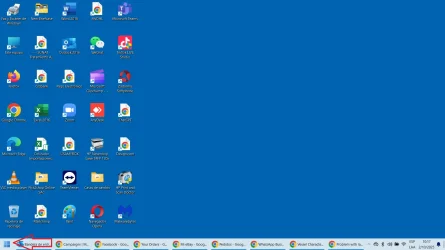
I am talking about the main Star Menu of Windows, please see the arrow...Sin título.webp
 

My Computer

System One

  • OS
    Windows 11 pro
    Computer type
    Laptop
    Manufacturer/Model
    Asus VivoBook
after you get back up and running go to your update setting look for " get the latest " updates setting, lick turn off ! until Windows get its act together and make sure those updates are turned off from any further annoying notices. I got stung twice had to have two laptops reset at $125.00 each before I learned my lesson.
 

My Computer

System One

  • OS
    Win 11 Home
    Computer type
    Laptop
    Manufacturer/Model
    Dell Inspiron i7640-7366BLU 2 in 1
    CPU
    Intel Core Ultra7 Processor
    Memory
    16gb
    Graphics Card(s)
    Intel Arc
    Monitor(s) Displays
    on laptop 1XHDMI 1.4
    Screen Resolution
    1920x1200 Full HD+
    Hard Drives
    1TB SSD
    Keyboard
    on laptop / on screen using as tablet
    Mouse
    Microsoft 3500
    Internet Speed
    800 mg
    Browser
    Edge
    Antivirus
    Defender
after you get back up and running go to your update setting look for " get the latest " updates setting, lick turn off ! until Windows get its act together and make sure those updates are turned off from any further annoying notices. I got stung twice had to have two laptops reset at $125.00 each before I learned my lesson.
I did it already; the issue is that once the pause ends; the update appears again and Windows installs them automatically.
 

My Computer

System One

  • OS
    Windows 11 pro
    Computer type
    Laptop
    Manufacturer/Model
    Asus VivoBook

My Computers

System One System Two

  • OS
    Windows11 Pro 26200.8524
    Computer type
    PC/Desktop
    Manufacturer/Model
    Dell Alienware Aurora R16
    CPU
    Intel Core i9 14900F (24 -Core, 68 MB Total Cache)
    Motherboard
    Dell Alienware
    Memory
    32GB DDR5
    Graphics Card(s)
    RTX 4080 Super w/581.95
    Sound Card
    Realtec
    Monitor(s) Displays
    Corsair XENEON 32QHD165
    Screen Resolution
    2560 X 1440
    Hard Drives
    1-2TB Samsung 990 Pro PCIe NVMe M2 SSD
    1-4TB Samsung 990 Pro PCIe NVMe M2 SSD
    PSU
    1000 Watt Platinum Dell
    Case
    Alienware
    Cooling
    Liquid Closed Loop
    Keyboard
    Corsair Strafe RGB
    Mouse
    Logitech MK270 Wireless
    Internet Speed
    100Gb's Down-20 Up
    Browser
    Firefox 151.0.3
    Antivirus
    Defender
    Other Info
    Very Quiet And Fast
    CyberPower UPS CP1500PFCLCD
  • Operating System
    PClinuxOS Mate (2025.7)
    Computer type
    PC/Desktop
    Manufacturer/Model
    Intel
    CPU
    13th Gen Inter(R) Core(TM) i3-1315U
    Motherboard
    Intel
    Memory
    64 GB DDR4 @3200 MHz.
    Graphics card(s)
    Internal
    Sound Card
    None
    Monitor(s) Displays
    Dell 2419HGCF
    Screen Resolution
    1920 X 1080
    Hard Drives
    SAMSUNG 980 PRO SSD 2TB, PCIe 4.0 M.2 2280
    PSU
    Chicony 30 Watt
    Case
    Small
    Keyboard
    Dell
    Mouse
    Razor
    Internet Speed
    1GB
    Browser
    Slimjet
Back
Top Bottom