Solved Program Icon/Thumbnail Blank.


samhainmitch

Active member
Local time
4:33 PM
Posts
9
OS
Windows 11 24H2
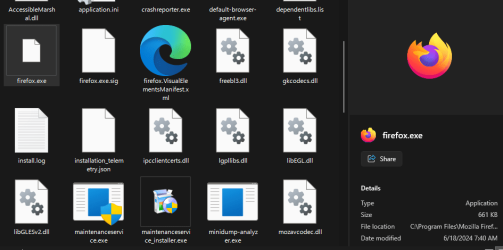
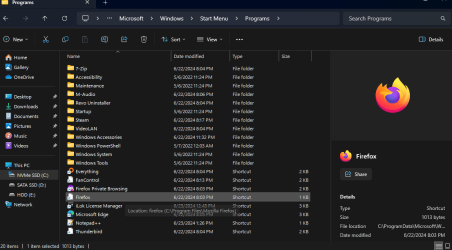
Hello Win11 forum lads and lasses. I keep having this strange issue with some icons/thumbnails, I'll be honest I'm not entirely sure which is which since this issue has been perplexing me. Out of complete random, certain programs icons/thumbnails, and their shortcuts go blank/white. I've spent an hour trying to figure this out. I have used disk cleanup to clear the thumbnail cache, and I have deleted the Iconcache.db file in Appdata/Local, restarted explorer a few times for good measure, and restarted my PC as well. Nothing has been able to bring these Icons back, except for reinstalling the program.

Notepad++ also had this same issue, but using Revo to uninstall it and then reinstalling it, the icon came back. When I click on one of these programs in explorer the Icon shows in the details pane, they also show up as normal in my taskbar, and the default win11 start menu. But I am using Startallback, so it pulls the icon/thumbnail straight from its install folder, which of course makes all the affected icons in my start menu programs list blank.

There is 4 more programs I would need to manually uninstall and reinstall, there has to be an easier way to fix this and an answer as to why this is happening. As after reinstalling everything and not knowing what caused it, it could just happen again. Does anyone have a clue whats going on, and how to fix it?

attatched photos of the startmenu shortcuts, and an example of one of the programs in its install directory.
 
Windows Build/Version
Win11 23H2 Build:22631.3737

Attachments
  • Screenshot 2024-06-23 134519.png
    Screenshot 2024-06-23 134519.png
    35.9 KB · Views: 5
  • Screenshot 2024-06-23 134700.png
    Screenshot 2024-06-23 134700.png
    22.5 KB · Views: 5

My Computer My Computer

At a glance

Windows 11 24H2Intel i7-9700k Base: 3.60GHz Boost: 4.90GHzCorsair Vengeance Pro 2x16Gb DDR4 3200MHzAsus ROG Strix RTX-2060S 8GB GDDR6
OS
Windows 11 24H2
Computer type
PC/Desktop
Manufacturer/Model
Custom Build
CPU
Intel i7-9700k Base: 3.60GHz Boost: 4.90GHz
Motherboard
Asus ROG Maximus 11 HERO (Wi-Fi)
Memory
Corsair Vengeance Pro 2x16Gb DDR4 3200MHz
Graphics Card(s)
Asus ROG Strix RTX-2060S 8GB GDDR6
Sound Card
External Interface: M-Audio Air 192|4
Monitor(s) Displays
BenQ Zowie XL 144Hz LCD
Screen Resolution
1920x1080
Hard Drives
WD Black 1TB M.2 NVMe (Boot)
Samsung 870 EVO 1TB
WD Blue 2TB HDD
PSU
Cougar GX 1050W
Case
Cougar DarkBlader G
Cooling
Case: Cougar Vortex HPB 120 x4 CPU: Corsair Hyper 212 Black
Keyboard
Razer Huntsman V2 TKL
Mouse
Razer Naga X
Internet Speed
1000d/200u
Browser
Firefox/Brave
Antivirus
All of them, all at once, all the time. take that viruses!
hHi Sam


For what it’s worth…

  • Open search on your PC and type CMD, right click on CMD and “Open as admin”
  • Click on the following command so it copies to your clipboard and paste it into the CMD window:
DISM /online /cleanup-image /restorehealth
  • Press enter and be patient.
  • Reboot your PC when finished.
After reboot:
  • Open search on your PC, type CMD.
  • Right click on CMD and “Open as admin”
  • Click on the following command so it copies to your clipboard and paste it into the CMD window:
SFC /scannow
  • Press enter and be patient.
 

My Computers My Computers

  • At a glance

    Windows 11 Pro 25H2 Build 26200.9168Intel(R) Core(TM) i7-4770K CPU @ 3.50GHz32.0 GB of I forget and the box is in storage.Gigabyte nVidia GeForce GTX 1660 Super OC 6GB
    OS
    Windows 11 Pro 25H2 Build 26200.9168
    Computer type
    PC/Desktop
    Manufacturer/Model
    Sin-built 2013
    CPU
    Intel(R) Core(TM) i7-4770K CPU @ 3.50GHz
    Motherboard
    ASUS ROG Maximus VI Formula
    Memory
    32.0 GB of I forget and the box is in storage.
    Graphics Card(s)
    Gigabyte nVidia GeForce GTX 1660 Super OC 6GB
    Sound Card
    ROG SupremeFX Formula 8-Channel High Definition Audio
    Monitor(s) Displays
    5 x LG 25MS500-B - 1 x 24MK430H-B - 1 x Wacom Pro 22" Touch Screen Tablet
    Screen Resolution
    All over the place
    Hard Drives
    Too many to list. OS on Samsung 1TB 870 QVO SATA
    PSU
    Silverstone 1500
    Case
    NZXT Phantom 820 Full-Tower Case
    Cooling
    Noctua NH-D15 Elite Class Dual Tower CPU Cooler / 6 x EziDIY 120mm / 2 x Corsair 140mm somethings / 1 x 140mm Thermaltake something / 2 x 200mm Corsair.
    Keyboard
    Corsair K95 / Logitech diNovo Edge Wireless
    Mouse
    Logitech: G402 / G502 / Mx Masters / Mx Air Cordless
    Internet Speed
    2000/500Mbps
    Browser
    All sorts
    Antivirus
    Kaspersky Premium
    Other Info
    ㅤㅤㅤㅤㅤㅤㅤㅤㅤㅤㅤㅤㅤㅤㅤㅤㅤㅤㅤㅤㅤㅤㅤㅤㅤㅤㅤㅤㅤㅤㅤㅤㅤㅤㅤㅤㅤㅤㅤㅤ⠀⠀⠀⠀⠀⠀⠀⠀⠀⠀
    TP-Link BE9300 WiFi 7 Bluetooth 5.4 (Archer TBE550E)
    TP-Link TX201 V1 2.5GB Lan

    Grandstream HT812 - VoIP
    ASUS DSL-AX82U - Mesh
    ASUS RT-AC68U - Mesh
    ASUS RT-BE88U Router

    Brother MFC-L2880DW Printer

    I’m on a horse.
  • At a glance

    Windows 11 Pro 25H2 Build 26200.9168 (Wifes)13th Generation Intel® Core™ i5-1340P Process...16GB LPDDR5-52001x Intel® Iris® Xe Graphics
    Operating System
    Windows 11 Pro 25H2 Build 26200.9168 (Wifes)
    Computer type
    Laptop
    Manufacturer/Model
    LENOVO Yoga 7 14IRL8 - Type 82YL
    CPU
    13th Generation Intel® Core™ i5-1340P Processor(Core™ i5-1340P)
    Memory
    16GB LPDDR5-5200
    Graphics card(s)
    1x Intel® Iris® Xe Graphics
    Sound Card
    Optimized with Dolby Atmos®
    Screen Resolution
    QHD 2880 x 1800 OLED
    Hard Drives
    M.2 512 GB SSD PCIe
    Mouse
    Logiteck MX Master 3S
    Internet Speed
    2000/500
    Antivirus
    Defender / Malwarebytes
    Other Info
    …still on a horse.


    Wireless Network: Wi-Fi 6E 2x2 AX; Bluetooth® 5.1 or above
    Ports: 1x 1 Novo button; 2 in 1 Audio Combo jack; Micro SD Card Reader; HDMI 1.4b; 2 x USB Type-C (TBT4)
    USB 3.2 Gen 2 DP 1.4a
    PD 3.0); 1 x USB 3.2 Gen1 Type A
    Camera
    1x 1080P FHD IR/RGB Hybrid with Privacy Shutter and Dual Array Microphone
    Graphics
    1x Intel® Iris® Xe Graphics
    Monitor
    14" WUXGA
    Form Factor
    Convertible Notebook
  • Windows 11 Pro 25H2 Build 26200.9168 (Wifes)

    Yoga 7 2-in-1 14IML9 - Type 83DJ

    Processor: Intel® Core™ Ultra 7 155H Processor(Core™ Ultra 7 155H)

    Memory: 32GB LPD5X-7467

    Hard Drive: 1 TB SSD PCIe

    Wireless Network: 1x Wi-Fi 6E 2x2 AX; Bluetooth® 5.1 or above

    Ports: 1 x HDMI 2.1 TMDS; 1 x Novo Button; 1 x Combo Audio Jack
    2 x USB-C (USB 4.0)
    1 x USB-A 3.2 Gen 1

    Camera: 1080P FHD IR Hybrid with Dual Microphone

    Graphics: Intel® Arc™ Graphics

    Monitor: 14" 2.8K

    ...Where's my horse?
Also, Sam.

Take a look at this tutorial. I read what you did but there are also comments in the thread, something might pop out.


My Computers My Computers

  • At a glance

    Windows 11 Pro 25H2 Build 26200.9168Intel(R) Core(TM) i7-4770K CPU @ 3.50GHz32.0 GB of I forget and the box is in storage.Gigabyte nVidia GeForce GTX 1660 Super OC 6GB
    OS
    Windows 11 Pro 25H2 Build 26200.9168
    Computer type
    PC/Desktop
    Manufacturer/Model
    Sin-built 2013
    CPU
    Intel(R) Core(TM) i7-4770K CPU @ 3.50GHz
    Motherboard
    ASUS ROG Maximus VI Formula
    Memory
    32.0 GB of I forget and the box is in storage.
    Graphics Card(s)
    Gigabyte nVidia GeForce GTX 1660 Super OC 6GB
    Sound Card
    ROG SupremeFX Formula 8-Channel High Definition Audio
    Monitor(s) Displays
    5 x LG 25MS500-B - 1 x 24MK430H-B - 1 x Wacom Pro 22" Touch Screen Tablet
    Screen Resolution
    All over the place
    Hard Drives
    Too many to list. OS on Samsung 1TB 870 QVO SATA
    PSU
    Silverstone 1500
    Case
    NZXT Phantom 820 Full-Tower Case
    Cooling
    Noctua NH-D15 Elite Class Dual Tower CPU Cooler / 6 x EziDIY 120mm / 2 x Corsair 140mm somethings / 1 x 140mm Thermaltake something / 2 x 200mm Corsair.
    Keyboard
    Corsair K95 / Logitech diNovo Edge Wireless
    Mouse
    Logitech: G402 / G502 / Mx Masters / Mx Air Cordless
    Internet Speed
    2000/500Mbps
    Browser
    All sorts
    Antivirus
    Kaspersky Premium
    Other Info
    ㅤㅤㅤㅤㅤㅤㅤㅤㅤㅤㅤㅤㅤㅤㅤㅤㅤㅤㅤㅤㅤㅤㅤㅤㅤㅤㅤㅤㅤㅤㅤㅤㅤㅤㅤㅤㅤㅤㅤㅤ⠀⠀⠀⠀⠀⠀⠀⠀⠀⠀
    TP-Link BE9300 WiFi 7 Bluetooth 5.4 (Archer TBE550E)
    TP-Link TX201 V1 2.5GB Lan

    Grandstream HT812 - VoIP
    ASUS DSL-AX82U - Mesh
    ASUS RT-AC68U - Mesh
    ASUS RT-BE88U Router

    Brother MFC-L2880DW Printer

    I’m on a horse.
  • At a glance

    Windows 11 Pro 25H2 Build 26200.9168 (Wifes)13th Generation Intel® Core™ i5-1340P Process...16GB LPDDR5-52001x Intel® Iris® Xe Graphics
    Operating System
    Windows 11 Pro 25H2 Build 26200.9168 (Wifes)
    Computer type
    Laptop
    Manufacturer/Model
    LENOVO Yoga 7 14IRL8 - Type 82YL
    CPU
    13th Generation Intel® Core™ i5-1340P Processor(Core™ i5-1340P)
    Memory
    16GB LPDDR5-5200
    Graphics card(s)
    1x Intel® Iris® Xe Graphics
    Sound Card
    Optimized with Dolby Atmos®
    Screen Resolution
    QHD 2880 x 1800 OLED
    Hard Drives
    M.2 512 GB SSD PCIe
    Mouse
    Logiteck MX Master 3S
    Internet Speed
    2000/500
    Antivirus
    Defender / Malwarebytes
    Other Info
    …still on a horse.


    Wireless Network: Wi-Fi 6E 2x2 AX; Bluetooth® 5.1 or above
    Ports: 1x 1 Novo button; 2 in 1 Audio Combo jack; Micro SD Card Reader; HDMI 1.4b; 2 x USB Type-C (TBT4)
    USB 3.2 Gen 2 DP 1.4a
    PD 3.0); 1 x USB 3.2 Gen1 Type A
    Camera
    1x 1080P FHD IR/RGB Hybrid with Privacy Shutter and Dual Array Microphone
    Graphics
    1x Intel® Iris® Xe Graphics
    Monitor
    14" WUXGA
    Form Factor
    Convertible Notebook
  • Windows 11 Pro 25H2 Build 26200.9168 (Wifes)

    Yoga 7 2-in-1 14IML9 - Type 83DJ

    Processor: Intel® Core™ Ultra 7 155H Processor(Core™ Ultra 7 155H)

    Memory: 32GB LPD5X-7467

    Hard Drive: 1 TB SSD PCIe

    Wireless Network: 1x Wi-Fi 6E 2x2 AX; Bluetooth® 5.1 or above

    Ports: 1 x HDMI 2.1 TMDS; 1 x Novo Button; 1 x Combo Audio Jack
    2 x USB-C (USB 4.0)
    1 x USB-A 3.2 Gen 1

    Camera: 1080P FHD IR Hybrid with Dual Microphone

    Graphics: Intel® Arc™ Graphics

    Monitor: 14" 2.8K

    ...Where's my horse?
I find that explorer sometimes loses it's marbles with icons and holding the control key and mouse scroll wheel up and down to cycle a few views makes it re-think.
 

My Computers My Computers

  • At a glance

    Windows 11 Enterprise 25H2 26200 7462Intel XEON E5-2699 v364GB Teamgroup UD4-3600NVIDIA GeForce GTX 1080 Ti
    OS
    Windows 11 Enterprise 25H2 26200 7462
    Computer type
    PC/Desktop
    Manufacturer/Model
    Custom Build
    CPU
    Intel XEON E5-2699 v3
    Motherboard
    ASUS X99-A
    Memory
    64GB Teamgroup UD4-3600
    Graphics Card(s)
    NVIDIA GeForce GTX 1080 Ti
    Sound Card
    Integrated
    Monitor(s) Displays
    ACER X34 Predator
    Screen Resolution
    3440 x 1440
    Hard Drives
    Crucial CT1000P 3P SSD8 1TB
    Crucial CT1000 BX500 SSD 1TB
    PSU
    GameMax Pro
    Case
    Fractal Design
    Cooling
    Corsair H110iGT + 6 140mm Fans
    Keyboard
    Corsair K4
    Mouse
    G-Skill G502
    Internet Speed
    300MBs
    Browser
    Chrome
    Antivirus
    OEM
    Other Info
    ASUS RT-AC87U Router
  • At a glance

    25H2 26200.50748GB
    Operating System
    25H2 26200.5074
    Computer type
    Laptop
    Manufacturer/Model
    ASUS X555LA
    Memory
    8GB
    Browser
    Chrome
    Antivirus
    OEM
hHi Sam


For what it’s worth…

  • Open search on your PC and type CMD, right click on CMD and “Open as admin”
  • Click on the following command so it copies to your clipboard and paste it into the CMD window:
DISM /online /cleanup-image /restorehealth
  • Press enter and be patient.
  • Reboot your PC when finished.
After reboot:
  • Open search on your PC, type CMD.
  • Right click on CMD and “Open as admin”
  • Click on the following command so it copies to your clipboard and paste it into the CMD window:
SFC /scannow
  • Press enter and be patient.
Unfortunately neither the System File Checker or Image Management commands worked, no issues found with either. I have been skimming through that other post, and will keep doing so, but haven't found anything yet.
not sure if this helps narrow it down at all but it seems to be isolated to windows explorer. the icons for the .exe's shows up normally in everything.
 

Attachments

  • Screenshot 2024-06-23 153938.png
    Screenshot 2024-06-23 153938.png
    3.7 KB · Views: 3
Last edited:

My Computer My Computer

At a glance

Windows 11 24H2Intel i7-9700k Base: 3.60GHz Boost: 4.90GHzCorsair Vengeance Pro 2x16Gb DDR4 3200MHzAsus ROG Strix RTX-2060S 8GB GDDR6
OS
Windows 11 24H2
Computer type
PC/Desktop
Manufacturer/Model
Custom Build
CPU
Intel i7-9700k Base: 3.60GHz Boost: 4.90GHz
Motherboard
Asus ROG Maximus 11 HERO (Wi-Fi)
Memory
Corsair Vengeance Pro 2x16Gb DDR4 3200MHz
Graphics Card(s)
Asus ROG Strix RTX-2060S 8GB GDDR6
Sound Card
External Interface: M-Audio Air 192|4
Monitor(s) Displays
BenQ Zowie XL 144Hz LCD
Screen Resolution
1920x1080
Hard Drives
WD Black 1TB M.2 NVMe (Boot)
Samsung 870 EVO 1TB
WD Blue 2TB HDD
PSU
Cougar GX 1050W
Case
Cougar DarkBlader G
Cooling
Case: Cougar Vortex HPB 120 x4 CPU: Corsair Hyper 212 Black
Keyboard
Razer Huntsman V2 TKL
Mouse
Razer Naga X
Internet Speed
1000d/200u
Browser
Firefox/Brave
Antivirus
All of them, all at once, all the time. take that viruses!

I find that explorer sometimes loses it's marbles with icons and holding the control key and mouse scroll wheel up and down to cycle a few views makes it re-think.
was worth a shot, lol. but no cigar.
 

My Computer My Computer

At a glance

Windows 11 24H2Intel i7-9700k Base: 3.60GHz Boost: 4.90GHzCorsair Vengeance Pro 2x16Gb DDR4 3200MHzAsus ROG Strix RTX-2060S 8GB GDDR6
OS
Windows 11 24H2
Computer type
PC/Desktop
Manufacturer/Model
Custom Build
CPU
Intel i7-9700k Base: 3.60GHz Boost: 4.90GHz
Motherboard
Asus ROG Maximus 11 HERO (Wi-Fi)
Memory
Corsair Vengeance Pro 2x16Gb DDR4 3200MHz
Graphics Card(s)
Asus ROG Strix RTX-2060S 8GB GDDR6
Sound Card
External Interface: M-Audio Air 192|4
Monitor(s) Displays
BenQ Zowie XL 144Hz LCD
Screen Resolution
1920x1080
Hard Drives
WD Black 1TB M.2 NVMe (Boot)
Samsung 870 EVO 1TB
WD Blue 2TB HDD
PSU
Cougar GX 1050W
Case
Cougar DarkBlader G
Cooling
Case: Cougar Vortex HPB 120 x4 CPU: Corsair Hyper 212 Black
Keyboard
Razer Huntsman V2 TKL
Mouse
Razer Naga X
Internet Speed
1000d/200u
Browser
Firefox/Brave
Antivirus
All of them, all at once, all the time. take that viruses!
@Brink the .BAT file worked!
If you haven't popped into this thread yet, thank you profusely, I am going mad with windows and all its "quirks"

for some reason running the command myself said that "/Q" was not a valid parameter.
but running the batch file worked perfectly. Saved for hopefully unnecessary future usage, but glad to have it.

marking thread solved, but the question still remains. Why is this happening in the first place? had this happen to an old install a couple weeks back too. If anyone knows an answer, I would be greatly appreciative.
 

My Computer My Computer

At a glance

Windows 11 24H2Intel i7-9700k Base: 3.60GHz Boost: 4.90GHzCorsair Vengeance Pro 2x16Gb DDR4 3200MHzAsus ROG Strix RTX-2060S 8GB GDDR6
OS
Windows 11 24H2
Computer type
PC/Desktop
Manufacturer/Model
Custom Build
CPU
Intel i7-9700k Base: 3.60GHz Boost: 4.90GHz
Motherboard
Asus ROG Maximus 11 HERO (Wi-Fi)
Memory
Corsair Vengeance Pro 2x16Gb DDR4 3200MHz
Graphics Card(s)
Asus ROG Strix RTX-2060S 8GB GDDR6
Sound Card
External Interface: M-Audio Air 192|4
Monitor(s) Displays
BenQ Zowie XL 144Hz LCD
Screen Resolution
1920x1080
Hard Drives
WD Black 1TB M.2 NVMe (Boot)
Samsung 870 EVO 1TB
WD Blue 2TB HDD
PSU
Cougar GX 1050W
Case
Cougar DarkBlader G
Cooling
Case: Cougar Vortex HPB 120 x4 CPU: Corsair Hyper 212 Black
Keyboard
Razer Huntsman V2 TKL
Mouse
Razer Naga X
Internet Speed
1000d/200u
Browser
Firefox/Brave
Antivirus
All of them, all at once, all the time. take that viruses!

My Computers My Computers

  • At a glance

    Windows 11 Pro 25H2 Build 26200.9168Intel(R) Core(TM) i7-4770K CPU @ 3.50GHz32.0 GB of I forget and the box is in storage.Gigabyte nVidia GeForce GTX 1660 Super OC 6GB
    OS
    Windows 11 Pro 25H2 Build 26200.9168
    Computer type
    PC/Desktop
    Manufacturer/Model
    Sin-built 2013
    CPU
    Intel(R) Core(TM) i7-4770K CPU @ 3.50GHz
    Motherboard
    ASUS ROG Maximus VI Formula
    Memory
    32.0 GB of I forget and the box is in storage.
    Graphics Card(s)
    Gigabyte nVidia GeForce GTX 1660 Super OC 6GB
    Sound Card
    ROG SupremeFX Formula 8-Channel High Definition Audio
    Monitor(s) Displays
    5 x LG 25MS500-B - 1 x 24MK430H-B - 1 x Wacom Pro 22" Touch Screen Tablet
    Screen Resolution
    All over the place
    Hard Drives
    Too many to list. OS on Samsung 1TB 870 QVO SATA
    PSU
    Silverstone 1500
    Case
    NZXT Phantom 820 Full-Tower Case
    Cooling
    Noctua NH-D15 Elite Class Dual Tower CPU Cooler / 6 x EziDIY 120mm / 2 x Corsair 140mm somethings / 1 x 140mm Thermaltake something / 2 x 200mm Corsair.
    Keyboard
    Corsair K95 / Logitech diNovo Edge Wireless
    Mouse
    Logitech: G402 / G502 / Mx Masters / Mx Air Cordless
    Internet Speed
    2000/500Mbps
    Browser
    All sorts
    Antivirus
    Kaspersky Premium
    Other Info
    ㅤㅤㅤㅤㅤㅤㅤㅤㅤㅤㅤㅤㅤㅤㅤㅤㅤㅤㅤㅤㅤㅤㅤㅤㅤㅤㅤㅤㅤㅤㅤㅤㅤㅤㅤㅤㅤㅤㅤㅤ⠀⠀⠀⠀⠀⠀⠀⠀⠀⠀
    TP-Link BE9300 WiFi 7 Bluetooth 5.4 (Archer TBE550E)
    TP-Link TX201 V1 2.5GB Lan

    Grandstream HT812 - VoIP
    ASUS DSL-AX82U - Mesh
    ASUS RT-AC68U - Mesh
    ASUS RT-BE88U Router

    Brother MFC-L2880DW Printer

    I’m on a horse.
  • At a glance

    Windows 11 Pro 25H2 Build 26200.9168 (Wifes)13th Generation Intel® Core™ i5-1340P Process...16GB LPDDR5-52001x Intel® Iris® Xe Graphics
    Operating System
    Windows 11 Pro 25H2 Build 26200.9168 (Wifes)
    Computer type
    Laptop
    Manufacturer/Model
    LENOVO Yoga 7 14IRL8 - Type 82YL
    CPU
    13th Generation Intel® Core™ i5-1340P Processor(Core™ i5-1340P)
    Memory
    16GB LPDDR5-5200
    Graphics card(s)
    1x Intel® Iris® Xe Graphics
    Sound Card
    Optimized with Dolby Atmos®
    Screen Resolution
    QHD 2880 x 1800 OLED
    Hard Drives
    M.2 512 GB SSD PCIe
    Mouse
    Logiteck MX Master 3S
    Internet Speed
    2000/500
    Antivirus
    Defender / Malwarebytes
    Other Info
    …still on a horse.


    Wireless Network: Wi-Fi 6E 2x2 AX; Bluetooth® 5.1 or above
    Ports: 1x 1 Novo button; 2 in 1 Audio Combo jack; Micro SD Card Reader; HDMI 1.4b; 2 x USB Type-C (TBT4)
    USB 3.2 Gen 2 DP 1.4a
    PD 3.0); 1 x USB 3.2 Gen1 Type A
    Camera
    1x 1080P FHD IR/RGB Hybrid with Privacy Shutter and Dual Array Microphone
    Graphics
    1x Intel® Iris® Xe Graphics
    Monitor
    14" WUXGA
    Form Factor
    Convertible Notebook
  • Windows 11 Pro 25H2 Build 26200.9168 (Wifes)

    Yoga 7 2-in-1 14IML9 - Type 83DJ

    Processor: Intel® Core™ Ultra 7 155H Processor(Core™ Ultra 7 155H)

    Memory: 32GB LPD5X-7467

    Hard Drive: 1 TB SSD PCIe

    Wireless Network: 1x Wi-Fi 6E 2x2 AX; Bluetooth® 5.1 or above

    Ports: 1 x HDMI 2.1 TMDS; 1 x Novo Button; 1 x Combo Audio Jack
    2 x USB-C (USB 4.0)
    1 x USB-A 3.2 Gen 1

    Camera: 1080P FHD IR Hybrid with Dual Microphone

    Graphics: Intel® Arc™ Graphics

    Monitor: 14" 2.8K

    ...Where's my horse?
What bat file
 

My Computer My Computer

At a glance

Windows 11 24H2Intel i7-9700k Base: 3.60GHz Boost: 4.90GHzCorsair Vengeance Pro 2x16Gb DDR4 3200MHzAsus ROG Strix RTX-2060S 8GB GDDR6
OS
Windows 11 24H2
Computer type
PC/Desktop
Manufacturer/Model
Custom Build
CPU
Intel i7-9700k Base: 3.60GHz Boost: 4.90GHz
Motherboard
Asus ROG Maximus 11 HERO (Wi-Fi)
Memory
Corsair Vengeance Pro 2x16Gb DDR4 3200MHz
Graphics Card(s)
Asus ROG Strix RTX-2060S 8GB GDDR6
Sound Card
External Interface: M-Audio Air 192|4
Monitor(s) Displays
BenQ Zowie XL 144Hz LCD
Screen Resolution
1920x1080
Hard Drives
WD Black 1TB M.2 NVMe (Boot)
Samsung 870 EVO 1TB
WD Blue 2TB HDD
PSU
Cougar GX 1050W
Case
Cougar DarkBlader G
Cooling
Case: Cougar Vortex HPB 120 x4 CPU: Corsair Hyper 212 Black
Keyboard
Razer Huntsman V2 TKL
Mouse
Razer Naga X
Internet Speed
1000d/200u
Browser
Firefox/Brave
Antivirus
All of them, all at once, all the time. take that viruses!
Thanks, Sam.

Asked to be clear incase anyone found your problem in a Google etc search. They’ll understand the fix. 🙏
 

My Computers My Computers

  • At a glance

    Windows 11 Pro 25H2 Build 26200.9168Intel(R) Core(TM) i7-4770K CPU @ 3.50GHz32.0 GB of I forget and the box is in storage.Gigabyte nVidia GeForce GTX 1660 Super OC 6GB
    OS
    Windows 11 Pro 25H2 Build 26200.9168
    Computer type
    PC/Desktop
    Manufacturer/Model
    Sin-built 2013
    CPU
    Intel(R) Core(TM) i7-4770K CPU @ 3.50GHz
    Motherboard
    ASUS ROG Maximus VI Formula
    Memory
    32.0 GB of I forget and the box is in storage.
    Graphics Card(s)
    Gigabyte nVidia GeForce GTX 1660 Super OC 6GB
    Sound Card
    ROG SupremeFX Formula 8-Channel High Definition Audio
    Monitor(s) Displays
    5 x LG 25MS500-B - 1 x 24MK430H-B - 1 x Wacom Pro 22" Touch Screen Tablet
    Screen Resolution
    All over the place
    Hard Drives
    Too many to list. OS on Samsung 1TB 870 QVO SATA
    PSU
    Silverstone 1500
    Case
    NZXT Phantom 820 Full-Tower Case
    Cooling
    Noctua NH-D15 Elite Class Dual Tower CPU Cooler / 6 x EziDIY 120mm / 2 x Corsair 140mm somethings / 1 x 140mm Thermaltake something / 2 x 200mm Corsair.
    Keyboard
    Corsair K95 / Logitech diNovo Edge Wireless
    Mouse
    Logitech: G402 / G502 / Mx Masters / Mx Air Cordless
    Internet Speed
    2000/500Mbps
    Browser
    All sorts
    Antivirus
    Kaspersky Premium
    Other Info
    ㅤㅤㅤㅤㅤㅤㅤㅤㅤㅤㅤㅤㅤㅤㅤㅤㅤㅤㅤㅤㅤㅤㅤㅤㅤㅤㅤㅤㅤㅤㅤㅤㅤㅤㅤㅤㅤㅤㅤㅤ⠀⠀⠀⠀⠀⠀⠀⠀⠀⠀
    TP-Link BE9300 WiFi 7 Bluetooth 5.4 (Archer TBE550E)
    TP-Link TX201 V1 2.5GB Lan

    Grandstream HT812 - VoIP
    ASUS DSL-AX82U - Mesh
    ASUS RT-AC68U - Mesh
    ASUS RT-BE88U Router

    Brother MFC-L2880DW Printer

    I’m on a horse.
  • At a glance

    Windows 11 Pro 25H2 Build 26200.9168 (Wifes)13th Generation Intel® Core™ i5-1340P Process...16GB LPDDR5-52001x Intel® Iris® Xe Graphics
    Operating System
    Windows 11 Pro 25H2 Build 26200.9168 (Wifes)
    Computer type
    Laptop
    Manufacturer/Model
    LENOVO Yoga 7 14IRL8 - Type 82YL
    CPU
    13th Generation Intel® Core™ i5-1340P Processor(Core™ i5-1340P)
    Memory
    16GB LPDDR5-5200
    Graphics card(s)
    1x Intel® Iris® Xe Graphics
    Sound Card
    Optimized with Dolby Atmos®
    Screen Resolution
    QHD 2880 x 1800 OLED
    Hard Drives
    M.2 512 GB SSD PCIe
    Mouse
    Logiteck MX Master 3S
    Internet Speed
    2000/500
    Antivirus
    Defender / Malwarebytes
    Other Info
    …still on a horse.


    Wireless Network: Wi-Fi 6E 2x2 AX; Bluetooth® 5.1 or above
    Ports: 1x 1 Novo button; 2 in 1 Audio Combo jack; Micro SD Card Reader; HDMI 1.4b; 2 x USB Type-C (TBT4)
    USB 3.2 Gen 2 DP 1.4a
    PD 3.0); 1 x USB 3.2 Gen1 Type A
    Camera
    1x 1080P FHD IR/RGB Hybrid with Privacy Shutter and Dual Array Microphone
    Graphics
    1x Intel® Iris® Xe Graphics
    Monitor
    14" WUXGA
    Form Factor
    Convertible Notebook
  • Windows 11 Pro 25H2 Build 26200.9168 (Wifes)

    Yoga 7 2-in-1 14IML9 - Type 83DJ

    Processor: Intel® Core™ Ultra 7 155H Processor(Core™ Ultra 7 155H)

    Memory: 32GB LPD5X-7467

    Hard Drive: 1 TB SSD PCIe

    Wireless Network: 1x Wi-Fi 6E 2x2 AX; Bluetooth® 5.1 or above

    Ports: 1 x HDMI 2.1 TMDS; 1 x Novo Button; 1 x Combo Audio Jack
    2 x USB-C (USB 4.0)
    1 x USB-A 3.2 Gen 1

    Camera: 1080P FHD IR Hybrid with Dual Microphone

    Graphics: Intel® Arc™ Graphics

    Monitor: 14" 2.8K

    ...Where's my horse?
Hi,
I have a more recent other cause for this, specifically in the start-bar, for anyone more recently hunting this problem.
No amount of icon cache deleting/rebuilding helped, even running through Shawn Brink's fix (thanks btw). Also updated my Intel graphics drivers.

For years I've been running my display at 3840 x 2160, using scale=125% in display settings, on Windows 10, now on Windows 11. Just for the last week or so, 7 icons recently have been blank placeholders in the start bar.
Ultimately, I changed the scaling from 125% to 150%, and suddenly all icons were displayed.
Changed to 100%: still all icons displayed.
Back to 125%: nearly all icons displayed now - one (Phone Link) still does not.
Back to 150%: all icons displayed.
Reboot on 125%: 7 blank icons again.
Flip to 150% and back to 125%: nearly all icons displayed - one (Phone Link) still does not.
150% is the "recommended" setting for me, but I'll stick with 125% for now, just flip the scaling away and back after a reboot.
Hope this helps someone, and hope this starts working properly again soonish...
 

My Computer My Computer

At a glance

Windows 11
OS
Windows 11
Computer type
PC/Desktop
Manufacturer/Model
Asus

Latest Support Threads

Back
Top Bottom