Purchasing a custom build - Intel or AMD? Asus or MSI?


My Computers My Computers

  • At a glance

    11 Homei7 13650HX16GB DDR5GeForce RTX 4060 Mobile
    OS
    11 Home
    Computer type
    Laptop
    Manufacturer/Model
    Asus TUF Gaming F16 (2024)
    CPU
    i7 13650HX
    Memory
    16GB DDR5
    Graphics Card(s)
    GeForce RTX 4060 Mobile
    Sound Card
    Eastern Electric MiniMax DAC Supreme; Emotiva UMC-200; Astell & Kern AK240
    Monitor(s) Displays
    Sony Bravia XR-55X90J
    Screen Resolution
    3840×2160
    Hard Drives
    512GB SSD internal
    37TB external
    PSU
    Li-ion
    Cooling
    2× Arc Flow Fans, 4× exhaust vents, 5× heatpipes
    Keyboard
    Logitech K800
    Mouse
    Logitech G402
    Internet Speed
    30Mbit/s up, 500Mbit/s down
    Browser
    FF
    Antivirus
    What's an antivirus?
  • At a glance

    11 Homei5 1135G716GB DDR4Intel Iris Xe
    Operating System
    11 Home
    Computer type
    Laptop
    Manufacturer/Model
    Medion S15450
    CPU
    i5 1135G7
    Memory
    16GB DDR4
    Graphics card(s)
    Intel Iris Xe
    Sound Card
    Eastern Electric MiniMax DAC Supreme; Emotiva UMC-200; Astell & Kern AK240
    Monitor(s) Displays
    Sony Bravia XR-55X90J
    Screen Resolution
    3840×2160
    Hard Drives
    2TB SSD internal
    37TB external
    PSU
    Li-ion
    Keyboard
    Logitech K800
    Mouse
    Logitech G402
    Internet Speed
    30Mbit/s up, 500Mbit/s down
    Browser
    FF
...if you play games and/or you have 9950X3D money.
The OP seems to have the funds. (Post 5.)

AMD may be a sound choice for non-gamers.

A 9950X3D seems to be about 100USD more than an Intel Core Ultra 9 285k. Not much difference in the total for a system of that caliber.

Puget Systems doesn't list configs for Topaz software, but for Adobe:


I give these just as examples. Puget is a very expensive builder, aimed at professionals. A DIYer could use their parts lists to build pretty nice systems, at a significant cost savings. (You'd have to provide your own support.)

I've assembled my own desktop systems since 1997. I've had a few disasters over the years, but mostly it has been painless.
 
Last edited:

My Computers My Computers

  • At a glance

    Windows 11 26200.8728Amd Threadripper 7970X128GB (4 X 32) G.Skill DDR5 6400 (RDIMM)Gigabyte RTX 4090 OC
    OS
    Windows 11 26200.8728
    Computer type
    PC/Desktop
    Manufacturer/Model
    homebuilt
    CPU
    Amd Threadripper 7970X
    Motherboard
    Gigabyte TRX50 Aero D Rev. 1.0
    Memory
    128GB (4 X 32) G.Skill DDR5 6400 (RDIMM)
    Graphics Card(s)
    Gigabyte RTX 4090 OC
    Sound Card
    none (USB to speakers), Realtek
    Monitor(s) Displays
    Innocn 32" OLED
    Screen Resolution
    3840 X 2160 @ 60Hz
    Hard Drives
    Crucial T700 2TB M.2 NVME SSD
    WD 4TB Blue SATA SSD
    Seagate 18TB IronWolf Pro
    PSU
    BeQuiet! Straight Power 12 1500W
    Case
    Lian Li 011 Dynamic Evo XL
    Cooling
    SilverStone Technology XE360-TR5, with 3 Phanteks T30 fans
    Keyboard
    Cherry KC 500 MX LP (mechanical)
    Mouse
    Logitech M500s (wired)
    Internet Speed
    2000/250 Mbps (down/up)
    Other Info
    xFinity gateway
  • At a glance

    windows 11 26200.8728Intel I9-13900K64GB G.Skill DDR5-6000Gigabyte RTX 3090 ti
    Operating System
    windows 11 26200.8728
    Computer type
    PC/Desktop
    Manufacturer/Model
    homebuilt
    CPU
    Intel I9-13900K
    Motherboard
    Asus RoG Strix Z690-E
    Memory
    64GB G.Skill DDR5-6000
    Graphics card(s)
    Gigabyte RTX 3090 ti
    Sound Card
    built in Realtek
    Monitor(s) Displays
    Philips 27E1N8900 27" OLED
    Screen Resolution
    3840 X 2160 @60Hz
    Hard Drives
    WDC SN850 1TB
    8TB Seagate Ironwolf
    4TB Seagate Ironwolf
    PSU
    eVGA SuperNOVA 1300 GT
    Case
    Lian Li 011 Dynamic Evo
    Cooling
    Corsair iCUE H150i ELITE CAPELLIX Liquid CPU Cooler
    Keyboard
    Cherry Streaming (wired)
    Mouse
    Logitech M500s (wired)
By choosing not to build your own PC you're robbing yourself of knowledge that would otherwise be useful in the long run. You'd likely save yourself some cash for one thing, but more importantly you'd have more intimate knowledge of your hardware. Building your own is a bonding and rewarding experience. You have more control over what you have and what you do with your unit and you can eliminate so much of the garbage that you don't want or need. Gone are the days of soldering guns and static sensitive chips. Everything just clicks into place. Building your own has never been easier. I wish I had seen this post earlier but I was out on the highway and just got back.

ASUS is okay, and I'm a bit of an ASUS fan myself but MSI and GIGABYTE aren't anything to sneeze at either. It really all depends on what you're trying to get from your build. There is no 'one size fits all' but some builds come pretty close.
 

My Computer My Computer

At a glance

WIN 11, WIN 10, WIN 8.1, WIN 7 U, WIN 7 PRO, ...Intel i7 6900K and i9-7960X / AMD 3800X (8 core)128 GB CORSAIR DOMINATOR PLATINUM (B DIE)NVIDIA 1070 and RTX 3070
OS
WIN 11, WIN 10, WIN 8.1, WIN 7 U, WIN 7 PRO, WIN 7 HOME (32 Bit), LINUX MINT
Computer type
PC/Desktop
Manufacturer/Model
DIY, ASUS, and DELL
CPU
Intel i7 6900K and i9-7960X / AMD 3800X (8 core)
Motherboard
ASUS X99E-WS USB 3.1 and ASUS X299 SAGE
Memory
128 GB CORSAIR DOMINATOR PLATINUM (B DIE)
Graphics Card(s)
NVIDIA 1070 and RTX 3070
Sound Card
Crystal Sound (onboard)
Monitor(s) Displays
single Samsung 30" 4K and 8" aux monitor
Screen Resolution
4K and something equally attrocious. I'll be working on this.
Hard Drives
A, B, C, D, E, F, G, H, I, J, K, L, M, N, O, P, Q, R, S, T, U, V, W

Ports X, Y, and Z are reserved for USB access and removable drives.

Drive types consist of the following: Various mechanical hard drives bearing the brand names, Seagate, Toshiba, and Western Digital. Various NVMe drives bearing the brand names Kingston, Intel, Silicon Power, Crucial, Western Digital, and Team Group. Various SATA SSDs bearing various different brand names.

RAID arrays included:

LSI RAID 10 (WD Velociraptors) 1115.72 GB
LSI RAID 10 (WD SSDS) 463.80 GB

INTEL RAID 0 (KINGSTON HYPER X) System 447.14 GB
INTEL RAID 1 TOSHIBA ENTERPRIZE class Data 2794.52 GB
INTEL RAID 1 SEAGATE HYBRID 931.51 GB
PSU
SEVERAL. I prefer my Corsair Platinum HX1000i but I also like EVGA power supplies
Case
ThermalTake Level 10 GT (among others)
Cooling
Noctua is my favorite and I use it in my main. I also own various other coolers.
Keyboard
all kinds.
Mouse
all kinds
Internet Speed
360 mbps - 1 gbps (depending)
Browser
FIREFOX
Antivirus
KASPERSKY (no apologies)
Other Info
Gave Dell touch screen with Windows 11 to daughter and got me an OTVOC. Being a PC builder I own many desktop PCs as well. I am a father of five providing PCs, laptops, and tablets for all my family, most of which I have modified, rebuilt, or simply built from scratch. I do not own a cell phone, never have, never will.
The OP seems to have the funds. (Post 5.)

AMD may be a sound choice for non-gamers.

A 9950X3D seems to be about 100USD more than an Intel Core Ultra 9 285k. Not much difference in the total for a system of that caliber.

Puget Systems doesn't list configs for Topaz software, but for Adobe:


Where do you see me claim the opposite? Everyone and their cat already knows that AMD Ryzen X3D CPUs are much better for gaming than Intel CPUs if the total cost of the rig will be similar. The Core Ultra 9 285K overclocks significantly better than the Ryzen 9 9950X3D does, but then you also need to factor in the higher cost of the Intel Z-series motherboard plus the higher cost of the more potent cooling solution that will prevent the overclocked Intel from crashing. Worse, the FCLGA1851 socket becomes essentially useless probably long before Zen 5 starts being phased out. Even if the Intel motherboard has better features and these features are useful for what you had in mind, it's still overall going to be a significantly poorer value when compared to the 9950X (or even when compared to the 9950X3D if you do play games but when it comes to determining whether the AMD is better than the Intel you're only looking at productivity scores vs the total cost, like, simply because you can). With only few exceptions, that is. For the most part, this is why so many people avoid Intel.

The reason why I said "and/or if you have 9950X3D money" was because if you don't need/want to spend anything close to that kind of cash, you might want to do a little bit extra research before making hollow statements of "Intel is behind AMD by quite a bit". Because, that depends, and it depends quite a bit.


My Computers My Computers

  • At a glance

    11 Homei7 13650HX16GB DDR5GeForce RTX 4060 Mobile
    OS
    11 Home
    Computer type
    Laptop
    Manufacturer/Model
    Asus TUF Gaming F16 (2024)
    CPU
    i7 13650HX
    Memory
    16GB DDR5
    Graphics Card(s)
    GeForce RTX 4060 Mobile
    Sound Card
    Eastern Electric MiniMax DAC Supreme; Emotiva UMC-200; Astell & Kern AK240
    Monitor(s) Displays
    Sony Bravia XR-55X90J
    Screen Resolution
    3840×2160
    Hard Drives
    512GB SSD internal
    37TB external
    PSU
    Li-ion
    Cooling
    2× Arc Flow Fans, 4× exhaust vents, 5× heatpipes
    Keyboard
    Logitech K800
    Mouse
    Logitech G402
    Internet Speed
    30Mbit/s up, 500Mbit/s down
    Browser
    FF
    Antivirus
    What's an antivirus?
  • At a glance

    11 Homei5 1135G716GB DDR4Intel Iris Xe
    Operating System
    11 Home
    Computer type
    Laptop
    Manufacturer/Model
    Medion S15450
    CPU
    i5 1135G7
    Memory
    16GB DDR4
    Graphics card(s)
    Intel Iris Xe
    Sound Card
    Eastern Electric MiniMax DAC Supreme; Emotiva UMC-200; Astell & Kern AK240
    Monitor(s) Displays
    Sony Bravia XR-55X90J
    Screen Resolution
    3840×2160
    Hard Drives
    2TB SSD internal
    37TB external
    PSU
    Li-ion
    Keyboard
    Logitech K800
    Mouse
    Logitech G402
    Internet Speed
    30Mbit/s up, 500Mbit/s down
    Browser
    FF
The OP hasn't offered enough information to say which is better. If money is no object perhaps Epyc or Thread Ripper is more in their venue. Are they looking for a work station or a gaming rig. Nobody can say which is better without knowing the full intended usage. Better for what ? Video and Photo AI?? How much storage do they need? What sort of memory do they want? Will it be networked? Just leaving all these things wide open and asking which is better is pointless.
 

My Computer My Computer

At a glance

WIN 11, WIN 10, WIN 8.1, WIN 7 U, WIN 7 PRO, ...Intel i7 6900K and i9-7960X / AMD 3800X (8 core)128 GB CORSAIR DOMINATOR PLATINUM (B DIE)NVIDIA 1070 and RTX 3070
OS
WIN 11, WIN 10, WIN 8.1, WIN 7 U, WIN 7 PRO, WIN 7 HOME (32 Bit), LINUX MINT
Computer type
PC/Desktop
Manufacturer/Model
DIY, ASUS, and DELL
CPU
Intel i7 6900K and i9-7960X / AMD 3800X (8 core)
Motherboard
ASUS X99E-WS USB 3.1 and ASUS X299 SAGE
Memory
128 GB CORSAIR DOMINATOR PLATINUM (B DIE)
Graphics Card(s)
NVIDIA 1070 and RTX 3070
Sound Card
Crystal Sound (onboard)
Monitor(s) Displays
single Samsung 30" 4K and 8" aux monitor
Screen Resolution
4K and something equally attrocious. I'll be working on this.
Hard Drives
A, B, C, D, E, F, G, H, I, J, K, L, M, N, O, P, Q, R, S, T, U, V, W

Ports X, Y, and Z are reserved for USB access and removable drives.

Drive types consist of the following: Various mechanical hard drives bearing the brand names, Seagate, Toshiba, and Western Digital. Various NVMe drives bearing the brand names Kingston, Intel, Silicon Power, Crucial, Western Digital, and Team Group. Various SATA SSDs bearing various different brand names.

RAID arrays included:

LSI RAID 10 (WD Velociraptors) 1115.72 GB
LSI RAID 10 (WD SSDS) 463.80 GB

INTEL RAID 0 (KINGSTON HYPER X) System 447.14 GB
INTEL RAID 1 TOSHIBA ENTERPRIZE class Data 2794.52 GB
INTEL RAID 1 SEAGATE HYBRID 931.51 GB
PSU
SEVERAL. I prefer my Corsair Platinum HX1000i but I also like EVGA power supplies
Case
ThermalTake Level 10 GT (among others)
Cooling
Noctua is my favorite and I use it in my main. I also own various other coolers.
Keyboard
all kinds.
Mouse
all kinds
Internet Speed
360 mbps - 1 gbps (depending)
Browser
FIREFOX
Antivirus
KASPERSKY (no apologies)
Other Info
Gave Dell touch screen with Windows 11 to daughter and got me an OTVOC. Being a PC builder I own many desktop PCs as well. I am a father of five providing PCs, laptops, and tablets for all my family, most of which I have modified, rebuilt, or simply built from scratch. I do not own a cell phone, never have, never will.
(snip)

The reason why I said "and/or if you have 9950X3D money" was because if you don't need/want to spend anything close to that kind of cash, you might want to do a little bit extra research before making hollow statements of "Intel is behind AMD by quite a bit". Because, that depends, and it depends quite a bit.

(snip)
Sorry. It seemed like it was a bit snarky. Too subtle for me, I guess.
 

My Computers My Computers

  • At a glance

    Windows 11 26200.8728Amd Threadripper 7970X128GB (4 X 32) G.Skill DDR5 6400 (RDIMM)Gigabyte RTX 4090 OC
    OS
    Windows 11 26200.8728
    Computer type
    PC/Desktop
    Manufacturer/Model
    homebuilt
    CPU
    Amd Threadripper 7970X
    Motherboard
    Gigabyte TRX50 Aero D Rev. 1.0
    Memory
    128GB (4 X 32) G.Skill DDR5 6400 (RDIMM)
    Graphics Card(s)
    Gigabyte RTX 4090 OC
    Sound Card
    none (USB to speakers), Realtek
    Monitor(s) Displays
    Innocn 32" OLED
    Screen Resolution
    3840 X 2160 @ 60Hz
    Hard Drives
    Crucial T700 2TB M.2 NVME SSD
    WD 4TB Blue SATA SSD
    Seagate 18TB IronWolf Pro
    PSU
    BeQuiet! Straight Power 12 1500W
    Case
    Lian Li 011 Dynamic Evo XL
    Cooling
    SilverStone Technology XE360-TR5, with 3 Phanteks T30 fans
    Keyboard
    Cherry KC 500 MX LP (mechanical)
    Mouse
    Logitech M500s (wired)
    Internet Speed
    2000/250 Mbps (down/up)
    Other Info
    xFinity gateway
  • At a glance

    windows 11 26200.8728Intel I9-13900K64GB G.Skill DDR5-6000Gigabyte RTX 3090 ti
    Operating System
    windows 11 26200.8728
    Computer type
    PC/Desktop
    Manufacturer/Model
    homebuilt
    CPU
    Intel I9-13900K
    Motherboard
    Asus RoG Strix Z690-E
    Memory
    64GB G.Skill DDR5-6000
    Graphics card(s)
    Gigabyte RTX 3090 ti
    Sound Card
    built in Realtek
    Monitor(s) Displays
    Philips 27E1N8900 27" OLED
    Screen Resolution
    3840 X 2160 @60Hz
    Hard Drives
    WDC SN850 1TB
    8TB Seagate Ironwolf
    4TB Seagate Ironwolf
    PSU
    eVGA SuperNOVA 1300 GT
    Case
    Lian Li 011 Dynamic Evo
    Cooling
    Corsair iCUE H150i ELITE CAPELLIX Liquid CPU Cooler
    Keyboard
    Cherry Streaming (wired)
    Mouse
    Logitech M500s (wired)
Regardless, a Threadripper 79X0 or 99X0 PC isn't a $4k machine.
Unless it is. That could be remedied easily just with storage. I wouldn't suggest that the following is exactly cheap either.

AMD EPYC
 

My Computer My Computer

At a glance

WIN 11, WIN 10, WIN 8.1, WIN 7 U, WIN 7 PRO, ...Intel i7 6900K and i9-7960X / AMD 3800X (8 core)128 GB CORSAIR DOMINATOR PLATINUM (B DIE)NVIDIA 1070 and RTX 3070
OS
WIN 11, WIN 10, WIN 8.1, WIN 7 U, WIN 7 PRO, WIN 7 HOME (32 Bit), LINUX MINT
Computer type
PC/Desktop
Manufacturer/Model
DIY, ASUS, and DELL
CPU
Intel i7 6900K and i9-7960X / AMD 3800X (8 core)
Motherboard
ASUS X99E-WS USB 3.1 and ASUS X299 SAGE
Memory
128 GB CORSAIR DOMINATOR PLATINUM (B DIE)
Graphics Card(s)
NVIDIA 1070 and RTX 3070
Sound Card
Crystal Sound (onboard)
Monitor(s) Displays
single Samsung 30" 4K and 8" aux monitor
Screen Resolution
4K and something equally attrocious. I'll be working on this.
Hard Drives
A, B, C, D, E, F, G, H, I, J, K, L, M, N, O, P, Q, R, S, T, U, V, W

Ports X, Y, and Z are reserved for USB access and removable drives.

Drive types consist of the following: Various mechanical hard drives bearing the brand names, Seagate, Toshiba, and Western Digital. Various NVMe drives bearing the brand names Kingston, Intel, Silicon Power, Crucial, Western Digital, and Team Group. Various SATA SSDs bearing various different brand names.

RAID arrays included:

LSI RAID 10 (WD Velociraptors) 1115.72 GB
LSI RAID 10 (WD SSDS) 463.80 GB

INTEL RAID 0 (KINGSTON HYPER X) System 447.14 GB
INTEL RAID 1 TOSHIBA ENTERPRIZE class Data 2794.52 GB
INTEL RAID 1 SEAGATE HYBRID 931.51 GB
PSU
SEVERAL. I prefer my Corsair Platinum HX1000i but I also like EVGA power supplies
Case
ThermalTake Level 10 GT (among others)
Cooling
Noctua is my favorite and I use it in my main. I also own various other coolers.
Keyboard
all kinds.
Mouse
all kinds
Internet Speed
360 mbps - 1 gbps (depending)
Browser
FIREFOX
Antivirus
KASPERSKY (no apologies)
Other Info
Gave Dell touch screen with Windows 11 to daughter and got me an OTVOC. Being a PC builder I own many desktop PCs as well. I am a father of five providing PCs, laptops, and tablets for all my family, most of which I have modified, rebuilt, or simply built from scratch. I do not own a cell phone, never have, never will.
Unless it is. That could be remedied easily just with storage. I wouldn't suggest that the following is exactly cheap either.

AMD EPYC
You quoted a post I deleted. I don't understand your comment, "Remedied easily just with storage"?

I admit that the lowest-end Threadrippers are closer to $1.5k. It may be possible to assemble a $4k system with one. But you'd still want 4 DDR5 Registered DIMMs, and the least expensive TRX50 motherboard I know of is $600 new.
 

My Computers My Computers

  • At a glance

    Windows 11 26200.8728Amd Threadripper 7970X128GB (4 X 32) G.Skill DDR5 6400 (RDIMM)Gigabyte RTX 4090 OC
    OS
    Windows 11 26200.8728
    Computer type
    PC/Desktop
    Manufacturer/Model
    homebuilt
    CPU
    Amd Threadripper 7970X
    Motherboard
    Gigabyte TRX50 Aero D Rev. 1.0
    Memory
    128GB (4 X 32) G.Skill DDR5 6400 (RDIMM)
    Graphics Card(s)
    Gigabyte RTX 4090 OC
    Sound Card
    none (USB to speakers), Realtek
    Monitor(s) Displays
    Innocn 32" OLED
    Screen Resolution
    3840 X 2160 @ 60Hz
    Hard Drives
    Crucial T700 2TB M.2 NVME SSD
    WD 4TB Blue SATA SSD
    Seagate 18TB IronWolf Pro
    PSU
    BeQuiet! Straight Power 12 1500W
    Case
    Lian Li 011 Dynamic Evo XL
    Cooling
    SilverStone Technology XE360-TR5, with 3 Phanteks T30 fans
    Keyboard
    Cherry KC 500 MX LP (mechanical)
    Mouse
    Logitech M500s (wired)
    Internet Speed
    2000/250 Mbps (down/up)
    Other Info
    xFinity gateway
  • At a glance

    windows 11 26200.8728Intel I9-13900K64GB G.Skill DDR5-6000Gigabyte RTX 3090 ti
    Operating System
    windows 11 26200.8728
    Computer type
    PC/Desktop
    Manufacturer/Model
    homebuilt
    CPU
    Intel I9-13900K
    Motherboard
    Asus RoG Strix Z690-E
    Memory
    64GB G.Skill DDR5-6000
    Graphics card(s)
    Gigabyte RTX 3090 ti
    Sound Card
    built in Realtek
    Monitor(s) Displays
    Philips 27E1N8900 27" OLED
    Screen Resolution
    3840 X 2160 @60Hz
    Hard Drives
    WDC SN850 1TB
    8TB Seagate Ironwolf
    4TB Seagate Ironwolf
    PSU
    eVGA SuperNOVA 1300 GT
    Case
    Lian Li 011 Dynamic Evo
    Cooling
    Corsair iCUE H150i ELITE CAPELLIX Liquid CPU Cooler
    Keyboard
    Cherry Streaming (wired)
    Mouse
    Logitech M500s (wired)
You quoted a post I deleted. I don't understand your comment, "Remedied easily just with storage"?

I admit that the lowest-end Threadrippers are closer to $1.5k. It may be possible to assemble a $4k system with one. But you'd still want 4 DDR5 Registered DIMMs, and the least expensive TRX50 motherboard I know of is $600 new.
Again. It depends. Most folks these days want silicon storage. Some (whom I believe to be a bit more frugal) still want to run with magnetic storage. :::shrugs::: I have no idea regarding our mainframe friend's background or personal preferences. As a PC builder this can be helpful in determining what they are looking for in a PC. Driving those costs past $4k is easy. Keeping them under 4K would be challenging but not entirely impossible. Just because our friend says what the most intensive software they're currently using is doesn't give me enough indication that they don't want a PC capable of doing considerably more or something entirely different in addition to whatever their current PC is managing.

As a rule I don't build PCs for people anymore. I'm retired and I'm no longer up to date on all this bleeding edge hardware. That aside I'm pretty sure the #1 rule pertaining to PC building still applies: Determine what it will be used for before you begin.
 

My Computer My Computer

At a glance

WIN 11, WIN 10, WIN 8.1, WIN 7 U, WIN 7 PRO, ...Intel i7 6900K and i9-7960X / AMD 3800X (8 core)128 GB CORSAIR DOMINATOR PLATINUM (B DIE)NVIDIA 1070 and RTX 3070
OS
WIN 11, WIN 10, WIN 8.1, WIN 7 U, WIN 7 PRO, WIN 7 HOME (32 Bit), LINUX MINT
Computer type
PC/Desktop
Manufacturer/Model
DIY, ASUS, and DELL
CPU
Intel i7 6900K and i9-7960X / AMD 3800X (8 core)
Motherboard
ASUS X99E-WS USB 3.1 and ASUS X299 SAGE
Memory
128 GB CORSAIR DOMINATOR PLATINUM (B DIE)
Graphics Card(s)
NVIDIA 1070 and RTX 3070
Sound Card
Crystal Sound (onboard)
Monitor(s) Displays
single Samsung 30" 4K and 8" aux monitor
Screen Resolution
4K and something equally attrocious. I'll be working on this.
Hard Drives
A, B, C, D, E, F, G, H, I, J, K, L, M, N, O, P, Q, R, S, T, U, V, W

Ports X, Y, and Z are reserved for USB access and removable drives.

Drive types consist of the following: Various mechanical hard drives bearing the brand names, Seagate, Toshiba, and Western Digital. Various NVMe drives bearing the brand names Kingston, Intel, Silicon Power, Crucial, Western Digital, and Team Group. Various SATA SSDs bearing various different brand names.

RAID arrays included:

LSI RAID 10 (WD Velociraptors) 1115.72 GB
LSI RAID 10 (WD SSDS) 463.80 GB

INTEL RAID 0 (KINGSTON HYPER X) System 447.14 GB
INTEL RAID 1 TOSHIBA ENTERPRIZE class Data 2794.52 GB
INTEL RAID 1 SEAGATE HYBRID 931.51 GB
PSU
SEVERAL. I prefer my Corsair Platinum HX1000i but I also like EVGA power supplies
Case
ThermalTake Level 10 GT (among others)
Cooling
Noctua is my favorite and I use it in my main. I also own various other coolers.
Keyboard
all kinds.
Mouse
all kinds
Internet Speed
360 mbps - 1 gbps (depending)
Browser
FIREFOX
Antivirus
KASPERSKY (no apologies)
Other Info
Gave Dell touch screen with Windows 11 to daughter and got me an OTVOC. Being a PC builder I own many desktop PCs as well. I am a father of five providing PCs, laptops, and tablets for all my family, most of which I have modified, rebuilt, or simply built from scratch. I do not own a cell phone, never have, never will.
Again. It depends. Most folks these days want silicon storage. Some (whom I believe to be a bit more frugal) still want to run with magnetic storage. :::shrugs::: I have no idea regarding our mainframe friend's background or personal preferences. As a PC builder this can be helpful in determining what they are looking for in a PC. Driving those costs past $4k is easy. Keeping them under 4K would be challenging but not entirely impossible. Just because our friend says what the most intensive software they're currently using is doesn't give me enough indication that they don't want a PC capable of doing considerably more or something entirely different in addition to whatever their current PC is managing.

As a rule I don't build PCs for people anymore. I'm retired and I'm no longer up to date on all this bleeding edge hardware. That aside I'm pretty sure the #1 rule pertaining to PC building still applies: Determine what it will be used for before you begin.
As regards storage, I presume that someone building a system for photo and video work will need a lot.

My primary system uses a 2TB SSD for the OS, programs, and some files. A 4TB SATA SSD for photos. And an 18TB spinner for large files or ones that aren't frequent accessed.

Maybe some could specify a PC based on its uses, but I'm not such a person. Topaz software, for example, can run fairly well on PCs over a wide range of specs. I don't do video, but I assume that wants more RAM and VRAM than the photo software. It may come down to whether the OP is a professional or enthusiast who need to process many images or video from a single shoot, and is willing to pay for a system that saves a little processing time per file.
 
Last edited:

My Computers My Computers

  • At a glance

    Windows 11 26200.8728Amd Threadripper 7970X128GB (4 X 32) G.Skill DDR5 6400 (RDIMM)Gigabyte RTX 4090 OC
    OS
    Windows 11 26200.8728
    Computer type
    PC/Desktop
    Manufacturer/Model
    homebuilt
    CPU
    Amd Threadripper 7970X
    Motherboard
    Gigabyte TRX50 Aero D Rev. 1.0
    Memory
    128GB (4 X 32) G.Skill DDR5 6400 (RDIMM)
    Graphics Card(s)
    Gigabyte RTX 4090 OC
    Sound Card
    none (USB to speakers), Realtek
    Monitor(s) Displays
    Innocn 32" OLED
    Screen Resolution
    3840 X 2160 @ 60Hz
    Hard Drives
    Crucial T700 2TB M.2 NVME SSD
    WD 4TB Blue SATA SSD
    Seagate 18TB IronWolf Pro
    PSU
    BeQuiet! Straight Power 12 1500W
    Case
    Lian Li 011 Dynamic Evo XL
    Cooling
    SilverStone Technology XE360-TR5, with 3 Phanteks T30 fans
    Keyboard
    Cherry KC 500 MX LP (mechanical)
    Mouse
    Logitech M500s (wired)
    Internet Speed
    2000/250 Mbps (down/up)
    Other Info
    xFinity gateway
  • At a glance

    windows 11 26200.8728Intel I9-13900K64GB G.Skill DDR5-6000Gigabyte RTX 3090 ti
    Operating System
    windows 11 26200.8728
    Computer type
    PC/Desktop
    Manufacturer/Model
    homebuilt
    CPU
    Intel I9-13900K
    Motherboard
    Asus RoG Strix Z690-E
    Memory
    64GB G.Skill DDR5-6000
    Graphics card(s)
    Gigabyte RTX 3090 ti
    Sound Card
    built in Realtek
    Monitor(s) Displays
    Philips 27E1N8900 27" OLED
    Screen Resolution
    3840 X 2160 @60Hz
    Hard Drives
    WDC SN850 1TB
    8TB Seagate Ironwolf
    4TB Seagate Ironwolf
    PSU
    eVGA SuperNOVA 1300 GT
    Case
    Lian Li 011 Dynamic Evo
    Cooling
    Corsair iCUE H150i ELITE CAPELLIX Liquid CPU Cooler
    Keyboard
    Cherry Streaming (wired)
    Mouse
    Logitech M500s (wired)
As regards storage, I presume that someone building a system for photo and video work will need a lot.

My primary system uses a 2TB SSD for the OS, programs, and some files. A 4TB SATA SSD for photos. And an 18TB spinner for large files or ones that aren't frequent accessed.

Maybe some could specify a PC based on its uses, but I'm not such a person. Topaz software, for example, can run fairly well on PCs over a wide range of specs. I don't do video, but I assume that wants more RAM and VRAM than the photo software. It may come down to whether the OP is a professional or enthusiast who need to process images or video from a single shoot, and is willing to pay for a system that saves a little processing time per file.
Yes. I'm leaning toward the idea that they're looking for a work station. They didn't say and these days the market is calling just about anything a work station. My 4TB CMR drives and my 12TB EXOS combined are enough for me with respect to storage and I'm sure having 128GB of RAM doesn't hurt when it comes to moving data around. But I'm not averse to using older tech and one can only speculate when one does not have all the details regarding the needs of the user. If I were to venture any additional guesses I'd suggest that what they're looking for is band width.

Anyway, until the OP can be a little more specific about what they're looking for in a PC all bets are off.
 

My Computer My Computer

At a glance

WIN 11, WIN 10, WIN 8.1, WIN 7 U, WIN 7 PRO, ...Intel i7 6900K and i9-7960X / AMD 3800X (8 core)128 GB CORSAIR DOMINATOR PLATINUM (B DIE)NVIDIA 1070 and RTX 3070
OS
WIN 11, WIN 10, WIN 8.1, WIN 7 U, WIN 7 PRO, WIN 7 HOME (32 Bit), LINUX MINT
Computer type
PC/Desktop
Manufacturer/Model
DIY, ASUS, and DELL
CPU
Intel i7 6900K and i9-7960X / AMD 3800X (8 core)
Motherboard
ASUS X99E-WS USB 3.1 and ASUS X299 SAGE
Memory
128 GB CORSAIR DOMINATOR PLATINUM (B DIE)
Graphics Card(s)
NVIDIA 1070 and RTX 3070
Sound Card
Crystal Sound (onboard)
Monitor(s) Displays
single Samsung 30" 4K and 8" aux monitor
Screen Resolution
4K and something equally attrocious. I'll be working on this.
Hard Drives
A, B, C, D, E, F, G, H, I, J, K, L, M, N, O, P, Q, R, S, T, U, V, W

Ports X, Y, and Z are reserved for USB access and removable drives.

Drive types consist of the following: Various mechanical hard drives bearing the brand names, Seagate, Toshiba, and Western Digital. Various NVMe drives bearing the brand names Kingston, Intel, Silicon Power, Crucial, Western Digital, and Team Group. Various SATA SSDs bearing various different brand names.

RAID arrays included:

LSI RAID 10 (WD Velociraptors) 1115.72 GB
LSI RAID 10 (WD SSDS) 463.80 GB

INTEL RAID 0 (KINGSTON HYPER X) System 447.14 GB
INTEL RAID 1 TOSHIBA ENTERPRIZE class Data 2794.52 GB
INTEL RAID 1 SEAGATE HYBRID 931.51 GB
PSU
SEVERAL. I prefer my Corsair Platinum HX1000i but I also like EVGA power supplies
Case
ThermalTake Level 10 GT (among others)
Cooling
Noctua is my favorite and I use it in my main. I also own various other coolers.
Keyboard
all kinds.
Mouse
all kinds
Internet Speed
360 mbps - 1 gbps (depending)
Browser
FIREFOX
Antivirus
KASPERSKY (no apologies)
Other Info
Gave Dell touch screen with Windows 11 to daughter and got me an OTVOC. Being a PC builder I own many desktop PCs as well. I am a father of five providing PCs, laptops, and tablets for all my family, most of which I have modified, rebuilt, or simply built from scratch. I do not own a cell phone, never have, never will.
I'm using an AMD processor and a ASUS motherboard... overall I'm happy with it and I would only switch the motherboard with an MSI
 

My Computer My Computer

At a glance

Windows 11 Home(RP) - 25H2 -26200.8728AMD Ryzen 5 5600GG.SKILL Ripjaws V Series 64GB 4x16Nvidia geforce gtx titan x
OS
Windows 11 Home(RP) - 25H2 -26200.8728
Computer type
PC/Desktop
Manufacturer/Model
Banana Junior 5600-G Series
CPU
AMD Ryzen 5 5600G
Motherboard
Asus ROG Strix B550-F
Memory
G.SKILL Ripjaws V Series 64GB 4x16
Graphics Card(s)
Nvidia geforce gtx titan x
Monitor(s) Displays
28" ASUS VP28U 4k
Screen Resolution
4K
Hard Drives
Primary SAMSUNG 970 EVO Plus
PSU
EVGA BQ 700w 80+ Bronze
Case
Zalman i3 NEO
Cooling
ARCTIC Freezer 7 X
Keyboard
Corsair
Mouse
Amazon Generic with Cord
Internet Speed
Download: 295.11 mbps Upload: 65.35 mbps T-Mobile Internet
Browser
Firefox and Edge
Antivirus
MS - Defender
Other Info
Speakers: Klipsch ProMedia 2.1
I'm not planning a new build (neither money nor necessity) but I like to be up to date and I'm seriously worried about one aspect of modern powerful builds: heat dissipation. I think this aspect must be covered in this build. A watt is a watt regardless of brands, quality, etc

I've not read the whole thread but one of the gfx cards mentioned consumes it alone (600 W) as double as my most powerful "heater" ever (330 W, Phenom II 125W + HD4890 190W theoretically, in practice I'm sure my sample didn't surpass 140W, 330W measured outside the PSU, what means the parts were getting about 270 W; in this age the TDP spec used to be higher than real consumption in general).

Dissipating 125W and 140W w/o excessive noise is easy. I got the impression (wrong?) that 125-150W is the limit for air, you'd need water beyond that.

But not only water. You need heatsinks (2 for say a 200W processor and a 600W vcard) and several fans per heatsink in the worst case. The water does only transport the heat to a more convenient place, why more convenient? Because in the destination you can fit a huge heatsink and several fans that you simply cannot fit close to the chip.

In theory 200W needs 2x120mm fans and a heatsink double as big (240x120mm) as a typical "normal" one for 100-125W?

In theory 600W needs 4-5x120mm fans and a heatsink quadruple or quintuple as big (480-600x120mm) as a typical "normal" one for 100-125W?

(I know there're 140mm fans available, that should be preferred to these, provided they've used the higher size to increase airflow, instead of to get quieter fans; simply I don't have experience with 140mm fans)

If you have a "classic wattage" processor and a "semi-modern wattage" GPU (up to 450 W), you can use a case with top mountings for a 360x120mm heatsink and 3x120mm fans for the GPU and any good "classic design cooler" for the processor, I've seen such cases, but I haven't seen one that can attend two multi big fans heatsinks, one for the CPU and one for the GPU.

-----------------------------------------

Predictably I would never use an "irrational" GPU, but I fear the following about processors (all this can be bad info, I'm just asking): they can have a TDP that is valid 90% or 99% of the time, say 120W, but the remaining 10% or 1% it's 200W (turbo mode etc). The 2nd spec is relatively hidden (it isn't called TDP). Whatever the name, you'd need cooling for 200W, not for 120W. Does this exist at all?

-----------------------------------------

I use Gigabyte boards for my 3 desktops, all old and 2 of them 2nd hand (one of them uses DDR2). When buying 2nd hand you try to hunt opportunities so this is likely a coincidence. Last time I chose brand and model of a new motherboard I compared photos from 2 or 3 mobos with the same chipset and I chose the one that had, in my opinion, better layout and cooling. I'm not very knowledgeable about Intel or AMD, I'm listening about that.

 

My Computer My Computer

At a glance

Windows 11Celeron J4125 (10th gen)8GB DDR4
OS
Windows 11
Manufacturer/Model
MeLE Quieter 2Q (fanless miniPC)
CPU
Celeron J4125 (10th gen)
Memory
8GB DDR4
Monitor(s) Displays
Samsung SyncMaster T260
Screen Resolution
1920x1200
Hard Drives
256GB eMMC (Windows)
2TB USB3 HDD Toshiba (Data)
I'm not planning a new build (neither money nor necessity) but I like to be up to date and I'm seriously worried about one aspect of modern powerful builds: heat dissipation. I think this aspect must be covered in this build. A watt is a watt regardless of brands, quality, etc
Yup. This fact is often overlooked. Ambient temperature is also often taken for granted these days when it shouldn't be.
I've not read the whole thread but one of the gfx cards mentioned consumes it alone (600 W) as double as my most powerful "heater" ever (330 W, Phenom II 125W + HD4890 190W theoretically, in practice I'm sure my sample didn't surpass 140W, 330W measured outside the PSU, what means the parts were getting about 270 W; in this age the TDP spec used to be higher than real consumption in general).
TDP is hardly even mentioned anymore. It used to be a big concern back in the days of Haswell, Ivy Bridge, and Sandy Bridge chips. It also used to be a big deal with high end AMD CPUs.
Dissipating 125W and 140W w/o excessive noise is easy. I got the impression (wrong?) that 125-150W is the limit for air, you'd need water beyond that.
Not in all cases (no pun intended). High end tower coolers such as the classic Noctua NH-D15 can deal with TDP of this calibre quite easily. My own case (featured in my thumbnail @ the top left) comes stocked with 2 X 200mm fans, one bringing in outside air while the other exhausts the flow through the top. Good air flow and positive pressure can go a long way.
But not only water. You need heatsinks (2 for say a 200W processor and a 600W vcard) and several fans per heatsink in the worst case. The water does only transport the heat to a more convenient place, why more convenient? Because in the destination you can fit a huge heatsink and several fans that you simply cannot fit close to the chip.

In theory 200W needs 2x120mm fans and a heatsink double as big (240x120mm) as a typical "normal" one for 100-125W?

In theory 600W needs 4-5x120mm fans and a heatsink quadruple or quintuple as big (480-600x120mm) as a typical "normal" one for 100-125W?

(I know there're 140mm fans available, that should be preferred to these, provided they've used the higher size to increase airflow, instead of to get quieter fans; simply I don't have experience with 140mm fans)
My 200mm fans are incredibly quiet. GFX cards these days come with very specific cooling solutions tailored to the requirements of the card, but to an extent you are correct: You will need more fans to deal with the ambient temperature all the same. I've never quite understood these companies that put high end chips in teeny-tiny little cases with next to nothing for airflow. This strikes me as a recipe for disaster. To each their own, I suppose.

If you have a "classic wattage" processor and a "semi-modern wattage" GPU (up to 450 W), you can use a case with top mountings for a 360x120mm heatsink and 3x120mm fans for the GPU and any good "classic design cooler" for the processor, I've seen such cases, but I haven't seen one that can attend two multi big fans heatsinks, one for the CPU and one for the GPU.
Perhaps this is because it really isn't necessary when you have proper airflow in the case to begin with. The thing about heat sinks is that they also hold heat. Airflow is equally important as it drives that heat out. What makes liquid cooling popular is the fact that the liquid so readily conducts on contact, quickly absorbing heat from the source. After that, however, the heat still needs to be removed. In the case with liquid cooling the liquid gets moved to a radiator where it gets cooled. Ironically, it gets cooled by air.

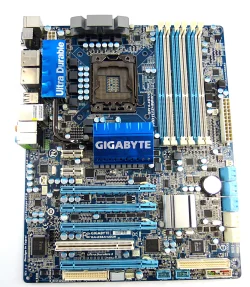
Here's a picture of what is in one of my daughter's PC. She uses standard (tower) air cooling in a push/pull fan configuration and a modest MSI 1050 Ti graphics card. She refuses to upgrade. For her purposes an i7 920 Bloomfield is enough. She runs 24GB of RAM with a CAS latency of 7-7-7. She has multiple drives, multiple OS, and Intel RAID 1.


GIGABYTE X58.webp
 
Last edited:

My Computer My Computer

At a glance

WIN 11, WIN 10, WIN 8.1, WIN 7 U, WIN 7 PRO, ...Intel i7 6900K and i9-7960X / AMD 3800X (8 core)128 GB CORSAIR DOMINATOR PLATINUM (B DIE)NVIDIA 1070 and RTX 3070
OS
WIN 11, WIN 10, WIN 8.1, WIN 7 U, WIN 7 PRO, WIN 7 HOME (32 Bit), LINUX MINT
Computer type
PC/Desktop
Manufacturer/Model
DIY, ASUS, and DELL
CPU
Intel i7 6900K and i9-7960X / AMD 3800X (8 core)
Motherboard
ASUS X99E-WS USB 3.1 and ASUS X299 SAGE
Memory
128 GB CORSAIR DOMINATOR PLATINUM (B DIE)
Graphics Card(s)
NVIDIA 1070 and RTX 3070
Sound Card
Crystal Sound (onboard)
Monitor(s) Displays
single Samsung 30" 4K and 8" aux monitor
Screen Resolution
4K and something equally attrocious. I'll be working on this.
Hard Drives
A, B, C, D, E, F, G, H, I, J, K, L, M, N, O, P, Q, R, S, T, U, V, W

Ports X, Y, and Z are reserved for USB access and removable drives.

Drive types consist of the following: Various mechanical hard drives bearing the brand names, Seagate, Toshiba, and Western Digital. Various NVMe drives bearing the brand names Kingston, Intel, Silicon Power, Crucial, Western Digital, and Team Group. Various SATA SSDs bearing various different brand names.

RAID arrays included:

LSI RAID 10 (WD Velociraptors) 1115.72 GB
LSI RAID 10 (WD SSDS) 463.80 GB

INTEL RAID 0 (KINGSTON HYPER X) System 447.14 GB
INTEL RAID 1 TOSHIBA ENTERPRIZE class Data 2794.52 GB
INTEL RAID 1 SEAGATE HYBRID 931.51 GB
PSU
SEVERAL. I prefer my Corsair Platinum HX1000i but I also like EVGA power supplies
Case
ThermalTake Level 10 GT (among others)
Cooling
Noctua is my favorite and I use it in my main. I also own various other coolers.
Keyboard
all kinds.
Mouse
all kinds
Internet Speed
360 mbps - 1 gbps (depending)
Browser
FIREFOX
Antivirus
KASPERSKY (no apologies)
Other Info
Gave Dell touch screen with Windows 11 to daughter and got me an OTVOC. Being a PC builder I own many desktop PCs as well. I am a father of five providing PCs, laptops, and tablets for all my family, most of which I have modified, rebuilt, or simply built from scratch. I do not own a cell phone, never have, never will.

Latest Support Threads

Back
Top Bottom