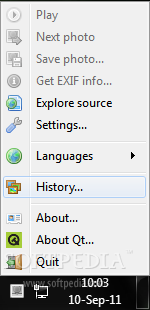
Hi, years ago I started using a program called Wally (ok, maybe not the greatest choice of names, some might say...).

 sourceforge.net
 www.softpedia.com
Now this is old ('ancient') freeware.. but it works really well.
On Win 10 I have it set up to cycle through a set of images I collected long ago that make suitable wallpaper against which icons show clearly.
But on Win 11, I decided to simply install the program, and set it to choose a picture from a couple of online sources it has preconfigured. You can filter these- I chose 'forest'.
I have the program set to launch on logon, change the wallpaper and exit. No overhead thereafter.
The result is a rather lovely fresh forest image every time I log on.
Of course, there are other such wallpaper changers.. I've not looked for one for years, being happy with this one.
Wally
Download Wally for free. Wally is a Qt4 wallpaper / background changer, using multiple sources like files, folders, FTP remote folders, Flickr, Panoramio, Ipernity, Photobucket, Buzznet, Picasa, Smugmug, Google, Vladstudio and deviantART images.
sourceforge.net
Wally - Download
Download Wally 2.4.5 - A Qt4 wallpaper changer, using multiple sources like files, folders, Flickr community
Now this is old ('ancient') freeware.. but it works really well.
On Win 10 I have it set up to cycle through a set of images I collected long ago that make suitable wallpaper against which icons show clearly.
But on Win 11, I decided to simply install the program, and set it to choose a picture from a couple of online sources it has preconfigured. You can filter these- I chose 'forest'.
I have the program set to launch on logon, change the wallpaper and exit. No overhead thereafter.
The result is a rather lovely fresh forest image every time I log on.
Of course, there are other such wallpaper changers.. I've not looked for one for years, being happy with this one.
My Computer
At a glance
Windows 11 Proi7-8650U16GBIntel UHD 620
- OS
- Windows 11 Pro
- Computer type
- Laptop
- Manufacturer/Model
- Lenovo t480s
- CPU
- i7-8650U
- Memory
- 16GB
- Graphics Card(s)
- Intel UHD 620
- Screen Resolution
- 1920x1080
- Hard Drives
- C SN810 SDCPNRY-512G-1006
- Browser
- Edge, Firefox
- Antivirus
- Defender