Solved Question on Task Scheduler entries


Hairy Scot

Well-known member
Member
VIP
Local time
6:52 PM
Posts
90
OS
Windows 11 Pro X64 Version 25H2 (OS Build 26200.80
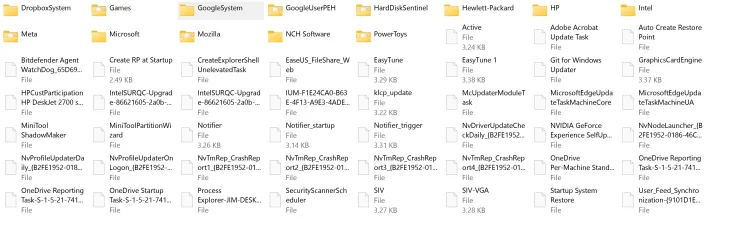
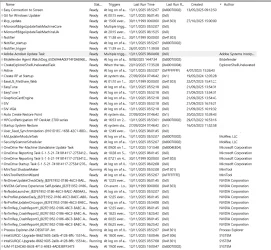
I recently looked into Task Scheduler and saw that there was a host of entries.
TBH I do not have a clue what purpose some of these serve.
Some show no author, and others show authorship by a application that is no longer on the system.
There are one or two that I know do not work.
Is there any risk in removing any of these tasks?

Details are attached.
 
Windows Build/Version
Windows 11 Pro 25H2 (OS Build 26200.7171)

Attachments
  • Taskschd.webp
    Taskschd.webp
    459.7 KB · Views: 3
  • Windows System32 Tasks.webp
    Windows System32 Tasks.webp
    247.3 KB · Views: 2

My Computer

System One

  • OS
    Windows 11 Pro X64 Version 25H2 (OS Build 26200.80
    Computer type
    PC/Desktop
    Manufacturer/Model
    ASUS PN54
    CPU
    AMD Ryzen
    Motherboard
    A. ELM_PN54 (FP8DDR5)
    Memory
    RAM 31.0GB
    Graphics Card(s)
    512MB ATI AMD Radeon 860M Graphics (ASUStek Computer Inc)
    Sound Card
    Realtek High Definition Audio
    Monitor(s) Displays
    DELL U2718Q (3840x2160@60Hz) DELL U2913WM (2560x1080@60Hz)
    Screen Resolution
    3840x2160@60Hz / 2560x1080@60Hz
    Hard Drives
    1863GB Crucial CT2000T500SSD8 SSD
    931GB Crucial CT1000E100SSD8 SSD
you can disable them and make a note of which ones you have disabled
then wait for a few weeks and if no errors or problems have occurred delete them.

that's how i deal with unwanted/unneeded tasks in task scheduler.
best of luck Steve ..
 

My Computers

System One System Two

  • OS
    Debian 13 KDE .. Windows 11 Home
    Computer type
    PC/Desktop
    Manufacturer/Model
    HP 24" AiO
    CPU
    Ryzen 7 5825u
    Motherboard
    HP
    Memory
    64GB DDR4 3200
    Graphics Card(s)
    Ryzen 7 5825u
    Sound Card
    RealTek
    Monitor(s) Displays
    24" HP AiO
    Screen Resolution
    1920 x 1080 @60 Hz
    Hard Drives
    1TB WD Blue SN580 M2 SSD Partitioned.
    2x 1TB USB HDD External Backup/Storage.
    PSU
    90W external power brick
    Case
    24" All in One
    Cooling
    Default Air Cooling
    Keyboard
    HP WiFi UK extended
    Mouse
    HP WiFi 3 Button
    Internet Speed
    1GB full fibre
    Browser
    Edge & Firefox
    Antivirus
    AVG Internet Security/Windows Defender
    Other Info
    Mainly Open Source Software
  • Operating System
    Ubuntu 22.04.5 LTS
    Computer type
    Laptop
    Manufacturer/Model
    Dell 13" Latitude 2017
    CPU
    i5 7200u
    Motherboard
    Dell
    Memory
    16GB DDR4
    Graphics card(s)
    Intel
    Sound Card
    Intel
    Monitor(s) Displays
    13" Dell Laptop
    Hard Drives
    250GB Crucial 2.5" SSD
    Mouse
    Generic WiFi 3 button
    Internet Speed
    WiFi only
    Browser
    Firefox
    Antivirus
    ClamAV TK
    Other Info
    Mainly Open Source Software
you can disable them and make a note of which ones you have disabled
then wait for a few weeks and if no errors or problems have occurred delete them.

that's how i deal with unwanted/unneeded tasks in task scheduler.
best of luck Steve ..
Thanks Steve. (y)
 

My Computer

System One

  • OS
    Windows 11 Pro X64 Version 25H2 (OS Build 26200.80
    Computer type
    PC/Desktop
    Manufacturer/Model
    ASUS PN54
    CPU
    AMD Ryzen
    Motherboard
    A. ELM_PN54 (FP8DDR5)
    Memory
    RAM 31.0GB
    Graphics Card(s)
    512MB ATI AMD Radeon 860M Graphics (ASUStek Computer Inc)
    Sound Card
    Realtek High Definition Audio
    Monitor(s) Displays
    DELL U2718Q (3840x2160@60Hz) DELL U2913WM (2560x1080@60Hz)
    Screen Resolution
    3840x2160@60Hz / 2560x1080@60Hz
    Hard Drives
    1863GB Crucial CT2000T500SSD8 SSD
    931GB Crucial CT1000E100SSD8 SSD
Back
Top Bottom