
Random BSODs and Unexpected Reboots


RodDam

Well-known member
Local time
5:34 AM
Posts
7
OS
Windows 11
Hi everyone,

I'm experiencing random BSODs and occasional unexpected reboots where the system restarts directly without showing a BSOD screen.I have tried keeping everything fully updated, but the issue persists. I'm not sure what is causing these crashes and would really appreciate some help troubleshooting the root cause.

Diagnostic Logs:
LOGS on Google Drive

Laptop Details:1781437148895.webp
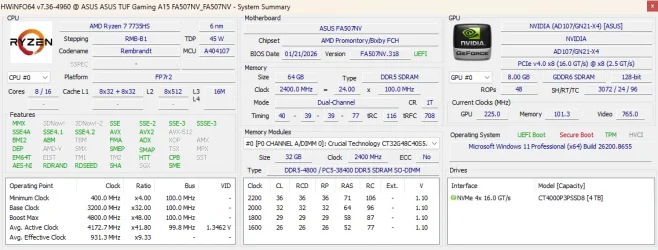
Thank you!
 

My Computer My Computer

At a glance

Windows 11AMD Ryzen 7 7735HS64GB DDR5 (Crucial)AMD Radeon / RTX 4060
OS
Windows 11
Computer type
Laptop
Manufacturer/Model
Asus/FA507NV
CPU
AMD Ryzen 7 7735HS
Memory
64GB DDR5 (Crucial)
Graphics Card(s)
AMD Radeon / RTX 4060
Debugging Details:
------------------

*** WARNING: Unable to verify timestamp for USBPcap.sys
*** WARNING: Unable to verify timestamp for mtkbtfilterx.sys
Uninstall USBPcap.sys driver it caused the last BSoD error.

Also update mtkbtfilterx.sys is a core driver file associated with the MediaTek Bluetooth Adapter. It is often pre-installed on laptops with MediaTek wireless cards, particularly ASUS and Acer systems.
 

My Computer My Computer

At a glance

Windows 11AMD Ryzen 7 5700GMicron Technology DDR4-3200 16GBNVIDIA GeForce RTX 3060
OS
Windows 11
Computer type
PC/Desktop
Manufacturer/Model
HP Pavilion
CPU
AMD Ryzen 7 5700G
Motherboard
Erica6
Memory
Micron Technology DDR4-3200 16GB
Graphics Card(s)
NVIDIA GeForce RTX 3060
Sound Card
Realtek ALC671
Monitor(s) Displays
Samsung SyncMaster U28E590
Screen Resolution
3840 x 2160
Hard Drives
SAMSUNG MZVLQ1T0HALB-000H1
1) How come the new installation is using volume activation


2) Add WMIC:

Administrative command prompt:

Code:
DISM /Online /Add-Capability /CapabilityName:WMIC~~~~


3) Run Tuneup plus >post a share link


4) Enable regback:


5) Create a new restore point:

Create System Restore Point in Windows 10


6) Run Memtest86+ for 8 or more passes > take pictures > post images or share links

Memtest86+ | The Open-Source Memory Testing Tool

Just 1 error is a test fail and testing can be aborted.

The more the passes the better the testing conditions.

It sometimes takes passes into the 20's to detect malfunctioning RAM.

The RAM can be tested all at one time or one at a time in the same DIMM.

Memtest86+ | The Open-Source Memory Testing Tool

MemTest86+ - Test RAM
 

My Computer My Computer

At a glance

Windows 10Intel(R) Core(TM) i7-4800MQ CPU @ 2.70GHz16 GB Total: Manufacturer : Samsung MemoryTyp...NVIDIA Quadro K3100M; Intel(R) HD Graphics 4600
OS
Windows 10
Computer type
Laptop
Manufacturer/Model
HP
CPU
Intel(R) Core(TM) i7-4800MQ CPU @ 2.70GHz
Motherboard
Product : 190A Version : KBC Version 94.56
Memory
16 GB Total: Manufacturer : Samsung MemoryType : DDR3 FormFactor : SODIMM Capacity : 8GB Speed : 1600
Graphics Card(s)
NVIDIA Quadro K3100M; Intel(R) HD Graphics 4600
Sound Card
IDT High Definition Audio CODEC; PNP Device ID HDAUDIO\FUNC_01&VEN_111D&DEV_76E0
Hard Drives
Model Hitachi HTS727575A9E364
Antivirus
Microsoft Defender
Other Info
Mobile Workstation

Latest Support Threads

Back
Top Bottom






