Random USB Connect/Disconnect Sounds + Micro Freezes + Constant Authentication Events (Windows 11)


Just the regular ones (and I connected a new Keyboard and Mouse just to be sure)

I have Keyboard, mouse, speakers. Also I have the wifi antena connected but that's a different connector that comes with the motherboard.

I swaped USB ports just in case, also I had UsbLogView open when the sound happened and I had nothing on the usb ports reconnecting.

Here is what I found in my situation. Let me step through this to make it easy:

I have a USB-C docking station connected to the Dell laptop via USB-C port. Everything works good with the docking station.

When I plug in a USB flash drive in one of the the USB-A ports, that USB drive keeps getting redetected in Windows 11.

If you keep Device Manager open where the USB controllers are expanded, the Device Manger window refreshes whenever the USB redetects.

The USBLogView does not show any differences, and File Explorer opens the USB flash drive.

Also if you have copying/moving files to the USB flash drive while Windows 11 redetects the connected USB drive, the process stops. If you are creating a bootable USB drive using Rufus at this time, the USB drive corrupts with an I/O Error making the USB drive unusable.

Now I remove the USB-C docking station from the Dell laptop. I connect the same USB-A flash drives to the laptop and zero problems. Windows 11 does not redetect anything. The USB drives experiences no problems.

I tested the same 3 USB-A flash drives in another system, zero problems.

When I read Diceman2037 response about the USB redetection, this may be correct:

@Diceman2037 : "Your chipset or iodie voltages are unstable and the usb controller is being dropped and reset."

Windows never has detected nor monitored USB power (Ohms) that would cause the problem I describe. I remember a LONG TIME AGO when USB 2.0 first came out many people experienced problems with older USB 1.0 flash drive in USB 2.0 ports. Anyway, it is possible that the USB device, in my case it would be the USB flash drive, may not be receiving enough persistent power in the USB port(s).

Since I do not know what you have troubleshooted so far including changing any configurations, I would suggest the following:

* Disconnect the USB speakers from the computer.
* Only connect the USB keyboard and mouse for testing purposes.
* When Windows 11 redetects the USB ports, move the mouse to see if the mouse stops. If the mouse briefly stops moving during the redetection, possible the USB mouse is at affected.
* If the mouse is not affected, then test the USB keyboard. Keep pressing the Windows Key for keeping an active process going to see if the Windows start window keeps opening and closing.
* If possible, test the same USB keyboard and mouse on another computer to see if there are any problems. I would expect no problems because this could possibly be a power issue.
Note: make sure the computer's power supply provide more power than needed on the system. Some people that prebuilds system may install a lower powered power supply and upgrading the power supply may be required.
* If there is no USB keyboard or mouse redetection issues on another computer, I would suggest trying a different power supply or replacing the existing power supply with slightly better power supply.

How does this relate to my problems. The USB docking station was not getting enough power from the self-powered USB-C port to keep the USB flash drives powered on. I have two faulty USB docking stations. In your case, it could possibly be a power supply issue.

Note: I'm a Professional person that has been correcting a large variety problems for 35+ years now and I usually do not provide such suggestions because my clients pay me good money. :)
 

My Computer

System One

  • OS
    Windows 11 Pro
    Computer type
    Laptop
    Manufacturer/Model
    Dell 16 Plus DB16255
    CPU
    AMD Ryzen AI 7 350 w/ Radeon 860M 50 TOPS
    Motherboard
    Dell 0PKMHG
    Memory
    32GB LPDDR5X 7500 MT/s
    Graphics Card(s)
    AMD Radeon 860M integrated (shared memory)
    Sound Card
    Stereo speakers (2.5 W x 2 = 5 W total peak)/Realtek SounzReal/Dolby Atmos
    Monitor(s) Displays
    Displays: 16" 1920 x 1200 (Full HD+/WUXGA) 300 nits 60Hz *** Samsung - 27” Odyssey FHD IPS 240Hz G-Sync Gaming Monitor
    Screen Resolution
    1920x1080 @ 60Hz
    Hard Drives
    EG6 KIOXIA 1TB NVME
    Case
    Ice Blue
    Cooling
    "dual-fan" or "enhanced" air-cooling system
    Mouse
    Logitech M650 Wireless/Bluetooth
    Internet Speed
    800/600 Fiber
Any USB devices plugged in to the USB ports on the computer or through a docking station?
Basic Logitech K120 keyboard and basic logitech mouse with scroll wheel.

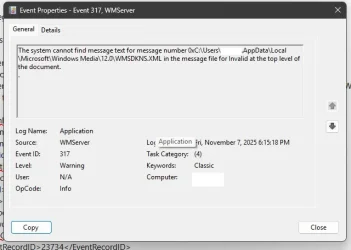
Mine does the exactly same thing.. When I view logs, there's almost always a WMServer with Event ID 317

And google is useless to identify this..

Event.webp
 

My Computer

System One

  • OS
    Windows 11 Home
    Computer type
    PC/Desktop
    CPU
    AMD RYZEN 5 3600
    Motherboard
    ASUS B450M DS3H WIFI
    Memory
    32 Gb 3200MT
    Graphics Card(s)
    GeForce GTX
    Monitor(s) Displays
    YES
    Screen Resolution
    Enough
    Hard Drives
    SAMSUNG 990 PRO SSD 1TB NVMe
    PSU
    YES
    Case
    Thermaltake
    Cooling
    YES
    Keyboard
    Logitech K120
    Mouse
    Logitech
    Internet Speed
    200 Mb/s - 1 Gbs
    Browser
    Firefox
    Antivirus
    Windows Defender
In Terminal [admin ],type in ---dism /online /cleanup-image /restorehealth ---and run it.
When completed,type in ---sfc /scannow ---and run it until a clean report is given.
Then shutdown,power off,for about a minute then restart.
Is the operation back to normal ?
 

My Computer

System One

  • OS
    win 10
    Computer type
    PC/Desktop
    Manufacturer/Model
    home built
    CPU
    amd ryzen 5-2600
    Motherboard
    gigabyte b450m-ds3h
    Memory
    ng skill sniper x 16gb
    Graphics Card(s)
    nvidea gtx 1050
    Monitor(s) Displays
    benq fp 92
    Hard Drives
    samsung 860 evo 500gb m2 ssd
    PSU
    antec ea550g
    Case
    nzxt noctis 450
    Browser
    edge
Basic Logitech K120 keyboard and basic logitech mouse with scroll wheel.

Mine does the exactly same thing.. When I view logs, there's almost always a WMServer with Event ID 317

And google is useless to identify this..

View attachment 151989

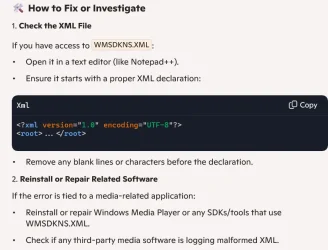
When I used Copilot search:

Copilot search: event viewer error 317 the system cannot find message text for WMSDKNS.XML in the message file for invalid at the top level of the document

the results showed a possible solutions to the XML file error.

1762565833582.webp

Worth a try.
 

My Computer

System One

  • OS
    Windows 11 Pro
    Computer type
    Laptop
    Manufacturer/Model
    Dell 16 Plus DB16255
    CPU
    AMD Ryzen AI 7 350 w/ Radeon 860M 50 TOPS
    Motherboard
    Dell 0PKMHG
    Memory
    32GB LPDDR5X 7500 MT/s
    Graphics Card(s)
    AMD Radeon 860M integrated (shared memory)
    Sound Card
    Stereo speakers (2.5 W x 2 = 5 W total peak)/Realtek SounzReal/Dolby Atmos
    Monitor(s) Displays
    Displays: 16" 1920 x 1200 (Full HD+/WUXGA) 300 nits 60Hz *** Samsung - 27” Odyssey FHD IPS 240Hz G-Sync Gaming Monitor
    Screen Resolution
    1920x1080 @ 60Hz
    Hard Drives
    EG6 KIOXIA 1TB NVME
    Case
    Ice Blue
    Cooling
    "dual-fan" or "enhanced" air-cooling system
    Mouse
    Logitech M650 Wireless/Bluetooth
    Internet Speed
    800/600 Fiber
Here is what I found in my situation. Let me step through this to make it easy:

I have a USB-C docking station connected to the Dell laptop via USB-C port. Everything works good with the docking station.

When I plug in a USB flash drive in one of the the USB-A ports, that USB drive keeps getting redetected in Windows 11.

If you keep Device Manager open where the USB controllers are expanded, the Device Manger window refreshes whenever the USB redetects.

The USBLogView does not show any differences, and File Explorer opens the USB flash drive.

Also if you have copying/moving files to the USB flash drive while Windows 11 redetects the connected USB drive, the process stops. If you are creating a bootable USB drive using Rufus at this time, the USB drive corrupts with an I/O Error making the USB drive unusable.

Now I remove the USB-C docking station from the Dell laptop. I connect the same USB-A flash drives to the laptop and zero problems. Windows 11 does not redetect anything. The USB drives experiences no problems.

I tested the same 3 USB-A flash drives in another system, zero problems.

When I read Diceman2037 response about the USB redetection, this may be correct:

@Diceman2037 : "Your chipset or iodie voltages are unstable and the usb controller is being dropped and reset."

Windows never has detected nor monitored USB power (Ohms) that would cause the problem I describe. I remember a LONG TIME AGO when USB 2.0 first came out many people experienced problems with older USB 1.0 flash drive in USB 2.0 ports. Anyway, it is possible that the USB device, in my case it would be the USB flash drive, may not be receiving enough persistent power in the USB port(s).

Since I do not know what you have troubleshooted so far including changing any configurations, I would suggest the following:

* Disconnect the USB speakers from the computer.
* Only connect the USB keyboard and mouse for testing purposes.
* When Windows 11 redetects the USB ports, move the mouse to see if the mouse stops. If the mouse briefly stops moving during the redetection, possible the USB mouse is at affected.
* If the mouse is not affected, then test the USB keyboard. Keep pressing the Windows Key for keeping an active process going to see if the Windows start window keeps opening and closing.
* If possible, test the same USB keyboard and mouse on another computer to see if there are any problems. I would expect no problems because this could possibly be a power issue.
Note: make sure the computer's power supply provide more power than needed on the system. Some people that prebuilds system may install a lower powered power supply and upgrading the power supply may be required.
* If there is no USB keyboard or mouse redetection issues on another computer, I would suggest trying a different power supply or replacing the existing power supply with slightly better power supply.

How does this relate to my problems. The USB docking station was not getting enough power from the self-powered USB-C port to keep the USB flash drives powered on. I have two faulty USB docking stations. In your case, it could possibly be a power supply issue.

Note: I'm a Professional person that has been correcting a large variety problems for 35+ years now and I usually do not provide such suggestions because my clients pay me good money. :)
Thanks for taking the time to make such a detailed answer.

I'll try to troubleshoot this but I think my PSU being 1000w 80+Platinum should be more than enough for this pc.

I will try this steps and see if I can find the culprit for this problem.

Sometimes I can use the computer 1 or 2 days and everything is fine. Sometimes the sound and small freeze happens when I'm gaming and some other times happens when I'm on the desktop just checking some videos.

Anyways thanks for the help if I have any updates I'll post again.
 

My Computer

System One

  • OS
    Windows 11
    Computer type
    PC/Desktop
    Manufacturer/Model
    Custom PC
    CPU
    AMD Ryzen 7 9800X3D
    Motherboard
    Asus Prime X870 - P Wifi
    Memory
    32GB (2x16GB) 6000MHz
    Graphics Card(s)
    RTX 5070 Ti 16G
    Sound Card
    Integrated in the Motherboard
    Monitor(s) Displays
    ASUS Gamer TUF
    Screen Resolution
    1080p
    Hard Drives
    SSD 2TB NVMe M.2 12800MBs
    PSU
    1000w 80+Platinum
    Case
    Adventurer Pro
    Cooling
    Watercooling 360mm RGB
    Keyboard
    Redragon Mechanical Keyboard
    Mouse
    G203 Logitech
In Terminal [admin ],type in ---dism /online /cleanup-image /restorehealth ---and run it.
When completed,type in ---sfc /scannow ---and run it until a clean report is given.
Then shutdown,power off,for about a minute then restart.
Is the operation back to normal ?
That was some of the first recommendations I got and my system had a few things that had to be fixed. Right now everything is fine with the system files on my computer but the problem is still happening in a really random way.

I'll keep trying to find the real reason for this issue and report my findings asap.
 

My Computer

System One

  • OS
    Windows 11
    Computer type
    PC/Desktop
    Manufacturer/Model
    Custom PC
    CPU
    AMD Ryzen 7 9800X3D
    Motherboard
    Asus Prime X870 - P Wifi
    Memory
    32GB (2x16GB) 6000MHz
    Graphics Card(s)
    RTX 5070 Ti 16G
    Sound Card
    Integrated in the Motherboard
    Monitor(s) Displays
    ASUS Gamer TUF
    Screen Resolution
    1080p
    Hard Drives
    SSD 2TB NVMe M.2 12800MBs
    PSU
    1000w 80+Platinum
    Case
    Adventurer Pro
    Cooling
    Watercooling 360mm RGB
    Keyboard
    Redragon Mechanical Keyboard
    Mouse
    G203 Logitech
Back
Top Bottom