Solved Re installing Microsoft Office 2024 not working


My Computer

System One

  • OS
    Win 11 Pro "25H2" Build 26200.8655, Zorin OS Pro
    Computer type
    PC/Desktop
    Manufacturer/Model
    Self built
    CPU
    Intel® Core™ i7-12700KF 12th Gen.
    Motherboard
    ASUS Prime Z690-A, BIOS v4505
    Memory
    32GB DDR5 5600-36 Vengeance
    Graphics Card(s)
    PCIe4.0 Asus NVIDIA RTX3060Ti
    Sound Card
    Onboard; Realtek
    Monitor(s) Displays
    34" LG 34UC79G-B Curved 21:9 144Hz
    Screen Resolution
    2560x1080 (No HDR)
    Hard Drives
    250Gb Samsung 870PRO NVMe (Win 11 Pro)
    1Tb Samsung 980PRO NVMe
    1Tb Samsung 970EVO NVMe
    2Tb Samsung 990PRO NVMe with heatsink.
    4Tb WDC WD40EZRZ Blue SATA (Int.)
    4Tb WDC WD40EZRZ Blue SATA (Int.)
    3Tb WDC WD30EFRZ Red SATA (Int.)
    256Gb Samsung 840PRO SSD (RHEL 9,5)
    256Gb Samsung 850PRO SSD (Zorin OS Pro 18)
    PSU
    Coolermaster 850W V2 Gold with internal 12cm exaust fan
    Case
    Be-Quiet Pure Base 600.
    Cooling
    3x Be-Quiet! 12/14cm "Silent Wings 4" casefans, 1x Arctic Freezer i35 CPU towerblock with fan.
    Keyboard
    Steelseries APEX 7 keyboard.
    Mouse
    Logitech G-502 Hero
    Internet Speed
    1Gb
    Browser
    Brave
    Antivirus
    F-Secure
    Other Info
    No Noise system.
    256Gb Kingston Travler USB 3.0 drive.
    64Gb Sandisk USB 3.2 drive. (Ventoy)
    8Gb Philips USB 3.0 drive. (Win. Inst.)
    8Gb Philips USB 3.0 drive. (Rescue disk)
    2Tb WD USB 3.0 Passport drive.
    USB Ext. 500Gb WD SATA drive.
    External USB 3.0 C.A. CD/DVD* burner.
I remember a similar case on an old computer running Windows 7, I could not remove all traces of Office in order to reinstall a specific version. I didn't know about Revo Uninstaller or other similar tools back then, so after I made sure no Office application was on the Programs and Features list, I manually deleted any Office folder from Program Files, ProgramData and my use folders. Then I was looking the Registry with any reference to Office applications and manually deleted all keys! It took much time and I am not sure if it was worth it, but I was determined to fix it. I had already spent too much time to give up. So after manually deleting all Registry keys, and restarting, I could finally install the Microsoft Office! Success! I just hope you won't have to go through this trouble, some uninstallers can look for traces, even if the application is uninstalled and remove them.

Here is the link for Microsoft own Office Remover utility:
 

My Computers

System One System Two

  • OS
    Windows 11 Pro 23H2 (5699), 25H2 (8655)
    Computer type
    Laptop
    Manufacturer/Model
    Acer Extensa 5630EZ
    CPU
    Mobile DualCore Intel Core 2 Duo T7250, 2000 MHz
    Motherboard
    Acer Extensa 5630
    Memory
    4GB
    Graphics Card(s)
    Mobile Intel(R) GMA 4500M (Mobile 4 series)
    Sound Card
    Realtek ALC268 @ Intel 82801IB ICH9 - High Definition Audio Controller
    Monitor(s) Displays
    1
    Screen Resolution
    1280x800
    Hard Drives
    Samsung SSD 850 EVO 250GB SATA Device (250 GB, SATA-III)
    Internet Speed
    VDSL 50 Mbps
    Browser
    MICROSOFT EDGE
    Antivirus
    WINDOWS DEFENDER
    Other Info
    Legacy MBR installation, no TPM, no Secure Boot, no WDDM 2.0 graphics drivers, no SSE4.2, cannot get more unsupported ;) This is only my test laptop. I had installed Windows 11 here before upgrading my main PC. For my main PC I use everyday see my 2nd system specs.
  • Operating System
    Windows 11 Pro v25H2 (build 26200.8655)
    Computer type
    PC/Desktop
    Manufacturer/Model
    Custom-built PC
    CPU
    Intel Core-i7 3770 3.40GHz s1155 (3rd generation)
    Motherboard
    Asus P8H61 s1155 ATX
    Memory
    2x Kingston Hyper-X Blu 8GB DDR3-1600
    Graphics card(s)
    GIGABYTE GeForce RTX 3050 WINDFORCE OC V2 6GB (GV-N3050WF2OCV2-6GD)
    Sound Card
    Realtek HD audio (ALC887)
    Monitor(s) Displays
    Sony Bravia KDL-19L4000 19" LCD TV via VGA
    Screen Resolution
    1440x900 32-bit 60Hz
    Hard Drives
    WD Blue SA510 2.5 1000GB SSD as system disk, Western Digital Caviar Purple 4TB SATA III (WD40PURZ) as second
    PSU
    Thermaltake Litepower RGB 550W Full Wired
    Case
    SUPERCASE MIDI-TOWER
    Cooling
    Deepcool Gamma Archer CPU cooler, 1x 8cm fan at the back
    Keyboard
    Mitsumi 101-key PS/2
    Mouse
    Sunnyline OptiEye PS/2
    Internet Speed
    100Mbps
    Browser
    Microsoft Edge, Mozilla Firefox
    Antivirus
    Microsoft Windows Defender
    Other Info
    Legacy BIOS (MBR) installation, no TPM, no Secure Boot, WDDM 3.0 graphics drivers, WEI score 7.4

My Computer

System One

  • OS
    Windows 11 Home. Win Version 23H2
    Computer type
    PC/Desktop
    Manufacturer/Model
    HP
    Hard Drives
    windows C Drive
    D Drive is SSD
    Browser
    Chrome
Don't know how to do that.
Removed any links to office from my apps list before I started. My copy is legal. Codt me a lot!
Only got this problem as I reset my pc.
Can you explain why you don't know how to do that? What seems to be the problem? It is downloading 2 programs and run them. You may have removed any links but it didn't removed the leftovers inside your registry. If there are leftovers from a previous install that could prevent installing Office 2024 to be installed again. The first program is from MS themself. The second program addresses the registry and checks if the first program did it's job.
This exercise is intended to clean your machine like Office 2024 was never previous installed before. Once that is done Office 2024 will install without any problems. (hopefully)
You can download and run SARA also here; Download Microsoft Support and Recovery Assistant 17.00.7513.007 - Free - latest version
SARA stands for MS Support And Recovery Assistant that let's diagnose issues with Office 365 and other Office products. See what it finds.
How to install and how to use it:
 

My Computer

System One

  • OS
    Win 11 Pro "25H2" Build 26200.8655, Zorin OS Pro
    Computer type
    PC/Desktop
    Manufacturer/Model
    Self built
    CPU
    Intel® Core™ i7-12700KF 12th Gen.
    Motherboard
    ASUS Prime Z690-A, BIOS v4505
    Memory
    32GB DDR5 5600-36 Vengeance
    Graphics Card(s)
    PCIe4.0 Asus NVIDIA RTX3060Ti
    Sound Card
    Onboard; Realtek
    Monitor(s) Displays
    34" LG 34UC79G-B Curved 21:9 144Hz
    Screen Resolution
    2560x1080 (No HDR)
    Hard Drives
    250Gb Samsung 870PRO NVMe (Win 11 Pro)
    1Tb Samsung 980PRO NVMe
    1Tb Samsung 970EVO NVMe
    2Tb Samsung 990PRO NVMe with heatsink.
    4Tb WDC WD40EZRZ Blue SATA (Int.)
    4Tb WDC WD40EZRZ Blue SATA (Int.)
    3Tb WDC WD30EFRZ Red SATA (Int.)
    256Gb Samsung 840PRO SSD (RHEL 9,5)
    256Gb Samsung 850PRO SSD (Zorin OS Pro 18)
    PSU
    Coolermaster 850W V2 Gold with internal 12cm exaust fan
    Case
    Be-Quiet Pure Base 600.
    Cooling
    3x Be-Quiet! 12/14cm "Silent Wings 4" casefans, 1x Arctic Freezer i35 CPU towerblock with fan.
    Keyboard
    Steelseries APEX 7 keyboard.
    Mouse
    Logitech G-502 Hero
    Internet Speed
    1Gb
    Browser
    Brave
    Antivirus
    F-Secure
    Other Info
    No Noise system.
    256Gb Kingston Travler USB 3.0 drive.
    64Gb Sandisk USB 3.2 drive. (Ventoy)
    8Gb Philips USB 3.0 drive. (Win. Inst.)
    8Gb Philips USB 3.0 drive. (Rescue disk)
    2Tb WD USB 3.0 Passport drive.
    USB Ext. 500Gb WD SATA drive.
    External USB 3.0 C.A. CD/DVD* burner.

My Computer

System One

  • OS
    Windows 11 Home. Win Version 23H2
    Computer type
    PC/Desktop
    Manufacturer/Model
    HP
    Hard Drives
    windows C Drive
    D Drive is SSD
    Browser
    Chrome
Can you explain why you don't know how to do that? What seems to be the problem? It is downloading 2 programs and run them. You may have removed any links but it didn't removed the leftovers inside your registry. If there are leftovers from a previous install that could prevent installing Office 2024 to be installed again. The first program is from MS themself. The second program addresses the registry and checks if the first program did it's job.
This exercise is intended to clean your machine like Office 2024 was never previous installed before. Once that is done Office 2024 will install without any problems. (hopefully)
You can download and run SARA also here; Download Microsoft Support and Recovery Assistant 17.00.7513.007 - Free - latest version
SARA stands for MS Support And Recovery Assistant that let's diagnose issues with Office 365 and other Office products. See what it finds.
How to install and how to use it:
Ran SARA but it kept freezing so got nowhere
Am really trying, doing everything suggested on the forum but dont undertand why it doesn't work.
Tried again it says my account is not validated. The ony one I have is a hotmail account I installed when I reset the pc
 

My Computer

System One

  • OS
    Windows 11 Home. Win Version 23H2
    Computer type
    PC/Desktop
    Manufacturer/Model
    HP
    Hard Drives
    windows C Drive
    D Drive is SSD
    Browser
    Chrome
So I did everything you all suggested
Still no change but thanks so much
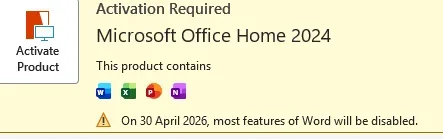
Latest now today when I open word it says I have till April 30th to activate Office 2024!!!

Please think of another way to help Im so frustrated and you have all tried so hard with a person who just uses the computer for simple easy things lol
 

My Computer

System One

  • OS
    Windows 11 Home. Win Version 23H2
    Computer type
    PC/Desktop
    Manufacturer/Model
    HP
    Hard Drives
    windows C Drive
    D Drive is SSD
    Browser
    Chrome
This is what it says!
 

Attachments

  • office.webp
    office.webp
    8.4 KB · Views: 1

My Computer

System One

  • OS
    Windows 11 Home. Win Version 23H2
    Computer type
    PC/Desktop
    Manufacturer/Model
    HP
    Hard Drives
    windows C Drive
    D Drive is SSD
    Browser
    Chrome

My Computers

System One System Two

  • OS
    Windows 11 Pro
    Computer type
    PC/Desktop
    Manufacturer/Model
    ASUS ROG Strix
  • Operating System
    Windows 11 Pro
    Computer type
    Laptop
    Manufacturer/Model
    ASUS VivoBook

My Computer

System One

  • OS
    Windows 11 Home. Win Version 23H2
    Computer type
    PC/Desktop
    Manufacturer/Model
    HP
    Hard Drives
    windows C Drive
    D Drive is SSD
    Browser
    Chrome
Had hoped ccleaner or Sara may have sorted it out. But no luck. Office sits there in my apps but still not activated to work. And I've had so many years of you helping feel very frustrated.
 

My Computer

System One

  • OS
    Windows 11 Home. Win Version 23H2
    Computer type
    PC/Desktop
    Manufacturer/Model
    HP
    Hard Drives
    windows C Drive
    D Drive is SSD
    Browser
    Chrome
Added all the keys but it doesn't like them.
What do you mean by all the keys...?
What do you mean by it doesn't like them...?
Please provide screenshots of every anomaly ensuring you blur out sensitive info!
 

My Computers

System One System Two

  • OS
    Windows 11 Pro
    Computer type
    PC/Desktop
    Manufacturer/Model
    ASUS ROG Strix
  • Operating System
    Windows 11 Pro
    Computer type
    Laptop
    Manufacturer/Model
    ASUS VivoBook
Keys. The long numbers of the offi e installation.
Typed them in the box that came up in word but they were rejected.
 

My Computer

System One

  • OS
    Windows 11 Home. Win Version 23H2
    Computer type
    PC/Desktop
    Manufacturer/Model
    HP
    Hard Drives
    windows C Drive
    D Drive is SSD
    Browser
    Chrome
Typed them in the box that came up in word but they were rejected.
Was there any indication why the key was rejected, eg. Invalid Key, or, That Key has already been used... etc.
Where exactly did you purchase the key? Is there a possibility that you purchased a bum key?
If it is a legit key, did you register the key with your MS account?
 

My Computers

System One System Two

  • OS
    Windows 11 Pro
    Computer type
    PC/Desktop
    Manufacturer/Model
    ASUS ROG Strix
  • Operating System
    Windows 11 Pro
    Computer type
    Laptop
    Manufacturer/Model
    ASUS VivoBook
Was there any indication why the key was rejected, eg. Invalid Key, or, That Key has already been used... etc.
Where exactly did you purchase the key? Is there a possibility that you purchased a bum key?
If it is a legit key, did you register the key with your MS account?
Yes it was a valid key cost me 100 ! Lot of money for me
 

My Computer

System One

  • OS
    Windows 11 Home. Win Version 23H2
    Computer type
    PC/Desktop
    Manufacturer/Model
    HP
    Hard Drives
    windows C Drive
    D Drive is SSD
    Browser
    Chrome

My Computers

System One System Two

  • OS
    Windows 11 Pro
    Computer type
    PC/Desktop
    Manufacturer/Model
    ASUS ROG Strix
  • Operating System
    Windows 11 Pro
    Computer type
    Laptop
    Manufacturer/Model
    ASUS VivoBook
Is the key registered with your MS account?
It doesn't show up in subscriptions. But now shows up in programs. But doesn't do anything. I've tried lots of suggestions in this thread which is great. Getting very confused now had thought it was a simple thing.
 

My Computer

System One

  • OS
    Windows 11 Home. Win Version 23H2
    Computer type
    PC/Desktop
    Manufacturer/Model
    HP
    Hard Drives
    windows C Drive
    D Drive is SSD
    Browser
    Chrome

My Computers

System One System Two

  • OS
    Windows 11 Pro
    Computer type
    PC/Desktop
    Manufacturer/Model
    ASUS ROG Strix
  • Operating System
    Windows 11 Pro
    Computer type
    Laptop
    Manufacturer/Model
    ASUS VivoBook
@polli
If you sign into your Microsoft Account online, and check your Order History..., if the Key you purchased is Completed or Redeemed, you should be good to go...

12954.webp

That's why I asked you where you purchased the Key.
If someone sold you a bum Key, you're screwed.

MS doesn't really give a sh*t what you have installed...

12950.webp

... as long as you sign in with an MS account that holds the Verified Key...

12952.webp
 

My Computers

System One System Two

  • OS
    Windows 11 Pro
    Computer type
    PC/Desktop
    Manufacturer/Model
    ASUS ROG Strix
  • Operating System
    Windows 11 Pro
    Computer type
    Laptop
    Manufacturer/Model
    ASUS VivoBook

My Computers

System One System Two

  • OS
    Windows 11 Pro 23H2 (5699), 25H2 (8655)
    Computer type
    Laptop
    Manufacturer/Model
    Acer Extensa 5630EZ
    CPU
    Mobile DualCore Intel Core 2 Duo T7250, 2000 MHz
    Motherboard
    Acer Extensa 5630
    Memory
    4GB
    Graphics Card(s)
    Mobile Intel(R) GMA 4500M (Mobile 4 series)
    Sound Card
    Realtek ALC268 @ Intel 82801IB ICH9 - High Definition Audio Controller
    Monitor(s) Displays
    1
    Screen Resolution
    1280x800
    Hard Drives
    Samsung SSD 850 EVO 250GB SATA Device (250 GB, SATA-III)
    Internet Speed
    VDSL 50 Mbps
    Browser
    MICROSOFT EDGE
    Antivirus
    WINDOWS DEFENDER
    Other Info
    Legacy MBR installation, no TPM, no Secure Boot, no WDDM 2.0 graphics drivers, no SSE4.2, cannot get more unsupported ;) This is only my test laptop. I had installed Windows 11 here before upgrading my main PC. For my main PC I use everyday see my 2nd system specs.
  • Operating System
    Windows 11 Pro v25H2 (build 26200.8655)
    Computer type
    PC/Desktop
    Manufacturer/Model
    Custom-built PC
    CPU
    Intel Core-i7 3770 3.40GHz s1155 (3rd generation)
    Motherboard
    Asus P8H61 s1155 ATX
    Memory
    2x Kingston Hyper-X Blu 8GB DDR3-1600
    Graphics card(s)
    GIGABYTE GeForce RTX 3050 WINDFORCE OC V2 6GB (GV-N3050WF2OCV2-6GD)
    Sound Card
    Realtek HD audio (ALC887)
    Monitor(s) Displays
    Sony Bravia KDL-19L4000 19" LCD TV via VGA
    Screen Resolution
    1440x900 32-bit 60Hz
    Hard Drives
    WD Blue SA510 2.5 1000GB SSD as system disk, Western Digital Caviar Purple 4TB SATA III (WD40PURZ) as second
    PSU
    Thermaltake Litepower RGB 550W Full Wired
    Case
    SUPERCASE MIDI-TOWER
    Cooling
    Deepcool Gamma Archer CPU cooler, 1x 8cm fan at the back
    Keyboard
    Mitsumi 101-key PS/2
    Mouse
    Sunnyline OptiEye PS/2
    Internet Speed
    100Mbps
    Browser
    Microsoft Edge, Mozilla Firefox
    Antivirus
    Microsoft Windows Defender
    Other Info
    Legacy BIOS (MBR) installation, no TPM, no Secure Boot, WDDM 3.0 graphics drivers, WEI score 7.4

Latest Support Threads

Back
Top Bottom