Recovering Data in portable USB


To the OP: This may not seem helpful at this stage, but if your external drive was a backup, can you not simply re-create it from the 'master' copy of the data?
 

My Computers

System One System Two

  • OS
    W10
    Computer type
    PC/Desktop
    Manufacturer/Model
    Home brew
    CPU
    Ryzen3-2200G
    Motherboard
    GA-A320M-S2H
    Memory
    16 GB Kingston HyperX DDR4
    Graphics Card(s)
    Integrated
    Sound Card
    Integrated
    Monitor(s) Displays
    LG W2246
    Screen Resolution
    1920x1080
    Hard Drives
    Intel 760p 256GB NVMe M.2
    Seagate Barracuda 7200 1TB
    Gash Seagate ST31608
    PSU
    2006-vintage no-name
    Case
    Acer Aspire 2006
    Cooling
    Air (fan-assist)
    Keyboard
    HP SK-2885
    Mouse
    wireless
    Internet Speed
    32 mbps
    Browser
    FF latest
    Antivirus
    MS Defender
  • Operating System
    W10
    Computer type
    Laptop
    Manufacturer/Model
    HP 255 G8
    CPU
    Ryzen 5 3500U
    Memory
    8 GB
    Graphics card(s)
    on-board
    Monitor(s) Displays
    16"
    Screen Resolution
    1920x1080
    Hard Drives
    Samsung SSD 512GB Nvme
    Browser
    FF + Edge
    Antivirus
    MS Defender
@ mngerhold.

It's all my portable apps, exes and unduplicated files/folders I need. Some are unique to various clients. They haven't got copies either. I have to recover this stuff if possible. It's my fault, I was an Idiot in a rush.

@jumanji

I'll wait for your advice. Thanks in advance.
 
Last edited:

My Computer

System One

  • OS
    Windows 11
    Computer type
    Laptop
    Manufacturer/Model
    Dell Inspiron 7737
Update:

I've scanned the disk D:ESD-USB and the lost partition using EaseUS Data Recovery. The files and folders are present and recoverable. It is a 1Tb disk but the scans have found 5.25 TBs of data. I presume most of this are obsolete, out date, superceded folders, files and data that I have deleted in the past and no longer need and was not present in the Folders structure when I accidently refomatted. Is there a way I can Isolate/Filter just the stuff that that was present at the time of the mishap. I haven't got a disk big enough to recover 5.25 TBs and will almost certainly have to purchase the Pro version of Ease DR unless somebody knows another way.

I have not attempted recovery and will wait for advice.
 

My Computer

System One

  • OS
    Windows 11
    Computer type
    Laptop
    Manufacturer/Model
    Dell Inspiron 7737
@Critical Mass

Try GetDataBack. GetDataBack — Data Recovery Software For Crashed Hard Drives . Read through the whole page, read the documentation on how to use it. It is a"Try before you buy" software. Select your faulty disk, do a Level 1 scan. If it does not show your folders and files , do a Level 2 scan then Level 3 and Level 4 Scan. If it shows your files and folders , you can open those and check the file integrity. If you see your desired folders and files and satisfied, you can buy a license (USD 79) and copy the desired folders and files to another disk.

( I have just started work on replicating your HD condition and experimenting. I may take another 10 to 15 days or even longer to analyse and find out whether it is possible to recover data using free software . May succeed, May not succeed, I cannot tell. That is the case with any data recovery project. :-))
 
Last edited:

My Computers

System One System Two

  • OS
    Windows 11 Pro Version:25H2 OS Build: 26200.8655
    Computer type
    PC/Desktop
    Manufacturer/Model
    Beelink Mini PC Model: SEi12
    CPU
    12th Gen Intel core i5-1235U(Alder
    Motherboard
    SEi (manufactured by AZW)
    Memory
    16*2 (32 GB) DDR 4-3200(1600MHz) Crucial Technology
    Graphics Card(s)
    Intel Iris Xe Graphics (Internal)
    Sound Card
    Internal
    Monitor(s) Displays
    BenQ GW2283
    Screen Resolution
    1920*1080
    Hard Drives
    500GB NVME (Kingston SNV2S500G)
    1TB (Crucial CT1000BX500SSD1)
    PSU
    Power Brick 19V-6.32A , 120.08W
    Keyboard
    Dell KB3322Wi (Wireless)
    Mouse
    Dell WM118t (Wireless)
    Internet Speed
    4G/5G
    Browser
    MS Edge, Chrome
    Antivirus
    Malwarebytes Premium - Subscription
  • Operating System
    Windows 11 Home Version 25H2 Build 26200.8655
    Computer type
    PC/Desktop
    Manufacturer/Model
    Dell Inspiron 3280 AIO 22"
    CPU
    Intel Core i3 8145U
    Motherboard
    Dell inc. 027W48
    Memory
    Intel Optane 16GB module + DDR 4 16GB (Optane disabled.)
    Graphics card(s)
    Intel UHD Graphics 620
    Sound Card
    Internal
    Monitor(s) Displays
    Dell Monitor 22"
    Screen Resolution
    1920x1080
    Hard Drives
    Crucial CT1000BX500SSD1 ; 1000,2 GB
    PSU
    Power Brick
    Case
    All-in one
    Keyboard
    Dell Wireless KM636
    Mouse
    Dell Wireless KM 636
    Internet Speed
    4G
    Browser
    Edge, Chrome
    Antivirus
    Malwarebytes
    Other Info
    Upgraded from Windows 10 Home to Windows 11 Home on 28 Oct 2023
Thank you Jumanji I appreciate your time and effort. I was worried initially because I thought I'd lost everything. I'm less worried now as I know it's still on the disk and recoverable depending on time and probably money. Thanks again I await your reply in the future.
 

My Computer

System One

  • OS
    Windows 11
    Computer type
    Laptop
    Manufacturer/Model
    Dell Inspiron 7737
Thank you Jumanji I appreciate your time and effort. I was worried initially because I thought I'd lost everything. I'm less worried now as I know it's still on the disk and recoverable depending on time and probably money. Thanks again I await your reply in the future.

you can try a live Linux USB distro such as Ubuntu
which will boot from the USB stick and will not install anything to your computer.

you can then check if the data is seen then you can transfer the required data to another drive.
i have used this method several times even on drives that Windows and other software cant recovery data.

you just use Rufus to burn Ubuntu to a USB stick and then boot from the USB stick.

Ubuntu download

Rufus from the Microsoft store

best of luck Steve ..
 

My Computers

System One System Two

  • OS
    Debian 13 KDE .. Windows 11 Home
    Computer type
    PC/Desktop
    Manufacturer/Model
    HP 24" AiO
    CPU
    Ryzen 7 5825u
    Motherboard
    HP
    Memory
    64GB DDR4 3200
    Graphics Card(s)
    Ryzen 7 5825u
    Sound Card
    RealTek
    Monitor(s) Displays
    24" HP AiO
    Screen Resolution
    1920 x 1080 @60 Hz
    Hard Drives
    1TB WD Blue SN580 M2 SSD Partitioned.
    2x 1TB USB HDD External Backup/Storage.
    PSU
    90W external power brick
    Case
    24" All in One
    Cooling
    Default Air Cooling
    Keyboard
    HP WiFi UK extended
    Mouse
    HP WiFi 3 Button
    Internet Speed
    1GB full fibre
    Browser
    Edge & Firefox
    Antivirus
    AVG Internet Security/Windows Defender
    Other Info
    Mainly Open Source Software
  • Operating System
    Ubuntu 22.04.5 LTS
    Computer type
    Laptop
    Manufacturer/Model
    Dell 13" Latitude 2017
    CPU
    i5 7200u
    Motherboard
    Dell
    Memory
    16GB DDR4
    Graphics card(s)
    Intel
    Sound Card
    Intel
    Monitor(s) Displays
    13" Dell Laptop
    Hard Drives
    250GB Crucial 2.5" SSD
    Mouse
    Generic WiFi 3 button
    Internet Speed
    WiFi only
    Browser
    Firefox
    Antivirus
    ClamAV TK
    Other Info
    Mainly Open Source Software
Thanks XxXxX. I've never used Ubuntu. I'll treat this method as last resort. At the moment I'm in the process of contacting EaseUS and GetDataBack.
 

My Computer

System One

  • OS
    Windows 11
    Computer type
    Laptop
    Manufacturer/Model
    Dell Inspiron 7737
@ Jumanji

Hi, any news about your research into my problem?
 

My Computer

System One

  • OS
    Windows 11
    Computer type
    Laptop
    Manufacturer/Model
    Dell Inspiron 7737
@ Jumanji

Hi, any news about your research into my problem?
The long story
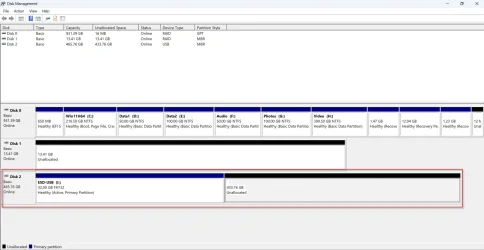
I loaded my 500GB Trial HDD with about 100GB data and then created the ESD USB on it.

Disk2 in Windows Disk Management
10-11-2025 10-56-24.webp

ESD USB in Partition Wizard

10-11-2025 10-58-43.webp

Partition Wizard showed the ESD disk as MBR. TestDisk which I normally use in Data Recovery would identify the ESD disk as GPT. Moreover it would show only the 32GB ESD partition but the Unallocated volume behind was a no-show. So no recovery action could be performed. TestDisk abandoned.

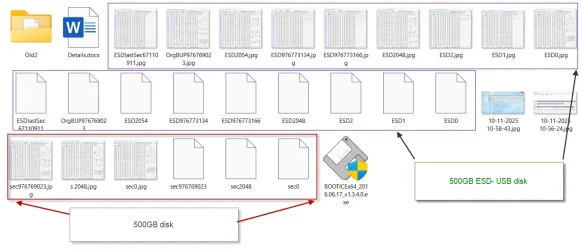
I checked the sectors in the USB ESD Disk using Bootice. While Sector 0 was indeed a normal MBR with the 32GB partition Table in it (not the Protective MBR in a GPT disk which will be the same in all GPT Disks with a 2TB partition table ), the FAT32 ESD USB volume was indeed a GPT with GPT Header in sector 1 and the partition table in Sector 2 with the Volume/Partition Boot Record (VBR/PBR) in sector 2048. Their backups were in the last sector n and n-32 of the disk respectively which in this case are 976773166 and 976773134 . ( By comparison the 500GB MBR disk we started with had its partition table in Sector 0 . the VBR/PBR in sector 2048 and its backup in the last sector of the partition (not the disk) which in the case of 500GB MBR disk is Sector 976169023) ( The partition start sector and the partition end sector of any partition can be ascertained with Parttition Wizard by right clicking on the Partition >Properties> Partition info)

Bootice backed up sectors and sector maps:

25-11-2025 22-41-06.webp I had saved all the relevant sectors and sector maps of the 500GB disk as well as the 500GB ESD USB disk and tried various forensic recovery ideas by manipulatig the various sectors but nothing worked. There is something more to it than what I know :-).
 
Last edited:

My Computers

System One System Two

  • OS
    Windows 11 Pro Version:25H2 OS Build: 26200.8655
    Computer type
    PC/Desktop
    Manufacturer/Model
    Beelink Mini PC Model: SEi12
    CPU
    12th Gen Intel core i5-1235U(Alder
    Motherboard
    SEi (manufactured by AZW)
    Memory
    16*2 (32 GB) DDR 4-3200(1600MHz) Crucial Technology
    Graphics Card(s)
    Intel Iris Xe Graphics (Internal)
    Sound Card
    Internal
    Monitor(s) Displays
    BenQ GW2283
    Screen Resolution
    1920*1080
    Hard Drives
    500GB NVME (Kingston SNV2S500G)
    1TB (Crucial CT1000BX500SSD1)
    PSU
    Power Brick 19V-6.32A , 120.08W
    Keyboard
    Dell KB3322Wi (Wireless)
    Mouse
    Dell WM118t (Wireless)
    Internet Speed
    4G/5G
    Browser
    MS Edge, Chrome
    Antivirus
    Malwarebytes Premium - Subscription
  • Operating System
    Windows 11 Home Version 25H2 Build 26200.8655
    Computer type
    PC/Desktop
    Manufacturer/Model
    Dell Inspiron 3280 AIO 22"
    CPU
    Intel Core i3 8145U
    Motherboard
    Dell inc. 027W48
    Memory
    Intel Optane 16GB module + DDR 4 16GB (Optane disabled.)
    Graphics card(s)
    Intel UHD Graphics 620
    Sound Card
    Internal
    Monitor(s) Displays
    Dell Monitor 22"
    Screen Resolution
    1920x1080
    Hard Drives
    Crucial CT1000BX500SSD1 ; 1000,2 GB
    PSU
    Power Brick
    Case
    All-in one
    Keyboard
    Dell Wireless KM636
    Mouse
    Dell Wireless KM 636
    Internet Speed
    4G
    Browser
    Edge, Chrome
    Antivirus
    Malwarebytes
    Other Info
    Upgraded from Windows 10 Home to Windows 11 Home on 28 Oct 2023
Thank you for your reply Jumanji. I appreciate your time and effort. What do you recommend me to do?
 

My Computer

System One

  • OS
    Windows 11
    Computer type
    Laptop
    Manufacturer/Model
    Dell Inspiron 7737
You have to try some commercial software only. I have not used or bought any commercial data recovery program since I am not a data recovery professional but from a liitle experiment I did with the freeware TestDisk, Disk Drill and EasUS Data Recovery Wizard sometime in the past, I was impressed with EaseUS Data Recovery Wzard for only it could recover a deleted Macrium Image.


But you know in data recovery one size does not fit all. You have to experiment and find it.
 

My Computers

System One System Two

  • OS
    Windows 11 Pro Version:25H2 OS Build: 26200.8655
    Computer type
    PC/Desktop
    Manufacturer/Model
    Beelink Mini PC Model: SEi12
    CPU
    12th Gen Intel core i5-1235U(Alder
    Motherboard
    SEi (manufactured by AZW)
    Memory
    16*2 (32 GB) DDR 4-3200(1600MHz) Crucial Technology
    Graphics Card(s)
    Intel Iris Xe Graphics (Internal)
    Sound Card
    Internal
    Monitor(s) Displays
    BenQ GW2283
    Screen Resolution
    1920*1080
    Hard Drives
    500GB NVME (Kingston SNV2S500G)
    1TB (Crucial CT1000BX500SSD1)
    PSU
    Power Brick 19V-6.32A , 120.08W
    Keyboard
    Dell KB3322Wi (Wireless)
    Mouse
    Dell WM118t (Wireless)
    Internet Speed
    4G/5G
    Browser
    MS Edge, Chrome
    Antivirus
    Malwarebytes Premium - Subscription
  • Operating System
    Windows 11 Home Version 25H2 Build 26200.8655
    Computer type
    PC/Desktop
    Manufacturer/Model
    Dell Inspiron 3280 AIO 22"
    CPU
    Intel Core i3 8145U
    Motherboard
    Dell inc. 027W48
    Memory
    Intel Optane 16GB module + DDR 4 16GB (Optane disabled.)
    Graphics card(s)
    Intel UHD Graphics 620
    Sound Card
    Internal
    Monitor(s) Displays
    Dell Monitor 22"
    Screen Resolution
    1920x1080
    Hard Drives
    Crucial CT1000BX500SSD1 ; 1000,2 GB
    PSU
    Power Brick
    Case
    All-in one
    Keyboard
    Dell Wireless KM636
    Mouse
    Dell Wireless KM 636
    Internet Speed
    4G
    Browser
    Edge, Chrome
    Antivirus
    Malwarebytes
    Other Info
    Upgraded from Windows 10 Home to Windows 11 Home on 28 Oct 2023

Latest Support Threads

Back
Top Bottom