Solved Recovery drive and restore point


Asus S5606

Member
Member
Local time
4:19 AM
Posts
55
OS
Windows 11 home ver 25H2 Build 26200.7840
Dear experts,
I have done a recovery drive Using an USB of 128 GB formated NTFS, and once finished, , file explorer, properties, indicates for the USB: format FAT32, used space 16 GB, free space 32 GB.
But it is a 128 GB USB?
Is this normal?
I have also done a restore point, including system files, and it only takes 7 GB, is this normal?

Thanks
 

My Computer My Computer

At a glance

Windows 11 home ver 25H2 Build 26200.7840Ultra 7 155H16 RAMArc 8 cores
OS
Windows 11 home ver 25H2 Build 26200.7840
Computer type
Laptop
Manufacturer/Model
Asus S5606MA MX095W
CPU
Ultra 7 155H
Motherboard
S5606MA
Memory
16 RAM
Graphics Card(s)
Arc 8 cores
Monitor(s) Displays
Oled
Screen Resolution
3200 x 2000
Hard Drives
1, 1 Tera
Keyboard
FR- BE
Internet Speed
6E
Browser
FF
Antivirus
Windows security
Other Info
HDMI 2.1, 2 USB A 3.2, 2 Thunderbol 4 (1 of them used for power supply)
You may have bought a fake usb stick?


My Computers My Computers

  • At a glance

    Windows 11 ProAMD Ryzen 9 8945HS32GB DDR5 SO-DIMMIntegrated AMD Radeon 780M (4.00 GHz)
    OS
    Windows 11 Pro
    Computer type
    PC/Desktop
    Manufacturer/Model
    GMKtec K11
    CPU
    AMD Ryzen 9 8945HS
    Memory
    32GB DDR5 SO-DIMM
    Graphics Card(s)
    Integrated AMD Radeon 780M (4.00 GHz)
    Monitor(s) Displays
    Benq 2250HM
    Screen Resolution
    1920 x 1080
    Hard Drives
    1 TB PCIe 4.0 NVMe M.2 SSD
    Antivirus
    Bit Defender Total Security
  • At a glance

    Windows 11 HomeIntel® Core™ Ultra 7 - 255H processor16 GB LPDDR5 SDRAMIntel Arc 140T onboard graphics
    Operating System
    Windows 11 Home
    Computer type
    Laptop
    Manufacturer/Model
    ASUS Zenbook 14 OLED 14" Laptop - UX3405CA-QL192W
    CPU
    Intel® Core™ Ultra 7 - 255H processor
    Memory
    16 GB LPDDR5 SDRAM
    Graphics card(s)
    Intel Arc 140T onboard graphics
    Screen Resolution
    1920 x 1200 (16:10 WUXGA resolution) OLED Touchscreen
    Hard Drives
    1TB SSD
    Antivirus
    Bit Defender Total Security
Are you sure it says
... USB: format FAT32, used space 16 GB, free space 32 GB.
But it is a 128 GB USB?
Are you sure it says 'free space' is 32, not 'capacity'? If so, what does 'capacity' show? More likely it shows 32GB capacity, as that is a Windows formatting limit.
 

My Computers My Computers

  • At a glance

    W10Ryzen3-2200G16 GB Kingston HyperX DDR4Integrated
    OS
    W10
    Computer type
    PC/Desktop
    Manufacturer/Model
    Home brew
    CPU
    Ryzen3-2200G
    Motherboard
    GA-A320M-S2H
    Memory
    16 GB Kingston HyperX DDR4
    Graphics Card(s)
    Integrated
    Sound Card
    Integrated
    Monitor(s) Displays
    LG W2246
    Screen Resolution
    1920x1080
    Hard Drives
    Intel 760p 256GB NVMe M.2
    Seagate Barracuda 7200 1TB
    Gash Seagate ST31608
    PSU
    2006-vintage no-name
    Case
    Acer Aspire 2006
    Cooling
    Air (fan-assist)
    Keyboard
    HP SK-2885
    Mouse
    wireless
    Internet Speed
    32 mbps
    Browser
    FF latest
    Antivirus
    MS Defender
  • At a glance

    W10Ryzen 5 3500U8 GBon-board
    Operating System
    W10
    Computer type
    Laptop
    Manufacturer/Model
    HP 255 G8
    CPU
    Ryzen 5 3500U
    Memory
    8 GB
    Graphics card(s)
    on-board
    Monitor(s) Displays
    16"
    Screen Resolution
    1920x1080
    Hard Drives
    Samsung SSD 512GB Nvme
    Browser
    FF + Edge
    Antivirus
    MS Defender
Yes I meant used space 16 GB, free space 16 GB, total space 32 GB
Why this difference between capacity of USB, 128 GB, and capacity indicated, 32 GB?
Why the recovery tools changges th format from NTFS to the old FAT32?
A restore point , including system files, of just 7 GB is not too small?
 

My Computer My Computer

At a glance

Windows 11 home ver 25H2 Build 26200.7840Ultra 7 155H16 RAMArc 8 cores
OS
Windows 11 home ver 25H2 Build 26200.7840
Computer type
Laptop
Manufacturer/Model
Asus S5606MA MX095W
CPU
Ultra 7 155H
Motherboard
S5606MA
Memory
16 RAM
Graphics Card(s)
Arc 8 cores
Monitor(s) Displays
Oled
Screen Resolution
3200 x 2000
Hard Drives
1, 1 Tera
Keyboard
FR- BE
Internet Speed
6E
Browser
FF
Antivirus
Windows security
Other Info
HDMI 2.1, 2 USB A 3.2, 2 Thunderbol 4 (1 of them used for power supply)
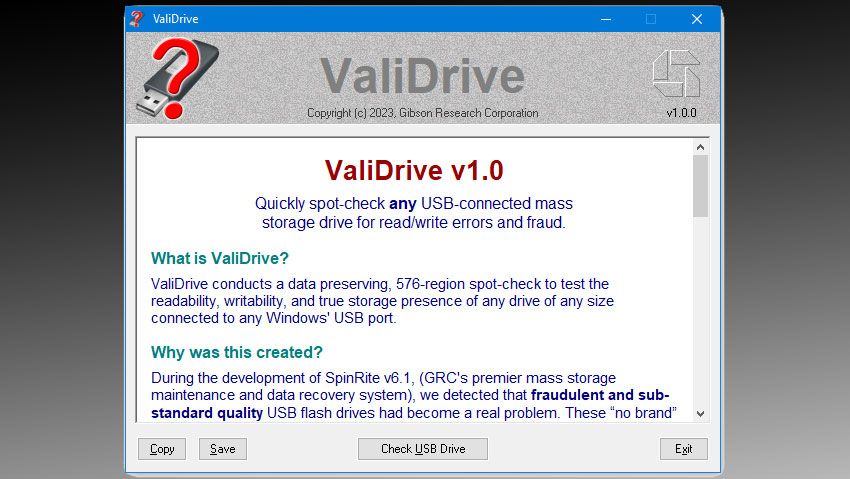
FAT32 file system cannot have a partition larger than 32GB. You need to format the flash drive NTFS to get the full capacity
Why the recovery tools changges th format from NTFS to the old FAT32?
What Recovery Tool did you use?
 

My Computer My Computer

At a glance

Windows 11 Pro Insider 64 bit 25H2 26200.5742Intel Core i7 9700K 3.6016 GBnVidia GEForce RTX 2060 Super
OS
Windows 11 Pro Insider 64 bit 25H2 26200.5742
Computer type
PC/Desktop
Manufacturer/Model
Gigabyte Z390 UD
CPU
Intel Core i7 9700K 3.60
Motherboard
Gigabyte Z390 UD
Memory
16 GB
Graphics Card(s)
nVidia GEForce RTX 2060 Super
Sound Card
onboard
Monitor(s) Displays
Two 27" Dell 4K monitors
Screen Resolution
3840 x 2160
Hard Drives
M.2 NVME SSD, 500 GB; Two 2TB Mechanical HDD's
PSU
850w PSU
Case
Cyberpower PC
Cooling
Water cooled
Keyboard
Backlit Cyberpower gaming keyboard
Mouse
Backlit Cyberpower gaming mouse
Internet Speed
1 GB mbps
Browser
Brave
Antivirus
Windows Security
When bought, USB sticks are usually FAT32 up to 32 GB, and exFAT greater than 32 GB, so your 128 GB drive would have been exFAT originally probably.

Making a Windows Recovery drive will partition and format the drive to it's own requirements. I forget what that would be on a 128 GB drive.

You need to Re-format the drive to exFAT or NTFS.
 

My Computer My Computer

At a glance

Windows 11
OS
Windows 11
Maybe you can try extending the 32GB partition with MiniTool or similar app. Doing a Recovery Drive is costly in time, I'd try cloning it to other pendrive (you can use imaging or partition managing apps), test the clone, extend the partition, test it, add new contents, test it. Idk how much picky is this Drive.

---------------------------------------

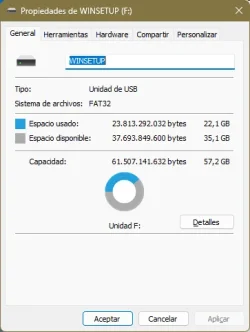
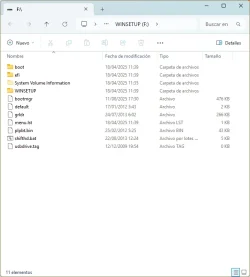
If it doesn't work there're several utilities (possibly the most popular is Ventoy, I use WinSetupFromUSB myself) to combine several boot disks in one USB stick (I combine the Windows 11 Recovery Drive and several Macrium Rescue Disks), but they can also be used to leverage the pendrive disk space. When booting from this media I'm displayed a list to choose from, where I've named each item myself. If there's only one item to choose from, I suppose you get a one item list and just pressing Enter boots it, but I've never done that.

Doing a media like this isn't super-easy. For example I use ImgBurn to do the needed iso file from the Recovery Drive done by Windows 11. My process is as follows:

- Do the Recovery Drive in a 64 GB stick.
- Do the iso file from it.
- "Format" the same USB stick for use with WinSetupFromUSB (Idk the mechanics of Ventoy if you prefer it; using "the same" stick is just for economy, you can use another if you prefer).
- Add the Recovery Drive iso.
- Add the other isos if you have more.

wsProperties.webpwsDir.webp

You can use the free space for more contents provided you leave alone the tool and disk(s) files. You may use additional folders to avoid accidentally overwriting files, but it isn't mandatory.
 

My Computer My Computer

At a glance

Windows 11Celeron J4125 (10th gen)8GB DDR4
OS
Windows 11
Manufacturer/Model
MeLE Quieter 2Q (fanless miniPC)
CPU
Celeron J4125 (10th gen)
Memory
8GB DDR4
Monitor(s) Displays
Samsung SyncMaster T260
Screen Resolution
1920x1200
Hard Drives
256GB eMMC (Windows)
2TB USB3 HDD Toshiba (Data)
Ok, so windows recovery disk always reformats usb to FAT32?
and a restore point, including system files, that only takes 7 GB, is normal?
 

My Computer My Computer

At a glance

Windows 11 home ver 25H2 Build 26200.7840Ultra 7 155H16 RAMArc 8 cores
OS
Windows 11 home ver 25H2 Build 26200.7840
Computer type
Laptop
Manufacturer/Model
Asus S5606MA MX095W
CPU
Ultra 7 155H
Motherboard
S5606MA
Memory
16 RAM
Graphics Card(s)
Arc 8 cores
Monitor(s) Displays
Oled
Screen Resolution
3200 x 2000
Hard Drives
1, 1 Tera
Keyboard
FR- BE
Internet Speed
6E
Browser
FF
Antivirus
Windows security
Other Info
HDMI 2.1, 2 USB A 3.2, 2 Thunderbol 4 (1 of them used for power supply)
and a restore point, including system files, that only takes 7 GB, is normal?
Quite possibly - I started SR the other day, and the first RP it created is only ~2GB. It is not storing (ie copying) the whole system, merely keeping track of subsequent changes. This is best explained here, where the commenter writes "A restore point is a snapshot. A snapshot is conceptually the system at a point in time, but it doesn't actually copy the entire system at that time. It means that future disk writes need to copy the previous contents of the disk, so that the original version is available. What this means is the space used for a restore point starts at zero, and grows as more changes are made to the system..."
 

My Computers My Computers

  • At a glance

    W10Ryzen3-2200G16 GB Kingston HyperX DDR4Integrated
    OS
    W10
    Computer type
    PC/Desktop
    Manufacturer/Model
    Home brew
    CPU
    Ryzen3-2200G
    Motherboard
    GA-A320M-S2H
    Memory
    16 GB Kingston HyperX DDR4
    Graphics Card(s)
    Integrated
    Sound Card
    Integrated
    Monitor(s) Displays
    LG W2246
    Screen Resolution
    1920x1080
    Hard Drives
    Intel 760p 256GB NVMe M.2
    Seagate Barracuda 7200 1TB
    Gash Seagate ST31608
    PSU
    2006-vintage no-name
    Case
    Acer Aspire 2006
    Cooling
    Air (fan-assist)
    Keyboard
    HP SK-2885
    Mouse
    wireless
    Internet Speed
    32 mbps
    Browser
    FF latest
    Antivirus
    MS Defender
  • At a glance

    W10Ryzen 5 3500U8 GBon-board
    Operating System
    W10
    Computer type
    Laptop
    Manufacturer/Model
    HP 255 G8
    CPU
    Ryzen 5 3500U
    Memory
    8 GB
    Graphics card(s)
    on-board
    Monitor(s) Displays
    16"
    Screen Resolution
    1920x1080
    Hard Drives
    Samsung SSD 512GB Nvme
    Browser
    FF + Edge
    Antivirus
    MS Defender

Latest Support Threads

Back
Top Bottom