I reverted the Terabyte USB to test this.I'm looking for users who haven't touched their USB recovery drives yet.
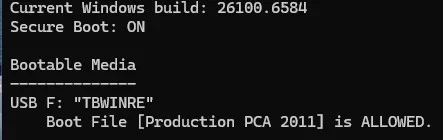
Result:
My Computer
At a glance
Windows 11 Pro
- OS
- Windows 11 Pro

Follow along with the video below to see how to install our site as a web app on your home screen.
Note: This feature may not be available in some browsers.
I reverted the Terabyte USB to test this.I'm looking for users who haven't touched their USB recovery drives yet.

As long as you build the rescue media from Windows' own WinRe image, yes — it's updated along with the OS itself. As soon as your machine's firmware, repeat, firmware, confusingly but commonly called "BIOS", is updated with the one containing new certs, you may safely rebuild the RM. On the other hand, I can't tell if a WinPE image option will work — I simply never even tried to build from it. I vaguely recall that there was a way to build the media using the Microsoft's PE Kit, you don't have to use the PE binaries that come with Reflect. But that may not be the case, as this option may have been pulled off, or I may be simply confabulating, no memory is perfect. I remember that I skimmed the documentation, but mentally filed this part under "it doesn't apply to me". But WinRe is the default and usual, the most convenient option. I don't even understand why one would use the WinPE option instead, but I still have to warn you, technically.Once the Microsoft UEFI CA 2011 certificate is revoked and put in the DBX and I need to update Reflects boot media, as I understand it one just creates new media through the Reflect application, right?
This shows how much your data is worth to you: exactly zero. I'm not excluding the possibility that your security is also worth nothing to you. It may or may not be the case, despite your question indirectly implying otherwise. We all make mistakes. I once lost over £12,000 to a RAID double-failure because I was worried about the data but not enough worried: I was, as I believed back then, thinking that I was too busy to set up a backup properly; that in case of a drive failure, I would just shut down the server and wouldn't turn in back on until I would hold a replacement drive in my hand; that I could afford a couple of days of its downtime; that blah-blah-blah… Then the hardware died and took both drives to the other side with it. Because I wasn't, in reality, thinking.I'm running the free version (I'm not going to pay the subscription fee)

It's been awhile since the last time I made a Macrium boot disk or added a new Macrium entry on my boot menu so I may be wrong. Doesn't Macrium check for a new WinRE and give you the option to use it?As long as you build the rescue media from Windows' own WinRe image, yes
Updated boot files may be acquired thru several methods:As long as you build the rescue media from Windows' own WinRe image, yes — it's updated along with the OS itself. As soon as your machine's firmware, repeat, firmware, confusingly but commonly called "BIOS", is updated with the one containing new certs, you may safely rebuild the RM. On the other hand, I can't tell if a WinPE image option will work — I simply never even tried to build from it. I vaguely recall that there was a way to build the media using the Microsoft's PE Kit, you don't have to use the PE binaries that come with Reflect. But that may not be the case, as this option may have been pulled off, or I may be simply confabulating, no memory is perfect. I remember that I skimmed the documentation, but mentally filed this part under "it doesn't apply to me". But WinRe is the default and usual, the most convenient option. I don't even understand why one would use the WinPE option instead, but I still have to warn you, technically.
Yes, and this is absolutely the default! Always read the Macrium release notes: they mention if the rescue image needs to be rebuilt (you read release notes, right? RIGHT???It's been awhile since the last time I made a Macrium boot disk or added a new Macrium entry on my boot menu so I may be wrong. Doesn't Macrium check for a new WinRE and give you the option to use it?
 ) Do it if they say: most likely, important bugs are fixed when they mention it. It's not that the old RM won't see "new format" backups, the format is always backwards-compatible, the reason is usually the bugs potentially affecting reliability.
Absolutely! But the OP maybe… possibly… I dunno, also wants to boot it. This is why you upgrade the firmware first, and update the media next.Updated boot files may be acquired thru several methods:
1. Windows ISO that has been updated with the latest CU, and by running Make2023BootableMedia.ps1 (or the equivalent actions).
2. From the Windows ADK January 2024, which includes the same EFI boot files.
3. From a live system which has been updated with the latest CU.
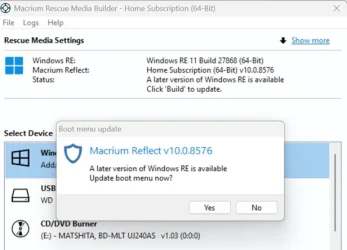
Thanks for the reply! As it turns out, you and Macrium both answered my question. I started Macrium and clicked on create rescue media. This is what popped up.Yes, and this is absolutely the default!

The Re as it is maintained by the update stack is guaranteed to be bootable on the machine it came from, but it has no official Wi-Fi support.
Much thanks for the correction SIW2, that's good to know! My statement was based on W11's RE as it was a few years ago (I upgraded as soon as my W10 was offered the upgrade); MS must have added it since then. Perhaps this help Macrium to use fewer hacks when creating the RM.WinRe.wim does have wifi support already included.
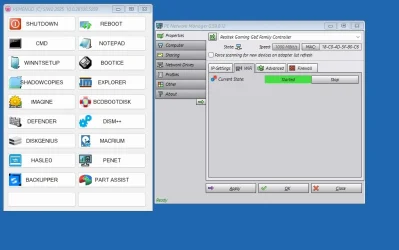
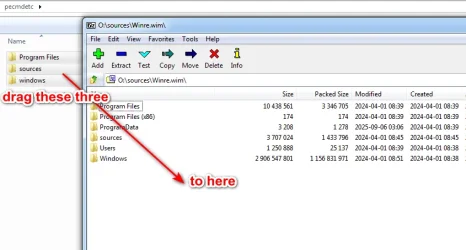
I do a very simple media which just shoves a few programs and a menu into winre.wim using wimlib so it is very quick and no need to mount.
can use winpeshl.ini or winreconfig.xml or both to launch the menu then select whatever program/function from the menu.
what is this network manager
What did you use to create the menu
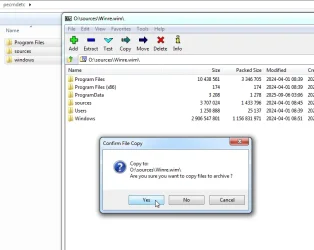
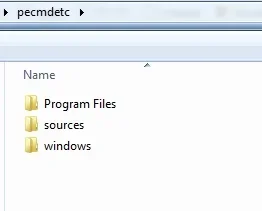
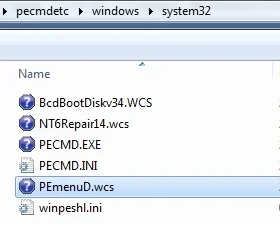
Thanks a lot, mate, I'll have a look at these programs!It is penetwork. … [and] pecmd.
also is useful if you put explorerframe.dll in system32








