Solved Reflect Boot Media After UEFI CA 2011 Revocation


Once the Microsoft UEFI CA 2011 certificate is revoked and put in the DBX and I need to update Reflects boot media, as I understand it one just creates new media through the Reflect application, right?
As long as you build the rescue media from Windows' own WinRe image, yes — it's updated along with the OS itself. As soon as your machine's firmware, repeat, firmware, confusingly but commonly called "BIOS", is updated with the one containing new certs, you may safely rebuild the RM. On the other hand, I can't tell if a WinPE image option will work — I simply never even tried to build from it. I vaguely recall that there was a way to build the media using the Microsoft's PE Kit, you don't have to use the PE binaries that come with Reflect. But that may not be the case, as this option may have been pulled off, or I may be simply confabulating, no memory is perfect. I remember that I skimmed the documentation, but mentally filed this part under "it doesn't apply to me". But WinRe is the default and usual, the most convenient option. I don't even understand why one would use the WinPE option instead, but I still have to warn you, technically.

Be aware that Microsoft may or may not be able to send you a permanent update, and likely can't unless you have enough of telemetry enabled. The best option is to get your update from the mobo manufacturer. ASUS have released updates in July-August already, so an update may be, and even likely to be available already if your hardware is not EOL. If you rely on the generic update from Microsoft, which only stores the new certs in the UEFI NVRAM, then you'll lose the certs stored in NVRAM if you ever turn off Secure Boot, perform a "BIOS reset", or replace the battery (or possibly for other reasons which I can't think of right now). In this case, you won't be able to turn Secure Boot back on after the UEFI 2011 cert would have expired and/or would have been entered into the dbx until you reinstall the update — and you do want it revoked, you can't rely on the on-board RTC for your security, so don't think that an expired cert is safe to have hanging around unrevoked in the db until the end of times. The firmware update is the only possible permanent fix.

Microsoft attempts to deliver manufacturer's updates to private (non-enterprise) customers for your convenience only, but they in principle can only if they know the brand name and model number, or, in some cases, even the serial number: some manufacturers, I won't call them out, but this includes major ones, are sloppy and don't designate changed hardware with the changed model number. If you at all can, get the update from the manufacturer's site.

I ought to write a long-winded message because

I'm running the free version (I'm not going to pay the subscription fee)
This shows how much your data is worth to you: exactly zero. I'm not excluding the possibility that your security is also worth nothing to you. It may or may not be the case, despite your question indirectly implying otherwise. We all make mistakes. I once lost over £12,000 to a RAID double-failure because I was worried about the data but not enough worried: I was, as I believed back then, thinking that I was too busy to set up a backup properly; that in case of a drive failure, I would just shut down the server and wouldn't turn in back on until I would hold a replacement drive in my hand; that I could afford a couple of days of its downtime; that blah-blah-blah… Then the hardware died and took both drives to the other side with it. Because I wasn't, in reality, thinking.

You're making a mistake. I understand that you're following your philosophical, theosophical, aesthetic, moral or whatever principles, but never skip a reality check once in a while: are you still ready to pay up in full for upholding your principles when rubbish hits the fan, being fully aware that it may be a lot, many, many times more than you "think" if you didn't, in fact, thought it through? Thought as in dedicated a significant time to the research and deliberate reasoning about your possible outcomes in the dangerous gamble, and are reasonably, with a cold head, confident that you have enumerated said outcomes exhaustively, — or maybe it's the time to re-balance the sheet.

Unfortunately, the classical "black swan" events follow, according to the best of the game theory we could only develop, the exponential distribution, which is scale-free. There are only two extremal cases in which you're guaranteed to beat the odds over an arbitrarily long time: when you assign exactly zero value to your data, or when you assign infinite value to following your principles. In either case, you don't even need backup: it only loses you time and effort, decreasing your guaranteed winning. If your data is worthless, you lose value when you back it up. If the principles that prevent you from purchasing functional backup software have infinite value, you have an equivalent of the Pascal's wager: whether you lose the data or not is irrelevant, you're still winning. Turning back to the real reality, either conclusion is nonsensical from the practical point of view. This is why I can confidently say that you make a mistake in your reasoning.
 

My Computers

System One System Two

  • OS
    Windows 11 26100.6584 or later, release channel
    Computer type
    Laptop
    Manufacturer/Model
    HP Spectre x360, 2023 model, customized.
    CPU
    i7 13th gen
    Motherboard
    OEM
    Memory
    64GB
    Graphics Card(s)
    Iris Xe on Soc + NVIDIA 4050, on-board
    Sound Card
    OEM on-board: Realtek HD; ext. USB: Scarlett Solo Gen. 4 by FocusRite Audio Eng. Ltd., UK.
    Monitor(s) Displays
    OEM 16" 4k OLED panel w/touch and pen
    Screen Resolution
    3840×2400
    Hard Drives
    Western Digital NVMe 2TB
    PSU
    OEM
    Case
    OEM
    Cooling
    OEM
    Keyboard
    OEM
    Mouse
    OEM touchpad, Synaptic; Ergo Trackball by Logi, Bluetooth
    Internet Speed
    Cable, 300/20 Mbps
    Browser
    Firefox (beta channel), MS Edge (prod channel)
    Antivirus
    Windows Defender
    Other Info
    NVIDIA mostly reserved for CUDA development; preferred graphic is the Xe.
  • Operating System
    Windows 11 26100.6584 or later, release channel
    Computer type
    PC/Desktop
    Manufacturer/Model
    Quiet PC Ltd., UK. Bespoke.
    CPU
    Intel i7 12th gen
    Motherboard
    ASUS Prime Z-690D P4
    Memory
    128 GB
    Graphics card(s)
    Intel Xe on-Soc + Palit NVIDIA 3070 Ti @ PCIe x16
    Sound Card
    Realtek, on-board; Volt 476P by UA, Inc. (for music production); monitors Klipsch R-51PM on Realtek fiber
    Monitor(s) Displays
    Dell UltraSharp 32 8K, UP3218K
    Screen Resolution
    7680×4320
    Hard Drives
    NVMe Samsung SSD 980 PRO 1TB (SoC x4 PCIe)
    2× NVMe Samsung SSD 980 EVO Plus 2TB (PCH x4 PCIe each)
    PSU
    800W, +35% headroom to requrements.
    Case
    be Quiet! Pure Base 500 Midi tower
    Cooling
    Noctua CPU cooler and case fans, to TDP/airflow spec
    Keyboard
    Code black keys/white case bespoke by WASD Inc., genuine Cherry Clears silent tactile 55/95g silent, added bottom-out dampers @3.5mm
    Mouse
    Ergo Trackball by Logi, Bluetooth
    Internet Speed
    Cable, 300/20 Mbps
    Browser
    Firefox, MS Edge
    Antivirus
    Windows Defender
    Other Info
    Power protection/back-up: Eaton 5S1500LCD UPS
    Main workstation.
    Also runs a Debian Hyper-V VM, required for xplat work.
    NVIDIA GPU is shared between display and CUDA development/computation.
    Add-on PCIe cards:
    * TP-Link BE7200 Wi-Fi 7 802.11be, 2.4/5/6 GHz 2×2 tri-band
    * ASUS Thunderbolt EX 4
As long as you build the rescue media from Windows' own WinRe image, yes
It's been awhile since the last time I made a Macrium boot disk or added a new Macrium entry on my boot menu so I may be wrong. Doesn't Macrium check for a new WinRE and give you the option to use it?
 

My Computers

System One System Two

  • OS
    Windows 11 Pro 25H2
    Computer type
    PC/Desktop
    Manufacturer/Model
    PowerSpec B746
    CPU
    Intel Core i7-10700K
    Motherboard
    ASRock Z490 Phantom Gaming 4/ax
    Memory
    16GB (8GB PC4-19200 DDR4 SDRAM x2)
    Graphics Card(s)
    NVIDIA GeForce GTX 1050 TI
    Sound Card
    Realtek Audio
    Monitor(s) Displays
    #1. LG ULTRAWIDE 34" #2. AOC Q32G2WG3 32"
    Screen Resolution
    #1. 3440 X 1440 #2. 1920 x 1080
    Hard Drives
    NVMe WDC WDS100T2B0C-00PXH0 1TB
    Samsung SSD 860 EVO 1TB
    PSU
    750 Watts (62.5A)
    Case
    PowerSpec/Lian Li ATX 205
    Keyboard
    Logitech K270
    Mouse
    Logitech M185
    Browser
    Microsoft Edge and Firefox
    Antivirus
    Webroot SecureAnywhere CE 26.1
  • Operating System
    Windows 11 Canary Channel
    Computer type
    PC/Desktop
    Manufacturer/Model
    PowerSpec G156
    CPU
    Intel Core i5-8400 CPU @ 2.80GHz
    Motherboard
    AsusTeK Prime B360M-A
    Memory
    16 MB DDR 4-2666
    Monitor(s) Displays
    23" Speptre HDMI 75Hz
    Screen Resolution
    1920x1080
    Hard Drives
    Samsung 970 EVO 500GB NVMe
    Keyboard
    Logitek K270
    Mouse
    Logitek M185
    Browser
    Firefox, Edge and Edge Canary
    Antivirus
    Windows Defender
As long as you build the rescue media from Windows' own WinRe image, yes — it's updated along with the OS itself. As soon as your machine's firmware, repeat, firmware, confusingly but commonly called "BIOS", is updated with the one containing new certs, you may safely rebuild the RM. On the other hand, I can't tell if a WinPE image option will work — I simply never even tried to build from it. I vaguely recall that there was a way to build the media using the Microsoft's PE Kit, you don't have to use the PE binaries that come with Reflect. But that may not be the case, as this option may have been pulled off, or I may be simply confabulating, no memory is perfect. I remember that I skimmed the documentation, but mentally filed this part under "it doesn't apply to me". But WinRe is the default and usual, the most convenient option. I don't even understand why one would use the WinPE option instead, but I still have to warn you, technically.
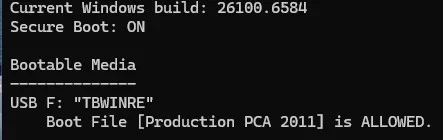
Updated boot files may be acquired thru several methods:

1. Windows ISO that has been updated with the latest CU, and by running Make2023BootableMedia.ps1 (or the equivalent actions).
2. From the Windows ADK January 2024, which includes the same EFI boot files.
3. From a live system which has been updated with the latest CU.
 

My Computer

System One

  • OS
    Windows 7
It's been awhile since the last time I made a Macrium boot disk or added a new Macrium entry on my boot menu so I may be wrong. Doesn't Macrium check for a new WinRE and give you the option to use it?
Yes, and this is absolutely the default! Always read the Macrium release notes: they mention if the rescue image needs to be rebuilt (you read release notes, right? RIGHT??? 😜) Do it if they say: most likely, important bugs are fixed when they mention it. It's not that the old RM won't see "new format" backups, the format is always backwards-compatible, the reason is usually the bugs potentially affecting reliability.
I, again vaguely, recall that a PE-based image has its limitation. I think that the reason the WinPE option exists at all may be either that it was the only one before they found a way to tweak a WinRe-based image, or maybe it is an enterprise thing.

The Re as it is maintained by the update stack is guaranteed to be bootable on the machine it came from, but it has no official Wi-Fi support. Macrium somehow stuff drivers and network stack into the already built image.

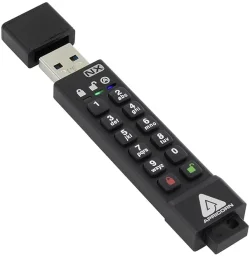
WinPE is a collection of modules to build a little Windows for kiosks and IoT, often w/o even a writeable filesystem. It has Wi-Fi support, also not very streamlined; the whole kit it's for specialists whose dedicated job is building FLASH or other small images for IoT and stuff, so it's full of terms I don't even understand. Microsoft has training programs for people on this job. WinPE is built without any starting image, from the ground up, by combining the base payload modules which come with the Microsoft PE Kit (the full desktop Windows is assembled from similar payloads, too, from MS' internal "kit"). With WinRe, you may use DISM to transfer whole payloads from the "big" system, and I believe that's how they modify it. Your only options are Wi-Fi or no Wi-Fi, BitLocker or no BitLocker, put auto-unlock keys and Wi-Fi profiles. Both are extremely sensitive, so better use the thing below. And I do mean Apricorn or other FIPS-140-2.3 certified drive (trust the NIST FIPS database, not Amazon's seller words!). Not the £10 "fingerprint to unlock" no-name "security" drive from the country that shall not be named. 4GB is already an overkill, the MD needs just over 1G.

1758294159960.webp

Windows uses the same underlying image modification methodology as that is used for Windows upgrades: they add/replace payloads, the predefined units of system functionality, only the bottommost update stack driver is different (it modifies the WIM image volume, not the live system NTFS volume). The required subset of OEM customisations is applied to the Re image at the time of Windows Update, so it's always current for noth MS and OEM purposes. You can find yours in C:\Windows\Recovery, just unhide it (remove the Hidden and System attributes from the directory, in Admin console prompt using ATTRIB, and enable "hidden operating system files (not recommended)" in Explorer's View option.) You can even mount the .wim file it from an Admin command line (reagent.exe or DISM.exe) and examine it, except it's mounted not to a drive but to an empty existing folder, as a type of the junction point. Make a copy or mount it R/O to avoid a fat-finger accident. Always unmount when done. The rest of the Recovery folder are OEM's scripts, if any, common in notebooks/tablets, that are re-applied after updates to finalise customisation. This is exactly that small Windows that boots for recovery if Windows becomes damaged or even unbootable, or while boots between performing large updates, including boot component updates, e.g. the kernel. You might have noticed double reboots during some updates; the first boot into Re can be identified by different font and the message at the bottom of the screen.
 

My Computers

System One System Two

  • OS
    Windows 11 26100.6584 or later, release channel
    Computer type
    Laptop
    Manufacturer/Model
    HP Spectre x360, 2023 model, customized.
    CPU
    i7 13th gen
    Motherboard
    OEM
    Memory
    64GB
    Graphics Card(s)
    Iris Xe on Soc + NVIDIA 4050, on-board
    Sound Card
    OEM on-board: Realtek HD; ext. USB: Scarlett Solo Gen. 4 by FocusRite Audio Eng. Ltd., UK.
    Monitor(s) Displays
    OEM 16" 4k OLED panel w/touch and pen
    Screen Resolution
    3840×2400
    Hard Drives
    Western Digital NVMe 2TB
    PSU
    OEM
    Case
    OEM
    Cooling
    OEM
    Keyboard
    OEM
    Mouse
    OEM touchpad, Synaptic; Ergo Trackball by Logi, Bluetooth
    Internet Speed
    Cable, 300/20 Mbps
    Browser
    Firefox (beta channel), MS Edge (prod channel)
    Antivirus
    Windows Defender
    Other Info
    NVIDIA mostly reserved for CUDA development; preferred graphic is the Xe.
  • Operating System
    Windows 11 26100.6584 or later, release channel
    Computer type
    PC/Desktop
    Manufacturer/Model
    Quiet PC Ltd., UK. Bespoke.
    CPU
    Intel i7 12th gen
    Motherboard
    ASUS Prime Z-690D P4
    Memory
    128 GB
    Graphics card(s)
    Intel Xe on-Soc + Palit NVIDIA 3070 Ti @ PCIe x16
    Sound Card
    Realtek, on-board; Volt 476P by UA, Inc. (for music production); monitors Klipsch R-51PM on Realtek fiber
    Monitor(s) Displays
    Dell UltraSharp 32 8K, UP3218K
    Screen Resolution
    7680×4320
    Hard Drives
    NVMe Samsung SSD 980 PRO 1TB (SoC x4 PCIe)
    2× NVMe Samsung SSD 980 EVO Plus 2TB (PCH x4 PCIe each)
    PSU
    800W, +35% headroom to requrements.
    Case
    be Quiet! Pure Base 500 Midi tower
    Cooling
    Noctua CPU cooler and case fans, to TDP/airflow spec
    Keyboard
    Code black keys/white case bespoke by WASD Inc., genuine Cherry Clears silent tactile 55/95g silent, added bottom-out dampers @3.5mm
    Mouse
    Ergo Trackball by Logi, Bluetooth
    Internet Speed
    Cable, 300/20 Mbps
    Browser
    Firefox, MS Edge
    Antivirus
    Windows Defender
    Other Info
    Power protection/back-up: Eaton 5S1500LCD UPS
    Main workstation.
    Also runs a Debian Hyper-V VM, required for xplat work.
    NVIDIA GPU is shared between display and CUDA development/computation.
    Add-on PCIe cards:
    * TP-Link BE7200 Wi-Fi 7 802.11be, 2.4/5/6 GHz 2×2 tri-band
    * ASUS Thunderbolt EX 4
Updated boot files may be acquired thru several methods:

1. Windows ISO that has been updated with the latest CU, and by running Make2023BootableMedia.ps1 (or the equivalent actions).
2. From the Windows ADK January 2024, which includes the same EFI boot files.
3. From a live system which has been updated with the latest CU.
Absolutely! But the OP maybe… possibly… I dunno, also wants to boot it. This is why you upgrade the firmware first, and update the media next.
 

My Computers

System One System Two

  • OS
    Windows 11 26100.6584 or later, release channel
    Computer type
    Laptop
    Manufacturer/Model
    HP Spectre x360, 2023 model, customized.
    CPU
    i7 13th gen
    Motherboard
    OEM
    Memory
    64GB
    Graphics Card(s)
    Iris Xe on Soc + NVIDIA 4050, on-board
    Sound Card
    OEM on-board: Realtek HD; ext. USB: Scarlett Solo Gen. 4 by FocusRite Audio Eng. Ltd., UK.
    Monitor(s) Displays
    OEM 16" 4k OLED panel w/touch and pen
    Screen Resolution
    3840×2400
    Hard Drives
    Western Digital NVMe 2TB
    PSU
    OEM
    Case
    OEM
    Cooling
    OEM
    Keyboard
    OEM
    Mouse
    OEM touchpad, Synaptic; Ergo Trackball by Logi, Bluetooth
    Internet Speed
    Cable, 300/20 Mbps
    Browser
    Firefox (beta channel), MS Edge (prod channel)
    Antivirus
    Windows Defender
    Other Info
    NVIDIA mostly reserved for CUDA development; preferred graphic is the Xe.
  • Operating System
    Windows 11 26100.6584 or later, release channel
    Computer type
    PC/Desktop
    Manufacturer/Model
    Quiet PC Ltd., UK. Bespoke.
    CPU
    Intel i7 12th gen
    Motherboard
    ASUS Prime Z-690D P4
    Memory
    128 GB
    Graphics card(s)
    Intel Xe on-Soc + Palit NVIDIA 3070 Ti @ PCIe x16
    Sound Card
    Realtek, on-board; Volt 476P by UA, Inc. (for music production); monitors Klipsch R-51PM on Realtek fiber
    Monitor(s) Displays
    Dell UltraSharp 32 8K, UP3218K
    Screen Resolution
    7680×4320
    Hard Drives
    NVMe Samsung SSD 980 PRO 1TB (SoC x4 PCIe)
    2× NVMe Samsung SSD 980 EVO Plus 2TB (PCH x4 PCIe each)
    PSU
    800W, +35% headroom to requrements.
    Case
    be Quiet! Pure Base 500 Midi tower
    Cooling
    Noctua CPU cooler and case fans, to TDP/airflow spec
    Keyboard
    Code black keys/white case bespoke by WASD Inc., genuine Cherry Clears silent tactile 55/95g silent, added bottom-out dampers @3.5mm
    Mouse
    Ergo Trackball by Logi, Bluetooth
    Internet Speed
    Cable, 300/20 Mbps
    Browser
    Firefox, MS Edge
    Antivirus
    Windows Defender
    Other Info
    Power protection/back-up: Eaton 5S1500LCD UPS
    Main workstation.
    Also runs a Debian Hyper-V VM, required for xplat work.
    NVIDIA GPU is shared between display and CUDA development/computation.
    Add-on PCIe cards:
    * TP-Link BE7200 Wi-Fi 7 802.11be, 2.4/5/6 GHz 2×2 tri-band
    * ASUS Thunderbolt EX 4
Yes, and this is absolutely the default!
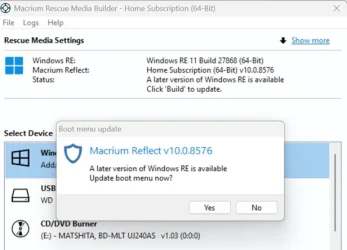
Thanks for the reply! As it turns out, you and Macrium both answered my question. I started Macrium and clicked on create rescue media. This is what popped up.

Macrium Rescue.webp
 

My Computers

System One System Two

  • OS
    Windows 11 Pro 25H2
    Computer type
    PC/Desktop
    Manufacturer/Model
    PowerSpec B746
    CPU
    Intel Core i7-10700K
    Motherboard
    ASRock Z490 Phantom Gaming 4/ax
    Memory
    16GB (8GB PC4-19200 DDR4 SDRAM x2)
    Graphics Card(s)
    NVIDIA GeForce GTX 1050 TI
    Sound Card
    Realtek Audio
    Monitor(s) Displays
    #1. LG ULTRAWIDE 34" #2. AOC Q32G2WG3 32"
    Screen Resolution
    #1. 3440 X 1440 #2. 1920 x 1080
    Hard Drives
    NVMe WDC WDS100T2B0C-00PXH0 1TB
    Samsung SSD 860 EVO 1TB
    PSU
    750 Watts (62.5A)
    Case
    PowerSpec/Lian Li ATX 205
    Keyboard
    Logitech K270
    Mouse
    Logitech M185
    Browser
    Microsoft Edge and Firefox
    Antivirus
    Webroot SecureAnywhere CE 26.1
  • Operating System
    Windows 11 Canary Channel
    Computer type
    PC/Desktop
    Manufacturer/Model
    PowerSpec G156
    CPU
    Intel Core i5-8400 CPU @ 2.80GHz
    Motherboard
    AsusTeK Prime B360M-A
    Memory
    16 MB DDR 4-2666
    Monitor(s) Displays
    23" Speptre HDMI 75Hz
    Screen Resolution
    1920x1080
    Hard Drives
    Samsung 970 EVO 500GB NVMe
    Keyboard
    Logitek K270
    Mouse
    Logitek M185
    Browser
    Firefox, Edge and Edge Canary
    Antivirus
    Windows Defender
The Re as it is maintained by the update stack is guaranteed to be bootable on the machine it came from, but it has no official Wi-Fi support.

WinRe.wim does have wifi support already included.

I do a very simple media which just shoves a few programs and a menu into winre.wim using wimlib so it is very quick and no need to mount.

can use winpeshl.ini or winreconfig.xml or both to launch the menu then select whatever program/function from the menu.

penet.webp
 
Last edited:

My Computers

System One System Two

  • OS
    Win7,Win11
    Computer type
    PC/Desktop
    CPU
    i7-9700
    Motherboard
    gigabyte b365m ds3h
    Memory
    2x16gb 3600mhz
    Monitor(s) Displays
    benq gw2480
    PSU
    bequiet pure power 11 400CM
    Cooling
    cryorig m9i
  • Operating System
    win7,win11
    Computer type
    PC/Desktop
    CPU
    i5-8400
    Motherboard
    gigabyte b365m ds3h
    Memory
    2x8gb 3200
    PSU
    xfx pro 450
WinRe.wim does have wifi support already included.
I do a very simple media which just shoves a few programs and a menu into winre.wim using wimlib so it is very quick and no need to mount.
can use winpeshl.ini or winreconfig.xml or both to launch the menu then select whatever program/function from the menu.
Much thanks for the correction SIW2, that's good to know! My statement was based on W11's RE as it was a few years ago (I upgraded as soon as my W10 was offered the upgrade); MS must have added it since then. Perhaps this help Macrium to use fewer hacks when creating the RM.

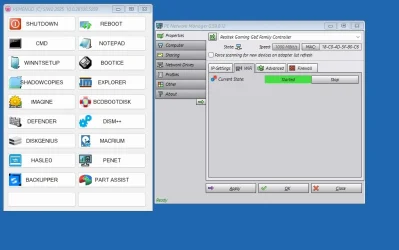
If you don't mind my question, what are these programs on your screen? What did you use to create the menu on the left, and what is this network manager on the right? I would indeed throw in a couple of such useful tool as the network manager into my RM.
And maybe you know — you seem to have played a lot with this stuff — is it at all possible to add clink to a WinRe-based image? The advanced command line is what I'm missing perhaps the most.
 

My Computers

System One System Two

  • OS
    Windows 11 26100.6584 or later, release channel
    Computer type
    Laptop
    Manufacturer/Model
    HP Spectre x360, 2023 model, customized.
    CPU
    i7 13th gen
    Motherboard
    OEM
    Memory
    64GB
    Graphics Card(s)
    Iris Xe on Soc + NVIDIA 4050, on-board
    Sound Card
    OEM on-board: Realtek HD; ext. USB: Scarlett Solo Gen. 4 by FocusRite Audio Eng. Ltd., UK.
    Monitor(s) Displays
    OEM 16" 4k OLED panel w/touch and pen
    Screen Resolution
    3840×2400
    Hard Drives
    Western Digital NVMe 2TB
    PSU
    OEM
    Case
    OEM
    Cooling
    OEM
    Keyboard
    OEM
    Mouse
    OEM touchpad, Synaptic; Ergo Trackball by Logi, Bluetooth
    Internet Speed
    Cable, 300/20 Mbps
    Browser
    Firefox (beta channel), MS Edge (prod channel)
    Antivirus
    Windows Defender
    Other Info
    NVIDIA mostly reserved for CUDA development; preferred graphic is the Xe.
  • Operating System
    Windows 11 26100.6584 or later, release channel
    Computer type
    PC/Desktop
    Manufacturer/Model
    Quiet PC Ltd., UK. Bespoke.
    CPU
    Intel i7 12th gen
    Motherboard
    ASUS Prime Z-690D P4
    Memory
    128 GB
    Graphics card(s)
    Intel Xe on-Soc + Palit NVIDIA 3070 Ti @ PCIe x16
    Sound Card
    Realtek, on-board; Volt 476P by UA, Inc. (for music production); monitors Klipsch R-51PM on Realtek fiber
    Monitor(s) Displays
    Dell UltraSharp 32 8K, UP3218K
    Screen Resolution
    7680×4320
    Hard Drives
    NVMe Samsung SSD 980 PRO 1TB (SoC x4 PCIe)
    2× NVMe Samsung SSD 980 EVO Plus 2TB (PCH x4 PCIe each)
    PSU
    800W, +35% headroom to requrements.
    Case
    be Quiet! Pure Base 500 Midi tower
    Cooling
    Noctua CPU cooler and case fans, to TDP/airflow spec
    Keyboard
    Code black keys/white case bespoke by WASD Inc., genuine Cherry Clears silent tactile 55/95g silent, added bottom-out dampers @3.5mm
    Mouse
    Ergo Trackball by Logi, Bluetooth
    Internet Speed
    Cable, 300/20 Mbps
    Browser
    Firefox, MS Edge
    Antivirus
    Windows Defender
    Other Info
    Power protection/back-up: Eaton 5S1500LCD UPS
    Main workstation.
    Also runs a Debian Hyper-V VM, required for xplat work.
    NVIDIA GPU is shared between display and CUDA development/computation.
    Add-on PCIe cards:
    * TP-Link BE7200 Wi-Fi 7 802.11be, 2.4/5/6 GHz 2×2 tri-band
    * ASUS Thunderbolt EX 4
what is this network manager

It is penetwork. Holger's PE Network Manager

Penetwork also comes included with hasleo backup

What did you use to create the menu

pecmd. I can only manage simple batch files and a bit of pecmd scripting. People who can do proper programming can probably make a menu from autoit or purebasic or whatever

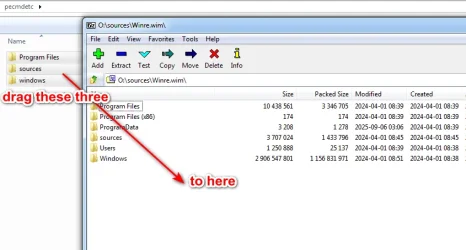
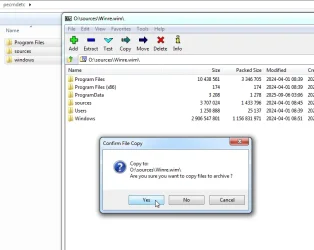
a simple way is to open winre.wim with 7-zip, then just drag them in

drag-to-7-zip.webp


Then OK

drag-to-7-zip2.webp


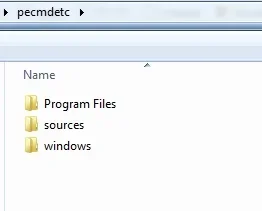
Only included justmanager in program files in the attached zip. You can add your own and adjust the pemenu if needed.

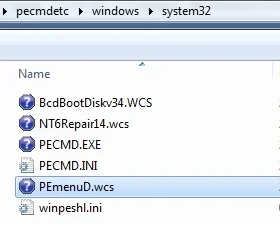
pecmetc.webp

can edit pemenud.wcs with notepad to add/remove your own programs on the menu

also is useful if you put explorerframe.dll in system32

pemenud1.webp
 

Attachments

Last edited:

My Computers

System One System Two

  • OS
    Win7,Win11
    Computer type
    PC/Desktop
    CPU
    i7-9700
    Motherboard
    gigabyte b365m ds3h
    Memory
    2x16gb 3600mhz
    Monitor(s) Displays
    benq gw2480
    PSU
    bequiet pure power 11 400CM
    Cooling
    cryorig m9i
  • Operating System
    win7,win11
    Computer type
    PC/Desktop
    CPU
    i5-8400
    Motherboard
    gigabyte b365m ds3h
    Memory
    2x8gb 3200
    PSU
    xfx pro 450
It is penetwork. … [and] pecmd.

also is useful if you put explorerframe.dll in system32
Thanks a lot, mate, I'll have a look at these programs!
 

My Computers

System One System Two

  • OS
    Windows 11 26100.6584 or later, release channel
    Computer type
    Laptop
    Manufacturer/Model
    HP Spectre x360, 2023 model, customized.
    CPU
    i7 13th gen
    Motherboard
    OEM
    Memory
    64GB
    Graphics Card(s)
    Iris Xe on Soc + NVIDIA 4050, on-board
    Sound Card
    OEM on-board: Realtek HD; ext. USB: Scarlett Solo Gen. 4 by FocusRite Audio Eng. Ltd., UK.
    Monitor(s) Displays
    OEM 16" 4k OLED panel w/touch and pen
    Screen Resolution
    3840×2400
    Hard Drives
    Western Digital NVMe 2TB
    PSU
    OEM
    Case
    OEM
    Cooling
    OEM
    Keyboard
    OEM
    Mouse
    OEM touchpad, Synaptic; Ergo Trackball by Logi, Bluetooth
    Internet Speed
    Cable, 300/20 Mbps
    Browser
    Firefox (beta channel), MS Edge (prod channel)
    Antivirus
    Windows Defender
    Other Info
    NVIDIA mostly reserved for CUDA development; preferred graphic is the Xe.
  • Operating System
    Windows 11 26100.6584 or later, release channel
    Computer type
    PC/Desktop
    Manufacturer/Model
    Quiet PC Ltd., UK. Bespoke.
    CPU
    Intel i7 12th gen
    Motherboard
    ASUS Prime Z-690D P4
    Memory
    128 GB
    Graphics card(s)
    Intel Xe on-Soc + Palit NVIDIA 3070 Ti @ PCIe x16
    Sound Card
    Realtek, on-board; Volt 476P by UA, Inc. (for music production); monitors Klipsch R-51PM on Realtek fiber
    Monitor(s) Displays
    Dell UltraSharp 32 8K, UP3218K
    Screen Resolution
    7680×4320
    Hard Drives
    NVMe Samsung SSD 980 PRO 1TB (SoC x4 PCIe)
    2× NVMe Samsung SSD 980 EVO Plus 2TB (PCH x4 PCIe each)
    PSU
    800W, +35% headroom to requrements.
    Case
    be Quiet! Pure Base 500 Midi tower
    Cooling
    Noctua CPU cooler and case fans, to TDP/airflow spec
    Keyboard
    Code black keys/white case bespoke by WASD Inc., genuine Cherry Clears silent tactile 55/95g silent, added bottom-out dampers @3.5mm
    Mouse
    Ergo Trackball by Logi, Bluetooth
    Internet Speed
    Cable, 300/20 Mbps
    Browser
    Firefox, MS Edge
    Antivirus
    Windows Defender
    Other Info
    Power protection/back-up: Eaton 5S1500LCD UPS
    Main workstation.
    Also runs a Debian Hyper-V VM, required for xplat work.
    NVIDIA GPU is shared between display and CUDA development/computation.
    Add-on PCIe cards:
    * TP-Link BE7200 Wi-Fi 7 802.11be, 2.4/5/6 GHz 2×2 tri-band
    * ASUS Thunderbolt EX 4

Latest Support Threads

Back
Top Bottom