Remove "Add a Network Location" Context Menu?!


Feuer

Fatal Error
Power User
VIP
Local time
7:54 AM
Posts
313
Location
Türkiye
OS
Windows 11 25H2 Home Single Language (26200.8037)
Is there a way to remove "Add a Network Location" from Computer Context Menu?
I dont use that fuction of Windows 11 so I want to remove it.
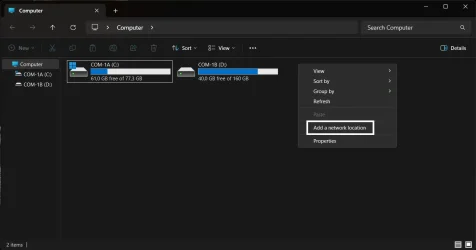

Computer Context Menu - Add a Network Location.webp
 

My Computer My Computer

At a glance

Windows 11 25H2 Home Single Language (26200.8...Intel Core i3-1115G48GBon-board
OS
Windows 11 25H2 Home Single Language (26200.8037)
Computer type
Laptop
Manufacturer/Model
LENOVO IdeaPad 5 15ITL05
CPU
Intel Core i3-1115G4
Motherboard
There is no such a God, I only know mother-Earth
Memory
8GB
Graphics Card(s)
on-board
Sound Card
on-board
Monitor(s) Displays
(s) is too ambitious for me
Screen Resolution
1920*1080
Hard Drives
256GB (SSD)
PSU
I was very young when I last saw a PSU
Case
...
Cooling
My coldness is enough to cool the computer
Keyboard
A broken and very clean keyboard
Mouse
Rat
Internet Speed
Slowest internet connection in Europe
Browser
ChromePortable / FirefoxPortable / TorBrowser
Antivirus
G-Virus
Other Info
I can simply say that I took the red pill and I am not happy with it.
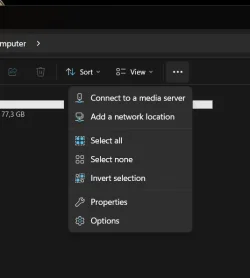
On my computer "add a network location" is NOT part of the context menu. It is part of the "more options" menu (3dots) in file explorer.

I reviewed a list of your threads. You haven't asked for my opinion but I'm going to give it anyway. I caution you to understand the difference in "tweaking" and "butchering". We all use proven SAFE methods to "tweak" but some of the things you want to do fall way over the line into "butchering" the core functionality of the OS.
 

My Computers My Computers

  • At a glance

    Windows 11 Pro 25H2 26200.8655i9-10900 10 core 20 threads32 gbnone-Intel UHD Graphics 630
    OS
    Windows 11 Pro 25H2 26200.8655
    Computer type
    PC/Desktop
    Manufacturer/Model
    Dell Optiplex 7080
    CPU
    i9-10900 10 core 20 threads
    Motherboard
    DELL 0J37VM
    Memory
    32 gb
    Graphics Card(s)
    none-Intel UHD Graphics 630
    Sound Card
    Integrated Realtek
    Monitor(s) Displays
    Benq 27
    Screen Resolution
    2560x1440
    Hard Drives
    2x1tb Solidigm m.2 nvme /External drives 512gb Samsung m.2 sata+2tb Kingston m2.nvme
    PSU
    500w
    Case
    MT
    Cooling
    Dell Premium
    Keyboard
    Logitech wired
    Mouse
    Logitech wireless
    Internet Speed
    so slow I'm too embarrassed to tell
    Browser
    #1 Edge #2 Firefox
    Antivirus
    Defender+MWB Premium
  • At a glance

    Windows 11 Pro 24H2 26200.8457AMD Ryzen 7 6800U32 gbintegrated
    Operating System
    Windows 11 Pro 24H2 26200.8457
    Computer type
    PC/Desktop
    Manufacturer/Model
    Beelink Mini PC SER5
    CPU
    AMD Ryzen 7 6800U
    Memory
    32 gb
    Graphics card(s)
    integrated
    Sound Card
    integrated
    Monitor(s) Displays
    Benq 27
    Screen Resolution
    2560x1440
    Hard Drives
    1TB Crucial nvme
    Keyboard
    Logitech wired
    Mouse
    Logitech wireless
    Internet Speed
    still too embarrassed to tell
    Browser
    Firefox
    Antivirus
    Defender
    Other Info
    System 3 is non compliant Dell 9020 i7-4770/24gb ram Win11 PRO 26200.8457
Hi, have you seen this tutorial by Brink? Seems relevant..


My Computer My Computer

At a glance

Windows 11 Proi7-8650U16GBIntel UHD 620
OS
Windows 11 Pro
Computer type
Laptop
Manufacturer/Model
Lenovo t480s
CPU
i7-8650U
Memory
16GB
Graphics Card(s)
Intel UHD 620
Screen Resolution
1920x1080
Hard Drives
C SN810 SDCPNRY-512G-1006
Browser
Edge, Firefox
Antivirus
Defender
On my computer "add a network location" is NOT part of the context menu. It is part of the "more options" menu (3dots) in file explorer.

I reviewed a list of your threads. You haven't asked for my opinion but I'm going to give it anyway. I caution you to understand the difference in "tweaking" and "butchering". We all use proven SAFE methods to "tweak" but some of the things you want to do fall way over the line into "butchering" the core functionality of the OS.

Hello @glasskuter , thanks for the reply.

- I like the term "butchering" really. :love:

- I ask opinions of anyone.

- It is classic context menu. You can get the same if you apply this safe tweak.

- Removing an item from Context Menu is not a procedure to damage OS. It is safe if you know what are you doing. If you search there are a lot of "add or remove context menu" tutorials in elevenforum.

Hi, have you seen this tutorial by Brink? Seems relevant..


Hello @dalchina , thanks for the reply.

I dont want to remove any network location, i want to remove "Add a Network Location" item from Computer Context Menu.
 

My Computer My Computer

At a glance

Windows 11 25H2 Home Single Language (26200.8...Intel Core i3-1115G48GBon-board
OS
Windows 11 25H2 Home Single Language (26200.8037)
Computer type
Laptop
Manufacturer/Model
LENOVO IdeaPad 5 15ITL05
CPU
Intel Core i3-1115G4
Motherboard
There is no such a God, I only know mother-Earth
Memory
8GB
Graphics Card(s)
on-board
Sound Card
on-board
Monitor(s) Displays
(s) is too ambitious for me
Screen Resolution
1920*1080
Hard Drives
256GB (SSD)
PSU
I was very young when I last saw a PSU
Case
...
Cooling
My coldness is enough to cool the computer
Keyboard
A broken and very clean keyboard
Mouse
Rat
Internet Speed
Slowest internet connection in Europe
Browser
ChromePortable / FirefoxPortable / TorBrowser
Antivirus
G-Virus
Other Info
I can simply say that I took the red pill and I am not happy with it.

Ok, sorry - you should at least be able to hide (disable) that with Shellexview (free) or failing that with Autoruns (free from MS).
Just tick the relevant box.

How was it added?
 

My Computer My Computer

At a glance

Windows 11 Proi7-8650U16GBIntel UHD 620
OS
Windows 11 Pro
Computer type
Laptop
Manufacturer/Model
Lenovo t480s
CPU
i7-8650U
Memory
16GB
Graphics Card(s)
Intel UHD 620
Screen Resolution
1920x1080
Hard Drives
C SN810 SDCPNRY-512G-1006
Browser
Edge, Firefox
Antivirus
Defender
Ok, sorry - you should at least be able to hide (disable) that with Shellexview (free) or failing that with Autoruns (free from MS).
Just tick the relevant box.

How was it added?

I did not add it, it is a default item. :(
Don't you have it?

I have both apps that you mentioned.
In Autoruns there are not any related item.
In ShellExView, I checked all Context Menu type items, but they are not related to it too.
 

My Computer My Computer

At a glance

Windows 11 25H2 Home Single Language (26200.8...Intel Core i3-1115G48GBon-board
OS
Windows 11 25H2 Home Single Language (26200.8037)
Computer type
Laptop
Manufacturer/Model
LENOVO IdeaPad 5 15ITL05
CPU
Intel Core i3-1115G4
Motherboard
There is no such a God, I only know mother-Earth
Memory
8GB
Graphics Card(s)
on-board
Sound Card
on-board
Monitor(s) Displays
(s) is too ambitious for me
Screen Resolution
1920*1080
Hard Drives
256GB (SSD)
PSU
I was very young when I last saw a PSU
Case
...
Cooling
My coldness is enough to cool the computer
Keyboard
A broken and very clean keyboard
Mouse
Rat
Internet Speed
Slowest internet connection in Europe
Browser
ChromePortable / FirefoxPortable / TorBrowser
Antivirus
G-Virus
Other Info
I can simply say that I took the red pill and I am not happy with it.
The following answer is not from me but co-pilot. I can not and do not ascertain its resulting effect. I recommend that you back up your registry key first.

The “Add a network location” entry in your screenshot is not a normal context‑menu handler.That’s why:
  • It does not appear in ShellExView
  • It does not appear in Autoruns
  • It cannot be removed using the usual “add/remove context menu” tutorials
This item is generated by a built‑in namespace extension registered under This PC.Explorer treats it as part of the core shell, not as a removable verb.

The item comes from this CLSID:

{B41DB860-8EE4-11D2-9906-E49FADC173CA}<br>
To hide it, you can change the Attributes value in its ShellFolder key:

HKEY_CLASSES_ROOT\CLSID\{B41DB860-8EE4-11D2-9906-E49FADC173CA}\ShellFolder<br>
"Attributes"=dword:a0000000

⚠ Important notes​

  • You must take ownership of the ShellFolder key before editing it.
  • This hides the feature everywhere, not just in the context menu.
  • Windows updates may revert the change.
  • There is no safer or more “official” method — this is how Explorer exposes it internally.

Why the usual tools don’t work​

Because this is not a shell extension, verb, or COM handler.It’s a namespace object baked into the “This PC” root, so tools like ShellExView and Autoruns simply never see it.
 

My Computers My Computers

  • At a glance

    Windows 11 Pro 25H2 26200.8655i9-10900 10 core 20 threads32 gbnone-Intel UHD Graphics 630
    OS
    Windows 11 Pro 25H2 26200.8655
    Computer type
    PC/Desktop
    Manufacturer/Model
    Dell Optiplex 7080
    CPU
    i9-10900 10 core 20 threads
    Motherboard
    DELL 0J37VM
    Memory
    32 gb
    Graphics Card(s)
    none-Intel UHD Graphics 630
    Sound Card
    Integrated Realtek
    Monitor(s) Displays
    Benq 27
    Screen Resolution
    2560x1440
    Hard Drives
    2x1tb Solidigm m.2 nvme /External drives 512gb Samsung m.2 sata+2tb Kingston m2.nvme
    PSU
    500w
    Case
    MT
    Cooling
    Dell Premium
    Keyboard
    Logitech wired
    Mouse
    Logitech wireless
    Internet Speed
    so slow I'm too embarrassed to tell
    Browser
    #1 Edge #2 Firefox
    Antivirus
    Defender+MWB Premium
  • At a glance

    Windows 11 Pro 24H2 26200.8457AMD Ryzen 7 6800U32 gbintegrated
    Operating System
    Windows 11 Pro 24H2 26200.8457
    Computer type
    PC/Desktop
    Manufacturer/Model
    Beelink Mini PC SER5
    CPU
    AMD Ryzen 7 6800U
    Memory
    32 gb
    Graphics card(s)
    integrated
    Sound Card
    integrated
    Monitor(s) Displays
    Benq 27
    Screen Resolution
    2560x1440
    Hard Drives
    1TB Crucial nvme
    Keyboard
    Logitech wired
    Mouse
    Logitech wireless
    Internet Speed
    still too embarrassed to tell
    Browser
    Firefox
    Antivirus
    Defender
    Other Info
    System 3 is non compliant Dell 9020 i7-4770/24gb ram Win11 PRO 26200.8457
Thank you so much @glasskuter

First I checked if I have that key HKEY_CLASSES_ROOT\CLSID\{B41DB860-8EE4-11D2-9906-E49FADC173CA} in registry but i havent.
But I applied copilot's method.

Then

I restarted explorer. > “Add a network location” was still there
I sign out - sign in > “Add a network location” was still there

I asked to chatgpt

It suggested me to change that key's attributes value
HKCR\CLSID\{D4480A50-BA28-11d1-8E75-00C04FA31A86}\ShellFolder

I checked its Shell\Open\Command value
rundll32 %SystemRoot%\System32\shwebsvc.dll,AddNetPlaceRunDll

it opens the same wizard as “Add a network location” context menu item.

I changed its "Attributes" value data 00100000 to a0000000

and again

I restarted explorer. > “Add a network location” was still there
I sign out - sign in > “Add a network location” was still there

Nothing happens.
 

My Computer My Computer

At a glance

Windows 11 25H2 Home Single Language (26200.8...Intel Core i3-1115G48GBon-board
OS
Windows 11 25H2 Home Single Language (26200.8037)
Computer type
Laptop
Manufacturer/Model
LENOVO IdeaPad 5 15ITL05
CPU
Intel Core i3-1115G4
Motherboard
There is no such a God, I only know mother-Earth
Memory
8GB
Graphics Card(s)
on-board
Sound Card
on-board
Monitor(s) Displays
(s) is too ambitious for me
Screen Resolution
1920*1080
Hard Drives
256GB (SSD)
PSU
I was very young when I last saw a PSU
Case
...
Cooling
My coldness is enough to cool the computer
Keyboard
A broken and very clean keyboard
Mouse
Rat
Internet Speed
Slowest internet connection in Europe
Browser
ChromePortable / FirefoxPortable / TorBrowser
Antivirus
G-Virus
Other Info
I can simply say that I took the red pill and I am not happy with it.
Then it will take someone better than me to give you an answer. I think it's one of the elements baked into the UI, There are some things we cannot change.🤷‍♀️🤷‍♀️🤷‍♀️
 

My Computers My Computers

  • At a glance

    Windows 11 Pro 25H2 26200.8655i9-10900 10 core 20 threads32 gbnone-Intel UHD Graphics 630
    OS
    Windows 11 Pro 25H2 26200.8655
    Computer type
    PC/Desktop
    Manufacturer/Model
    Dell Optiplex 7080
    CPU
    i9-10900 10 core 20 threads
    Motherboard
    DELL 0J37VM
    Memory
    32 gb
    Graphics Card(s)
    none-Intel UHD Graphics 630
    Sound Card
    Integrated Realtek
    Monitor(s) Displays
    Benq 27
    Screen Resolution
    2560x1440
    Hard Drives
    2x1tb Solidigm m.2 nvme /External drives 512gb Samsung m.2 sata+2tb Kingston m2.nvme
    PSU
    500w
    Case
    MT
    Cooling
    Dell Premium
    Keyboard
    Logitech wired
    Mouse
    Logitech wireless
    Internet Speed
    so slow I'm too embarrassed to tell
    Browser
    #1 Edge #2 Firefox
    Antivirus
    Defender+MWB Premium
  • At a glance

    Windows 11 Pro 24H2 26200.8457AMD Ryzen 7 6800U32 gbintegrated
    Operating System
    Windows 11 Pro 24H2 26200.8457
    Computer type
    PC/Desktop
    Manufacturer/Model
    Beelink Mini PC SER5
    CPU
    AMD Ryzen 7 6800U
    Memory
    32 gb
    Graphics card(s)
    integrated
    Sound Card
    integrated
    Monitor(s) Displays
    Benq 27
    Screen Resolution
    2560x1440
    Hard Drives
    1TB Crucial nvme
    Keyboard
    Logitech wired
    Mouse
    Logitech wireless
    Internet Speed
    still too embarrassed to tell
    Browser
    Firefox
    Antivirus
    Defender
    Other Info
    System 3 is non compliant Dell 9020 i7-4770/24gb ram Win11 PRO 26200.8457
Then it will take someone better than me to give you an answer. I think it's one of the elements baked into the UI, There are some things we cannot change.🤷‍♀️🤷‍♀️🤷‍♀️

Thanks for spending your time. 💫
 

My Computer My Computer

At a glance

Windows 11 25H2 Home Single Language (26200.8...Intel Core i3-1115G48GBon-board
OS
Windows 11 25H2 Home Single Language (26200.8037)
Computer type
Laptop
Manufacturer/Model
LENOVO IdeaPad 5 15ITL05
CPU
Intel Core i3-1115G4
Motherboard
There is no such a God, I only know mother-Earth
Memory
8GB
Graphics Card(s)
on-board
Sound Card
on-board
Monitor(s) Displays
(s) is too ambitious for me
Screen Resolution
1920*1080
Hard Drives
256GB (SSD)
PSU
I was very young when I last saw a PSU
Case
...
Cooling
My coldness is enough to cool the computer
Keyboard
A broken and very clean keyboard
Mouse
Rat
Internet Speed
Slowest internet connection in Europe
Browser
ChromePortable / FirefoxPortable / TorBrowser
Antivirus
G-Virus
Other Info
I can simply say that I took the red pill and I am not happy with it.

 

My Computer My Computer

At a glance

Windows 11 Pro
OS
Windows 11 Pro

Hello @KevTech , Thanks for the reply.

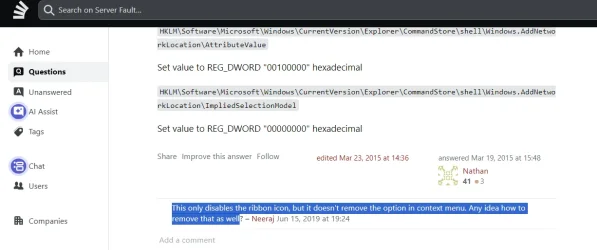
I tried that method before it only removes "Add a network location" from ribbon menu (not from context menu)

SS_20260331_11103945.webp
 

My Computer My Computer

At a glance

Windows 11 25H2 Home Single Language (26200.8...Intel Core i3-1115G48GBon-board
OS
Windows 11 25H2 Home Single Language (26200.8037)
Computer type
Laptop
Manufacturer/Model
LENOVO IdeaPad 5 15ITL05
CPU
Intel Core i3-1115G4
Motherboard
There is no such a God, I only know mother-Earth
Memory
8GB
Graphics Card(s)
on-board
Sound Card
on-board
Monitor(s) Displays
(s) is too ambitious for me
Screen Resolution
1920*1080
Hard Drives
256GB (SSD)
PSU
I was very young when I last saw a PSU
Case
...
Cooling
My coldness is enough to cool the computer
Keyboard
A broken and very clean keyboard
Mouse
Rat
Internet Speed
Slowest internet connection in Europe
Browser
ChromePortable / FirefoxPortable / TorBrowser
Antivirus
G-Virus
Other Info
I can simply say that I took the red pill and I am not happy with it.
I tried that method before it only removes "Add a network location" from ribbon menu (not from context menu)
Did you scroll down to the bottom as there are registry edits.
Relevant to what you want I think is in the section that starts with UPDATED.
 

My Computer My Computer

At a glance

Windows 11 Pro
OS
Windows 11 Pro
Did you scroll down to the bottom as there are registry edits.
Relevant to what you want I think is in the section that starts with UPDATED.
Yes, I already tried that method and:

It removes from ribbon
It does not remove from classic context menu.

SS_20260331_19045979.webp
 

My Computer My Computer

At a glance

Windows 11 25H2 Home Single Language (26200.8...Intel Core i3-1115G48GBon-board
OS
Windows 11 25H2 Home Single Language (26200.8037)
Computer type
Laptop
Manufacturer/Model
LENOVO IdeaPad 5 15ITL05
CPU
Intel Core i3-1115G4
Motherboard
There is no such a God, I only know mother-Earth
Memory
8GB
Graphics Card(s)
on-board
Sound Card
on-board
Monitor(s) Displays
(s) is too ambitious for me
Screen Resolution
1920*1080
Hard Drives
256GB (SSD)
PSU
I was very young when I last saw a PSU
Case
...
Cooling
My coldness is enough to cool the computer
Keyboard
A broken and very clean keyboard
Mouse
Rat
Internet Speed
Slowest internet connection in Europe
Browser
ChromePortable / FirefoxPortable / TorBrowser
Antivirus
G-Virus
Other Info
I can simply say that I took the red pill and I am not happy with it.
Back
Top Bottom