mikolajek
Well-known member
I've already disabled Action Center completely - using both WinAero Tweaker and Group Policy for sure, but I cannot get rid of a related icon that got stuck in my taskbar:
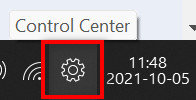
No hack seems to work on it, it's also for whatever reason greyed out in the classic system icons on/off panel:

Can anyone offer a trick to remove it from the taskbar, please?
No hack seems to work on it, it's also for whatever reason greyed out in the classic system icons on/off panel:
Can anyone offer a trick to remove it from the taskbar, please?
- Windows Build/Version
- 21H2 22000.194
Last edited:
My Computer
At a glance
Win11 Pro 25H2
- OS
- Win11 Pro 25H2
- Computer type
- Laptop
- Manufacturer/Model
- Dell XPS14 9440
- Monitor(s) Displays
- 2 x Dell UltraSharp U2718Q 4K
- Screen Resolution
- 4K
- Keyboard
- Dell KB900
- Mouse
- Razer Cobra Pro
- Internet Speed
- 1 Gbps
- Other Info
- Dell WD22TB4 dock