repetitive black screen crashing while playing games


codiola

Member
Local time
4:39 PM
Posts
6
OS
windows 11
First i fixed Windows automatically updating my GPU drivers by using the group policy editor. this was also making my pc shut off and reboot with fans turning max speed with no screen coming back on, had to hold power button to reboot. now it is crashing the same exact way but more frequently but my drivers are not being touched. i have included my crash logs from V2 log collector i found on this exact site. I am at my wit's end here im begging someone to help me out.

crash log: desktop crash reports.zip
EDIT: forgot to mention that when i get the black screen, the VGA light is lit on my motherboard
 
Windows Build/Version
24H2 (OS Build 23100.4946)
Last edited:

My Computer

System One

  • OS
    windows 11
    Computer type
    PC/Desktop
    Manufacturer/Model
    custom
    CPU
    ryzen 7 5700x3D
    Motherboard
    b450 gaming plus max
    Memory
    32gb
    Graphics Card(s)
    RX 6800
    PSU
    CORSAIR RM850e
Hello @codiola and welcome to ElevenForum.

You may have done parts of this before... but please do these things in this order.


1. Turn OFF the computer, remove the RAM, clean any dust out the RAM slots and re-seat the RAM.
2. See if you still have the problem.

If you do, then...

DDU Instructions - AMD
DDU Instructions - Nvidia[/C]
1. First, do Option #2, step #3 and onward, here...
2. This will block MS from including drivers in Windows Updates.
3. They'll still be listed in the Optional Updates, if you ever need them.


1. Get this program, here: Display Driver Uninstaller (DDU) | Wagnardsoft ...get the latest version, and save it to your desktop.
2. Get your vid card driver here, use the Manual Search: http://support.amd.com/en-us/download ...save this to your desktop.
Unhook the internet completely.
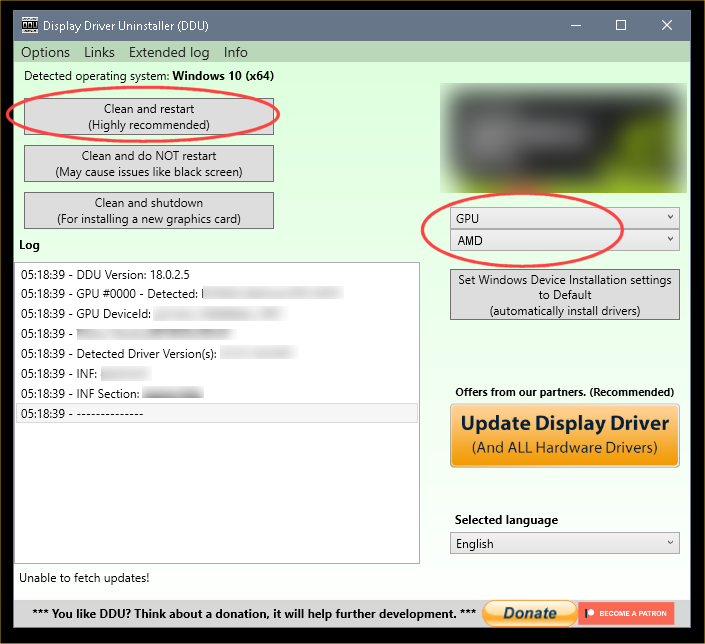
3. Reboot into Safe Mode and run DDU (Display Driver Uninstaller) choose the "Highly Recommend Option", and just do what it tells you.
4. After it's done, reboot to normal mode, then just double click the AMD driver to install. If it want's to reboot, let it.
Rehook the internet.


I just blurred out the Nvidia stuff...
ZeG5oTO.png
 
Last edited:

My Computers

System One System Two

  • OS
    Win 11 Home ♦♦♦26200.8457 ♦♦♦♦♦♦♦25H2
    Computer type
    PC/Desktop
    Manufacturer/Model
    Built by Ghot® [May 2020]
    CPU
    AMD Ryzen 7 3700X
    Motherboard
    Asus Pro WS X570-ACE (BIOS 5302)
    Memory
    G.Skill (F4-3200C14D-16GTZKW)
    Graphics Card(s)
    EVGA RTX 2070 (08G-P4-2171-KR)
    Sound Card
    Realtek ALC1220P / ALC S1220A
    Monitor(s) Displays
    Dell U3011 30"
    Screen Resolution
    2560 x 1600
    Hard Drives
    2x Samsung 860 EVO 500GB,
    WD 4TB Black FZBX - SATA III,
    WD 8TB Black FZBX - SATA III,
    DRW-24B1ST CD/DVD Burner
    PSU
    PC Power & Cooling 750W Quad EPS12V
    Case
    Cooler Master ATCS 840 Tower
    Cooling
    CM Hyper 212 EVO (push/pull)
    Keyboard
    Ducky DK9008 Shine II Blue LED
    Mouse
    Logitech Optical M-100
    Internet Speed
    300/300
    Browser
    Firefox (latest)
    Antivirus
    Bitdefender Total Security
    Other Info
    Speakers: Klipsch Pro Media 2.1
  • Operating System
    Windows XP Pro 32bit w/SP3
    Computer type
    PC/Desktop
    Manufacturer/Model
    Built by Ghot® (not in use)
    CPU
    AMD Athlon 64 X2 5000+ (OC'd @ 3.2Ghz)
    Motherboard
    ASUS M2N32-SLI Deluxe Wireless Edition
    Memory
    TWIN2X2048-6400C4DHX (2 x 1GB, DDR2 800)
    Graphics card(s)
    EVGA 256-P2-N758-TR GeForce 8600GT SSC
    Sound Card
    Onboard
    Monitor(s) Displays
    ViewSonic G90FB Black 19" Professional (CRT)
    Screen Resolution
    up to 2048 x 1536
    Hard Drives
    WD 36GB 10,000rpm Raptor SATA
    Seagate 80GB 7200rpm SATA
    Lite-On LTR-52246S CD/RW
    Lite-On LH-18A1P CD/DVD Burner
    PSU
    PC Power & Cooling Silencer 750 Quad EPS12V
    Case
    Generic Beige case, 80mm fans
    Cooling
    ZALMAN 9500A 92mm CPU Cooler
    Keyboard
    Logitech Classic Keybooard 200
    Mouse
    Logitech Optical M-BT96a
    Internet Speed
    300/300
    Browser
    Firefox 3.x ??
    Antivirus
    Symantec (Norton)
    Other Info
    Still assembled, still runs. Haven't turned it on for 15 years?
Hello @codiola and welcome to ElevenForum.

You may have done parts of this before... but please do these things in this order.


1. Turn OFF the computer, remove the RAM, clean any dust out the RAM slots and re-seat the RAM.
2. See if you still have the problem.

If you do, then...

DDU Instructions - AMD
DDU Instructions - Nvidia[/C]
1. First, do Option #2, step #3 and onward, here...
2. This will block MS from including drivers in Windows Updates.
3. They'll still be listed in the Optional Updates, if you ever need them.


1. Get this program, here: Display Driver Uninstaller (DDU) | Wagnardsoft ...get the latest version, and save it to your desktop.
2. Get your vid card driver here, use the Manual Search: http://support.amd.com/en-us/download ...save this to your desktop.
Unhook the internet completely.
3. Reboot into Safe Mode and run DDU (Display Driver Uninstaller) choose the "Highly Recommend Option", and just do what it tells you.
4. After it's done, reboot to normal mode, then just double click the AMD driver to install. If it want's to reboot, let it.
Rehook the internet.


I just blurred out the Nvidia stuff
while i was in DDU i also removed my old nvidia drivers to see if they were playing a part of this but after clean install i played a game for 3 minutes before another crash. there was also a good bit of dust in the ram slots but i cleaned them out very well with a duster with brush attached to end. also still showing kernel power event 172 in event viewer
 

My Computer

System One

  • OS
    windows 11
    Computer type
    PC/Desktop
    Manufacturer/Model
    custom
    CPU
    ryzen 7 5700x3D
    Motherboard
    b450 gaming plus max
    Memory
    32gb
    Graphics Card(s)
    RX 6800
    PSU
    CORSAIR RM850e
I'm gonna go out on a limb here because I've run into this problem twice before over the last 25 years. Check your power supply with a power supply tester. If you don't have one, you can get one fairly priced on amazon.

Both times I've run into this situation, it turned out my power supplies were not providing the proper amount of voltage to my motherboard, my tester revealed power spikes on the main 12 volt rail which would cause my computer to reboot.
 

My Computer

System One

  • OS
    Windows 11 Pro Version 25H2 (26200.6901)
    Computer type
    PC/Desktop
    Manufacturer/Model
    DIY
    CPU
    AMD Ryzen 5 2600
    Motherboard
    MSI B450 Tomahawk Max (MS-7C02)
    Memory
    Corsair 32 GB
    Graphics Card(s)
    ASRock AMD Radeon RX 6600
    Sound Card
    Realtek 7.1
    Monitor(s) Displays
    LG IPS Full HD 27 (x2)
    Screen Resolution
    1920 x 1080
    Hard Drives
    NVMe XPG Spectrix S40G - 1 TB
    PSU
    CX-M Series CX750M — 750 Watt 80 PLUS Bronze Semi Modular ATX PSU
    Case
    Corsair Carbide Series Air 540 High Airflow ATX Cube Case
    Cooling
    CORSAIR Hydro Series H60 AIO Liquid CPU Cooler
    Keyboard
    Redragon Caesura
    Mouse
    Redragon Vampire Elite
    Internet Speed
    1 GB
    Browser
    Mozilla Firefox
    Antivirus
    Windows Defender
I'm gonna go out on a limb here because I've run into this problem twice before over the last 25 years. Check your power supply with a power supply tester. If you don't have one, you can get one fairly priced on amazon.

Both times I've run into this situation, it turned out my power supplies were not providing the proper amount of voltage to my motherboard, my tester revealed power spikes on the main 12 volt rail which would cause my computer to reboot.
i have just overnighted one on amazon, thank you for this advice. could be the issue since i have the thermaltake 700w and i bought it in a pinch when i needed an extra power plug for my 2060super (?)
 

My Computer

System One

  • OS
    windows 11
    Computer type
    PC/Desktop
    Manufacturer/Model
    custom
    CPU
    ryzen 7 5700x3D
    Motherboard
    b450 gaming plus max
    Memory
    32gb
    Graphics Card(s)
    RX 6800
    PSU
    CORSAIR RM850e
First i fixed Windows automatically updating my GPU drivers by using the group policy editor. this was also making my pc shut off and reboot with fans turning max speed with no screen coming back on, had to hold power button to reboot. now it is crashing the same exact way but more frequently but my drivers are not being touched. i have included my crash logs from V2 log collector i found on this exact site. I am at my wit's end here im begging someone to help me out.

crash log: desktop crash reports.zip
EDIT: forgot to mention that when i get the black screen, the VGA light is lit on my motherboard
UPDATE: i have replaced my psu with a 850w corsair and i can now play games much longer but ultimately it still crashes. if i turn my graphics down there is no problem (im guessing less power demand).
 

My Computer

System One

  • OS
    windows 11
    Computer type
    PC/Desktop
    Manufacturer/Model
    custom
    CPU
    ryzen 7 5700x3D
    Motherboard
    b450 gaming plus max
    Memory
    32gb
    Graphics Card(s)
    RX 6800
    PSU
    CORSAIR RM850e
UPDATE: i have replaced my psu with a 850w corsair and i can now play games much longer but ultimately it still crashes. if i turn my graphics down there is no problem (im guessing less power demand).
Either you have a Thermal issue....

Download/Run this: FurMark2 download | Geeks3D -> to stress the GPU.

+

TechPowerUp -> to check the Temperatures. Click on Sensors tab + check "Log To File (down - left corner)" - while Furmark is running. How are the temps?

----

Or... it's a hardware issue - be it a burned capacitor (either from the Motherboard or the CPU), or a short circuit - that's causing issue with the GPU voltage regulator (thus, crashing - while reaching an unstable voltage point - a safety feature intended to save the hardware from more damage).

Even if it's not a Platinum rated PSU - that corsair should be able to handle your system's power consumption (less than 500 W).
 

My Computer

System One

  • OS
    WinDOS 25H2
    Computer type
    Laptop
    CPU
    Intel & AMD
    Memory
    SO-DIMM SK Hynix 15.8 GB Dual-Channel DDR4-2666 (2 x 8 GB) 1329MHz (19-19-19-43)
    Graphics Card(s)
    nVidia RTX 2060 6GB Mobile GPU (TU106M)
    Sound Card
    Onbord Realtek ALC1220
    Screen Resolution
    1920 x 1080
    Hard Drives
    1x Samsung PM981 NVMe PCIe M.2 512GB / 1x Seagate Expansion ST1000LM035 1TB
Either you have a Thermal issue....

Download/Run this: FurMark2 download | Geeks3D -> to stress the GPU.

+

TechPowerUp -> to check the Temperatures. Click on Sensors tab + check "Log To File (down - left corner)" - while Furmark is running. How are the temps?

----

Or... it's a hardware issue - be it a burned capacitor (either from the Motherboard or the CPU), or a short circuit - that's causing issue with the GPU voltage regulator (thus, crashing - while reaching an unstable voltage point - a safety feature intended to save the hardware from more damage).

Even if it's not a Platinum rated PSU - that corsair should be able to handle your system's power consumption (less than 500 W).
hangs out around 60c the entire time, no signs of overheating at all. i guess im looking at a hardware issue after all. whats the best course of action, take it to a repair shop?
 

My Computer

System One

  • OS
    windows 11
    Computer type
    PC/Desktop
    Manufacturer/Model
    custom
    CPU
    ryzen 7 5700x3D
    Motherboard
    b450 gaming plus max
    Memory
    32gb
    Graphics Card(s)
    RX 6800
    PSU
    CORSAIR RM850e
hangs out around 60c the entire time, no signs of overheating at all. i guess im looking at a hardware issue after all. whats the best course of action, take it to a repair shop?
Would help - to have another GPU/Video-card - to test it and make sure it's not the Motherboard. Or test the Video-card - in a different system (if you know someone who'd be ok with that). Not necessarily a fix, but you could try lowering the voltage (under-volting) - just to see if it helps in any way:


Try something like 900 mV and see if it's stable. Under-volting is pretty safe - the opposite can be risky (overclocking and increasing voltage).

If it doesn't help - and you don't have an alternative video card or system (to test your video-card), yeah - you'll have to take the whole PC - to a repair shop. Your system keeps loosing power - and it's less likely for a coincidence - for a new PSU to have the same issue.
 

My Computer

System One

  • OS
    WinDOS 25H2
    Computer type
    Laptop
    CPU
    Intel & AMD
    Memory
    SO-DIMM SK Hynix 15.8 GB Dual-Channel DDR4-2666 (2 x 8 GB) 1329MHz (19-19-19-43)
    Graphics Card(s)
    nVidia RTX 2060 6GB Mobile GPU (TU106M)
    Sound Card
    Onbord Realtek ALC1220
    Screen Resolution
    1920 x 1080
    Hard Drives
    1x Samsung PM981 NVMe PCIe M.2 512GB / 1x Seagate Expansion ST1000LM035 1TB
Imo you have "kind of" discarded the PSU. There's a difference yet, the new PSU (the Corsair RM850e? which was the other, and how much old was it?) allows longer time. Sounds to random error with less probability now. Imo the main suspect is the vcard. Your consumption should be about 400-450W (105 CPU + 250 GPU + 50 or 100) but your choice of PSU power is sensible.

Which case do you have? Often only the 2 main temperatures, CPU and GPU, are watched. This works if the case is well ventilated. The problem is many "small" components (some not so "small", read voltage regulators, both mainboard's and GPU) don't have temp sensor and many not even a heatsink. All passively cooled or not cooled things rely totally on good general ventilation.

The good level of your build (CPU HSF?) and the vcard construction give confidence provided a high performance exhaust fan is working. And this part can only fulfilled buying such fan. No case stock fan will be say a Scythe SlipStream 1900rpm (my favourite one, although it's currently discontinued) or a Thermaltake Toughfan 12 Turbo (to say a modern one, this model is better suited as heatsink fan -higher pressure, high but not brilliant airflow- although I put one as exhaust fan where the said Scythe was and the thermal performance was about the same). Some modern cases come with many fans but all 1000/1200 rpm and only one exhaust. Seriously a 25 cfm exhaust fan for a high level build??? This can work well specially with AIOs, that by definition add exhaust, with 3 exhaust semi-fans like these you already have 75 cfm which is a good level, but in general you need a serious exhaust fan.
 

My Computer

System One

  • OS
    Windows 11
    Manufacturer/Model
    MeLE Quieter 2Q (fanless miniPC)
    CPU
    Celeron J4125 (10th gen)
    Memory
    8GB DDR4
    Monitor(s) Displays
    Samsung SyncMaster T260
    Screen Resolution
    1920x1200
    Hard Drives
    256GB eMMC (Windows)
    2TB USB3 HDD Toshiba (Data)
Imo you have "kind of" discarded the PSU. There's a difference yet, the new PSU (the Corsair RM850e? which was the other, and how much old was it?) allows longer time. Sounds to random error with less probability now. Imo the main suspect is the vcard. Your consumption should be about 400-450W (105 CPU + 250 GPU + 50 or 100) but your choice of PSU power is sensible.

Which case do you have? Often only the 2 main temperatures, CPU and GPU, are watched. This works if the case is well ventilated. The problem is many "small" components (some not so "small", read voltage regulators, both mainboard's and GPU) don't have temp sensor and many not even a heatsink. All passively cooled or not cooled things rely totally on good general ventilation.

The good level of your build (CPU HSF?) and the vcard construction give confidence provided a high performance exhaust fan is working. And this part can only fulfilled buying such fan. No case stock fan will be say a Scythe SlipStream 1900rpm (my favourite one, although it's currently discontinued) or a Thermaltake Toughfan 12 Turbo (to say a modern one, this model is better suited as heatsink fan -higher pressure, high but not brilliant airflow- although I put one as exhaust fan where the said Scythe was and the thermal performance was about the same). Some modern cases come with many fans but all 1000/1200 rpm and only one exhaust. Seriously a 25 cfm exhaust fan for a high level build??? This can work well specially with AIOs, that by definition add exhaust, with 3 exhaust semi-fans like these you already have 75 cfm which is a good level, but in general you need a serious exhaus
UPDATE: your comment made me think about heat temps and i believe my issue is solved. i replaced my exhaust fan and intake, along with adding another intake fan. this ALSO made my game last much longer before crashing. i then downloaded afterburner and manually adjusted my gpu fan speed to 100%. i have just played for an hour without a crash. thank you! do you think i should re paste the gpu since there has been many heat related crashes on the card? or do you think it would be fine to let it go since in theory the pc should have shut down before damage occurs?
 

My Computer

System One

  • OS
    windows 11
    Computer type
    PC/Desktop
    Manufacturer/Model
    custom
    CPU
    ryzen 7 5700x3D
    Motherboard
    b450 gaming plus max
    Memory
    32gb
    Graphics Card(s)
    RX 6800
    PSU
    CORSAIR RM850e
I have never "re-pasted" anything. I've never used an intake fan (here I would need to write 400+ pages...). I've lost or replaced for instability 0 processors and 1-2 gfx cards, neither of them was overheating. The only dead gfx card I recall clearly was a X1950pro AGP bought in 2007 and dead in 2020.

I've replaced the stock cooling of several gfx cards for noise problems, one of them partially for HDD overheating (60ºC, both parts are close in a typical case).

I think you might have a case cooling problem but Idk anything about your hw there. This is easy to diagnose. The gfx card could have a hw problem. This is difficult to diagnose. I've little time just now...
 

My Computer

System One

  • OS
    Windows 11
    Manufacturer/Model
    MeLE Quieter 2Q (fanless miniPC)
    CPU
    Celeron J4125 (10th gen)
    Memory
    8GB DDR4
    Monitor(s) Displays
    Samsung SyncMaster T260
    Screen Resolution
    1920x1200
    Hard Drives
    256GB eMMC (Windows)
    2TB USB3 HDD Toshiba (Data)

Latest Support Threads

Back
Top Bottom