Reset |PC's


woldsweather

Well-known member
Member
VIP
Local time
3:39 AM
Posts
319
OS
Windows 10 PRO
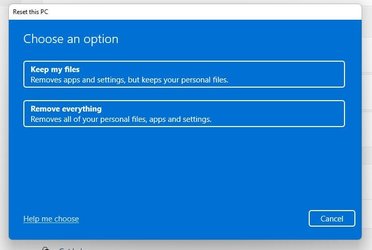
I have googled reset PC without removing installed programs. They all lead to the attached image which doesn't show such asn option.

Is there a way to reset my Windows 11 PC WITHOUT losing installed programs?
 

Attachments

  • reset.jpg
    reset.jpg
    25.2 KB · Views: 3

My Computer My Computer

At a glance

Windows 10 PROIntel(R) Core(TM) i7-8700 CPU @ 3.20GHz 3.20 GHz64 GBNVIDIA GeForce GTX 1070
OS
Windows 10 PRO
Computer type
PC/Desktop
Manufacturer/Model
HP Omen
CPU
Intel(R) Core(TM) i7-8700 CPU @ 3.20GHz 3.20 GHz
Motherboard
Board: HP 8437 1.3 Serial Number: PGUCR0HP1B90LD Bus Clock: 100 megahertz UEFI: AMI F.53 10/23/2020
Memory
64 GB
Graphics Card(s)
NVIDIA GeForce GTX 1070
Sound Card
NVIDIA High Definition Audio Realtek High Definition Audio
Monitor(s) Displays
AOC 2778X [Monitor] (27.2"vis, s/n GJGJ7HA027112, July 2018) DELL U2412M [Monitor] (24.0"vis, s/n XX-00FFXD-XXXXX-529-64AS, February 2015)
Hard Drives
c: (NTFS on drive 0) * 999.21 GB 857.61 GB free
d: (NTFS on drive 1) 1984.45 GB 741.65 GB free
e: (NTFS on drive 1) 15.95 GB 1.78 GB free
h: (NTFS on drive 2) 239.93 GB 231.23 GB free
i: (NTFS on drive 2) 14.81 GB 1.71 GB free
Keyboard
Omoton
Mouse
Omoton
Internet Speed
9Gbps
Browser
Chrome Edge and Firefox
Antivirus
Kaspersky
Other Info
Have discovered 31/01/2022 Internet speed at router 41 mbps. At this PC 9. Internet is via wired ethernet.
Have you checked our tutorial?


My Computers My Computers

  • At a glance

    Windows 11 WorkstationRyzen 9 5950XCorsair Vengeance RGB PRO Black 64GB (4x16GB)...ASUS AMD Radeon RX 6900 XT 16GB ROG Strix LC OC
    OS
    Windows 11 Workstation
    Computer type
    PC/Desktop
    Manufacturer/Model
    doofenshmirtz evil incorporated
    CPU
    Ryzen 9 5950X
    Motherboard
    Asus ROG Crosshair VIII Formula
    Memory
    Corsair Vengeance RGB PRO Black 64GB (4x16GB) 3600MHz AMD Ryzen Tuned DDR4
    Graphics Card(s)
    ASUS AMD Radeon RX 6900 XT 16GB ROG Strix LC OC
    Sound Card
    Sound BlasterX Katana
    Monitor(s) Displays
    3 x27" Dell U2724D & 1 x 34" Dell U3415W
    Hard Drives
    Samsung 980 Pro 1TB M.2 2280 PCI-e 4.0 x4 NVMe Solid State
    Drive
    PSU
    ASUS ROG THOR 850W 80 Plus Platinum
    Case
    ASUS ROG Strix Helios Midi-Tower ARGB Gaming Case
    Cooling
    ASUS ROG Strix LC Performance RGB AIO CPU Liquid Cooler - 360mm
    Keyboard
    Logi Ergo
    Mouse
    Logitech MX Vertical
    Internet Speed
    1000/200 Mbps
    Browser
    Chrome
    Antivirus
    Windows Defender, Malwarebytes Pro
    Other Info
    HP M281 Printer
    Logitech Brio Stream webcam
    Logitech G Yeti orb mic
  • At a glance

    Windows 11 ProSnapdragon X2 Plus64GB
    Operating System
    Windows 11 Pro
    Computer type
    Laptop
    Manufacturer/Model
    Surface Laptop
    CPU
    Snapdragon X2 Plus
    Memory
    64GB
    Monitor(s) Displays
    15"
  • Nothing to see here.
@woldsweather
Yes there is...


Here is the short version of the In-place upgrade tutorial...

DISABLE non-Microsoft:
a) antivirus software
b) firewall software
c) drive encryption software

Make a full OS backup with a program like Macrium Reflect (free)
Macrium Software | Macrium Reflect Free

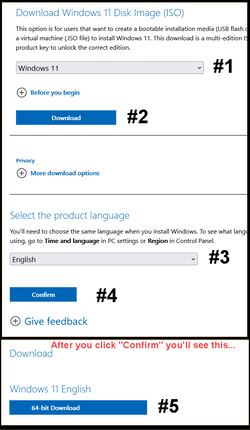
Go here and get the Windows 11 ISO (use the 3rd option), and save the ISO to your desktop.
Download Windows 11

Image1.png

Right click the ISO image and choose: MOUNT
Open File Explorer and you will see a new drive letter. It will "look" like a DVD optical drive.
Double click the new drive letter to open it.
Find setup.exe and double click it to start the in-place upgrade.

Choose the Keep personal files and apps option.

After it's all done... to UNmount the ISO image, right click the new drive letter and choose: EJECT.


The ONLY thing you will lose is some of your personalizations. Your programs and data will be intact.
 

My Computers My Computers

  • At a glance

    Win 11 Home ♦♦♦26300.9445 ♦♦♦♦♦♦♦26H2AMD Ryzen 7 3700XG.Skill (F4-3200C14D-16GTZKW)EVGA RTX 2070 (08G-P4-2171-KR)
    OS
    Win 11 Home ♦♦♦26300.9445 ♦♦♦♦♦♦♦26H2
    Computer type
    PC/Desktop
    Manufacturer/Model
    Built by Ghot® [May 2020]
    CPU
    AMD Ryzen 7 3700X
    Motherboard
    Asus Pro WS X570-ACE (BIOS 5302)
    Memory
    G.Skill (F4-3200C14D-16GTZKW)
    Graphics Card(s)
    EVGA RTX 2070 (08G-P4-2171-KR)
    Sound Card
    Realtek ALC1220P / ALC S1220A
    Monitor(s) Displays
    Dell U3011 30"
    Screen Resolution
    2560 x 1600
    Hard Drives
    2x Samsung 860 EVO 500GB,
    WD 4TB Black FZBX - SATA III,
    WD 8TB Black FZBX - SATA III,
    DRW-24B1ST CD/DVD Burner
    PSU
    PC Power & Cooling 750W Quad EPS12V
    Case
    Cooler Master ATCS 840 Tower
    Cooling
    CM Hyper 212 EVO (push/pull)
    Keyboard
    Ducky DK9008 Shine II Blue LED
    Mouse
    Logitech Optical M-100
    Internet Speed
    300/300
    Browser
    Firefox (latest)
    Antivirus
    Bitdefender Total Security
    Other Info
    Speakers: Klipsch Pro Media 2.1
  • At a glance

    Windows XP Pro 32bit w/SP3AMD Athlon 64 X2 5000+ (OC'd @ 3.2Ghz)TWIN2X2048-6400C4DHX (2 x 1GB, DDR2 800)EVGA 256-P2-N758-TR GeForce 8600GT SSC
    Operating System
    Windows XP Pro 32bit w/SP3
    Computer type
    PC/Desktop
    Manufacturer/Model
    Built by Ghot® (not in use)
    CPU
    AMD Athlon 64 X2 5000+ (OC'd @ 3.2Ghz)
    Motherboard
    ASUS M2N32-SLI Deluxe Wireless Edition
    Memory
    TWIN2X2048-6400C4DHX (2 x 1GB, DDR2 800)
    Graphics card(s)
    EVGA 256-P2-N758-TR GeForce 8600GT SSC
    Sound Card
    Onboard
    Monitor(s) Displays
    ViewSonic G90FB Black 19" Professional (CRT)
    Screen Resolution
    up to 2048 x 1536
    Hard Drives
    WD 36GB 10,000rpm Raptor SATA
    Seagate 80GB 7200rpm SATA
    Lite-On LTR-52246S CD/RW
    Lite-On LH-18A1P CD/DVD Burner
    PSU
    PC Power & Cooling Silencer 750 Quad EPS12V
    Case
    Generic Beige case, 80mm fans
    Cooling
    ZALMAN 9500A 92mm CPU Cooler
    Keyboard
    Logitech Classic Keybooard 200
    Mouse
    Logitech Optical M-BT96a
    Internet Speed
    300/300
    Browser
    Firefox 3.x ??
    Antivirus
    Symantec (Norton)
    Other Info
    Still assembled, still runs. Haven't turned it on for 15 years?
OK well I download the iso yesterday and mounted it and clkickjed set.up half an hour ago. Its very slowly checking for updates.

I'll continue on this route thanks for the help.
 

My Computer My Computer

At a glance

Windows 10 PROIntel(R) Core(TM) i7-8700 CPU @ 3.20GHz 3.20 GHz64 GBNVIDIA GeForce GTX 1070
OS
Windows 10 PRO
Computer type
PC/Desktop
Manufacturer/Model
HP Omen
CPU
Intel(R) Core(TM) i7-8700 CPU @ 3.20GHz 3.20 GHz
Motherboard
Board: HP 8437 1.3 Serial Number: PGUCR0HP1B90LD Bus Clock: 100 megahertz UEFI: AMI F.53 10/23/2020
Memory
64 GB
Graphics Card(s)
NVIDIA GeForce GTX 1070
Sound Card
NVIDIA High Definition Audio Realtek High Definition Audio
Monitor(s) Displays
AOC 2778X [Monitor] (27.2"vis, s/n GJGJ7HA027112, July 2018) DELL U2412M [Monitor] (24.0"vis, s/n XX-00FFXD-XXXXX-529-64AS, February 2015)
Hard Drives
c: (NTFS on drive 0) * 999.21 GB 857.61 GB free
d: (NTFS on drive 1) 1984.45 GB 741.65 GB free
e: (NTFS on drive 1) 15.95 GB 1.78 GB free
h: (NTFS on drive 2) 239.93 GB 231.23 GB free
i: (NTFS on drive 2) 14.81 GB 1.71 GB free
Keyboard
Omoton
Mouse
Omoton
Internet Speed
9Gbps
Browser
Chrome Edge and Firefox
Antivirus
Kaspersky
Other Info
Have discovered 31/01/2022 Internet speed at router 41 mbps. At this PC 9. Internet is via wired ethernet.

Checking for updates should only take a few seconds before it moves on. What are your machine specs?
 

My Computer My Computer

At a glance

Windows 11 Pro Beta, 11 Dev, W11 CanaryAMD Ryzen™ 9 5900HX32GBNVIDIA® GeForce RTX™ 3070 8GB GDDR6
OS
Windows 11 Pro Beta, 11 Dev, W11 Canary
Computer type
Laptop
Manufacturer/Model
Dell Alienware M15 Ryzen Edition R6
CPU
AMD Ryzen™ 9 5900HX
Memory
32GB
Graphics Card(s)
NVIDIA® GeForce RTX™ 3070 8GB GDDR6
Hard Drives
1 x Samsung 980 Pro 1TB
1 x Samsung 970 Evo Plus 1TB
When performing a reset there is always a loss of drivers and applications.
The same with Windows refresh, custom install, and clean install.

If there are Windows problems and you want to retain applications then the remaining options are in place upgrade repair as Ghot posted or startup repair, system restore, or manually troubleshooting the Windows problems.

Lose applications:
a) reset save files
b) reset remove files
c) Window refresh
d) custom install
e) clean install

Maintain applications:
a) in place upgrade repair
b) startup repair
c) system restore


My Computer My Computer

At a glance

Windows 10Intel(R) Core(TM) i7-4800MQ CPU @ 2.70GHz16 GB Total: Manufacturer : Samsung MemoryTyp...NVIDIA Quadro K3100M; Intel(R) HD Graphics 4600
OS
Windows 10
Computer type
Laptop
Manufacturer/Model
HP
CPU
Intel(R) Core(TM) i7-4800MQ CPU @ 2.70GHz
Motherboard
Product : 190A Version : KBC Version 94.56
Memory
16 GB Total: Manufacturer : Samsung MemoryType : DDR3 FormFactor : SODIMM Capacity : 8GB Speed : 1600
Graphics Card(s)
NVIDIA Quadro K3100M; Intel(R) HD Graphics 4600
Sound Card
IDT High Definition Audio CODEC; PNP Device ID HDAUDIO\FUNC_01&VEN_111D&DEV_76E0
Hard Drives
Model Hitachi HTS727575A9E364
Antivirus
Microsoft Defender
Other Info
Mobile Workstation
Back
Top Bottom