Resolve Task Manager process might continue to run in background after app is closed


Personally, IMO , I would just leave well enough alone, it will probably get addressed in the next update. Whether you do or don't use TM often it only takes two seconds to run the command:
Code:
taskkill.exe /im taskmgr.exe /f
Yes! You can run this command to solve the issue now. Reboot and try again. does the issue still exist? Oeps yes. It's back again. This is not a solution.

This is:
ViVeTool.exe /enable /id:57048231
ViVeTool.exe /enable /id:49407484

Search for this tool online and find it at GitHub. It can correct the issue permanently what MS forgot to implement. Sorry to be so short. In fact this is the fast and quick solution. Have a warning also. If your Winver doesn't show Build 26100/26200.7019 !!!!DON'T!!!!! execute these commands. It's only valid for 26100/26200.7019!!!! I predict that the next update will solve this issue again..... You ask the question; When ever I would call the Taskmanger at each time you log on..... If don't? Then don't bother.... The impact on your system is not measurable. It has some RAM impact but that if I would grab to the panic button? No.....

Just getting down on my feet firmly on the ground. Is this a major problem? No it isn't. Just pressing the dots on the right place. It can be severe as you make it want it to be. "Ah. Jippey an other error found. Bashing...Use Linux.... " Yes But I am not bashing MS for their mistake. It's not a good marktingwise problem. They introduced the WinRE problem before and pressed the CA2023 also on to us. And this "bug" could be avoided also. MS has to shape up!! Linux versions which look like Windows are more and more at the increase. If MS ignore this... Then hello to a real Windows look alike. Safe as they can make it. I am looking at Nobara latest version. I am impressed. Still it needs more some looks. They are trying as hell and it's getting beter each time. MS have to worry...

Downside. Linux Windows versions are not for the noobs. You have some knowledge deep inside to estable things. Just the plain truth.
 
Last edited:

My Computer

System One

  • OS
    Win 11 Pro "25H2" Build 26200.8524, Zorin OS Pro
    Computer type
    PC/Desktop
    Manufacturer/Model
    Self built
    CPU
    Intel® Core™ i7-12700KF 12th Gen.
    Motherboard
    ASUS Prime Z690-A, BIOS v4505
    Memory
    32GB DDR5 5600-36 Vengeance
    Graphics Card(s)
    PCIe4.0 Asus NVIDIA RTX3060Ti
    Sound Card
    Onboard; Realtek
    Monitor(s) Displays
    34" LG 34UC79G-B Curved 21:9 144Hz
    Screen Resolution
    2560x1080 (No HDR)
    Hard Drives
    250Gb Samsung 870PRO NVMe (Win 11 Pro)
    1Tb Samsung 980PRO NVMe
    1Tb Samsung 970EVO NVMe
    2Tb Samsung 990PRO NVMe with heatsink.
    4Tb WDC WD40EZRZ Blue SATA (Int.)
    4Tb WDC WD40EZRZ Blue SATA (Int.)
    3Tb WDC WD30EFRZ Red SATA (Int.)
    256Gb Samsung 840PRO SSD (RHEL 9,5)
    256Gb Samsung 850PRO SSD (Zorin OS Pro 18)
    PSU
    Coolermaster 850W V2 Gold with internal 12cm exaust fan
    Case
    Be-Quiet Pure Base 600.
    Cooling
    3x Be-Quiet! 12/14cm "Silent Wings 4" casefans, 1x Arctic Freezer i35 CPU towerblock with fan.
    Keyboard
    Steelseries APEX 7 keyboard.
    Mouse
    Logitech G-502 Hero
    Internet Speed
    1Gb
    Browser
    Brave
    Antivirus
    F-Secure
    Other Info
    No Noise system.
    256Gb Kingston Travler USB 3.0 drive.
    64Gb Sandisk USB 3.2 drive. (Ventoy)
    8Gb Philips USB 3.0 drive. (Win. Inst.)
    8Gb Philips USB 3.0 drive. (Rescue disk)
    2Tb WD USB 3.0 Passport drive.
    USB Ext. 500Gb WD SATA drive.
    External USB 3.0 C.A. CD/DVD* burner.
Looking at Vivetool and their commands; Vivetool /query show us a list of features which can be enabled or disabled.
No reaction? I have a deep knowledge of Windows internals. CRF is a new one. But I understand their reason; Make every system ready under the hood until they give the go ahead worldwide. The burden or responsibility is... Immens. Figure the guy that calls it "it's a go" and it goes wrong... Panic. You and me in that position? Never! We do not want to fail. Want to expend my knowledge also. I want to understand what MS is doing under the hood.

Ah Linux. A totally other system. It has it purpose.. My number 1 for business purposes. So more on the business part then on the home user part. You have to have some basic skills of Linux to enable it's max potential. That's what wrong at it. It's not an OS meant for the noobs. And if we are talking about noobs worldwide; It will shock you; 95%... That's the reason why Windows exists today. I see what they want; pushing the OS into the cloud so they can earn mo money.... Many people would say just.... Nope.... And their is the demand. Who would stand up and save nothing into a "cloud" (Yes I know what it means. Data into cloud is for the grabs for those who want to earn money with it. It comes al down to this (even the society) money... more and more..... We have not enough money to spend even it is 3 trillion dollars..... We wants it to be Zillions. My precious...... )
 

My Computer

System One

  • OS
    Win 11 Pro "25H2" Build 26200.8524, Zorin OS Pro
    Computer type
    PC/Desktop
    Manufacturer/Model
    Self built
    CPU
    Intel® Core™ i7-12700KF 12th Gen.
    Motherboard
    ASUS Prime Z690-A, BIOS v4505
    Memory
    32GB DDR5 5600-36 Vengeance
    Graphics Card(s)
    PCIe4.0 Asus NVIDIA RTX3060Ti
    Sound Card
    Onboard; Realtek
    Monitor(s) Displays
    34" LG 34UC79G-B Curved 21:9 144Hz
    Screen Resolution
    2560x1080 (No HDR)
    Hard Drives
    250Gb Samsung 870PRO NVMe (Win 11 Pro)
    1Tb Samsung 980PRO NVMe
    1Tb Samsung 970EVO NVMe
    2Tb Samsung 990PRO NVMe with heatsink.
    4Tb WDC WD40EZRZ Blue SATA (Int.)
    4Tb WDC WD40EZRZ Blue SATA (Int.)
    3Tb WDC WD30EFRZ Red SATA (Int.)
    256Gb Samsung 840PRO SSD (RHEL 9,5)
    256Gb Samsung 850PRO SSD (Zorin OS Pro 18)
    PSU
    Coolermaster 850W V2 Gold with internal 12cm exaust fan
    Case
    Be-Quiet Pure Base 600.
    Cooling
    3x Be-Quiet! 12/14cm "Silent Wings 4" casefans, 1x Arctic Freezer i35 CPU towerblock with fan.
    Keyboard
    Steelseries APEX 7 keyboard.
    Mouse
    Logitech G-502 Hero
    Internet Speed
    1Gb
    Browser
    Brave
    Antivirus
    F-Secure
    Other Info
    No Noise system.
    256Gb Kingston Travler USB 3.0 drive.
    64Gb Sandisk USB 3.2 drive. (Ventoy)
    8Gb Philips USB 3.0 drive. (Win. Inst.)
    8Gb Philips USB 3.0 drive. (Rescue disk)
    2Tb WD USB 3.0 Passport drive.
    USB Ext. 500Gb WD SATA drive.
    External USB 3.0 C.A. CD/DVD* burner.
Yes! You can run this command to solve the issue now. Reboot and try again. does the issue still exist? Oeps yes. It's back again. This is not a solution.

This is:
ViVeTool.exe /enable /id:57048231
ViVeTool.exe /enable /id:49407484
Tested but feels sluggish now, process icons show immediately, but process names follow after a second or two.
But I like the grouping of processes. Have to choose whether to keep this feature and have the display be slower, or not have the feature.
 

My Computers

System One System Two

  • OS
    Windows 11 Pro 25h2
    Computer type
    PC/Desktop
    CPU
    Intel 10980XE
    Motherboard
    Asus Rampage VI Extreme Encore
    Memory
    G.Skill TridentZ Royale
    Graphics Card(s)
    EVGA RTX 2080Ti Hydro Copper
    Sound Card
    Asus
    Monitor(s) Displays
    Dell 27"
    Hard Drives
    Intel Optane P5801X
    Samsung 990 Pro
    PSU
    Seasonic Prime TX 1000W
    Case
    Lian Li A77F
    Cooling
    Watercooling
    Keyboard
    Logitech MX keys
    Mouse
    Logitech MX Master 3S
    Browser
    Edge Canary
    Antivirus
    Kaspersky
  • Operating System
    Windows 11 Pro 24h2
    Computer type
    Laptop
    Manufacturer/Model
    Asus Pro
Tested but feels sluggish now, process icons show immediately, but process names follow after a second or two.
But I like the grouping of processes. Have to choose whether to keep this feature and have the display be slower, or not have the feature.
It's not a feature. It's a solution to an MS bug. They forgot to tackle this problem. It's not an issue what takes up more time. (sluggish) It wil take no CPU time. You must reboot to take everything valid. Alles. The only drawback. A reboot to make it valid? An issue? Nope!

It will fix you're issue if you want to see it as such... How many time would I call Taskmanager if I see problems I can't explain? For the normal user? None... For the more "download things" Yes. Some things behave other on different things. A look at at the Taskmanager would not solve any problems. It's FUBAR. The real problem lies underneath the program/game. It needs patching....
 

My Computer

System One

  • OS
    Win 11 Pro "25H2" Build 26200.8524, Zorin OS Pro
    Computer type
    PC/Desktop
    Manufacturer/Model
    Self built
    CPU
    Intel® Core™ i7-12700KF 12th Gen.
    Motherboard
    ASUS Prime Z690-A, BIOS v4505
    Memory
    32GB DDR5 5600-36 Vengeance
    Graphics Card(s)
    PCIe4.0 Asus NVIDIA RTX3060Ti
    Sound Card
    Onboard; Realtek
    Monitor(s) Displays
    34" LG 34UC79G-B Curved 21:9 144Hz
    Screen Resolution
    2560x1080 (No HDR)
    Hard Drives
    250Gb Samsung 870PRO NVMe (Win 11 Pro)
    1Tb Samsung 980PRO NVMe
    1Tb Samsung 970EVO NVMe
    2Tb Samsung 990PRO NVMe with heatsink.
    4Tb WDC WD40EZRZ Blue SATA (Int.)
    4Tb WDC WD40EZRZ Blue SATA (Int.)
    3Tb WDC WD30EFRZ Red SATA (Int.)
    256Gb Samsung 840PRO SSD (RHEL 9,5)
    256Gb Samsung 850PRO SSD (Zorin OS Pro 18)
    PSU
    Coolermaster 850W V2 Gold with internal 12cm exaust fan
    Case
    Be-Quiet Pure Base 600.
    Cooling
    3x Be-Quiet! 12/14cm "Silent Wings 4" casefans, 1x Arctic Freezer i35 CPU towerblock with fan.
    Keyboard
    Steelseries APEX 7 keyboard.
    Mouse
    Logitech G-502 Hero
    Internet Speed
    1Gb
    Browser
    Brave
    Antivirus
    F-Secure
    Other Info
    No Noise system.
    256Gb Kingston Travler USB 3.0 drive.
    64Gb Sandisk USB 3.2 drive. (Ventoy)
    8Gb Philips USB 3.0 drive. (Win. Inst.)
    8Gb Philips USB 3.0 drive. (Rescue disk)
    2Tb WD USB 3.0 Passport drive.
    USB Ext. 500Gb WD SATA drive.
    External USB 3.0 C.A. CD/DVD* burner.
Of course I rebooted and several people have noticed this slow display after applying this "fix".

And this "feature" (that's what I call it) works on builds not affected by this problem (grouping of processes for the same Apps)
 

My Computers

System One System Two

  • OS
    Windows 11 Pro 25h2
    Computer type
    PC/Desktop
    CPU
    Intel 10980XE
    Motherboard
    Asus Rampage VI Extreme Encore
    Memory
    G.Skill TridentZ Royale
    Graphics Card(s)
    EVGA RTX 2080Ti Hydro Copper
    Sound Card
    Asus
    Monitor(s) Displays
    Dell 27"
    Hard Drives
    Intel Optane P5801X
    Samsung 990 Pro
    PSU
    Seasonic Prime TX 1000W
    Case
    Lian Li A77F
    Cooling
    Watercooling
    Keyboard
    Logitech MX keys
    Mouse
    Logitech MX Master 3S
    Browser
    Edge Canary
    Antivirus
    Kaspersky
  • Operating System
    Windows 11 Pro 24h2
    Computer type
    Laptop
    Manufacturer/Model
    Asus Pro

My Computer

System One

  • OS
    Windows 11 Pro 25H2
    Computer type
    PC/Desktop
    Manufacturer/Model
    Intel NUC12WSHi7
    CPU
    12th Gen Core i7-1260P
    Motherboard
    NUC12WSBi7
    Memory
    64 GB Micron PC4-25600
    Graphics Card(s)
    Intel Iris Xe Graphics
    Sound Card
    on-board Realtek HD Audio
    Monitor(s) Displays
    Dell U3219Q
    Screen Resolution
    3840 x 2160
    Hard Drives
    Samsung SSD 990 PRO 1TB
    Crucial MX500 2 TB
    Antivirus
    Microsoft Defender
Yes! You can run this command to solve the issue now. Reboot and try again. does the issue still exist? Oeps yes. It's back again. This is not a solution.

This is:
ViVeTool.exe /enable /id:57048231
ViVeTool.exe /enable /id:49407484
Feedback: None. I am expending my knowledge what it's going on under the hood of Win11 25H2. Got their pants down immediately. 25H2 is just a normal 24H2. Only settings-system and winver are tricked to show us 16100/26200.7019. Inside the Component Store their only 26100.xxx packages found which is related directly to 24H2 and call it now "so wonderful" 25H2? BS!!! CRF is a new thing but I understand it's basics. Prepare al systems worldwide and press the button: "Go ahead" You may have lost into the overrides forest but I don't I see a purpose why they choose for going down this path. In some aspect it makes sense. Don't want likes for it. It's a complex matter we are talking about. Some people understand wherever I am talking about. So my greetings and kudo's go to them. For others? Sorry. You are not one of them. As I said (no offence) It's a complex issue.
 

My Computer

System One

  • OS
    Win 11 Pro "25H2" Build 26200.8524, Zorin OS Pro
    Computer type
    PC/Desktop
    Manufacturer/Model
    Self built
    CPU
    Intel® Core™ i7-12700KF 12th Gen.
    Motherboard
    ASUS Prime Z690-A, BIOS v4505
    Memory
    32GB DDR5 5600-36 Vengeance
    Graphics Card(s)
    PCIe4.0 Asus NVIDIA RTX3060Ti
    Sound Card
    Onboard; Realtek
    Monitor(s) Displays
    34" LG 34UC79G-B Curved 21:9 144Hz
    Screen Resolution
    2560x1080 (No HDR)
    Hard Drives
    250Gb Samsung 870PRO NVMe (Win 11 Pro)
    1Tb Samsung 980PRO NVMe
    1Tb Samsung 970EVO NVMe
    2Tb Samsung 990PRO NVMe with heatsink.
    4Tb WDC WD40EZRZ Blue SATA (Int.)
    4Tb WDC WD40EZRZ Blue SATA (Int.)
    3Tb WDC WD30EFRZ Red SATA (Int.)
    256Gb Samsung 840PRO SSD (RHEL 9,5)
    256Gb Samsung 850PRO SSD (Zorin OS Pro 18)
    PSU
    Coolermaster 850W V2 Gold with internal 12cm exaust fan
    Case
    Be-Quiet Pure Base 600.
    Cooling
    3x Be-Quiet! 12/14cm "Silent Wings 4" casefans, 1x Arctic Freezer i35 CPU towerblock with fan.
    Keyboard
    Steelseries APEX 7 keyboard.
    Mouse
    Logitech G-502 Hero
    Internet Speed
    1Gb
    Browser
    Brave
    Antivirus
    F-Secure
    Other Info
    No Noise system.
    256Gb Kingston Travler USB 3.0 drive.
    64Gb Sandisk USB 3.2 drive. (Ventoy)
    8Gb Philips USB 3.0 drive. (Win. Inst.)
    8Gb Philips USB 3.0 drive. (Rescue disk)
    2Tb WD USB 3.0 Passport drive.
    USB Ext. 500Gb WD SATA drive.
    External USB 3.0 C.A. CD/DVD* burner.
Of course I rebooted and several people have noticed this slow display after applying this "fix".

And this "feature" (that's what I call it) works on builds not affected by this problem (grouping of processes for the same Apps)
If this still the case when you in the next morning boot up your system? No? It's your biased that is taking over. Unknown fixes. Will be bad. No it will fix the problem. A problem? For real? How many times did you invoke Taskmanager after each boot? None? What are you complaining about then while the impact on your system is... Zero?.....
 

My Computer

System One

  • OS
    Win 11 Pro "25H2" Build 26200.8524, Zorin OS Pro
    Computer type
    PC/Desktop
    Manufacturer/Model
    Self built
    CPU
    Intel® Core™ i7-12700KF 12th Gen.
    Motherboard
    ASUS Prime Z690-A, BIOS v4505
    Memory
    32GB DDR5 5600-36 Vengeance
    Graphics Card(s)
    PCIe4.0 Asus NVIDIA RTX3060Ti
    Sound Card
    Onboard; Realtek
    Monitor(s) Displays
    34" LG 34UC79G-B Curved 21:9 144Hz
    Screen Resolution
    2560x1080 (No HDR)
    Hard Drives
    250Gb Samsung 870PRO NVMe (Win 11 Pro)
    1Tb Samsung 980PRO NVMe
    1Tb Samsung 970EVO NVMe
    2Tb Samsung 990PRO NVMe with heatsink.
    4Tb WDC WD40EZRZ Blue SATA (Int.)
    4Tb WDC WD40EZRZ Blue SATA (Int.)
    3Tb WDC WD30EFRZ Red SATA (Int.)
    256Gb Samsung 840PRO SSD (RHEL 9,5)
    256Gb Samsung 850PRO SSD (Zorin OS Pro 18)
    PSU
    Coolermaster 850W V2 Gold with internal 12cm exaust fan
    Case
    Be-Quiet Pure Base 600.
    Cooling
    3x Be-Quiet! 12/14cm "Silent Wings 4" casefans, 1x Arctic Freezer i35 CPU towerblock with fan.
    Keyboard
    Steelseries APEX 7 keyboard.
    Mouse
    Logitech G-502 Hero
    Internet Speed
    1Gb
    Browser
    Brave
    Antivirus
    F-Secure
    Other Info
    No Noise system.
    256Gb Kingston Travler USB 3.0 drive.
    64Gb Sandisk USB 3.2 drive. (Ventoy)
    8Gb Philips USB 3.0 drive. (Win. Inst.)
    8Gb Philips USB 3.0 drive. (Rescue disk)
    2Tb WD USB 3.0 Passport drive.
    USB Ext. 500Gb WD SATA drive.
    External USB 3.0 C.A. CD/DVD* burner.
[rant]
Yes let's keep things real. It's bad enough that MS introduce problems and are feeling the heat. Rightly so. But let's keep it together. When do you start TM on a daily basis many times. Yes I know if a Program behaves bad en your asking "what the foodle is my system doing?" Yes I must admit. I am starting sometimes TM because I am downloaded some questionable programs to try out. Mostly in a VM environment. They can reeve havoc in that environment sometimes. But I know. Shutting it down and restore the whole system would annihilate any issues. Risk taking under controlled environment.

For the Windows illerate under us. Who pushes a button and their system just starts up in order to receive updates and want to browse and to receive messages... This falls onto deaf ears. TM? What's that. Can we eat it? Look arround! We are well educated and look arround. They? Shrug their shoulders and think it doesn't bother me. And rightly so. 95% off the community I recon.... We are the only few of the community that are talking about issues. The 5%. (don't mix it whith the 1% who are really rich... Bastards rule country's.... That is the real Dafuq. :look:)

I am seeing a more dangerous part of MS. They are snooping already our critical data. Windows 12? They would have that running in their cloud. Your laptop or PC is running a much powerful machine in the cloud. No need to have powerful machine. Well's send the output to your screen if you have subscription and the right provider (with speed. Fiber is everywhere) with us and pay us for each feature you ever want. A distorted view? No NVIDIA already showed it it does work. You can subscribe and pay for a game PC in the cloud that is more powerful then what you have. How powerful? Anything that you want. The more powerful the much money you must pay them to run it. MS is also jumping on their wagon. They are offering Office 365 in the cloud. That's the start... Where ever you are and what you are using? Just log in with whatever OS and it's their for you. You're personal cloud! We know everything already about you so we follow where ever you are and keep you up to date with every need you want.... If you pay..... In the end.... Mo Money. This drives the whole planet. Their never ending search for mo money drives us mad and sometimes broke. I? Will not take a part of this. I come from a time where I could pay for a product and it was mine and use it as I see fit. Who cares about updates for Win 95 now or XP? Seven was a better OS. Now? Don't know. They got us tied to a virtual tree now and nowhere is a knife to be found. It's not just NVIDIA, but Oracle to. Machines in the cloud under their management. It's towards a PC less and a cheap monitor future. A mobile phone will replace everything if you don't mind the small monitor. They are also increasing their screen size.... In the future? They will project a screen with glasses in front of you like your looking at a 50 inch screen that's everywhere where you look. If you ware your glasses that is. Otherwise your phone has to become a 10 inch monitor. Things to come..... I watch them....

Linux then? I have seen this project in the early stages. Competing with MSDOS. It was not new. Businesses invented Unix where Linux became a branch of it. Unix was a more secure and reliable platform. Absolutely not user friendly. All commands: You get a prompt. So what have I to type in.....? I learned it the hard way. Now? It's more a secure and a reliable platform now. Unix has left the building and Linux came in. It's that reason that more and more company's are using Linux machines. Cheap and more reliable than other OS systems. With a much lower standard (hardware) than Windows would like to see. Some are unbreakable because it's strict rule system. Once in? If you don't have enough rights? A mad horse could not impact the system. Not enough rights. It's is still a an OS for the professionals. But times are changing. I have seen distributions that are really attempting to replace Windows. That's their target now. Making it user friendly and all of if it is free of charge. A GNU attempt worldwide to overtake MS. Nobare is a real attempt to make it so. They looked at Windows and attempting to give it the same look and feel to it. They are not their yet. The power lies underneath the hood and that is asking for more knowledge. As a professional I like RHEL more. But from a user friendly presentative I like Nobara. They are progressing. As much like other distributions. Linux is advancing towards Windows. Linux is also advancing. It's competition with the leaders is still busy.... Getting beter and beter each time.... It will become a serious competitor if MS don't back down towards their (profitable. aka mo money) future. That change with Win10 to 11. It forced demands onto us which where BS. I have an 15 year old system which is capable to still run 25H2. Linux? No problems there.....
[/rant] :LOL::LOL::LOL:
 

My Computer

System One

  • OS
    Win 11 Pro "25H2" Build 26200.8524, Zorin OS Pro
    Computer type
    PC/Desktop
    Manufacturer/Model
    Self built
    CPU
    Intel® Core™ i7-12700KF 12th Gen.
    Motherboard
    ASUS Prime Z690-A, BIOS v4505
    Memory
    32GB DDR5 5600-36 Vengeance
    Graphics Card(s)
    PCIe4.0 Asus NVIDIA RTX3060Ti
    Sound Card
    Onboard; Realtek
    Monitor(s) Displays
    34" LG 34UC79G-B Curved 21:9 144Hz
    Screen Resolution
    2560x1080 (No HDR)
    Hard Drives
    250Gb Samsung 870PRO NVMe (Win 11 Pro)
    1Tb Samsung 980PRO NVMe
    1Tb Samsung 970EVO NVMe
    2Tb Samsung 990PRO NVMe with heatsink.
    4Tb WDC WD40EZRZ Blue SATA (Int.)
    4Tb WDC WD40EZRZ Blue SATA (Int.)
    3Tb WDC WD30EFRZ Red SATA (Int.)
    256Gb Samsung 840PRO SSD (RHEL 9,5)
    256Gb Samsung 850PRO SSD (Zorin OS Pro 18)
    PSU
    Coolermaster 850W V2 Gold with internal 12cm exaust fan
    Case
    Be-Quiet Pure Base 600.
    Cooling
    3x Be-Quiet! 12/14cm "Silent Wings 4" casefans, 1x Arctic Freezer i35 CPU towerblock with fan.
    Keyboard
    Steelseries APEX 7 keyboard.
    Mouse
    Logitech G-502 Hero
    Internet Speed
    1Gb
    Browser
    Brave
    Antivirus
    F-Secure
    Other Info
    No Noise system.
    256Gb Kingston Travler USB 3.0 drive.
    64Gb Sandisk USB 3.2 drive. (Ventoy)
    8Gb Philips USB 3.0 drive. (Win. Inst.)
    8Gb Philips USB 3.0 drive. (Rescue disk)
    2Tb WD USB 3.0 Passport drive.
    USB Ext. 500Gb WD SATA drive.
    External USB 3.0 C.A. CD/DVD* burner.
I am seeing a more dangerous part of MS. They are snooping already our critical data. Windows 12? They would have that running in their cloud.
you're just saying stuff like Microsoft is hoarding your data.... this has been known for decades in regard to MANY tech giants... and even 100% proven over a decade ago. does the name Snowden ring a bell?

as for the rest of that novel, i haven't the slightest what you're getting at.
 

My Computer

System One

  • OS
    Windows 11 Pro
as for the rest of that novel, i haven't the slightest what you're getting at.
Maybe a bit ignorant? The cloud is the replacement they want to see in the future. Your identity and your data belongs to us and we will use it and sell it to everybody in order to make mo money. Plain and simple. You don't see it? Wake up..... Did you miss the rant mark? It's there for everybody to see.... I know that's public knowledge. Google took the foreground and Meta did the same. Don't cry if your data is on the streets. It's free. We want to earn also in order to give it to you by the way.. for free.... Do not want? So don't make us of it then. Don't cry! You must see what people on those platform not being at work for Meta they willingly reveal about them self's... You laugh... Those tech giants know more about me then my closest sister does for starters.... So what's new?
 
Last edited:

My Computer

System One

  • OS
    Win 11 Pro "25H2" Build 26200.8524, Zorin OS Pro
    Computer type
    PC/Desktop
    Manufacturer/Model
    Self built
    CPU
    Intel® Core™ i7-12700KF 12th Gen.
    Motherboard
    ASUS Prime Z690-A, BIOS v4505
    Memory
    32GB DDR5 5600-36 Vengeance
    Graphics Card(s)
    PCIe4.0 Asus NVIDIA RTX3060Ti
    Sound Card
    Onboard; Realtek
    Monitor(s) Displays
    34" LG 34UC79G-B Curved 21:9 144Hz
    Screen Resolution
    2560x1080 (No HDR)
    Hard Drives
    250Gb Samsung 870PRO NVMe (Win 11 Pro)
    1Tb Samsung 980PRO NVMe
    1Tb Samsung 970EVO NVMe
    2Tb Samsung 990PRO NVMe with heatsink.
    4Tb WDC WD40EZRZ Blue SATA (Int.)
    4Tb WDC WD40EZRZ Blue SATA (Int.)
    3Tb WDC WD30EFRZ Red SATA (Int.)
    256Gb Samsung 840PRO SSD (RHEL 9,5)
    256Gb Samsung 850PRO SSD (Zorin OS Pro 18)
    PSU
    Coolermaster 850W V2 Gold with internal 12cm exaust fan
    Case
    Be-Quiet Pure Base 600.
    Cooling
    3x Be-Quiet! 12/14cm "Silent Wings 4" casefans, 1x Arctic Freezer i35 CPU towerblock with fan.
    Keyboard
    Steelseries APEX 7 keyboard.
    Mouse
    Logitech G-502 Hero
    Internet Speed
    1Gb
    Browser
    Brave
    Antivirus
    F-Secure
    Other Info
    No Noise system.
    256Gb Kingston Travler USB 3.0 drive.
    64Gb Sandisk USB 3.2 drive. (Ventoy)
    8Gb Philips USB 3.0 drive. (Win. Inst.)
    8Gb Philips USB 3.0 drive. (Rescue disk)
    2Tb WD USB 3.0 Passport drive.
    USB Ext. 500Gb WD SATA drive.
    External USB 3.0 C.A. CD/DVD* burner.
Personally, IMO , I would just leave well enough alone, it will probably get addressed in the next update. Whether you do or don't use TM often it only takes two seconds to run the command:
Code:
taskkill.exe /im taskmgr.exe /f

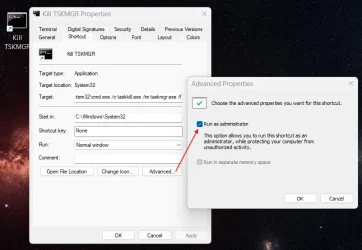
I made a simple shortcut to CMD and pinned it to my taskbar.

1762311560501.webp
 

My Computers

System One System Two

  • OS
    Win 11 Pro 25H2 26200.8524
    Computer type
    PC/Desktop
    Manufacturer/Model
    Self Built
    CPU
    Intel® Core™ i7-14700K
    Motherboard
    ASUS TUF Z690-PLUS WIFI BIOS 4505 11/29/25
    Memory
    G.SKILL Ripjaws S5 Series 64GB (2 x 32GB) DDR5
    Graphics Card(s)
    ASUS GeForce RTX 4070 Super 12GB
    Sound Card
    Sound Blaster AE-5 Plus
    Monitor(s) Displays
    ASUS TUF Gaming 27" 2K HDR Gaming
    Screen Resolution
    2560 x 1440
    Hard Drives
    Samsung 990 Pro 1TB NVMe (Win 11 25H2)
    SK hynix P41 500GB NVMe 25H2 DEV/Games
    SK hynix P41 2TB NVMe (x3)
    Crucial P3 Plus 4TB
    PSU
    Corsair RM850x Shift
    Case
    Antec Dark Phantom DP502 FLUX
    Cooling
    Corsair Nautilus 360 RS AIO
    Keyboard
    Logitech MK 320
    Mouse
    Razer Basilisk V3
    Internet Speed
    350Mbs
    Browser
    Firefox
    Antivirus
    Winows Security
    Other Info
    MR 8.1 Home

    System 3 Specs
    Win 11 Pro 25H2 26200.8524
    ASUS PRIME Z370-P II BIOS 3004 7/12/21
    Intel Core i7-8700 CPU @ 3.20GHz
    32GB DDR4 RAM (4x8)
    iGPU Intel UHD Graphics 630
  • Operating System
    Win 11 Pro 25H2 26200.8524
    Computer type
    PC/Desktop
    Manufacturer/Model
    Self Built
    CPU
    Intel Core i7-11700F
    Motherboard
    Asus TUF Gaming Z590 Plus WiFi (BIOS 2803)
    Memory
    64 GB DDR4
    Graphics card(s)
    MSI GeForce RTX 3060 Ventus 2X 12GB
    Sound Card
    SoundBlaster Audigy Fx V2
    Monitor(s) Displays
    Samsung F27T350
    Screen Resolution
    1920x1080
    Hard Drives
    Samsung 980 Pro 1TB
    Samsung 970 EVO Plus 2TB
    Samsung 870 EVO 500GB SSD
    PSU
    Corsair HX750
    Case
    Cougar MX330-G Window
    Cooling
    Thermalright Frozen Edge 240 Black AIO
    Internet Speed
    350Mbps
    Browser
    Firefox
    Antivirus
    Windows Security
Temp fix, kill switch for Task Manager
This is not a "fixed" or "temp fix". the issue still exists.This did not fix the issue with the [X] button. This only terminates taskmgr.exe using the command. it does not fix the [X] button issue.
 

My Computer

System One

  • OS
    Windows 11, version 25H2 (26200)
    Computer type
    PC/Desktop
    CPU
    AMD Ryzen 9 9950X 16-Core Processor
    Motherboard
    ASRock B650M PG Riptide
    Memory
    DDR5-6000 (CL36) 64.0 GB
    Graphics Card(s)
    NVIDIA GeForce RTX 4090
    PSU
    1200W
    Case
    Phanteks Enthoo Pro 2
    Cooling
    Noctua NH-D12L
Oh my eyes! Biggest mistake I've made today (so far) is reading this thread. Is there such a thing as users having an overabundance of Windows' testosterones?
 

My Computers

System One System Two

  • OS
    Windows 11 Pro 25H2
    Computer type
    PC/Desktop
    Manufacturer/Model
    Dell Optiplex 7080
    CPU
    i9-10900 10 core 20 threads
    Motherboard
    DELL 0J37VM
    Memory
    32 gb
    Graphics Card(s)
    none-Intel UHD Graphics 630
    Sound Card
    Integrated Realtek
    Monitor(s) Displays
    Benq 27
    Screen Resolution
    2560x1440
    Hard Drives
    2x1tb Solidigm m.2 nvme /External drives 512gb Samsung m.2 sata+2tb Kingston m2.nvme
    PSU
    500w
    Case
    MT
    Cooling
    Dell Premium
    Keyboard
    Logitech wired
    Mouse
    Logitech wireless
    Internet Speed
    so slow I'm too embarrassed to tell
    Browser
    #1 Edge #2 Firefox
    Antivirus
    Defender+MWB Premium
  • Operating System
    Windows 11 Pro 24H2 26200.8457
    Computer type
    PC/Desktop
    Manufacturer/Model
    Beelink Mini PC SER5
    CPU
    AMD Ryzen 7 6800U
    Memory
    32 gb
    Graphics card(s)
    integrated
    Sound Card
    integrated
    Monitor(s) Displays
    Benq 27
    Screen Resolution
    2560x1440
    Hard Drives
    1TB Crucial nvme
    Keyboard
    Logitech wired
    Mouse
    Logitech wireless
    Internet Speed
    still too embarrassed to tell
    Browser
    Firefox
    Antivirus
    Defender
    Other Info
    System 3 is non compliant Dell 9020 i7-4770/24gb ram Win11 PRO 26200.8457
Oh my eyes! Biggest mistake I've made today (so far) is reading this thread. Is there such a thing as users having an overabundance of Windows' testosterones?
Nope. Just people that “know everything”, yet seek guidance from others. There are a few of them roaming the forum lately. It’s just become free amusement at this point. Wind em up and watch em go.
 

My Computer

System One

  • OS
    Windows 11 Pro
Nope. Just people that “know everything”, yet seek guidance from others. There are a few of them roaming the forum lately. It’s just become free amusement at this point. Wind em up and watch em go.

ah the .. i know everything but what i don't know i will never know so i will never know everything (smile)
best of luck Steve ..
 

My Computers

System One System Two

  • OS
    Debian 13 Trixie .. Windows 11 Home
    Computer type
    PC/Desktop
    Manufacturer/Model
    HP 24" AiO
    CPU
    Ryzen 7 5825u
    Motherboard
    HP
    Memory
    64GB DDR4 3200
    Graphics Card(s)
    Ryzen 7 5825u
    Sound Card
    RealTek
    Monitor(s) Displays
    24" HP AiO
    Screen Resolution
    1920 x 1080 @60 Hz
    Hard Drives
    1TB WD Blue SN580 M2 SSD Partitioned.
    2x 1TB USB HDD External Backup/Storage.
    PSU
    90W external power brick
    Case
    24" All in One
    Cooling
    Default Air Cooling
    Keyboard
    HP WiFi UK extended
    Mouse
    HP WiFi 3 Button
    Internet Speed
    1GB full fibre
    Browser
    Edge & Firefox
    Antivirus
    AVG Internet Security/Windows Defender
    Other Info
    Mainly Open Source Software
  • Operating System
    Ubuntu 22.04.5 LTS
    Computer type
    Laptop
    Manufacturer/Model
    Dell 13" Latitude 2017
    CPU
    i5 7200u
    Motherboard
    Dell
    Memory
    16GB DDR4
    Graphics card(s)
    Intel
    Sound Card
    Intel
    Monitor(s) Displays
    13" Dell Laptop
    Hard Drives
    250GB Crucial 2.5" SSD
    Mouse
    Generic WiFi 3 button
    Internet Speed
    WiFi only
    Browser
    Firefox
    Antivirus
    ClamAV TK
    Other Info
    Mainly Open Source Software
Interesting reading, all this, but Microsoft will probably introduce a fix for it pretty soon.

Besides, I rarely open Task Manager but when I do, why not just right-mouse click the taskmgr entry in Task Manager itself and click on "End Task"?

Seems easy enough to me....
 

My Computers

System One System Two

  • OS
    Windows 11 Pro 25H2 build: (26200.7623)
    Computer type
    Laptop
    Manufacturer/Model
    Microsoft Surface Pro
    Memory
    32GB
  • Operating System
    Microsoft 25H2 Pro
    Computer type
    Laptop
    Manufacturer/Model
    Dell Pro 14 - PC14250
    CPU
    Intel Core Ultra 7
    Memory
    64GB
    Graphics card(s)
    Intel Integrated Graphics
    Hard Drives
    Micron 1TB SSD
Interesting reading, all this, but Microsoft will probably introduce a fix for it pretty soon.

Besides, I rarely open Task Manager but when I do, why not just right-mouse click the taskmgr entry in Task Manager itself and click on "End Task"?
or have the 'end task' in the right click menu
best of luck Steve ..
 

My Computers

System One System Two

  • OS
    Debian 13 Trixie .. Windows 11 Home
    Computer type
    PC/Desktop
    Manufacturer/Model
    HP 24" AiO
    CPU
    Ryzen 7 5825u
    Motherboard
    HP
    Memory
    64GB DDR4 3200
    Graphics Card(s)
    Ryzen 7 5825u
    Sound Card
    RealTek
    Monitor(s) Displays
    24" HP AiO
    Screen Resolution
    1920 x 1080 @60 Hz
    Hard Drives
    1TB WD Blue SN580 M2 SSD Partitioned.
    2x 1TB USB HDD External Backup/Storage.
    PSU
    90W external power brick
    Case
    24" All in One
    Cooling
    Default Air Cooling
    Keyboard
    HP WiFi UK extended
    Mouse
    HP WiFi 3 Button
    Internet Speed
    1GB full fibre
    Browser
    Edge & Firefox
    Antivirus
    AVG Internet Security/Windows Defender
    Other Info
    Mainly Open Source Software
  • Operating System
    Ubuntu 22.04.5 LTS
    Computer type
    Laptop
    Manufacturer/Model
    Dell 13" Latitude 2017
    CPU
    i5 7200u
    Motherboard
    Dell
    Memory
    16GB DDR4
    Graphics card(s)
    Intel
    Sound Card
    Intel
    Monitor(s) Displays
    13" Dell Laptop
    Hard Drives
    250GB Crucial 2.5" SSD
    Mouse
    Generic WiFi 3 button
    Internet Speed
    WiFi only
    Browser
    Firefox
    Antivirus
    ClamAV TK
    Other Info
    Mainly Open Source Software
or have the 'end task' in the right click menu

Or when Task Manager appears down in the Task Bar, just right-mouse click it and "Close Window".
I do it that way a lot. So much so that I've nearly forgotten about the red x up at the top.

Easy-peasy...
 

My Computers

System One System Two

  • OS
    Windows 11 Pro 25H2 build: (26200.7623)
    Computer type
    Laptop
    Manufacturer/Model
    Microsoft Surface Pro
    Memory
    32GB
  • Operating System
    Microsoft 25H2 Pro
    Computer type
    Laptop
    Manufacturer/Model
    Dell Pro 14 - PC14250
    CPU
    Intel Core Ultra 7
    Memory
    64GB
    Graphics card(s)
    Intel Integrated Graphics
    Hard Drives
    Micron 1TB SSD

Latest Support Threads

Back
Top Bottom