Solved Restoring classic taskbar context menu (Win 11, 24H2)


jim55

New member
Local time
5:21 PM
Posts
5
OS
Win 11, 24H2
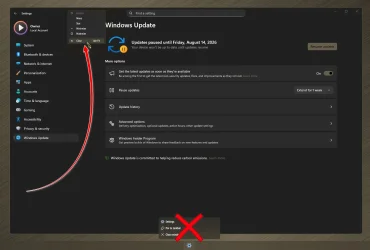
How can I get this back as the default (without having to press Shift while right-clicking)?

R2UkbHx.jpeg
 
Windows Build/Version
Win 11, 24H2

My Computer

System One

  • OS
    Win 11, 24H2
Do you mean this?
 

My Computers

System One System Two

  • OS
    Windows 11 Pro 25H2
    Computer type
    PC/Desktop
    Manufacturer/Model
    Dell Optiplex 7080
    CPU
    i9-10900 10 core 20 threads
    Motherboard
    DELL 0J37VM
    Memory
    32 gb
    Graphics Card(s)
    none-Intel UHD Graphics 630
    Sound Card
    Integrated Realtek
    Monitor(s) Displays
    Benq 27
    Screen Resolution
    2560x1440
    Hard Drives
    2x1tb Solidigm m.2 nvme /External drives 512gb Samsung m.2 sata+2tb Kingston m2.nvme
    PSU
    500w
    Case
    MT
    Cooling
    Dell Premium
    Keyboard
    Logitech wired
    Mouse
    Logitech wireless
    Internet Speed
    so slow I'm too embarrassed to tell
    Browser
    #1 Edge #2 Firefox
    Antivirus
    Defender+MWB Premium
  • Operating System
    Windows 11 Pro 24H2 26200.8457
    Computer type
    PC/Desktop
    Manufacturer/Model
    Beelink Mini PC SER5
    CPU
    AMD Ryzen 7 6800U
    Memory
    32 gb
    Graphics card(s)
    integrated
    Sound Card
    integrated
    Monitor(s) Displays
    Benq 27
    Screen Resolution
    2560x1440
    Hard Drives
    1TB Crucial nvme
    Keyboard
    Logitech wired
    Mouse
    Logitech wireless
    Internet Speed
    still too embarrassed to tell
    Browser
    Firefox
    Antivirus
    Defender
    Other Info
    System 3 is non compliant Dell 9020 i7-4770/24gb ram Win11 PRO 26200.8457
No, this is for the explorer only and does not affect the taskbar.
 

My Computer

System One

  • OS
    Win 11, 24H2
Settings/Personalization/Taskbar/Taskbar Behaviors . Try there
 

My Computers

System One System Two

  • OS
    Windows11 Pro 26200.8524
    Computer type
    PC/Desktop
    Manufacturer/Model
    Dell Alienware Aurora R16
    CPU
    Intel Core i9 14900F (24 -Core, 68 MB Total Cache)
    Motherboard
    Dell Alienware
    Memory
    32GB DDR5
    Graphics Card(s)
    RTX 4080 Super w/581.95
    Sound Card
    Realtec
    Monitor(s) Displays
    Corsair XENEON 32QHD165
    Screen Resolution
    2560 X 1440
    Hard Drives
    1-2TB Samsung 990 Pro PCIe NVMe M2 SSD
    1-4TB Samsung 990 Pro PCIe NVMe M2 SSD
    PSU
    1000 Watt Platinum Dell
    Case
    Alienware
    Cooling
    Liquid Closed Loop
    Keyboard
    Corsair Strafe RGB
    Mouse
    Logitech MK270 Wireless
    Internet Speed
    100Gb's Down-20 Up
    Browser
    Firefox 151.0.3
    Antivirus
    Defender
    Other Info
    Very Quiet And Fast
    CyberPower UPS CP1500PFCLCD
  • Operating System
    PClinuxOS Mate (2025.7)
    Computer type
    PC/Desktop
    Manufacturer/Model
    Intel
    CPU
    13th Gen Inter(R) Core(TM) i3-1315U
    Motherboard
    Intel
    Memory
    64 GB DDR4 @3200 MHz.
    Graphics card(s)
    Internal
    Sound Card
    None
    Monitor(s) Displays
    Dell 2419HGCF
    Screen Resolution
    1920 X 1080
    Hard Drives
    SAMSUNG 980 PRO SSD 2TB, PCIe 4.0 M.2 2280
    PSU
    Chicony 30 Watt
    Case
    Small
    Keyboard
    Dell
    Mouse
    Razor
    Internet Speed
    1GB
    Browser
    Slimjet
Already checked there, but none of the options is relevant.
 

My Computer

System One

  • OS
    Win 11, 24H2
How can I get this back as the default (without having to press Shift while right-clicking)?

R2UkbHx.jpeg

See if this works.
Download this zip file (below), it contains two registry files. Then Extract it to wherever you want to save the folder.
Now click on the file that should pertain to what you want, the one named "Enable_taskbar_context_menus_all_users.reg".
Run it, then choose Yes (Are you sure you want to continue?). Finally click on OK.
Now restart your PC and see if it works.
 

Attachments

My Computer

System One

  • OS
    Windows 11 25H2 Pro (RP Build 26200.8524)
    Computer type
    PC/Desktop
    Manufacturer/Model
    Alienware
How can I get this back as the default (without having to press Shift while right-clicking)?
Use the same feature, except right click the Title Bar instead...

9503.webp
 

My Computers

System One System Two

  • OS
    Windows 11 Pro
    Computer type
    PC/Desktop
    Manufacturer/Model
    ASUS ROG Strix
  • Operating System
    Windows 11 Pro
    Computer type
    Laptop
    Manufacturer/Model
    ASUS VivoBook
See if this works.
Download this zip file (below), it contains two registry files. Then Extract it to wherever you want to save the folder.
Now click on the file that should pertain to what you want, the one named "Enable_taskbar_context_menus_all_users.reg".
Run it, then choose Yes (Are you sure you want to continue?). Finally click on OK.
Now restart your PC and see if it works.
Your registry changes allow me to switch between the new menu and no menu, but not the old menu.

Use the same feature, except right click the Title Bar instead...

View attachment 141942
I don't care about title bars. I want old the taskbar menu back with its important functionality and without all the new junk.
 

My Computer

System One

  • OS
    Win 11, 24H2
I want old the taskbar menu back with its important functionality...
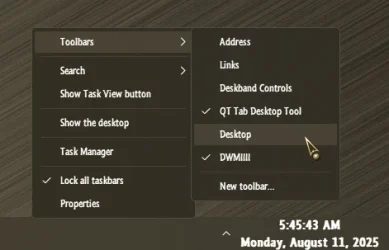
To me, it's unclear, according to your clip and descriptions, what you're after.
Perhaps this is what you want:

10373.webp

If not, then I don't know what you want.
 

My Computers

System One System Two

  • OS
    Windows 11 Pro
    Computer type
    PC/Desktop
    Manufacturer/Model
    ASUS ROG Strix
  • Operating System
    Windows 11 Pro
    Computer type
    Laptop
    Manufacturer/Model
    ASUS VivoBook

My Computers

System One System Two

  • OS
    11 Home
    Computer type
    Laptop
    Manufacturer/Model
    Asus TUF Gaming F16 (2024)
    CPU
    i7 13650HX
    Memory
    16GB DDR5
    Graphics Card(s)
    GeForce RTX 4060 Mobile
    Sound Card
    Eastern Electric MiniMax DAC Supreme; Emotiva UMC-200; Astell & Kern AK240
    Monitor(s) Displays
    Sony Bravia XR-55X90J
    Screen Resolution
    3840×2160
    Hard Drives
    512GB SSD internal
    37TB external
    PSU
    Li-ion
    Cooling
    2× Arc Flow Fans, 4× exhaust vents, 5× heatpipes
    Keyboard
    Logitech K800
    Mouse
    Logitech G402
    Internet Speed
    30Mbit/s up, 500Mbit/s down
    Browser
    FF
    Antivirus
    What's an antivirus?
  • Operating System
    11 Home
    Computer type
    Laptop
    Manufacturer/Model
    Medion S15450
    CPU
    i5 1135G7
    Memory
    16GB DDR4
    Graphics card(s)
    Intel Iris Xe
    Sound Card
    Eastern Electric MiniMax DAC Supreme; Emotiva UMC-200; Astell & Kern AK240
    Monitor(s) Displays
    Sony Bravia XR-55X90J
    Screen Resolution
    3840×2160
    Hard Drives
    2TB SSD internal
    37TB external
    PSU
    Li-ion
    Keyboard
    Logitech K800
    Mouse
    Logitech G402
    Internet Speed
    30Mbit/s up, 500Mbit/s down
    Browser
    FF
To me, it's unclear, according to your clip and descriptions, what you're after.
Perhaps this is what you want:

View attachment 141960

If not, then I don't know what you want.
In the past, when right-clicking items on your taskbar, you had a menu with options to move/minimize/... (as seen on the right part of my image, all of which I want to have).
Now you get a different menu with of none of those options, only one to pin the program (on the left, which I don't want) and possibly some app-specific tasks and jumplists (recent files for a text editor/new tab for a browser/..., which I also don't want).


Perfect! Thank you!
 

My Computer

System One

  • OS
    Win 11, 24H2

Latest Support Threads

Back
Top Bottom