
Robocopy runs very slow...


PMB

Member
Local time
9:07 PM
Posts
9
OS
Windows 11
I am new to Robocopy and trying to learn as I go. I have two external USB connected hard disk drives, E: is a 10 TB (7.2 TB capacity) drive with 1.96 TB used space, G: is a 12 TB (10.9 TB capacity) drive and is new. The E: drive is 6 years old and I want to replicate the filesystem from E: to G: and continue using E: but occasionally (maybe weekly) keeping G: up to date with the contents on E: The filesystem contains years of photography and video files so the sizes are mostly large with some very large.

I have performed a couple test copies, choosing just one folder for now, to see how robocopy works. My latest attempts have include the /mir switch. I am finding that some time robocopy runs ok and sometimes it is extremely slow. See below two logfiles (middle sections removed to save space), each run copying the exact same files & folders. I have highlighted the speed in each log file. The second run where I am testing (for the first time) the /mir switch runs about 13 times slower. Why? What can I do to speed this up? And what do the times mean at the end of the log file - they don't make any sense to me?
1746790108611.webp


1746790155673.webp
Thanks,
Peter
 
Windows Build/Version
Windows 11 Home, 24H2, OS Build 26100.3194

My Computer

System One

  • OS
    Windows 11
    Computer type
    PC/Desktop
    Manufacturer/Model
    ASUS ROG STRIX Z790 E
    CPU
    i7-13700K 3.40 GHz
    Motherboard
    ASUS ROG STRIX Z790 E
    Memory
    64 GB
    Graphics Card(s)
    GIGABYTE RTX 3070 Ti
    Sound Card
    n/a
    Monitor(s) Displays
    BenQ SW2700 inch & Dell P1917S
I am new to Robocopy and trying to learn as I go. I have two external USB connected hard disk drives, E: is a 10 TB (7.2 TB capacity) drive with 1.96 TB used space, G: is a 12 TB (10.9 TB capacity) drive and is new. The E: drive is 6 years old and I want to replicate the filesystem from E: to G: and continue using E: but occasionally (maybe weekly) keeping G: up to date with the contents on E: The filesystem contains years of photography and video files so the sizes are mostly large with some very large.

I have performed a couple test copies, choosing just one folder for now, to see how robocopy works. My latest attempts have include the /mir switch. I am finding that some time robocopy runs ok and sometimes it is extremely slow. See below two logfiles (middle sections removed to save space), each run copying the exact same files & folders. I have highlighted the speed in each log file. The second run where I am testing (for the first time) the /mir switch runs about 13 times slower. Why? What can I do to speed this up? And what do the times mean at the end of the log file - they don't make any sense to me?

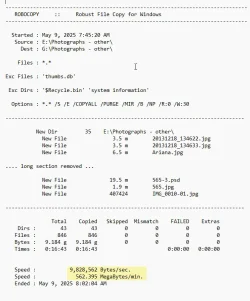


Thanks,
Peter
So many variables there, Peter.
Are all those HDDs? Are the USB ports all the same type? A-B or C ?
Are the files indexed?
 

My Computers

System One System Two

  • OS
    All Branches but Release
    Computer type
    Laptop
    Manufacturer/Model
    Acer Nitro ANV15-51
    CPU
    AMD Ryzen 7 7735HS 3200-4500 Mhz 8 cores x 2
    Motherboard
    Sportage_RBH
    Memory
    32 GB DDR5
    Graphics Card(s)
    Radeon Graphic / NVIDIA GeForce RTX 4060 8 GB GDDR6
    Sound Card
    AMD/Realtek(R) Audio
    Monitor(s) Displays
    Integrated Monitor (15.3"vis)
    Screen Resolution
    FHD 1920X1080 16:9 144Hz
    Hard Drives
    KINGSTON OM8SEP4512Q-AA 1TB
    Western Digital 256GB
    PSU
    19V DC 6.32 A 120 W
    Cooling
    Dual Fans
    Mouse
    MS Bluetooth
    Internet Speed
    Fiber 1GB Cox -us & 1GB Orange-fr
    Browser
    Edge Canary- Firefox Nightly-Chrome Dev-Chrome Dev
    Antivirus
    Windows Defender
  • Operating System
    Windows 11 Beta
    Computer type
    Laptop
    Manufacturer/Model
    Asus X751BP
    CPU
    AMD A9-9420
    Memory
    8 GB of DDR4
    Graphics card(s)
    AMD Radeon R5
    Screen Resolution
    1600x900
    Hard Drives
    Seagate 1 TB
The older HDD I bought in March 2019 as so I am thinking I need to be prepared for when it gives me trouble. It is a G-Technology 16TB G-RAID Removable Thunderbolt 3 connected to a USB 3.2 Gen 2 10 GB/s with a compatible USB cable that came with the drive Type-C to Type-C. This box has a pair of 8 GB 7200 rpm drives that are mirrored (in the G-RAID box).
The new HDD I bought it in April 2025. It is a WD G-RAID MIRROR with a pair of 12 TB 7200 rpm drives, mirrored. Again connected to a USB 3.2 Gen 2 10 GB/s with a compatible USB cable that came with the drive Type-C to Type-C.
Ah, indexing... I just checked. The older HDD is not indexed but the newer one is, I guess by default.

Peter
 

My Computer

System One

  • OS
    Windows 11
    Computer type
    PC/Desktop
    Manufacturer/Model
    ASUS ROG STRIX Z790 E
    CPU
    i7-13700K 3.40 GHz
    Motherboard
    ASUS ROG STRIX Z790 E
    Memory
    64 GB
    Graphics Card(s)
    GIGABYTE RTX 3070 Ti
    Sound Card
    n/a
    Monitor(s) Displays
    BenQ SW2700 inch & Dell P1917S

Latest Support Threads

Back
Top Bottom



