
Solved Rufus 4.9 Windows 11 Install Local User Account


Sparks79

Member
Local time
6:21 AM
Posts
5
OS
Windows 11 pro
I am Quite Conversant with Using Iso's in Ventoy.
It is a Very Handy Tool to have.
Amoung Many things, Installing Windows from an Iso is so much more Easy.
The Current Procedure of Installing Windows 11 from Microsoft which by default Forces you to Use a User Account, is Totally Unaceptible .
If you Pay for the Windows Key, you should be given the Choice to Install Windows with either a Local Account or a Online Account.
And not be Forced for just the Online Account.
Now, RUFUS to the Rescue.
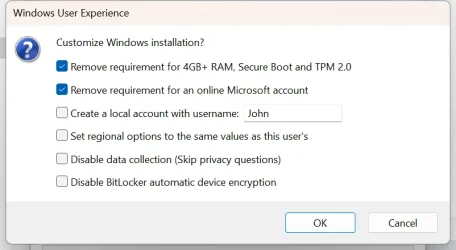
Rufus 4.9 has a very Handy set of Tweaks that can really make your installation much more Pleasant.
At the Bottom of Rufus, where you Click on Finish, Up Pops this Magic set of Tweaks ( see my Attachment ).
And one of those enables you to Bypass the User Account and Use a Local User Account.
I have one small Problem with that System.
For me to be able to Supply an ISO to Ventoy, I have Make an ISO from the USB Flash Drive that Rufus just Created.
Am I missing something or is there another way to get Rufus to Output an ISO instead of using a Flash Drive.
Up until now what I have been doing is Using Ntlite to Load the Flash Drive and then make an ISO from it.
 

Attachments
  • Screenshot - 8_12_2025 , 4_22_39 AM 002.webp
    Screenshot - 8_12_2025 , 4_22_39 AM 002.webp
    30 KB · Views: 7

My Computer

System One

  • OS
    Windows 11 pro
    Computer type
    PC/Desktop
    Manufacturer/Model
    Home Built
    CPU
    i9
    Motherboard
    z790-a
    Memory
    128gb
    Graphics Card(s)
    onboard
    Sound Card
    onboard
    Monitor(s) Displays
    34" Curved
    Screen Resolution
    60hz
    Hard Drives
    Four Samsung 990Pro SSD @ 1TB in Raid 0
    PSU
    750 Gigabyte
    Cooling
    Thermaltake Water 3
    Keyboard
    Keji
    Mouse
    keji
    Internet Speed
    flipping Fast
    Browser
    Chrome
    Antivirus
    Microsoft
No one hates the default option more than me of using a MS account and getting one's wagon automatically hitched to onedrive without his knowlwdge or permission. However, when one owns a license key, it only gives him the right to use windows, but he does not own it. MS does. They can do what they want to with it. As users, we do what we gotta do to make it useable for us. Right now, we can jump thru hoops to change this or alter that ONLY because MS has left the doors open for us to do so. Once those doors are closed, and it's my opinion they eventually will be, we will have to adapt to the MS way or seek another OS.

Yes Rufus has had this option for quite some time now. Right now one can also enter a command during install that accomplishes the same thing if his install media was not created using Rufus.
 

My Computers

System One System Two

  • OS
    Windows 11 Pro 25H2
    Computer type
    PC/Desktop
    Manufacturer/Model
    Dell Optiplex 7080
    CPU
    i9-10900 10 core 20 threads
    Motherboard
    DELL 0J37VM
    Memory
    32 gb
    Graphics Card(s)
    none-Intel UHD Graphics 630
    Sound Card
    Integrated Realtek
    Monitor(s) Displays
    Benq 27
    Screen Resolution
    2560x1440
    Hard Drives
    2x1tb Solidigm m.2 nvme /External drives 512gb Samsung m.2 sata+2tb Kingston m2.nvme
    PSU
    500w
    Case
    MT
    Cooling
    Dell Premium
    Keyboard
    Logitech wired
    Mouse
    Logitech wireless
    Internet Speed
    so slow I'm too embarrassed to tell
    Browser
    #1 Edge #2 Firefox
    Antivirus
    Defender+MWB Premium
  • Operating System
    Windows 11 Pro 24H2 26200.8457
    Computer type
    PC/Desktop
    Manufacturer/Model
    Beelink Mini PC SER5
    CPU
    AMD Ryzen 7 6800U
    Memory
    32 gb
    Graphics card(s)
    integrated
    Sound Card
    integrated
    Monitor(s) Displays
    Benq 27
    Screen Resolution
    2560x1440
    Hard Drives
    1TB Crucial nvme
    Keyboard
    Logitech wired
    Mouse
    Logitech wireless
    Internet Speed
    still too embarrassed to tell
    Browser
    Firefox
    Antivirus
    Defender
    Other Info
    System 3 is non compliant Dell 9020 i7-4770/24gb ram Win11 PRO 26200.8457
you could transfer/copy the complete contents of the Rufus USB drive over to a folder and then create a ISO of that image within that folder.
then transfer the ISO image to Ventoy.

best of luck, Steve ..
 

My Computers

System One System Two

  • OS
    Windows 11 Home
    Computer type
    PC/Desktop
    Manufacturer/Model
    HP 24" AiO
    CPU
    Ryzen 7 5825u
    Motherboard
    HP
    Memory
    64GB DDR4 3200
    Graphics Card(s)
    Ryzen 7 5825u
    Sound Card
    RealTek
    Monitor(s) Displays
    24" HP AiO
    Screen Resolution
    1920 x 1080 @60 Hz
    Hard Drives
    1TB WD Blue SN580 M2 SSD Partitioned.
    2x 1TB USB HDD External Backup/Storage.
    PSU
    90W external power brick
    Case
    24" All in One
    Cooling
    Default Air Cooling
    Keyboard
    HP WiFi UK extended
    Mouse
    HP WiFi 3 Button
    Internet Speed
    1GB full fibre
    Browser
    Edge & Firefox
    Antivirus
    AVG Internet Security/Windows Defender
    Other Info
    Mainly Open Source Software
  • Operating System
    Ubuntu 22.04.5 LTS
    Computer type
    Laptop
    Manufacturer/Model
    Dell 13" Latitude 2017
    CPU
    i5 7200u
    Motherboard
    Dell
    Memory
    16GB DDR4
    Graphics card(s)
    Intel
    Sound Card
    Intel
    Monitor(s) Displays
    13" Dell Laptop
    Hard Drives
    250GB Crucial 2.5" SSD
    Mouse
    Generic WiFi 3 button
    Internet Speed
    WiFi only
    Browser
    Firefox
    Antivirus
    ClamAV TK
    Other Info
    Mainly Open Source Software
When you use Rufus to customize a Windows ISO, all it's really doing is creating a hidden unattended file for you. That's it. You can duplicate this functionality by copying that file to another ISO.

1. Run Rufus once to create a new USB, using the Windows options you want.

2. Copy\sources\$OEM$\$$\Setup\unattend.xmlfrom the Rufus drive, and save it to a local folder asautounattend.xml.

3. When you're in NTLite, import this file in Post-Setup so it gets included on the ISO image. File / Add / Before logon (Machine) -> autounattend.xml. Under the Mode column, check it's "ISO". Change the Destination column path to\autounattend.xml.

1754947153317.webp

4. If you're not using NTLite, then copy autounattend.xml to the root folder where your ISO distribution is before you use whatever tool that creates an ISO file from the distribution folder.
 

My Computer

System One

  • OS
    Windows 7
I did a little Google search reveals that apparently Rufus can also create an ISO from the USB flash drive. So first use it to patch the Windows 11 ISO and create the USB flash drive, then use it the other way around, to write the patched USB flash drive in a new ISO. Just copy that ISO in your Ventoy disk and voila! It is local time 00:55 and I must go to bed, no time to investigate how this is done. I will have a look tomorrow and post results.
 

My Computers

System One System Two

  • OS
    Windows 11 Pro 23H2 (5699), 25H2 (8457)
    Computer type
    Laptop
    Manufacturer/Model
    Acer Extensa 5630EZ
    CPU
    Mobile DualCore Intel Core 2 Duo T7250, 2000 MHz
    Motherboard
    Acer Extensa 5630
    Memory
    4GB
    Graphics Card(s)
    Mobile Intel(R) GMA 4500M (Mobile 4 series)
    Sound Card
    Realtek ALC268 @ Intel 82801IB ICH9 - High Definition Audio Controller
    Monitor(s) Displays
    1
    Screen Resolution
    1280x800
    Hard Drives
    Samsung SSD 850 EVO 250GB SATA Device (250 GB, SATA-III)
    Internet Speed
    VDSL 50 Mbps
    Browser
    MICROSOFT EDGE
    Antivirus
    WINDOWS DEFENDER
    Other Info
    Legacy MBR installation, no TPM, no Secure Boot, no WDDM 2.0 graphics drivers, no SSE4.2, cannot get more unsupported ;) This is only my test laptop. I had installed Windows 11 here before upgrading my main PC. For my main PC I use everyday see my 2nd system specs.
  • Operating System
    Windows 11 Pro v25H2 (build 26200.8457)
    Computer type
    PC/Desktop
    Manufacturer/Model
    Custom-built PC
    CPU
    Intel Core-i7 3770 3.40GHz s1155 (3rd generation)
    Motherboard
    Asus P8H61 s1155 ATX
    Memory
    2x Kingston Hyper-X Blu 8GB DDR3-1600
    Graphics card(s)
    GIGABYTE GeForce RTX 3050 WINDFORCE OC V2 6GB (GV-N3050WF2OCV2-6GD)
    Sound Card
    Realtek HD audio (ALC887)
    Monitor(s) Displays
    Sony Bravia KDL-19L4000 19" LCD TV via VGA
    Screen Resolution
    1440x900 32-bit 60Hz
    Hard Drives
    WD Blue SA510 2.5 1000GB SSD as system disk, Western Digital Caviar Purple 4TB SATA III (WD40PURZ) as second
    PSU
    Thermaltake Litepower RGB 550W Full Wired
    Case
    SUPERCASE MIDI-TOWER
    Cooling
    Deepcool Gamma Archer CPU cooler, 1x 8cm fan at the back
    Keyboard
    Mitsumi 101-key PS/2
    Mouse
    Sunnyline OptiEye PS/2
    Internet Speed
    100Mbps
    Browser
    Microsoft Edge, Mozilla Firefox
    Antivirus
    Microsoft Windows Defender
    Other Info
    Legacy BIOS (MBR) installation, no TPM, no Secure Boot, WDDM 3.0 graphics drivers, WEI score 7.4
Thanks ( garlin ) , I will try your procedure when I get home next week, many thanks.
And Thanks to everyone else.
 

My Computer

System One

  • OS
    Windows 11 pro
    Computer type
    PC/Desktop
    Manufacturer/Model
    Home Built
    CPU
    i9
    Motherboard
    z790-a
    Memory
    128gb
    Graphics Card(s)
    onboard
    Sound Card
    onboard
    Monitor(s) Displays
    34" Curved
    Screen Resolution
    60hz
    Hard Drives
    Four Samsung 990Pro SSD @ 1TB in Raid 0
    PSU
    750 Gigabyte
    Cooling
    Thermaltake Water 3
    Keyboard
    Keji
    Mouse
    keji
    Internet Speed
    flipping Fast
    Browser
    Chrome
    Antivirus
    Microsoft

Latest Support Threads

Back
Top Bottom




