safe boot with network - no network


yky378

New member
Local time
3:42 AM
Posts
3
OS
windows 11
I typed "msconfig", chose "boot", clicked on "safe boot" and chose "network", then, restarted the PC.

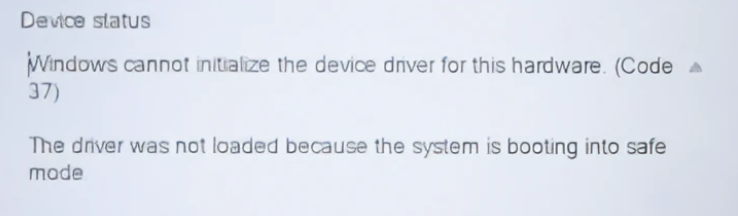
There was no network connection. I righ-clicked on the PC icon on the desktop, chose "manage", opened "Device Manager", clicked on "Network Adapters", and found the Killer E2600 Gibabit network adapter driver was not loaded.

Is this a general problem with Windows 11? I'm sure I didn't have this problem when running Windows 10 on a different PC.

Is there a way to load the network driver using a cmd command? Please note that this is in safe mode. Thanks.
 
Windows Build/Version
23H2/22631.2792

My Computer My Computer

At a glance

windows 1111th Gen Intel(R) Core(TM) i7-11700 @ 2.50GHz16G
OS
windows 11
Computer type
PC/Desktop
Manufacturer/Model
Dell XPS 8940
CPU
11th Gen Intel(R) Core(TM) i7-11700 @ 2.50GHz
Memory
16G
Screen Resolution
1360X657
Internet Speed
40Mb/s
Antivirus
AVG
Consider returning to normal boot then try another method.

See options 3 and 4.


Some computers may or may not have safe mode with Wifi.

Most have safe mode with Ethernet.
 

My Computer My Computer

At a glance

Windows 10Intel(R) Core(TM) i7-4800MQ CPU @ 2.70GHz16 GB Total: Manufacturer : Samsung MemoryTyp...NVIDIA Quadro K3100M; Intel(R) HD Graphics 4600
OS
Windows 10
Computer type
Laptop
Manufacturer/Model
HP
CPU
Intel(R) Core(TM) i7-4800MQ CPU @ 2.70GHz
Motherboard
Product : 190A Version : KBC Version 94.56
Memory
16 GB Total: Manufacturer : Samsung MemoryType : DDR3 FormFactor : SODIMM Capacity : 8GB Speed : 1600
Graphics Card(s)
NVIDIA Quadro K3100M; Intel(R) HD Graphics 4600
Sound Card
IDT High Definition Audio CODEC; PNP Device ID HDAUDIO\FUNC_01&VEN_111D&DEV_76E0
Hard Drives
Model Hitachi HTS727575A9E364
Antivirus
Microsoft Defender
Other Info
Mobile Workstation
Is this a general problem with Windows 11?
For many people it is extremely common. Me Included on both my Dells which use Intel wireless adapters and none of the solutions that work for some people will work for me. The only network driver that gets loaded is ethernet. It's been going on for several years now, more so on machines using newer wireless adapters.

Some folks have reported using certain usb wireless adapters working in safe mode. I've tried 3 brands and it's a no-go. (the common denominator between all of them though is they use a Realtek chip)

Other folks say that connecting from the network icon on the login screen before you put in your pin/password works

I spent days trying to get wireless to work in safe boot using every method I could find on the web. I ended up running a 75 foot lan cable across the floor to get it into my office. If one has a device that is not equipped with an ethernet port, you can buy usb ethernet adapters for cheap. At least if you have a laptop rather than a PC like I do, it's easy to move close to your router.

The biggest problem I have with this issue is no one, neither Microsoft, OEMs, or the manufacturers like Intel will give users a definitive answer as to why. Is it the fault of the OEM bios, the adapters/drivers themselves, a combination of both, or Windows?

This article has most of all the things people have tried across the web. You might hit it lucky and find something that works, but I seriously doubt it.

There is even a long discussion about it over in tenforums. Safe Mode with Networking - No network - No WiFi adapter... - Windows 10 Help Forums
 

My Computers My Computers

  • At a glance

    Windows 11 Pro 25H2 26200.9457i9-10900 10 core 20 threads32 gbnone-Intel UHD Graphics 630
    OS
    Windows 11 Pro 25H2 26200.9457
    Computer type
    PC/Desktop
    Manufacturer/Model
    Dell Optiplex 7080
    CPU
    i9-10900 10 core 20 threads
    Motherboard
    DELL 0J37VM
    Memory
    32 gb
    Graphics Card(s)
    none-Intel UHD Graphics 630
    Sound Card
    Integrated Realtek
    Monitor(s) Displays
    Benq 27
    Screen Resolution
    2560x1440
    Hard Drives
    2x1tb Solidigm m.2 nvme /External drives 512gb Samsung m.2 sata+2tb Kingston m2.nvme
    PSU
    500w
    Case
    MT
    Cooling
    Dell Premium
    Keyboard
    Logitech wired
    Mouse
    Logitech wireless
    Internet Speed
    so slow I'm too embarrassed to tell
    Browser
    #1 Edge #2 Firefox
    Antivirus
    Defender+MWB Premium
  • At a glance

    Windows 11 Pro 24H2 26200.9457AMD Ryzen 7 6800U32 gbintegrated
    Operating System
    Windows 11 Pro 24H2 26200.9457
    Computer type
    PC/Desktop
    Manufacturer/Model
    Beelink Mini PC SER5
    CPU
    AMD Ryzen 7 6800U
    Memory
    32 gb
    Graphics card(s)
    integrated
    Sound Card
    integrated
    Monitor(s) Displays
    Benq 27
    Screen Resolution
    2560x1440
    Hard Drives
    1TB Crucial nvme
    Keyboard
    Logitech wired
    Mouse
    Logitech wireless
    Internet Speed
    still too embarrassed to tell
    Browser
    Firefox
    Antivirus
    Defender
  • System 3 is non compliant Dell 9020 i7-4770/24gb ram Win11 PRO 26200.9457
@zbook Thanks for the reply.

I tried this command in option 3 - "bcdedit /set {current} safeboot network" and got this error message - "The integer data is not valid as specified." In a PS window, it gave this error message - "The set command specified is not valid."

Both cmd and PS were run in elevated mode.
 
Last edited:

My Computer My Computer

At a glance

windows 1111th Gen Intel(R) Core(TM) i7-11700 @ 2.50GHz16G
OS
windows 11
Computer type
PC/Desktop
Manufacturer/Model
Dell XPS 8940
CPU
11th Gen Intel(R) Core(TM) i7-11700 @ 2.50GHz
Memory
16G
Screen Resolution
1360X657
Internet Speed
40Mb/s
Antivirus
AVG
@glasskuter Thank you for the reply. I apologized for not specifying that my PC was connected to the router using an Ethernet cable. On the login window in safe mode, the network icon was a globe, indicating there was not network. The Ethernet driver- Killer E2600 Gigabit driver - was not loaded. In the Device Manager\Network Adapters window, the Killer E2600 icon had an exclamation mark.
 

My Computer My Computer

At a glance

windows 1111th Gen Intel(R) Core(TM) i7-11700 @ 2.50GHz16G
OS
windows 11
Computer type
PC/Desktop
Manufacturer/Model
Dell XPS 8940
CPU
11th Gen Intel(R) Core(TM) i7-11700 @ 2.50GHz
Memory
16G
Screen Resolution
1360X657
Internet Speed
40Mb/s
Antivirus
AVG

This is a guess here. If you per chance have both killer wireless and killer ethernet, and have Killer Network Manager software installed, you might configure Killer Doubleshot Pro in its settings.It might load then...notice I say might...twice.
 

My Computers My Computers

  • At a glance

    Windows 11 Pro 25H2 26200.9457i9-10900 10 core 20 threads32 gbnone-Intel UHD Graphics 630
    OS
    Windows 11 Pro 25H2 26200.9457
    Computer type
    PC/Desktop
    Manufacturer/Model
    Dell Optiplex 7080
    CPU
    i9-10900 10 core 20 threads
    Motherboard
    DELL 0J37VM
    Memory
    32 gb
    Graphics Card(s)
    none-Intel UHD Graphics 630
    Sound Card
    Integrated Realtek
    Monitor(s) Displays
    Benq 27
    Screen Resolution
    2560x1440
    Hard Drives
    2x1tb Solidigm m.2 nvme /External drives 512gb Samsung m.2 sata+2tb Kingston m2.nvme
    PSU
    500w
    Case
    MT
    Cooling
    Dell Premium
    Keyboard
    Logitech wired
    Mouse
    Logitech wireless
    Internet Speed
    so slow I'm too embarrassed to tell
    Browser
    #1 Edge #2 Firefox
    Antivirus
    Defender+MWB Premium
  • At a glance

    Windows 11 Pro 24H2 26200.9457AMD Ryzen 7 6800U32 gbintegrated
    Operating System
    Windows 11 Pro 24H2 26200.9457
    Computer type
    PC/Desktop
    Manufacturer/Model
    Beelink Mini PC SER5
    CPU
    AMD Ryzen 7 6800U
    Memory
    32 gb
    Graphics card(s)
    integrated
    Sound Card
    integrated
    Monitor(s) Displays
    Benq 27
    Screen Resolution
    2560x1440
    Hard Drives
    1TB Crucial nvme
    Keyboard
    Logitech wired
    Mouse
    Logitech wireless
    Internet Speed
    still too embarrassed to tell
    Browser
    Firefox
    Antivirus
    Defender
  • System 3 is non compliant Dell 9020 i7-4770/24gb ram Win11 PRO 26200.9457
I typed "msconfig", chose "boot", clicked on "safe boot" and chose "network", then, restarted the PC.

There was no network connection. I righ-clicked on the PC icon on the desktop, chose "manage", opened "Device Manager", clicked on "Network Adapters", and found the Killer E2600 Gibabit network adapter driver was not loaded.

Is this a general problem with Windows 11? I'm sure I didn't have this problem when running Windows 10 on a different PC.

Is there a way to load the network driver using a cmd command? Please note that this is in safe mode. Thanks.
If your talking about Wi-Fi then I can say that this happened to me and I did a lot of searching to find a solution. I even went as far as buying a USB Wi-Fi adapter that was well known to work. In the end I found that the OEM of the motherboards prevents this as a security measure. If the Bios doesn't allow it, It's not going to happen. My router is on another floor and to far away to use the wired network so I gave up.
 

My Computers My Computers

  • At a glance

    Windows 11 Pro 25H2Intel Core i7-10700K16GB (8GB PC4-19200 DDR4 SDRAM x2)NVIDIA GeForce GTX 1050 TI
    OS
    Windows 11 Pro 25H2
    Computer type
    PC/Desktop
    Manufacturer/Model
    PowerSpec B746
    CPU
    Intel Core i7-10700K
    Motherboard
    ASRock Z490 Phantom Gaming 4/ax
    Memory
    16GB (8GB PC4-19200 DDR4 SDRAM x2)
    Graphics Card(s)
    NVIDIA GeForce GTX 1050 TI
    Sound Card
    Realtek Audio
    Monitor(s) Displays
    #1. LG ULTRAWIDE 34" #2. AOC Q32G2WG3 32"
    Screen Resolution
    #1. 3440 X 1440 #2. 1920 x 1080
    Hard Drives
    NVMe WDC WDS100T2B0C-00PXH0 1TB
    Samsung SSD 860 EVO 1TB
    PSU
    750 Watts (62.5A)
    Case
    PowerSpec/Lian Li ATX 205
    Keyboard
    Logitech K270
    Mouse
    Logitech M185
    Browser
    Microsoft Edge and Firefox
    Antivirus
    Webroot SecureAnywhere CE 26.1
  • At a glance

    Windows 11 Canary ChannelIntel Core i5-8400 CPU @ 2.80GHz16 MB DDR 4-2666
    Operating System
    Windows 11 Canary Channel
    Computer type
    PC/Desktop
    Manufacturer/Model
    PowerSpec G156
    CPU
    Intel Core i5-8400 CPU @ 2.80GHz
    Motherboard
    AsusTeK Prime B360M-A
    Memory
    16 MB DDR 4-2666
    Monitor(s) Displays
    23" Speptre HDMI 75Hz
    Screen Resolution
    1920x1080
    Hard Drives
    Samsung 970 EVO 500GB NVMe
    Keyboard
    Logitek K270
    Mouse
    Logitek M185
    Browser
    Firefox, Edge and Edge Canary
    Antivirus
    Windows Defender
Windows will only load certain drivers in Safe Mode w/ Networking according to the Safe Boot registry key. You will need to ensure that the appropriate driver service is set to load in that particular Safe Mode.


My Computer My Computer

At a glance

Windows 11, Windows 10, Linux Fedora Cinnamon
OS
Windows 11, Windows 10, Linux Fedora Cinnamon
I think I recall adding some things to win7 safe mode. The details escape me for the moment.
 

My Computers My Computers

  • At a glance

    Win7,Win11i7-97002x16gb 3600mhz
    OS
    Win7,Win11
    Computer type
    PC/Desktop
    CPU
    i7-9700
    Motherboard
    gigabyte b365m ds3h
    Memory
    2x16gb 3600mhz
    Monitor(s) Displays
    benq gw2480
    PSU
    bequiet pure power 11 400CM
    Cooling
    cryorig m9i
  • At a glance

    win7,win11i5-84002x8gb 3200
    Operating System
    win7,win11
    Computer type
    PC/Desktop
    CPU
    i5-8400
    Motherboard
    gigabyte b365m ds3h
    Memory
    2x8gb 3200
    PSU
    xfx pro 450
If anyone knows how to bypass the Bios to allow blocked drivers please tell us how. I wasted a few dollars and a lot of time and effort and never found a way.
 

My Computers My Computers

  • At a glance

    Windows 11 Pro 25H2Intel Core i7-10700K16GB (8GB PC4-19200 DDR4 SDRAM x2)NVIDIA GeForce GTX 1050 TI
    OS
    Windows 11 Pro 25H2
    Computer type
    PC/Desktop
    Manufacturer/Model
    PowerSpec B746
    CPU
    Intel Core i7-10700K
    Motherboard
    ASRock Z490 Phantom Gaming 4/ax
    Memory
    16GB (8GB PC4-19200 DDR4 SDRAM x2)
    Graphics Card(s)
    NVIDIA GeForce GTX 1050 TI
    Sound Card
    Realtek Audio
    Monitor(s) Displays
    #1. LG ULTRAWIDE 34" #2. AOC Q32G2WG3 32"
    Screen Resolution
    #1. 3440 X 1440 #2. 1920 x 1080
    Hard Drives
    NVMe WDC WDS100T2B0C-00PXH0 1TB
    Samsung SSD 860 EVO 1TB
    PSU
    750 Watts (62.5A)
    Case
    PowerSpec/Lian Li ATX 205
    Keyboard
    Logitech K270
    Mouse
    Logitech M185
    Browser
    Microsoft Edge and Firefox
    Antivirus
    Webroot SecureAnywhere CE 26.1
  • At a glance

    Windows 11 Canary ChannelIntel Core i5-8400 CPU @ 2.80GHz16 MB DDR 4-2666
    Operating System
    Windows 11 Canary Channel
    Computer type
    PC/Desktop
    Manufacturer/Model
    PowerSpec G156
    CPU
    Intel Core i5-8400 CPU @ 2.80GHz
    Motherboard
    AsusTeK Prime B360M-A
    Memory
    16 MB DDR 4-2666
    Monitor(s) Displays
    23" Speptre HDMI 75Hz
    Screen Resolution
    1920x1080
    Hard Drives
    Samsung 970 EVO 500GB NVMe
    Keyboard
    Logitek K270
    Mouse
    Logitek M185
    Browser
    Firefox, Edge and Edge Canary
    Antivirus
    Windows Defender
Windows will only load drivers, more specifically services, which have permitted to do so, according to the SafeBoot registry key.
 

My Computer My Computer

At a glance

Windows 11, Windows 10, Linux Fedora Cinnamon
OS
Windows 11, Windows 10, Linux Fedora Cinnamon
Back
Top Bottom