Samsung Begins Official Rollout of One UI 8 to Galaxy Devices


 Samsung Newsroom:

Samsung Electronics today announced the official rollout of One UI 8 — introducing advanced multimodal AI capabilities, a UX optimized for different device form factors and personalized, proactive suggestions to make everyday life smarter and more convenient. Starting this week with the Galaxy S25 series, One UI 8 will also reach the Galaxy S24 series, Galaxy Z Fold6, Galaxy Z Flip6, Galaxy S24 FE and additional eligible models later this year.

Personalized Suggestions With Advanced Security
Samsung-Mobile-One-UI-8-Rollout-Galaxy-AI-Multimodal-AI-Galaxy-S25-series_main1.jpg


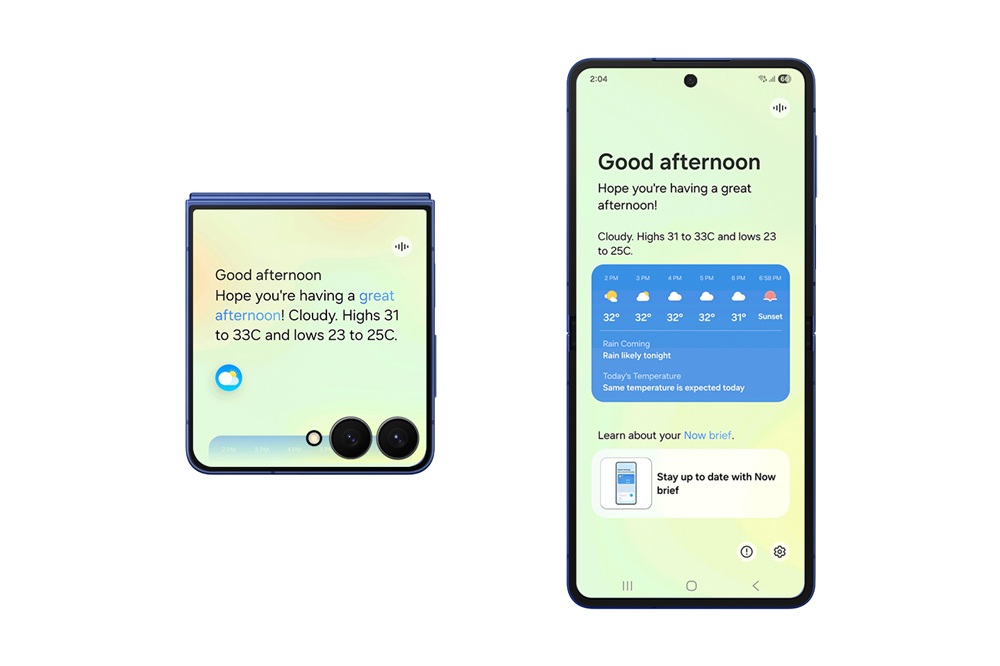
One UI 8 recognizes the user’s context, offering personalized, proactive suggestions that support their unique daily routines. And as Galaxy AI becomes more intelligent, so does its commitment to protecting private data. One UI 8 combines advanced personalization tools with top-tier security features, anticipating user needs while keeping information safe.
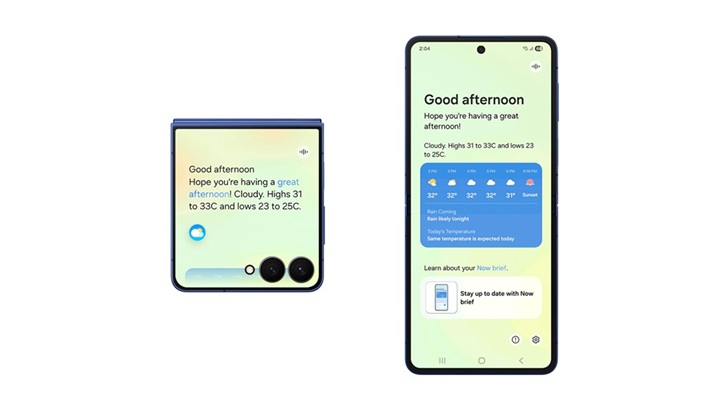
  • Now Bar shows real-time app activity and media player progress directly on Galaxy Z Flip’s FlexWindow, and is also now integrated with even more third-party apps.
  • Now Brief provides even more personalized daily updates including traffic, important reminders and Samsung Moments, which allows users to reflect on their daily routines. They can also get personalized suggestions and recommendations, such as music and video picks based on subscriptions and interests. In addition, personalized health insights from Galaxy Watch are also easily accessible.
  • Knox Enhanced Encrypted Protection (KEEP) is a new security architecture designed to safeguard the next generation of AI experiences used by Galaxy’s Personal Data Engine (PDE). KEEP creates encrypted, app-specific storage environments within the device, ensuring each app can only access its own sensitive information.
  • Knox Matrix takes security a step further by automatically signing devices out of the Samsung Account if flagged for serious risks. It sends notifications across connected Galaxy devices and gives additional guidance on how to protect data.
  • Upgraded Secure Wi-Fi with post-quantum cryptography (PQC) encompasses a new cryptographic framework designed to strengthen network protection against emerging threats, helping to ensure robust privacy — even over public networks.

Intelligent Multimodality: AI That Works the Way the User Does
Samsung-Mobile-One-UI-8-Rollout-Galaxy-AI-Multimodal-AI-Galaxy-S25-series_main2.jpg


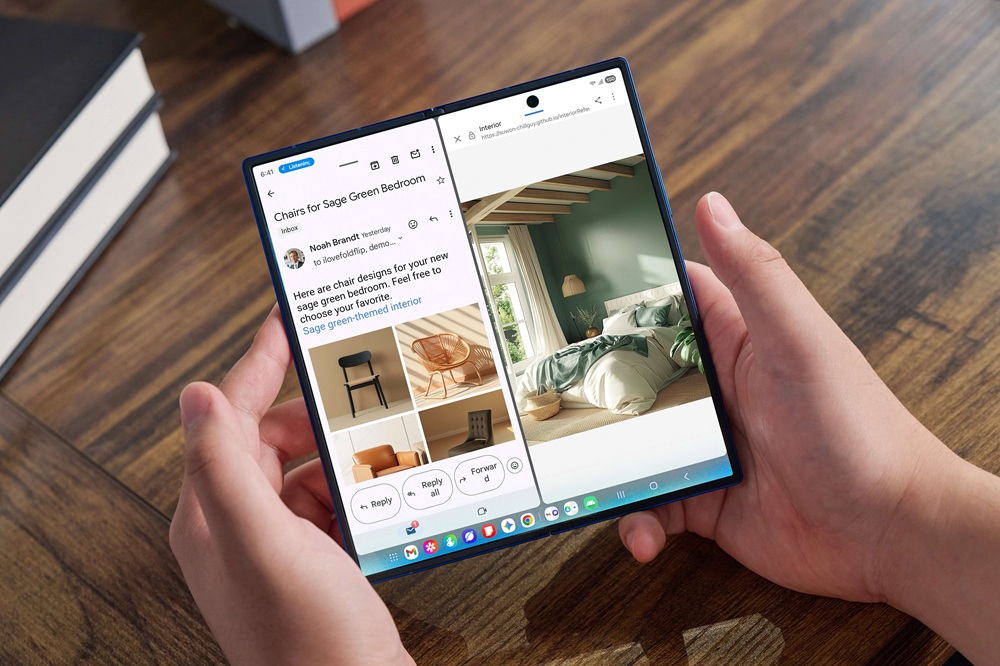
Powered by multimodal AI designed to deliver experiences tailored to user needs, One UI 8 transforms the way users interact with Galaxy devices. By combining visual, auditory and contextual intelligence, it makes everyday tasks intuitive and effortless.
  • Gemini Live allows for natural, seamless communication with AI that understands what the user is seeing or watching in real-time, without the need for switching between apps.
  • Circle to Search with Google gives in-the-moment gaming help when the user circles anything on the screen during game-play. It provides more information about characters and strategies to help the user navigate to the exact spot in the game, with helpful links and videos from across the web to explore further. With Circle to Search’s improved translation capabilities, users can see translated text in real-time as they scroll and interact with the screen. From news articles to social media posts, they will see instant, on-screen translations of the underlying text in their preferred language.

UX Optimized for Multiple Form Factors
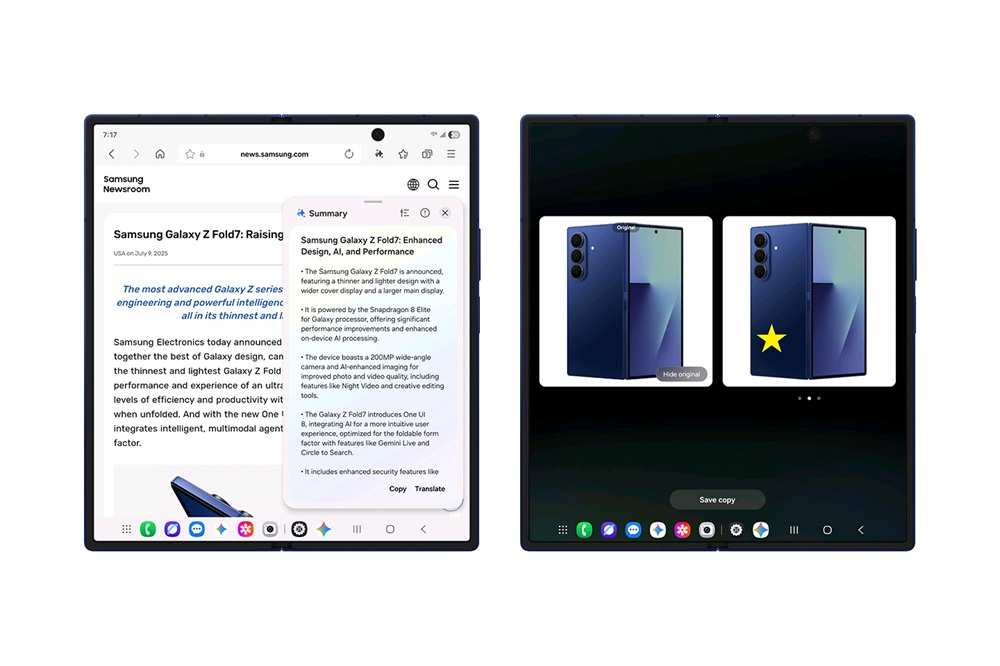
Samsung-Mobile-One-UI-8-Rollout-Galaxy-AI-Multimodal-AI-Galaxy-S25-series_main3.jpg


One UI 8 redefines versatility with UX optimized across the Galaxy product portfolio. Designed to adapt to the unique form factors of Galaxy smartphones and tablets, One UI 8 ensures seamless functionality while boosting productivity and efficiency.
  • AI Results View displays results from AI features in a separate Split View or Floating View, keeping their original content visible and unobstructed.
  • Thanks to Galaxy AI Optimized for Large Screens, Multi Window lets users drag and drop AI-generated content — including images and text — directly into their workflow. Tools like Drawing Assist and Writing Assist unlock an even smoother creative process, as users can move ideas and visuals around more easily than ever before.
  • Gemini Live is now available directly on Flip’s FlexWindow for hands-free voice search, acting as a personal assistant right on the cover screen.
  • Audio Eraser proactively detects and removes unwanted background noise, like wind or traffic, with a single tap on a new toggle in video apps and audio apps.
  • Featuring a new clock design that stretches and adapts to match the user’s wallpaper. The clock’s font wraps around faces or contours, ensuring visibility without disrupting the image, whether it’s a close-up selfie or a picture of pets. Users can also customize the thickness, size and color of the font to meet their personal taste.
  • With advanced customization even for FlexWindow, users can easily create a wallpaper by receiving recommendations and auto-curated wallpapers from the Gallery. Emojis and background colors are also customizable for FlexWindow Emojis wallpaper.
One UI 8 also provides AI-powered tools like Portrait Studio, which can capture the vibrant expressions of pets and then generate artistic, studio-like pet portraits. Users can also enjoy seamless communication in noisy environments with Call Captions — which instantly converts voices into text during calls — as well as keyboard inputs when using Interpreter, which allows users to translate ideas by typing.


 Source:


My Computers

System One System Two

  • OS
    Windows 11 Pro 25H2
    Computer type
    PC/Desktop
    Manufacturer/Model
    PowerSpec B746
    CPU
    Intel Core i7-10700K
    Motherboard
    ASRock Z490 Phantom Gaming 4/ax
    Memory
    16GB (8GB PC4-19200 DDR4 SDRAM x2)
    Graphics Card(s)
    NVIDIA GeForce GTX 1050 TI
    Sound Card
    Realtek Audio
    Monitor(s) Displays
    #1. LG ULTRAWIDE 34" #2. AOC Q32G2WG3 32"
    Screen Resolution
    #1. 3440 X 1440 #2. 1920 x 1080
    Hard Drives
    NVMe WDC WDS100T2B0C-00PXH0 1TB
    Samsung SSD 860 EVO 1TB
    PSU
    750 Watts (62.5A)
    Case
    PowerSpec/Lian Li ATX 205
    Keyboard
    Logitech K270
    Mouse
    Logitech M185
    Browser
    Microsoft Edge and Firefox
    Antivirus
    Webroot SecureAnywhere CE 26.1
  • Operating System
    Windows 11 Canary Channel
    Computer type
    PC/Desktop
    Manufacturer/Model
    PowerSpec G156
    CPU
    Intel Core i5-8400 CPU @ 2.80GHz
    Motherboard
    AsusTeK Prime B360M-A
    Memory
    16 MB DDR 4-2666
    Monitor(s) Displays
    23" Speptre HDMI 75Hz
    Screen Resolution
    1920x1080
    Hard Drives
    Samsung 970 EVO 500GB NVMe
    Keyboard
    Logitek K270
    Mouse
    Logitek M185
    Browser
    Firefox, Edge and Edge Canary
    Antivirus
    Windows Defender
"advanced multimodal AI" "offering proactive suggestions to make everyday life smarter and more convenient" sounds very, very creepy.
Why would anyone want to be spied on and censored by their own devices?
 

My Computer

System One

  • OS
    Windows 11 22H2 Pro (X-lite Micro 11 version)
    Computer type
    Laptop
    Manufacturer/Model
    Dell/ Precision 7680
    CPU
    i7 13850HX (20 cores, 28 threads)
    Motherboard
    Dell
    Memory
    32GB DDR5
    Graphics Card(s)
    Intel UHD/ RTX 1000 ADA
    Sound Card
    Realtek
    Monitor(s) Displays
    4K UHD Touchscreen
    Screen Resolution
    3840 x 2400
    Hard Drives
    Samsung 512GB system drive
    WD Blue 1TB game drive
    PSU
    240W AC adapter, 1800W when docked
    Internet Speed
    1 gigabit symmetrical
    Browser
    Firefox, Librewolf
    Antivirus
    None. Manully configured so nobody except me can change any critical system files. (Don't ask how, it's probably against some rule somewhere)
Why does Samsung find it necessary to alert me about Unused apps slated for deep sleep, at 3am every time!?!?!? 🤷‍♂️
 

My Computers

System One System Two

  • OS
    Windows 11 Pro
    Computer type
    PC/Desktop
    Manufacturer/Model
    ASUS ROG Strix
  • Operating System
    Windows 11 Pro
    Computer type
    Laptop
    Manufacturer/Model
    ASUS VivoBook
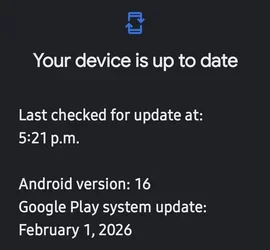
The Google Play February 1, 2026 system update.

• significant backend stability improvements
• significant security improvements
• performance improvements

G.webp
 

My Computers

System One System Two

  • OS
    Windows 11 Pro
    Computer type
    PC/Desktop
    Manufacturer/Model
    ASUS ROG Strix
  • Operating System
    Windows 11 Pro
    Computer type
    Laptop
    Manufacturer/Model
    ASUS VivoBook
Why does Samsung find it necessary to alert me about Unused apps slated for deep sleep, at 3am every time!?!?!? 🤷‍♂️
Because it is 4pm approx in South Korea🤣.
 

My Computer

System One

  • OS
    Windows 11 Pro + Win11 Canary VM.
    Computer type
    Laptop
    Manufacturer/Model
    ASUS Zenbook 14
    CPU
    I9 13th gen i9-13900H 2.60 GHZ
    Motherboard
    Yep, Laptop has one.
    Memory
    16 GB soldered
    Graphics Card(s)
    Integrated Intel Iris XE
    Sound Card
    Realtek built in
    Monitor(s) Displays
    laptop OLED screen
    Screen Resolution
    2880x1800 touchscreen
    Hard Drives
    1 TB NVME SSD (only weakness is only one slot)
    PSU
    Internal + 65W thunderbolt USB4 charger
    Case
    Yep, got one
    Cooling
    Stella Artois (UK pint cans - 568 ml) - extra cost.
    Keyboard
    Built in UK keybd
    Mouse
    Bluetooth , wireless dongled, wired
    Internet Speed
    900 mbs (ethernet), wifi 6 typical 350-450 mb/s both up and down
    Browser
    Edge
    Antivirus
    Defender
    Other Info
    TPM 2.0, 2xUSB4 thunderbolt, 1xUsb3 (usb a), 1xUsb-c, hdmi out, 3.5 mm audio out/in combo, ASUS backlit trackpad (inc. switchable number pad)

    Macrium Reflect Home V8
    Office 365 Family (6 users each 1TB onedrive space)
    Hyper-V (a vm runs almost as fast as my older laptop)
 

My Computers

System One System Two

  • OS
    Windows 11 Pro for Workstations
    Computer type
    PC/Desktop
    Manufacturer/Model
    Custom self build
    CPU
    Intel i7-8700K 5 GHz
    Motherboard
    ASUS ROG Maximus XI Formula Z390
    Memory
    64 GB (4x16GB) G.SKILL TridentZ RGB DDR4 3600 MHz (F4-3600C18D-32GTZR)
    Graphics Card(s)
    ASUS ROG-STRIX-GTX1080TI-O11G-GAMING (11GB GDDR5X)
    Sound Card
    Integrated Digital Audio (S/PDIF)
    Monitor(s) Displays
    2 x Samsung Odyssey G75 27"
    Screen Resolution
    2560x1440
    Hard Drives
    1TB Samsung 990 PRO M.2,
    4TB Samsung 990 PRO M.2,
    TerraMaster F8 SSD Plus NAS
    PSU
    Seasonic Prime Titanium 850W
    Case
    Thermaltake Core P3 wall mounted
    Cooling
    Corsair Hydro H115i
    Keyboard
    Amazon Basics Wired Full Keyboard MD005
    Mouse
    Logitech MX Master 4
    Internet Speed
    2 Gbps Download and 100 Mbps Upload
    Browser
    Chrome and Edge
    Antivirus
    Microsoft Defender
    Other Info
    Logitech Z625 speaker system,
    Logitech BRIO 4K Pro webcam,
    HP Color LaserJet Pro MFP M477fdn,
    CyberPower CP1500PFCLCD
    Galaxy S23 Plus phone
  • Operating System
    Windows 11 Pro
    Computer type
    Laptop
    Manufacturer/Model
    Surface Laptop 7 Copilot+ PC
    CPU
    Snapdragon X Elite (12 core) 3.42 GHz
    Memory
    16 GB LPDDR5x-7467 MHz
    Monitor(s) Displays
    15" HDR
    Screen Resolution
    2496 x 1664
    Hard Drives
    1 TB SSD
    Internet Speed
    Wi-Fi 7 and Bluetooth 5.4
    Browser
    Chrome and Edge
    Antivirus
    Microsoft Defender
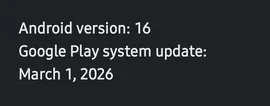
GP System Update.

G.webp
 

My Computers

System One System Two

  • OS
    Windows 11 Pro
    Computer type
    PC/Desktop
    Manufacturer/Model
    ASUS ROG Strix
  • Operating System
    Windows 11 Pro
    Computer type
    Laptop
    Manufacturer/Model
    ASUS VivoBook
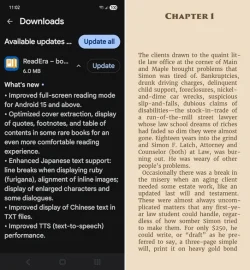
ReadEra
The most feature rich yet resource lite PDF, EPUB, etc. reader I have ever found!
 

My Computers

System One System Two

  • OS
    Windows 11 Pro
    Computer type
    PC/Desktop
    Manufacturer/Model
    ASUS ROG Strix
  • Operating System
    Windows 11 Pro
    Computer type
    Laptop
    Manufacturer/Model
    ASUS VivoBook
ReadEra
The most feature rich yet resource lite PDF, EPUB, etc. reader I have ever found!
Agreed, I've been using it for a few years now and purchased the Premium version for 10 bucks...and it's in the Family Library on Google Play.
 

My Computer

System One

  • OS
    windows 11 Pro
    Computer type
    Laptop
    Manufacturer/Model
    Dell XPS 15 9510
    CPU
    11th Gen Intel(R) Core(TM) i7-11800H @ 2.30GHz (16 CPUs
    Memory
    16 GB
    Graphics Card(s)
    NVIDIA GeForce RTX 3050 Ti
    Hard Drives
    512GB Solid State Drive
    Browser
    Firefox

My Computers

System One System Two

  • OS
    Windows 11 Pro
    Computer type
    PC/Desktop
    Manufacturer/Model
    ASUS ROG Strix
  • Operating System
    Windows 11 Pro
    Computer type
    Laptop
    Manufacturer/Model
    ASUS VivoBook
Dayum!!!
I've had this A17 on for over 13 hours..., haven't done anything, to speak of, on it all day long, but still...

S.webp
 

My Computers

System One System Two

  • OS
    Windows 11 Pro
    Computer type
    PC/Desktop
    Manufacturer/Model
    ASUS ROG Strix
  • Operating System
    Windows 11 Pro
    Computer type
    Laptop
    Manufacturer/Model
    ASUS VivoBook
I used the setting that limits the charging to 80%, Supposed to extend the battery life overall

A Guy
 

My Computers

System One System Two

  • OS
    Windows 10 Home x64
    Computer type
    PC/Desktop
    Manufacturer/Model
    Custom
    CPU
    INTEL Core i5-11400
    Motherboard
    ASUS PRIME H570-PLUS
    Memory
    KINGSTON HyperX Fury Black DDR4 16GB (2 x 8GB) 3200MHz, CL16
    Graphics Card(s)
    EVGA GeForce GTX 750 Superclocked 1GB 128-Bit GDDR5
    Monitor(s) Displays
    LG 32MA68HY 32" IPS
    Screen Resolution
    1920 x 1080
    Hard Drives
    SAMSUNG 250GB 970 EVO Plus NVMe, M.2 SSD, Crucial 250GB MX500, SEAGATE 500GB Barracuda® 7200.12, SATA 3 Gb/s, 7200 RPM, 16MB cache
    PSU
    CORSAIR RM550x 80 PLUS Gold 550W
    Case
    ANTEC P10 FLUX
    Cooling
    be quiet! Pure Rock 2, 5 x 120 mm Case Fans
    Internet Speed
    480 + Mbps Up/ 12+ Mbps Down
    Browser
    Vivaldi Snapshot
    Antivirus
    Avast
  • Operating System
    Windows 10 Home x64
    Computer type
    PC/Desktop
    Manufacturer/Model
    Custom
    CPU
    Intel Core i5-750
    Motherboard
    ASUS P7P55D
    Memory
    Kingston HyperX Fury Black 8GB (2x4GB) DDR3-1600MHz CL8
    Graphics card(s)
    MSI GeForce GT 240 N240GT-MD1G/D5 1 GB DDR5
    Monitor(s) Displays
    LG 32MA68HY 32" IPS
    Screen Resolution
    1980x1040
    Hard Drives
    Samsung Electronics 840 EVO 120GB, SEAGATE 500GB Barracuda® 7200.12, SATA 3 Gb/s, 7200 RPM, 16MB cache
    PSU
    Antec TruePower New TP-550 550W
    Case
    Antec 300
    Cooling
    Cooler Master Hyper 212+, 4 Noctua NF-P12 120mm, 1 Noctua NF-P14 FLX
    Internet Speed
    480+ Mbps Down/12+Mbps Up
    Browser
    Vivaldi Snapshot
    Antivirus
    Avast
I used the setting that limits the charging to 80%, Supposed to extend the battery life overall

A Guy
Funny thing is nobody has ever presented any recent scientific evidence to prove this.

My phone is 1 year old, and the battery health shows 100%.

Aa far as I can tell by reading online is that it is the number of charge cycles that eventually causes a battery to deteriorate.

So if you only charge to 80%, you could be increasing the charge cycles.

I have concluded it really does not matter as vast majority of my usage is at home where I have easy access to recharge phone. When I am out and about, I hardly use any power - I just make sure battery is fully powered.

Another factor is batteries may lose some initial health but nobody ever proves if the decay is year on year linear, if it accelerates, or even plateaus.

Batteries in general (not just phones) do deteriorate a bit in early years (infancy), then steady out for a number years (mid life), and eventually deteriorate significantly again (end of life).

I have never had a phone go into end of life decline but then again, I rarely keep a phone more than five years.

In the end, perhaps the more pertinent issue is whether you need to replace phone due to ridiculously short security support e.g. only 4 years for cheaper models. Flagship Samsungs have increased to 7 years. I am certain, I reach phone support EOL long before I ever reach battery EOL.

Of course, battery life is a statistical thing (bell shaped curve). Some batteries die early, some last a long time.

I reckon battery saving is really only needed if you are out and about. I have only used it once when I was in a hotel with no usb ports (pretty rare these days) and I had forgotten a charger and usb cables.

So in the end I do not bother with all the battery saving crap, charge when I need pragmatically accepting I might need to replace the battery when it has declined to point it is becoming very inconvenient.
 

My Computer

System One

  • OS
    Windows 11 Pro + Win11 Canary VM.
    Computer type
    Laptop
    Manufacturer/Model
    ASUS Zenbook 14
    CPU
    I9 13th gen i9-13900H 2.60 GHZ
    Motherboard
    Yep, Laptop has one.
    Memory
    16 GB soldered
    Graphics Card(s)
    Integrated Intel Iris XE
    Sound Card
    Realtek built in
    Monitor(s) Displays
    laptop OLED screen
    Screen Resolution
    2880x1800 touchscreen
    Hard Drives
    1 TB NVME SSD (only weakness is only one slot)
    PSU
    Internal + 65W thunderbolt USB4 charger
    Case
    Yep, got one
    Cooling
    Stella Artois (UK pint cans - 568 ml) - extra cost.
    Keyboard
    Built in UK keybd
    Mouse
    Bluetooth , wireless dongled, wired
    Internet Speed
    900 mbs (ethernet), wifi 6 typical 350-450 mb/s both up and down
    Browser
    Edge
    Antivirus
    Defender
    Other Info
    TPM 2.0, 2xUSB4 thunderbolt, 1xUsb3 (usb a), 1xUsb-c, hdmi out, 3.5 mm audio out/in combo, ASUS backlit trackpad (inc. switchable number pad)

    Macrium Reflect Home V8
    Office 365 Family (6 users each 1TB onedrive space)
    Hyper-V (a vm runs almost as fast as my older laptop)

My Computers

System One System Two

  • OS
    Windows 10 Home x64
    Computer type
    PC/Desktop
    Manufacturer/Model
    Custom
    CPU
    INTEL Core i5-11400
    Motherboard
    ASUS PRIME H570-PLUS
    Memory
    KINGSTON HyperX Fury Black DDR4 16GB (2 x 8GB) 3200MHz, CL16
    Graphics Card(s)
    EVGA GeForce GTX 750 Superclocked 1GB 128-Bit GDDR5
    Monitor(s) Displays
    LG 32MA68HY 32" IPS
    Screen Resolution
    1920 x 1080
    Hard Drives
    SAMSUNG 250GB 970 EVO Plus NVMe, M.2 SSD, Crucial 250GB MX500, SEAGATE 500GB Barracuda® 7200.12, SATA 3 Gb/s, 7200 RPM, 16MB cache
    PSU
    CORSAIR RM550x 80 PLUS Gold 550W
    Case
    ANTEC P10 FLUX
    Cooling
    be quiet! Pure Rock 2, 5 x 120 mm Case Fans
    Internet Speed
    480 + Mbps Up/ 12+ Mbps Down
    Browser
    Vivaldi Snapshot
    Antivirus
    Avast
  • Operating System
    Windows 10 Home x64
    Computer type
    PC/Desktop
    Manufacturer/Model
    Custom
    CPU
    Intel Core i5-750
    Motherboard
    ASUS P7P55D
    Memory
    Kingston HyperX Fury Black 8GB (2x4GB) DDR3-1600MHz CL8
    Graphics card(s)
    MSI GeForce GT 240 N240GT-MD1G/D5 1 GB DDR5
    Monitor(s) Displays
    LG 32MA68HY 32" IPS
    Screen Resolution
    1980x1040
    Hard Drives
    Samsung Electronics 840 EVO 120GB, SEAGATE 500GB Barracuda® 7200.12, SATA 3 Gb/s, 7200 RPM, 16MB cache
    PSU
    Antec TruePower New TP-550 550W
    Case
    Antec 300
    Cooling
    Cooler Master Hyper 212+, 4 Noctua NF-P12 120mm, 1 Noctua NF-P14 FLX
    Internet Speed
    480+ Mbps Down/12+Mbps Up
    Browser
    Vivaldi Snapshot
    Antivirus
    Avast
I think the assumption that you'll probably buy a new device before your battery fully deteriorates, is fairly reasonable.
Mind you, my Galaxy A52 is over five years old and it's battery and performance is healthy as a horse!

My go-to phone is my A35, it has all the bells and whistles running on it. I charge it to 100% every morning, it rarely goes below 80% during a normal day's use.
All my other phones are hard tweaked to the max..., they'll stay above 80% for days, even weeks!!!
 

My Computers

System One System Two

  • OS
    Windows 11 Pro
    Computer type
    PC/Desktop
    Manufacturer/Model
    ASUS ROG Strix
  • Operating System
    Windows 11 Pro
    Computer type
    Laptop
    Manufacturer/Model
    ASUS VivoBook
Some time ago I decided to purchase a new samsung A25 5g phone from my mobile data provider because of zero interest and installment payments that were made available to me. I received the UI-8 software update some time ago and I've been promised future software updates for the foreseeable future.
 

My Computer

System One

  • OS
    Windows11Pro (x64)
    Computer type
    PC/Desktop
    Manufacturer/Model
    HP/HP8300EliteSFF
    CPU
    Intel(R) Core(TM) i5-3470 CPU @ 3.20GHz 3.20 GHz
    Memory
    8.00 GB (7.88 GB usable)
I think the assumption that you'll probably buy a new device before your battery fully deteriorates, is fairly reasonable.
Mind you, my Galaxy A52 is over five years old and it's battery and performance is healthy as a horse!

My go-to phone is my A35, it has all the bells and whistles running on it. I charge it to 100% every morning, it rarely goes below 80% during a normal day's use.
All my other phones are hard tweaked to the max..., they'll stay above 80% for days, even weeks!!!
Yep totally agree - despite posts claiming life expectancy is increased by only charging to 80%, reality is (as you say) few people keep a phone long enough for battery decline to be a serious issue.

In any case, I bought a refurbished iphone 14 with original battery saving over 50% on new cost and was expecting to maybe replacing battery at around £70 locally, but have not even come close to needing it. I reckon the remaining useful life of its battery is close to or greater than my useful life lol.
 

My Computer

System One

  • OS
    Windows 11 Pro + Win11 Canary VM.
    Computer type
    Laptop
    Manufacturer/Model
    ASUS Zenbook 14
    CPU
    I9 13th gen i9-13900H 2.60 GHZ
    Motherboard
    Yep, Laptop has one.
    Memory
    16 GB soldered
    Graphics Card(s)
    Integrated Intel Iris XE
    Sound Card
    Realtek built in
    Monitor(s) Displays
    laptop OLED screen
    Screen Resolution
    2880x1800 touchscreen
    Hard Drives
    1 TB NVME SSD (only weakness is only one slot)
    PSU
    Internal + 65W thunderbolt USB4 charger
    Case
    Yep, got one
    Cooling
    Stella Artois (UK pint cans - 568 ml) - extra cost.
    Keyboard
    Built in UK keybd
    Mouse
    Bluetooth , wireless dongled, wired
    Internet Speed
    900 mbs (ethernet), wifi 6 typical 350-450 mb/s both up and down
    Browser
    Edge
    Antivirus
    Defender
    Other Info
    TPM 2.0, 2xUSB4 thunderbolt, 1xUsb3 (usb a), 1xUsb-c, hdmi out, 3.5 mm audio out/in combo, ASUS backlit trackpad (inc. switchable number pad)

    Macrium Reflect Home V8
    Office 365 Family (6 users each 1TB onedrive space)
    Hyper-V (a vm runs almost as fast as my older laptop)
Okay..., so this is pretty cool:
I'm setting up this new A17, I took the 1TB Micro SD Card out of my A54, (about 100GB of stuff), put it in the A17..., then, I did the cabled Smart Switch thing from my A35, (another 100GB of stuff), to the A17, and Smart Switch ported all my apps, settings and files over and merged/organized them just as they were on the other phone! I didn't have to do a damn thing! (y)

S.webp
 

My Computers

System One System Two

  • OS
    Windows 11 Pro
    Computer type
    PC/Desktop
    Manufacturer/Model
    ASUS ROG Strix
  • Operating System
    Windows 11 Pro
    Computer type
    Laptop
    Manufacturer/Model
    ASUS VivoBook
Okay..., so this is pretty cool:
I'm setting up this new A17, I took the 1TB Micro SD Card out of my A54, (about 100GB of stuff), put it in the A17..., then, I did the cabled Smart Switch thing from my A35, (another 100GB of stuff), to the A17, and Smart Switch ported all my apps, settings and files over and merged/organized them just as they were on the other phone! I didn't have to do a damn thing! (y)

View attachment 167915
Convenient isn't it? I did that from my S22 to the new S26. Sadly a couple old outdated S22 apps wouldn't work on the S26. They aren't even allowed to install on it.
 

My Computers

System One System Two

  • OS
    Windows 11 25H2
    Computer type
    Laptop
    Manufacturer/Model
    Alienware 18 Area-51
    CPU
    Intel Core Ultra 9 275HX (24-Core)
    Motherboard
    Alienware
    Memory
    64GB DDR5 6400MT/s
    Graphics Card(s)
    NVIDIA GeForce RTX 5080 and Intel UHD Graphics
    Sound Card
    Onboard, Realtek high-performance Audio chips (ALC3329 & ALC1708))
    Monitor(s) Displays
    300HZ 18-inch QHD 500 nit Comfort View+
    Screen Resolution
    2560 x 1600
    Hard Drives
    2TB NVMe M.2 PCIe Gen 5 SSD
    Case
    Magnesium Alloy
    Cooling
    Advanced Cryo-Tech Quad-Fan Cooling system & large vapor chamber
    Keyboard
    Cherry MX ultra low profile mechanical keyboard with per key AlienFX RGB lighting
    Mouse
    Logitech MX Master 4
    Browser
    Vivaldi (main), Firefox, Chrome, Edge
    Antivirus
    MS Defender and Malwarebytes Free
  • Operating System
    Windows 11 25H2
    Computer type
    Laptop
    Manufacturer/Model
    Microsoft Surface Laptop 7
    CPU
    Qualcomm Snapdragon X Elite (12 Core) ARM based CPU
    Motherboard
    Microsoft Corp.
    Memory
    16GB LPDDR5
    Graphics card(s)
    Qualcomm Adreno X1-85
    Sound Card
    Omnisonic speakers with Dolby Atmos spatial sound
    Monitor(s) Displays
    120 Hz 13.8-inch 600 nit PixelSense Flow touchscreen
    Screen Resolution
    2304x1536
    Hard Drives
    1TB NVMe Gen 4 SSD
    Case
    Anodized Aluminum
    Cooling
    Traditional active cooling fan system
    Keyboard
    Mechanical QWERTY, backlit when in use
    Mouse
    Logitech MX Master 4 and Surface Arc Mouse
    Browser
    Vivaldi (main), Firefox, Chrome, Edge
    Antivirus
    MS Defender and Malwarebytes Free
Great android pool game (offline, single player), and you can get around the ads. :D

Pool Tour - Pocket Billiards (Play Store)


Every time you finish a level go to Settings > Apps > Pool Tour <---- only have to click these once.
Force stop > OK >>> Open = No Ads. :-)


I was up to level 464 and I uninstalled it by accident. Now I'm only on level 73. :(


If you run the table (no misses), and don't scratch, you get a big gold star for that level.
Any misses or scratches... you get three little stars.
You can repeat levels as long as you want.

The higher the levels, the more balls there are and the put them in bad locations, and they have some really weird tables.

image1.webp image1].webp

Physics seems pretty accurate, but the cue ball seems to be... friction-less. LOL
 
Last edited:

My Computers

System One System Two

  • OS
    Win 11 Home ♦♦♦26200.8457 ♦♦♦♦♦♦♦25H2
    Computer type
    PC/Desktop
    Manufacturer/Model
    Built by Ghot® [May 2020]
    CPU
    AMD Ryzen 7 3700X
    Motherboard
    Asus Pro WS X570-ACE (BIOS 5302)
    Memory
    G.Skill (F4-3200C14D-16GTZKW)
    Graphics Card(s)
    EVGA RTX 2070 (08G-P4-2171-KR)
    Sound Card
    Realtek ALC1220P / ALC S1220A
    Monitor(s) Displays
    Dell U3011 30"
    Screen Resolution
    2560 x 1600
    Hard Drives
    2x Samsung 860 EVO 500GB,
    WD 4TB Black FZBX - SATA III,
    WD 8TB Black FZBX - SATA III,
    DRW-24B1ST CD/DVD Burner
    PSU
    PC Power & Cooling 750W Quad EPS12V
    Case
    Cooler Master ATCS 840 Tower
    Cooling
    CM Hyper 212 EVO (push/pull)
    Keyboard
    Ducky DK9008 Shine II Blue LED
    Mouse
    Logitech Optical M-100
    Internet Speed
    300/300
    Browser
    Firefox (latest)
    Antivirus
    Bitdefender Total Security
    Other Info
    Speakers: Klipsch Pro Media 2.1
  • Operating System
    Windows XP Pro 32bit w/SP3
    Computer type
    PC/Desktop
    Manufacturer/Model
    Built by Ghot® (not in use)
    CPU
    AMD Athlon 64 X2 5000+ (OC'd @ 3.2Ghz)
    Motherboard
    ASUS M2N32-SLI Deluxe Wireless Edition
    Memory
    TWIN2X2048-6400C4DHX (2 x 1GB, DDR2 800)
    Graphics card(s)
    EVGA 256-P2-N758-TR GeForce 8600GT SSC
    Sound Card
    Onboard
    Monitor(s) Displays
    ViewSonic G90FB Black 19" Professional (CRT)
    Screen Resolution
    up to 2048 x 1536
    Hard Drives
    WD 36GB 10,000rpm Raptor SATA
    Seagate 80GB 7200rpm SATA
    Lite-On LTR-52246S CD/RW
    Lite-On LH-18A1P CD/DVD Burner
    PSU
    PC Power & Cooling Silencer 750 Quad EPS12V
    Case
    Generic Beige case, 80mm fans
    Cooling
    ZALMAN 9500A 92mm CPU Cooler
    Keyboard
    Logitech Classic Keybooard 200
    Mouse
    Logitech Optical M-BT96a
    Internet Speed
    300/300
    Browser
    Firefox 3.x ??
    Antivirus
    Symantec (Norton)
    Other Info
    Still assembled, still runs. Haven't turned it on for 15 years?

Latest Support Threads

Back
Top Bottom