SAMSUNG external SSD drive T7 2 TB Blue (MU-PC2T0H/WW) USB 3.2 Gen2


Asus S5606

Member
Member
Local time
8:40 PM
Posts
55
OS
Windows 11 home ver 25H2 Build 26200.7840
  • I have just bought the T7. The main purpose is to keep disk images for restoring my laptop, Asus S16 S5606 running on Windows 11 homen formatted NTFS.
  • I read that T7 comes preformatted in exfat and with a firmware.
  • Iplan to create in T7 a folder for a disk backup made by Hasleo and another folder to backup my files. Then I would also store in the root of T7 a disk image for recovery made by windows.
  • So, how should I best proceed to ensure an eventual restore success? I do not plan to use the encryption.
  • Just use T7 as it comes, with ex fat format even when my C:drive is formatted NFTS, and use the firmware as it comes, just updating it?
  • I format T7 NTFS and then use it without any firmware? Or use it with what firmware exactly (link please)?

  • Many thanks
 

My Computer My Computer

At a glance

Windows 11 home ver 25H2 Build 26200.7840Ultra 7 155H16 RAMArc 8 cores
OS
Windows 11 home ver 25H2 Build 26200.7840
Computer type
Laptop
Manufacturer/Model
Asus S5606MA MX095W
CPU
Ultra 7 155H
Motherboard
S5606MA
Memory
16 RAM
Graphics Card(s)
Arc 8 cores
Monitor(s) Displays
Oled
Screen Resolution
3200 x 2000
Hard Drives
1, 1 Tera
Keyboard
FR- BE
Internet Speed
6E
Browser
FF
Antivirus
Windows security
Other Info
HDMI 2.1, 2 USB A 3.2, 2 Thunderbol 4 (1 of them used for power supply)
I have the same question. I have a Samsung T5 which is a great drive. I use Macrium for backups. However, if I boot from my Macrium rescue usb then how do I decrypt the T5 to restore the image ? At the moment I use the T5 for file backup and have another drive formatted NTFS for system images. I think the answer is to reformat your T7 as NTFS.
 

My Computer My Computer

At a glance

Windows 11 Professional 24H2Intel i5 8th Gen
OS
Windows 11 Professional 24H2
Computer type
Laptop
Manufacturer/Model
Thinkpad T480
CPU
Intel i5 8th Gen
Just use T7 as it comes, with ex fat format even when my C:drive is formatted NFTS, and use the firmware as it comes, just updating it?

I’m not a fan of exFAT. If it were me, unless you’re going to use the drive for cross-platform use (like macOS, and Linux) I’d format it to NTFS, don’t worry about anything else and start you backup.

However, using exFAT will cause no issues to my knowladge.

exFAT:
  • Pros:
    • Cross-Platform Compatibility: Works well on Windows, macOS, and Linux, making it ideal for sharing data between different operating systems.
    • Lightweight:Designed for portable storage devices, offering faster performance and better memory management.
      • No File Size Limit: Supports very large files, exceeding the 4GB limit of FAT32.
    • Cons:
        • Lacks Advanced Features: Doesn't have journaling, security features, or encryption like NTFS.
        • Not Native to macOS: While macOS can read exFAT drives, it requires third-party software to write to them.
NTFS:
    • Pros:
        • Advanced Features: Includes journaling, file-level security, and compression, making it suitable for internal drives and data integrity.
        • Faster Performance: Generally faster than exFAT for internal drives.
        • Default for Windows: The standard file system for Windows operating systems.
    • Cons:
        • Limited Compatibility: Primarily designed for Windows, with limited support on other operating systems.
        • Requires Third-Party Software: macOS requires third-party software to write to NTFS drives.
In Summary:
    • Use exFAT for:
      Portable drives, external hard drives, USB sticks, and SD cards that need to be used across different operating systems.
    • Use NTFS for:
      Internal drives, Windows-only storage, and when advanced features like journaling and security are needed.
 

My Computers My Computers

  • At a glance

    Windows 11 Pro 25H2 Build 26200.8655Intel(R) Core(TM) i7-4770K CPU @ 3.50GHz32.0 GB of I forget and the box is in storage.Gigabyte nVidia GeForce GTX 1660 Super OC 6GB
    OS
    Windows 11 Pro 25H2 Build 26200.8655
    Computer type
    PC/Desktop
    Manufacturer/Model
    Sin-built 2013
    CPU
    Intel(R) Core(TM) i7-4770K CPU @ 3.50GHz
    Motherboard
    ASUS ROG Maximus VI Formula
    Memory
    32.0 GB of I forget and the box is in storage.
    Graphics Card(s)
    Gigabyte nVidia GeForce GTX 1660 Super OC 6GB
    Sound Card
    ROG SupremeFX Formula 8-Channel High Definition Audio
    Monitor(s) Displays
    5 x LG 25MS500-B - 1 x 24MK430H-B - 1 x Wacom Pro 22" Touch Screen Tablet
    Screen Resolution
    All over the place
    Hard Drives
    Too many to list. OS on Samsung 1TB 870 QVO SATA
    PSU
    Silverstone 1500
    Case
    NZXT Phantom 820 Full-Tower Case
    Cooling
    Noctua NH-D15 Elite Class Dual Tower CPU Cooler / 6 x EziDIY 120mm / 2 x Corsair 140mm somethings / 1 x 140mm Thermaltake something / 2 x 200mm Corsair.
    Keyboard
    Corsair K95 / Logitech diNovo Edge Wireless
    Mouse
    Logitech: G402 / G502 / Mx Masters / Mx Air Cordless
    Internet Speed
    2000/500Mbps
    Browser
    All sorts
    Antivirus
    Kaspersky Premium
    Other Info
    ㅤㅤㅤㅤㅤㅤㅤㅤㅤㅤㅤㅤㅤㅤㅤㅤㅤㅤㅤㅤㅤㅤㅤㅤㅤㅤㅤㅤㅤㅤㅤㅤㅤㅤㅤㅤㅤㅤㅤㅤ⠀⠀⠀⠀⠀⠀⠀⠀⠀⠀
    TP-Link BE9300 WiFi 7 Bluetooth 5.4 (Archer TBE550E)
    TP-Link TX201 V1 2.5GB Lan

    Grandstream HT812 - VoIP
    ASUS DSL-AX82U - Mesh
    ASUS RT-AC68U - Mesh
    ASUS RT-BE88U Router

    Brother MFC-L2880DW Printer

    I’m on a horse.
  • At a glance

    Windows 11 Pro 25H2 Build 26200.8655 (Wifes)13th Generation Intel® Core™ i5-1340P Process...16GB LPDDR5-52001x Intel® Iris® Xe Graphics
    Operating System
    Windows 11 Pro 25H2 Build 26200.8655 (Wifes)
    Computer type
    Laptop
    Manufacturer/Model
    LENOVO Yoga 7 14IRL8 - Type 82YL
    CPU
    13th Generation Intel® Core™ i5-1340P Processor(Core™ i5-1340P)
    Memory
    16GB LPDDR5-5200
    Graphics card(s)
    1x Intel® Iris® Xe Graphics
    Sound Card
    Optimized with Dolby Atmos®
    Screen Resolution
    QHD 2880 x 1800 OLED
    Hard Drives
    M.2 512 GB SSD PCIe
    Mouse
    Logiteck MX Master 3S
    Internet Speed
    2000/500
    Antivirus
    Defender / Malwarebytes
    Other Info
    …still on a horse.


    Wireless Network: Wi-Fi 6E 2x2 AX; Bluetooth® 5.1 or above
    Ports: 1x 1 Novo button; 2 in 1 Audio Combo jack; Micro SD Card Reader; HDMI 1.4b; 2 x USB Type-C (TBT4)
    USB 3.2 Gen 2 DP 1.4a
    PD 3.0); 1 x USB 3.2 Gen1 Type A
    Camera
    1x 1080P FHD IR/RGB Hybrid with Privacy Shutter and Dual Array Microphone
    Graphics
    1x Intel® Iris® Xe Graphics
    Monitor
    14" WUXGA
    Form Factor
    Convertible Notebook
  • Windows 11 Pro 25H2 Build 26200.8655 (Wifes)

    Yoga 7 2-in-1 14IML9 - Type 83DJ

    Processor: Intel® Core™ Ultra 7 155H Processor(Core™ Ultra 7 155H)

    Memory: 32GB LPD5X-7467

    Hard Drive: 1 TB SSD PCIe

    Wireless Network: 1x Wi-Fi 6E 2x2 AX; Bluetooth® 5.1 or above

    Ports: 1 x HDMI 2.1 TMDS; 1 x Novo Button; 1 x Combo Audio Jack
    2 x USB-C (USB 4.0)
    1 x USB-A 3.2 Gen 1

    Camera: 1080P FHD IR Hybrid with Dual Microphone

    Graphics: Intel® Arc™ Graphics

    Monitor: 14" 2.8K

    ...Where's my horse?
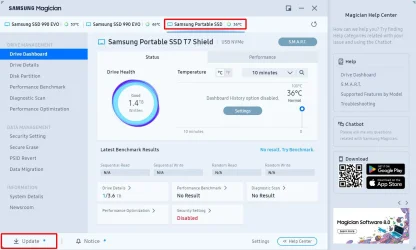
I have a 4TB Samsung T7 Shield.

The Samsung T7 comes with built-in firmware. It needs the firmware to communicate with Windows 11.

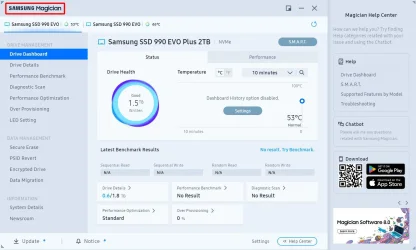
To check for the firmware version and update it if needed you use the Samsung Magician Software.

1. If you run Magician then you should see the T7 SSD. If not then click on SAMSUNG Magician at the upper left. Magician should then re-scan the drives.

m1.webp

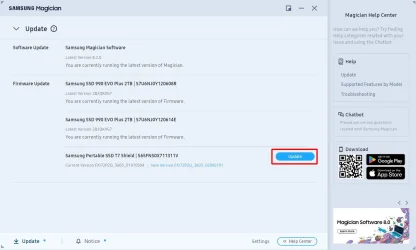
2. You should then see the T7 SSD. Just click on its tab to select it. Click on Update at the lower left to check for Software/Firmware updates.

m2.webp

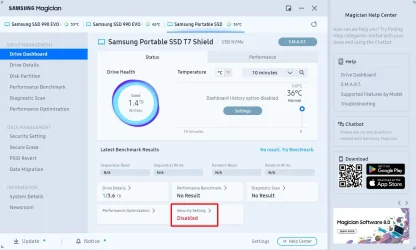
3. If there is a firmware update for the T7 SSD then click on Update to download and install it.

m3.webp

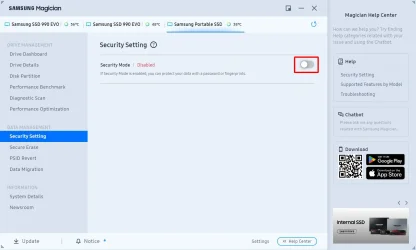
The Security for the T7 SSD is disabled by default. You can change that if you want. BTW, I have never used this.

m4.webp

If you want to enable the Security Mode you can select it.

m5.webp
 

My Computers My Computers

  • At a glance

    Windows 11 Pro 25H2 (26200.6901)AMD Ryzen 7 6800H with Radeon 680M GPU (486MB...Crucial DDR5-4800 (2400MHz) 32GB (2 x 16GB)NVIDIA RTX 3060 Laptop (6GB RAM)
    OS
    Windows 11 Pro 25H2 (26200.6901)
    Computer type
    Laptop
    Manufacturer/Model
    ASUS TUF Gaming A15 (2022)
    CPU
    AMD Ryzen 7 6800H with Radeon 680M GPU (486MB RAM)
    Memory
    Crucial DDR5-4800 (2400MHz) 32GB (2 x 16GB)
    Graphics Card(s)
    NVIDIA RTX 3060 Laptop (6GB RAM)
    Sound Card
    n/a
    Monitor(s) Displays
    15.6-inch
    Screen Resolution
    1920x1080 300Hz
    Hard Drives
    2 x Samsung 990 Evo Plus (2TB M.2 NVME SSD)
    PSU
    n/a
    Mouse
    Wireless Mouse M510
    Internet Speed
    2100Mbps/300Mbps
    Browser
    Firefox
    Antivirus
    Malwarebytes
  • At a glance

    Windows 11 Pro 25H2 (26200.8246)AMD Ryzen 7 5700X3DG.SKILL Flare X 32GB (2x16GB) DDR4ASUS ROG-STRIX-RTX3060TI-08G-V2-GAMING (RTX 3...
    Operating System
    Windows 11 Pro 25H2 (26200.8246)
    Computer type
    PC/Desktop
    Manufacturer/Model
    Custom build
    CPU
    AMD Ryzen 7 5700X3D
    Motherboard
    ASUS ROG Strix B550-F Gaming WiFi II
    Memory
    G.SKILL Flare X 32GB (2x16GB) DDR4
    Graphics card(s)
    ASUS ROG-STRIX-RTX3060TI-08G-V2-GAMING (RTX 3060-Ti, 8GB RAM)
    Monitor(s) Displays
    Samsung G50D IPS 27"
    Screen Resolution
    1440p/180Hz
    Hard Drives
    SAMSUNG 990 EVO Plus (2TB] M.2 NVME SSD
    SAMSUNG 990 EVO Plus (4TB) M.2 NVME SSD
    PSU
    Corsair RM750x (750 watts)
    Case
    Cooler Master MasterCase 5
    Cooling
    Scythe Mugen 6
    Keyboard
    Logitech K520 (MK540 keyboard/mouse combo)
    Mouse
    Logitech M310 (MK540 keyboard/mouse combo)
    Internet Speed
    2100 Mbps down / 300 Mbps up
    Browser
    Firefox, Edge, Chrome
    Antivirus
    Malwarebytes (Premium)
    Other Info
    ASUS Blu-ray Burner BW-16D1HT (SATA) || Western Digital Easystore 20TB USB 3.0 external hard drive used with Acronis True Image 2025 backup software || HP OfficeJet Pro 6975 Printer/Scanner
So best options:;
I format T7 NTFS,
I must download & install the magician software (installer version 8.2.0.880) because without any firmware I will not be able to use properly the T7 for the purposes above in my question, right?
I do not need to use anything of magician apart from update firmware, I just do the images using windows and Hasleo. For backups I just copy/paste folders, right?
 

My Computer My Computer

At a glance

Windows 11 home ver 25H2 Build 26200.7840Ultra 7 155H16 RAMArc 8 cores
OS
Windows 11 home ver 25H2 Build 26200.7840
Computer type
Laptop
Manufacturer/Model
Asus S5606MA MX095W
CPU
Ultra 7 155H
Motherboard
S5606MA
Memory
16 RAM
Graphics Card(s)
Arc 8 cores
Monitor(s) Displays
Oled
Screen Resolution
3200 x 2000
Hard Drives
1, 1 Tera
Keyboard
FR- BE
Internet Speed
6E
Browser
FF
Antivirus
Windows security
Other Info
HDMI 2.1, 2 USB A 3.2, 2 Thunderbol 4 (1 of them used for power supply)
So best options:;
I format T7 NTFS,
I must download & install the magician software (installer version 8.2.0.880) because without any firmware I will not be able to use properly the T7 for the purposes above in my question, right?
I do not need to use anything of magician apart from update firmware, I just do the images using windows and Hasleo. For backups I just copy/paste folders, right?
I mainly use Magician for updating the firmware. I use other software to check the health of the SSDs and test their speeds.

Firmware was installed in the T7 when it was manufactured. Otherwise it wouldn't even work at all.

I bought my T7 Shield last October. I don't know when it was manufactured. Apparently there has been a firmware update since it was manufactured.

Important! Don't interrupt Magician while it is updating the firmware. If you do then you will brick the T7.

The same goes true for updating the BIOS on your computer. Don't interrupt it when it is being updated.

I just copy files and folders to the Samsung T7. I only use it for temporary storage.

I use an external hard drive to back up my laptop. For that I use Acronis True Image to back up important files every day and whole disks once a week.

My laptop used to have 2 x 1TB SSDs. I replaced those with 2 x 2 TB SSDs. I used Acronis to clone the original SSDs to the new ones.
 

My Computers My Computers

  • At a glance

    Windows 11 Pro 25H2 (26200.6901)AMD Ryzen 7 6800H with Radeon 680M GPU (486MB...Crucial DDR5-4800 (2400MHz) 32GB (2 x 16GB)NVIDIA RTX 3060 Laptop (6GB RAM)
    OS
    Windows 11 Pro 25H2 (26200.6901)
    Computer type
    Laptop
    Manufacturer/Model
    ASUS TUF Gaming A15 (2022)
    CPU
    AMD Ryzen 7 6800H with Radeon 680M GPU (486MB RAM)
    Memory
    Crucial DDR5-4800 (2400MHz) 32GB (2 x 16GB)
    Graphics Card(s)
    NVIDIA RTX 3060 Laptop (6GB RAM)
    Sound Card
    n/a
    Monitor(s) Displays
    15.6-inch
    Screen Resolution
    1920x1080 300Hz
    Hard Drives
    2 x Samsung 990 Evo Plus (2TB M.2 NVME SSD)
    PSU
    n/a
    Mouse
    Wireless Mouse M510
    Internet Speed
    2100Mbps/300Mbps
    Browser
    Firefox
    Antivirus
    Malwarebytes
  • At a glance

    Windows 11 Pro 25H2 (26200.8246)AMD Ryzen 7 5700X3DG.SKILL Flare X 32GB (2x16GB) DDR4ASUS ROG-STRIX-RTX3060TI-08G-V2-GAMING (RTX 3...
    Operating System
    Windows 11 Pro 25H2 (26200.8246)
    Computer type
    PC/Desktop
    Manufacturer/Model
    Custom build
    CPU
    AMD Ryzen 7 5700X3D
    Motherboard
    ASUS ROG Strix B550-F Gaming WiFi II
    Memory
    G.SKILL Flare X 32GB (2x16GB) DDR4
    Graphics card(s)
    ASUS ROG-STRIX-RTX3060TI-08G-V2-GAMING (RTX 3060-Ti, 8GB RAM)
    Monitor(s) Displays
    Samsung G50D IPS 27"
    Screen Resolution
    1440p/180Hz
    Hard Drives
    SAMSUNG 990 EVO Plus (2TB] M.2 NVME SSD
    SAMSUNG 990 EVO Plus (4TB) M.2 NVME SSD
    PSU
    Corsair RM750x (750 watts)
    Case
    Cooler Master MasterCase 5
    Cooling
    Scythe Mugen 6
    Keyboard
    Logitech K520 (MK540 keyboard/mouse combo)
    Mouse
    Logitech M310 (MK540 keyboard/mouse combo)
    Internet Speed
    2100 Mbps down / 300 Mbps up
    Browser
    Firefox, Edge, Chrome
    Antivirus
    Malwarebytes (Premium)
    Other Info
    ASUS Blu-ray Burner BW-16D1HT (SATA) || Western Digital Easystore 20TB USB 3.0 external hard drive used with Acronis True Image 2025 backup software || HP OfficeJet Pro 6975 Printer/Scanner
Just use your T7 or T5 drive as is, just make folders for your Image files and other folders for other things.
Best not to complicate things.

"I just do the images using windows and Hasleo. For backups I just copy/paste folders, right?"
Yes.

I have Macrium and Hasleo image files, and other folders for File History, documents, drivers etc stored on a couple of NAS boxes one is formatted in EXT4 and the other is BTRFS.

It does not matter what the filing system is, the Image files are just files.

I presume they use exFAT for a bit wider compatibility.

Updating Firmware, testing with Samsung Magician is a different subject, not essential.
 

My Computer My Computer

At a glance

Windows 11
OS
Windows 11
Yes it comes exFat, and with old firmware, but I read on Samsung site that magician firmware can be installed on T7.
I have downloaded both firmwares just in case
So then, for my purposes,
a) I keep the original format (exFat) and old firmware or
b) I format it to NTFS and install magician? without risks T7 will no longer work?
 

My Computer My Computer

At a glance

Windows 11 home ver 25H2 Build 26200.7840Ultra 7 155H16 RAMArc 8 cores
OS
Windows 11 home ver 25H2 Build 26200.7840
Computer type
Laptop
Manufacturer/Model
Asus S5606MA MX095W
CPU
Ultra 7 155H
Motherboard
S5606MA
Memory
16 RAM
Graphics Card(s)
Arc 8 cores
Monitor(s) Displays
Oled
Screen Resolution
3200 x 2000
Hard Drives
1, 1 Tera
Keyboard
FR- BE
Internet Speed
6E
Browser
FF
Antivirus
Windows security
Other Info
HDMI 2.1, 2 USB A 3.2, 2 Thunderbol 4 (1 of them used for power supply)
I format it to NTFS and install magician? without risks T7 will no longer work?

I have never in my life had an external drive cease to operate because I made the decision to format it as NTFS. As I do with all of them.
 

My Computers My Computers

  • At a glance

    Windows 11 Pro 25H2 Build 26200.8655Intel(R) Core(TM) i7-4770K CPU @ 3.50GHz32.0 GB of I forget and the box is in storage.Gigabyte nVidia GeForce GTX 1660 Super OC 6GB
    OS
    Windows 11 Pro 25H2 Build 26200.8655
    Computer type
    PC/Desktop
    Manufacturer/Model
    Sin-built 2013
    CPU
    Intel(R) Core(TM) i7-4770K CPU @ 3.50GHz
    Motherboard
    ASUS ROG Maximus VI Formula
    Memory
    32.0 GB of I forget and the box is in storage.
    Graphics Card(s)
    Gigabyte nVidia GeForce GTX 1660 Super OC 6GB
    Sound Card
    ROG SupremeFX Formula 8-Channel High Definition Audio
    Monitor(s) Displays
    5 x LG 25MS500-B - 1 x 24MK430H-B - 1 x Wacom Pro 22" Touch Screen Tablet
    Screen Resolution
    All over the place
    Hard Drives
    Too many to list. OS on Samsung 1TB 870 QVO SATA
    PSU
    Silverstone 1500
    Case
    NZXT Phantom 820 Full-Tower Case
    Cooling
    Noctua NH-D15 Elite Class Dual Tower CPU Cooler / 6 x EziDIY 120mm / 2 x Corsair 140mm somethings / 1 x 140mm Thermaltake something / 2 x 200mm Corsair.
    Keyboard
    Corsair K95 / Logitech diNovo Edge Wireless
    Mouse
    Logitech: G402 / G502 / Mx Masters / Mx Air Cordless
    Internet Speed
    2000/500Mbps
    Browser
    All sorts
    Antivirus
    Kaspersky Premium
    Other Info
    ㅤㅤㅤㅤㅤㅤㅤㅤㅤㅤㅤㅤㅤㅤㅤㅤㅤㅤㅤㅤㅤㅤㅤㅤㅤㅤㅤㅤㅤㅤㅤㅤㅤㅤㅤㅤㅤㅤㅤㅤ⠀⠀⠀⠀⠀⠀⠀⠀⠀⠀
    TP-Link BE9300 WiFi 7 Bluetooth 5.4 (Archer TBE550E)
    TP-Link TX201 V1 2.5GB Lan

    Grandstream HT812 - VoIP
    ASUS DSL-AX82U - Mesh
    ASUS RT-AC68U - Mesh
    ASUS RT-BE88U Router

    Brother MFC-L2880DW Printer

    I’m on a horse.
  • At a glance

    Windows 11 Pro 25H2 Build 26200.8655 (Wifes)13th Generation Intel® Core™ i5-1340P Process...16GB LPDDR5-52001x Intel® Iris® Xe Graphics
    Operating System
    Windows 11 Pro 25H2 Build 26200.8655 (Wifes)
    Computer type
    Laptop
    Manufacturer/Model
    LENOVO Yoga 7 14IRL8 - Type 82YL
    CPU
    13th Generation Intel® Core™ i5-1340P Processor(Core™ i5-1340P)
    Memory
    16GB LPDDR5-5200
    Graphics card(s)
    1x Intel® Iris® Xe Graphics
    Sound Card
    Optimized with Dolby Atmos®
    Screen Resolution
    QHD 2880 x 1800 OLED
    Hard Drives
    M.2 512 GB SSD PCIe
    Mouse
    Logiteck MX Master 3S
    Internet Speed
    2000/500
    Antivirus
    Defender / Malwarebytes
    Other Info
    …still on a horse.


    Wireless Network: Wi-Fi 6E 2x2 AX; Bluetooth® 5.1 or above
    Ports: 1x 1 Novo button; 2 in 1 Audio Combo jack; Micro SD Card Reader; HDMI 1.4b; 2 x USB Type-C (TBT4)
    USB 3.2 Gen 2 DP 1.4a
    PD 3.0); 1 x USB 3.2 Gen1 Type A
    Camera
    1x 1080P FHD IR/RGB Hybrid with Privacy Shutter and Dual Array Microphone
    Graphics
    1x Intel® Iris® Xe Graphics
    Monitor
    14" WUXGA
    Form Factor
    Convertible Notebook
  • Windows 11 Pro 25H2 Build 26200.8655 (Wifes)

    Yoga 7 2-in-1 14IML9 - Type 83DJ

    Processor: Intel® Core™ Ultra 7 155H Processor(Core™ Ultra 7 155H)

    Memory: 32GB LPD5X-7467

    Hard Drive: 1 TB SSD PCIe

    Wireless Network: 1x Wi-Fi 6E 2x2 AX; Bluetooth® 5.1 or above

    Ports: 1 x HDMI 2.1 TMDS; 1 x Novo Button; 1 x Combo Audio Jack
    2 x USB-C (USB 4.0)
    1 x USB-A 3.2 Gen 1

    Camera: 1080P FHD IR Hybrid with Dual Microphone

    Graphics: Intel® Arc™ Graphics

    Monitor: 14" 2.8K

    ...Where's my horse?
I have never in my life had an external drive cease to operate because I made the decision to format it as NTFS. As I do with all of them.
I just double checked my T5. I formatted it NTFS ages ago and it works fine. I also turned off security and it is recognized when I boot from my Macrium usb rescue disk so I can recover the image I created previously without worrying about the password. I guess it would be the same if you use Hasleo.
 

My Computer My Computer

At a glance

Windows 11 Professional 24H2Intel i5 8th Gen
OS
Windows 11 Professional 24H2
Computer type
Laptop
Manufacturer/Model
Thinkpad T480
CPU
Intel i5 8th Gen

Latest Support Threads

Back
Top Bottom