

- Local time
- 6:53 AM
- Posts
- 10
- OS
- Windows 11pro
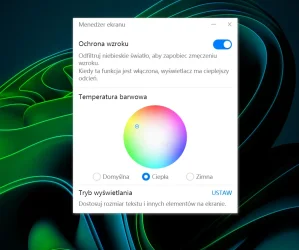
Despite the screen manager, I cannot change the color temperature of the Huawei laptop screen. I move the dot around the color wheel and nothing changes. The same 3 defined profiles (cold, neutral, warm) do not work. The eye protection slider moves but does not make any changes
Attachments
My Computer
At a glance
Windows 11proIntel(R) Core(TM) i5-8250U CPU @ 1.60GHz 1.80...16,0 GB
- OS
- Windows 11pro
- Computer type
- Laptop
- Manufacturer/Model
- Huawei Notebook d15
- CPU
- Intel(R) Core(TM) i5-8250U CPU @ 1.60GHz 1.80 GHz
- Motherboard
- MRC-WX0-PCB
- Memory
- 16,0 GB






