script file location


jack78

Member
Local time
12:06 PM
Posts
6
OS
win 11
hi guys
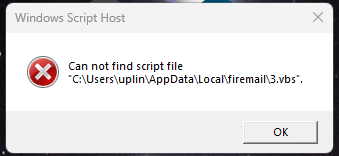
this keeps popping up randomly after i removed a firemail virus or malware.would i need to search out the registry to clear this? or just use a regcleaner or any other advice
 

Attachments

  • Screenshot_14.png
    Screenshot_14.png
    3.9 KB · Views: 2

My Computer My Computer

At a glance

win 11amd ryzen 532 giggigabyte 1050 ti
OS
win 11
Computer type
PC/Desktop
Manufacturer/Model
custom
CPU
amd ryzen 5
Motherboard
gigabyte
Memory
32 gig
Graphics Card(s)
gigabyte 1050 ti
Sound Card
onboard
Look at startup programs using Autoruns.
 

My Computer My Computer

At a glance

Windows 11AMD Ryzen 7 5700GMicron Technology DDR4-3200 16GBNVIDIA GeForce RTX 3060
OS
Windows 11
Computer type
PC/Desktop
Manufacturer/Model
HP Pavilion
CPU
AMD Ryzen 7 5700G
Motherboard
Erica6
Memory
Micron Technology DDR4-3200 16GB
Graphics Card(s)
NVIDIA GeForce RTX 3060
Sound Card
Realtek ALC671
Monitor(s) Displays
Samsung SyncMaster U28E590
Screen Resolution
3840 x 2160
Hard Drives
SAMSUNG MZVLQ1T0HALB-000H1
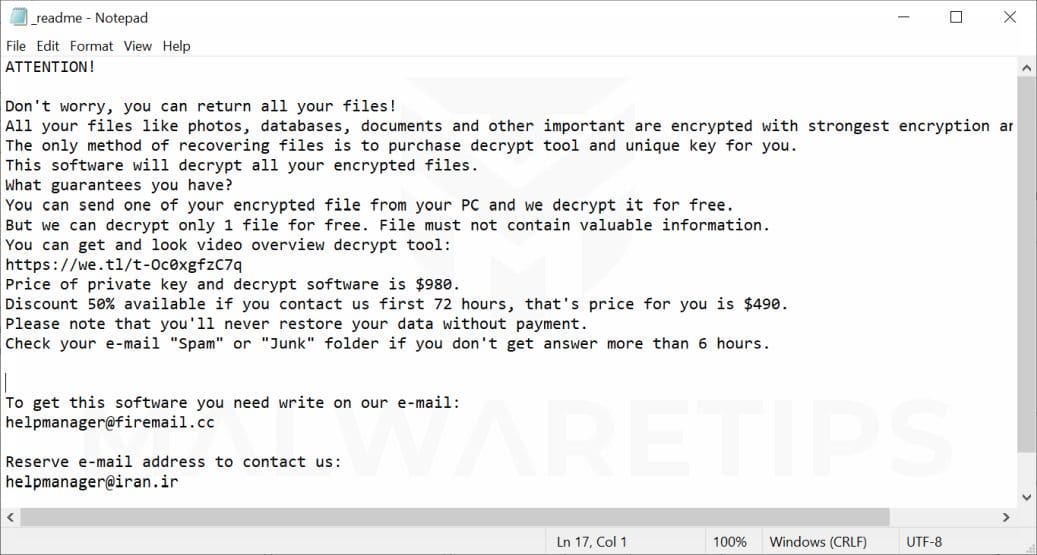
By Firemail virus, do you mean this?


I would look at posting at a forum which provides malware removal support to ensure that it has been removed completely. However, if you did want to check what was trying to run that script, then Process Monitor from Sysinternals would be a better option than Autoruns.
 

My Computer My Computer

At a glance

Windows 11, Windows 10, Linux Fedora Cinnamon
OS
Windows 11, Windows 10, Linux Fedora Cinnamon
Autoruns will show you startup locations for processes that are not running like the one you have nothing running except for error message display by dialog box.
 

My Computer My Computer

At a glance

Windows 11AMD Ryzen 7 5700GMicron Technology DDR4-3200 16GBNVIDIA GeForce RTX 3060
OS
Windows 11
Computer type
PC/Desktop
Manufacturer/Model
HP Pavilion
CPU
AMD Ryzen 7 5700G
Motherboard
Erica6
Memory
Micron Technology DDR4-3200 16GB
Graphics Card(s)
NVIDIA GeForce RTX 3060
Sound Card
Realtek ALC671
Monitor(s) Displays
Samsung SyncMaster U28E590
Screen Resolution
3840 x 2160
Hard Drives
SAMSUNG MZVLQ1T0HALB-000H1
Autoruns is just going to provide a list of programs without actually indicating which specific program is attempting to access that file path.

With Process Monitor or even Sysmon for that matter, the user can filter the trace to that particular path and see what process is trying to access it. It's likely just going to be VBScriptHost.exe or whichever name it has.

Anyhow, if the user has been infected by malware at some point, it would be prudent for the user to seek assistance from someone who is well versed with examining FRST logs and the alike.
 

My Computer My Computer

At a glance

Windows 11, Windows 10, Linux Fedora Cinnamon
OS
Windows 11, Windows 10, Linux Fedora Cinnamon
OP deleted 3.vbs script, so Process Explorer will not show where this startup program launching, all it will do shows process displaying the error message which is File Explorer anyhow i agree OP should get Windows checked out.
 

My Computer My Computer

At a glance

Windows 11AMD Ryzen 7 5700GMicron Technology DDR4-3200 16GBNVIDIA GeForce RTX 3060
OS
Windows 11
Computer type
PC/Desktop
Manufacturer/Model
HP Pavilion
CPU
AMD Ryzen 7 5700G
Motherboard
Erica6
Memory
Micron Technology DDR4-3200 16GB
Graphics Card(s)
NVIDIA GeForce RTX 3060
Sound Card
Realtek ALC671
Monitor(s) Displays
Samsung SyncMaster U28E590
Screen Resolution
3840 x 2160
Hard Drives
SAMSUNG MZVLQ1T0HALB-000H1
I'm not talking about Process Explorer, I'm referring to Process Monitor which is a separate program and it will show which process is trying to access that path. I've used it for this exact purpose.

You're also making the assumption that the process is starting using the Run subkey. In either case, as we've both agreed, it would be best if they sought assistance in ensuring that its completely removed.
 

My Computer My Computer

At a glance

Windows 11, Windows 10, Linux Fedora Cinnamon
OS
Windows 11, Windows 10, Linux Fedora Cinnamon
I'm not talking about Process Explorer, I'm referring to Process Monitor which is a separate program and it will show which process is trying to access that path. I've used it for this exact purpose.

You're also making the assumption that the process is starting using the Run subkey. In either case, as we've both agreed, it would be best if they sought assistance in ensuring that its completely removed.
My bad i'm making no assumptions i'm just letting OP know there is Autoruns which can help look for startup programs and services and tasks the Process Monitor is a difficult utility to understand.

Let us take a look at some of the functionalities provided by Process Monitor that can help in our quest of hunting malware.


My Computer My Computer

At a glance

Windows 11AMD Ryzen 7 5700GMicron Technology DDR4-3200 16GBNVIDIA GeForce RTX 3060
OS
Windows 11
Computer type
PC/Desktop
Manufacturer/Model
HP Pavilion
CPU
AMD Ryzen 7 5700G
Motherboard
Erica6
Memory
Micron Technology DDR4-3200 16GB
Graphics Card(s)
NVIDIA GeForce RTX 3060
Sound Card
Realtek ALC671
Monitor(s) Displays
Samsung SyncMaster U28E590
Screen Resolution
3840 x 2160
Hard Drives
SAMSUNG MZVLQ1T0HALB-000H1
My bad i'm making no assumptions i'm just letting OP know there is Autoruns which can help look for startup programs and services and tasks the Process Monitor is a difficult utility to understand.

Let us take a look at some of the functionalities provided by Process Monitor that can help in our quest of hunting malware.

Hi Freebooter
I ran the autorun64, under scheduled tasks i found the files(8 of them) i removed and rebooted and everything is running fantastic. ill be working with autoruns more in the future to learn more
 

My Computer My Computer

At a glance

win 11amd ryzen 532 giggigabyte 1050 ti
OS
win 11
Computer type
PC/Desktop
Manufacturer/Model
custom
CPU
amd ryzen 5
Motherboard
gigabyte
Memory
32 gig
Graphics Card(s)
gigabyte 1050 ti
Sound Card
onboard
Fantastic hopefully infection gone.
 

My Computer My Computer

At a glance

Windows 11AMD Ryzen 7 5700GMicron Technology DDR4-3200 16GBNVIDIA GeForce RTX 3060
OS
Windows 11
Computer type
PC/Desktop
Manufacturer/Model
HP Pavilion
CPU
AMD Ryzen 7 5700G
Motherboard
Erica6
Memory
Micron Technology DDR4-3200 16GB
Graphics Card(s)
NVIDIA GeForce RTX 3060
Sound Card
Realtek ALC671
Monitor(s) Displays
Samsung SyncMaster U28E590
Screen Resolution
3840 x 2160
Hard Drives
SAMSUNG MZVLQ1T0HALB-000H1

Latest Support Threads

Back
Top Bottom