Microsoft says:
 techcommunity.microsoft.com
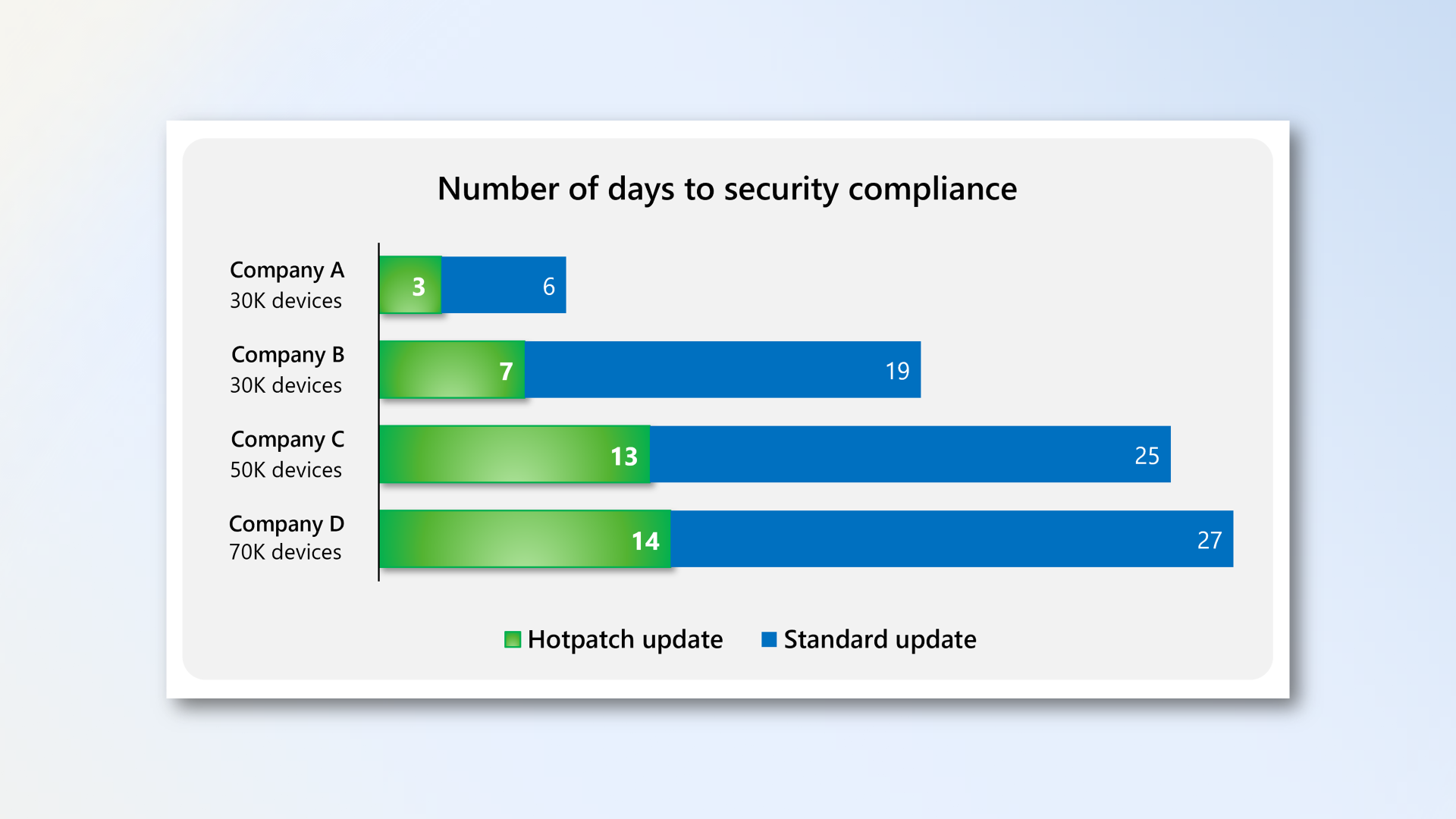
Windows Autopatch is enabling hotpatching by default because hotpatch updates are the quickest way to get secure. As such, we recommend keeping hotpatch updates enabled for your devices. If you're not ready for this change, you can opt out groups of devices or the whole tenant.
The tenant setting to opt out of hotpatch updates is scheduled to go live on April 1, 2026. And because April is a hotpatch baseline month, you have until May 11, 2026 before any hotpatch updates are deployed.
Securing devices faster with hotpatch updates on by default - Windows IT Pro Blog
Get Windows devices secure faster with hotpatch updates enabled by default in Microsoft Intune.
techcommunity.microsoft.com
My Computer
At a glance
Windows 11 ProIntel Core i9 12900KFCorsair 64GB DDR5 Vengeance C40 5200MhzASUS GeForce RTX 3090 ROG Strix OC 24GB
- OS
- Windows 11 Pro
- Computer type
- PC/Desktop
- Manufacturer/Model
- Custom Build
- CPU
- Intel Core i9 12900KF
- Motherboard
- ASUS ROG Maximus Z690 Hero
- Memory
- Corsair 64GB DDR5 Vengeance C40 5200Mhz
- Graphics Card(s)
- ASUS GeForce RTX 3090 ROG Strix OC 24GB
- Sound Card
- OnBoard
- Monitor(s) Displays
- Acer Predator XB323UGP 32" QHD G-SYNC-C 144Hz 1MS IPS LED
- Screen Resolution
- 2560 x 1440
- Hard Drives
- 1x Samsung 980 Pro Series Gen4 250GB M.2 NVMe
1x Samsung 980 Pro Series Gen4 500GB M.2 NVMe
2x Samsung 980 Pro Series Gen4 2TB M.2 NVMe
- PSU
- Corsair AX1200i 1200W 80PLUS Titanium Modular
- Case
- Corsair 4000D Black Case w/ Tempered Glass Side Panel
- Cooling
- Noctua NH-U12A Chromax Black CPU Cooler, 4x Noctua 120mm Fans
- Keyboard
- Logitech MK545
- Mouse
- Logitech MX Master 3
- Internet Speed
- Fixed Wireless 150mbps/75mbps
- Browser
- Firefox
- Antivirus
- Kaspersky
- Other Info
- Thrustmaster TS-PC RACER
Fanatec CSL Elite Pedals with the Load Cell Kit
Yamaha Amp with Bose Speakers