Seeking a second opinion... Is OneDrive malicious malpractice ?


I have no inherent dislike in subscription software, as long as it provides value to me. For OneDrive alone, I see plenty of value in Microsoft 365. I cannot find 6TB of cloud storage space for my family for under $129 a year from anybody else. 6TB is $30 a month from Apple, for 1 user. Google 2TB is $119 a year for 1 user. Dropbox is $16.99 a month for 6 users sharing 2TB.
Obviously, some people find it a worth while value, I'm just not one of them Lol. I agree with those who feel it should be an optional feature that you add and enable it if you so choose. It should not be installed and enabled by default especially with only a 5GB limit that grabs and moves your data without permission. But worse, most average users aren't aware how to unlink it from their MS account and uninstall it. Hell, my girlfriend won't even use facial recognition and Windows Hello on her PC let alone that or finger prints on her phone. She wants nothing to do with putting her stuff in the cloud. 🤣
 

My Computers My Computers

  • At a glance

    Windows 11 25H2Intel Core Ultra 9 275HX (24-Core)64GB DDR5 6400MT/sNVIDIA GeForce RTX 5080 and Intel UHD Graphics
    OS
    Windows 11 25H2
    Computer type
    Laptop
    Manufacturer/Model
    Alienware 18 Area-51
    CPU
    Intel Core Ultra 9 275HX (24-Core)
    Motherboard
    Alienware
    Memory
    64GB DDR5 6400MT/s
    Graphics Card(s)
    NVIDIA GeForce RTX 5080 and Intel UHD Graphics
    Sound Card
    Onboard, Realtek high-performance Audio chips (ALC3329 & ALC1708))
    Monitor(s) Displays
    300HZ 18-inch QHD 500 nit Comfort View+
    Screen Resolution
    2560 x 1600
    Hard Drives
    2TB NVMe M.2 PCIe Gen 5 SSD
    Case
    Magnesium Alloy
    Cooling
    Advanced Cryo-Tech Quad-Fan Cooling system & large vapor chamber
    Keyboard
    Cherry MX ultra low profile mechanical keyboard with per key AlienFX RGB lighting
    Mouse
    Logitech MX Master 4
    Browser
    Vivaldi (main), Firefox, Chrome, Edge
    Antivirus
    MS Defender and Malwarebytes Free
  • At a glance

    Windows 11 25H2Qualcomm Snapdragon X Elite (12 Core) ARM bas...16GB LPDDR5Qualcomm Adreno X1-85
    Operating System
    Windows 11 25H2
    Computer type
    Laptop
    Manufacturer/Model
    Microsoft Surface Laptop 7
    CPU
    Qualcomm Snapdragon X Elite (12 Core) ARM based CPU
    Motherboard
    Microsoft Corp.
    Memory
    16GB LPDDR5
    Graphics card(s)
    Qualcomm Adreno X1-85
    Sound Card
    Omnisonic speakers with Dolby Atmos spatial sound
    Monitor(s) Displays
    120 Hz 13.8-inch 600 nit PixelSense Flow touchscreen
    Screen Resolution
    2304x1536
    Hard Drives
    1TB NVMe Gen 4 SSD
    Case
    Anodized Aluminum
    Cooling
    Traditional active cooling fan system
    Keyboard
    Mechanical QWERTY, backlit when in use
    Mouse
    Logitech MX Master 4 and Surface Arc Mouse
    Browser
    Vivaldi (main), Firefox, Chrome, Edge
    Antivirus
    MS Defender and Malwarebytes Free
Encrypt everything locally, THEN upload it to the cloud. I've used it before. Easy-peasy.
Yeah, my only real concern with this approach is that the veracrypt container is a single file with a bunch of stuff in it. when you upload it, it's going to have to transfer the whole thing every time to safely store it in the cloud. That's gonna chew up a lot of bandwidth.

For something like tax returns, medical records, will's, power of attorney paperwork, deeds to your house...stuff like that...I absolutely agree that something like this you want to encrypt before you upload it. Or put it in the encrypted File Vault that OneDrive provides.

For things like my notes on how to format and install Mac OS Sequoia on my M1 Mac from scratch....don't see a reason this really needs to be encrypted. But I like having the notes for when I have to do it again or remember exactly what I did.
 

My Computers My Computers

  • At a glance

    Windows 11 ProIntel Core i5-8279u32GB DDR4 2666MhzIntel Iris Plus 655
    OS
    Windows 11 Pro
    Computer type
    PC/Desktop
    Manufacturer/Model
    Beelink SEI8
    CPU
    Intel Core i5-8279u
    Motherboard
    AZW SEI
    Memory
    32GB DDR4 2666Mhz
    Graphics Card(s)
    Intel Iris Plus 655
    Sound Card
    Intel SST
    Monitor(s) Displays
    Asus ProArt PA278QV
    Screen Resolution
    2560x1440
    Hard Drives
    512GB NVMe
    PSU
    NA
    Case
    NA
    Cooling
    NA
    Keyboard
    NA
    Mouse
    NA
    Internet Speed
    500/50
    Browser
    Edge
    Antivirus
    Defender
    Other Info
    Mini PC used for testing Windows 11.
  • At a glance

    Windows 10 ProRyzen 9 5900x64GB DDR4-3600EVGA GeForce 3080 FT3 Ultra
    Operating System
    Windows 10 Pro
    Computer type
    PC/Desktop
    Manufacturer/Model
    Custom
    CPU
    Ryzen 9 5900x
    Motherboard
    Asus Rog Strix X570-E Gaming
    Memory
    64GB DDR4-3600
    Graphics card(s)
    EVGA GeForce 3080 FT3 Ultra
    Sound Card
    Onboard
    Monitor(s) Displays
    ASUS TUF Gaming VG27AQ. ASUS ProArt Display PA278QV 27” WQHD
    Screen Resolution
    2560x1440
    Hard Drives
    2TB WD SN850 PCI-E Gen 4 NVMe
    2TB Sandisk Ultra 2.5" SATA SSD
    PSU
    Seasonic Focus 850
    Case
    Fractal Meshify S2 in White
    Cooling
    Dark Rock Pro CPU cooler, 3 x 140mm case fans
    Keyboard
    Corsiar K65 RGB Lux
    Mouse
    Logitech G9 Laser Mouse
    Internet Speed
    500/50
    Browser
    Chrome
    Antivirus
    Defender.
Well..., I've voiced my opinion more than once..., I think I'll bow out now!
 

My Computers My Computers

  • At a glance

    Windows 11 Pro
    OS
    Windows 11 Pro
    Computer type
    PC/Desktop
    Manufacturer/Model
    ASUS ROG Strix
  • At a glance

    Windows 11 Pro
    Operating System
    Windows 11 Pro
    Computer type
    Laptop
    Manufacturer/Model
    ASUS VivoBook
  • ASUS VivoBook 'Lite' ~ Windows 11 Home
You're right! I started with OneDrive 19 years ago when it was first called SkyDrive! Well, I've still used it for a long time. :wink:
yep, i used SKydrive too.
 

My Computers My Computers

  • At a glance

    Windows 11 ProIntel Core i5-8279u32GB DDR4 2666MhzIntel Iris Plus 655
    OS
    Windows 11 Pro
    Computer type
    PC/Desktop
    Manufacturer/Model
    Beelink SEI8
    CPU
    Intel Core i5-8279u
    Motherboard
    AZW SEI
    Memory
    32GB DDR4 2666Mhz
    Graphics Card(s)
    Intel Iris Plus 655
    Sound Card
    Intel SST
    Monitor(s) Displays
    Asus ProArt PA278QV
    Screen Resolution
    2560x1440
    Hard Drives
    512GB NVMe
    PSU
    NA
    Case
    NA
    Cooling
    NA
    Keyboard
    NA
    Mouse
    NA
    Internet Speed
    500/50
    Browser
    Edge
    Antivirus
    Defender
    Other Info
    Mini PC used for testing Windows 11.
  • At a glance

    Windows 10 ProRyzen 9 5900x64GB DDR4-3600EVGA GeForce 3080 FT3 Ultra
    Operating System
    Windows 10 Pro
    Computer type
    PC/Desktop
    Manufacturer/Model
    Custom
    CPU
    Ryzen 9 5900x
    Motherboard
    Asus Rog Strix X570-E Gaming
    Memory
    64GB DDR4-3600
    Graphics card(s)
    EVGA GeForce 3080 FT3 Ultra
    Sound Card
    Onboard
    Monitor(s) Displays
    ASUS TUF Gaming VG27AQ. ASUS ProArt Display PA278QV 27” WQHD
    Screen Resolution
    2560x1440
    Hard Drives
    2TB WD SN850 PCI-E Gen 4 NVMe
    2TB Sandisk Ultra 2.5" SATA SSD
    PSU
    Seasonic Focus 850
    Case
    Fractal Meshify S2 in White
    Cooling
    Dark Rock Pro CPU cooler, 3 x 140mm case fans
    Keyboard
    Corsiar K65 RGB Lux
    Mouse
    Logitech G9 Laser Mouse
    Internet Speed
    500/50
    Browser
    Chrome
    Antivirus
    Defender.
One does wonder if it's such a good deal, what does Microsoft gain out of the deal. 🤔
Consistent revenue stream, plus fewer people who are pirating Office products.


It really is a good deal. I'm astounded that the price is anywhere near as cheap as it is, considered what you get, and the fact they allow you to share the subscription with friends and family. I've been a subscriber since 2016 and it's only gone up in price, 1 time.
 

My Computers My Computers

  • At a glance

    Windows 11 ProIntel Core i5-8279u32GB DDR4 2666MhzIntel Iris Plus 655
    OS
    Windows 11 Pro
    Computer type
    PC/Desktop
    Manufacturer/Model
    Beelink SEI8
    CPU
    Intel Core i5-8279u
    Motherboard
    AZW SEI
    Memory
    32GB DDR4 2666Mhz
    Graphics Card(s)
    Intel Iris Plus 655
    Sound Card
    Intel SST
    Monitor(s) Displays
    Asus ProArt PA278QV
    Screen Resolution
    2560x1440
    Hard Drives
    512GB NVMe
    PSU
    NA
    Case
    NA
    Cooling
    NA
    Keyboard
    NA
    Mouse
    NA
    Internet Speed
    500/50
    Browser
    Edge
    Antivirus
    Defender
    Other Info
    Mini PC used for testing Windows 11.
  • At a glance

    Windows 10 ProRyzen 9 5900x64GB DDR4-3600EVGA GeForce 3080 FT3 Ultra
    Operating System
    Windows 10 Pro
    Computer type
    PC/Desktop
    Manufacturer/Model
    Custom
    CPU
    Ryzen 9 5900x
    Motherboard
    Asus Rog Strix X570-E Gaming
    Memory
    64GB DDR4-3600
    Graphics card(s)
    EVGA GeForce 3080 FT3 Ultra
    Sound Card
    Onboard
    Monitor(s) Displays
    ASUS TUF Gaming VG27AQ. ASUS ProArt Display PA278QV 27” WQHD
    Screen Resolution
    2560x1440
    Hard Drives
    2TB WD SN850 PCI-E Gen 4 NVMe
    2TB Sandisk Ultra 2.5" SATA SSD
    PSU
    Seasonic Focus 850
    Case
    Fractal Meshify S2 in White
    Cooling
    Dark Rock Pro CPU cooler, 3 x 140mm case fans
    Keyboard
    Corsiar K65 RGB Lux
    Mouse
    Logitech G9 Laser Mouse
    Internet Speed
    500/50
    Browser
    Chrome
    Antivirus
    Defender.
Microsoft didn't build in a backdoor, but a vulnerability was discovered (CVE-2026-45585) which allows somebody with physical access to your device to bypass Bitlocker via the Windows recovery environment. This takes advantage of the WinRE's trusted relationship with the TPM module. This vulnerability wasn't written by Microsoft to provide them with access to your data.

It's a convenience versus a security tradeoff. Imagine how many non-technical people could lose all of their data because they don't have their bitlocker recovery key stored somewhere.

What's a more likely scenario
1). Your laptop is lost or stolen and a their manages to log in or take out the hard drive and harvest all of your data.

2). The local police show up at Microsoft demanding that they turn over the bitlocker recovery key that is stored in your account to decrypt your data.

BTW: You can remove the bitlocker recover key from your account if you like to do so.
So why wasn't windows 10 effected if the problem was in WinRE/TPM Windows 10 have that secure boot function bitlocker too.

exactly (convenience versus a security tradeoff) encryption is not meant for convenience its meant for pure security... period.. no buts.. either you have security or you dont.
You dont get something to be "almost secure".... or do you?

This "likely scenarios" is for people that dont understand future security problems or that has a business and they want to cut costs on security as its saves money to not secure things as its only a 2 to 5% chance it even can be an intrusion.

How likely is it that microsoft get hacked and everyone's onedrive data ends up on darknet.. its darn small chance.
But with state backed hackers and AI powered hacking (as we have read in the news how AI broke out from Anthropic labs and hacked websites) how much have the risk percentage gone up just the last year for a state backed bad actor to actually be able to hack cloud services?

Gambling with security is like russian roulette.. its not likely something goes bad... but if it does, it will become a catastrophic


So how likely is it that the police will try to get to your data VS a bad actor manage to do a data breach?
if you are a criminal.. answer is the police...
if you not a criminal, the answer is a data breach

and the BTW should be as default, not for someone to figure out how to do if the isn't tech-savvy

as i say.. MS get an A for effort... and an F for bad execution
 

My Computers My Computers

  • At a glance

    Linux: Debian, Kali-linux, Alma, Win:7,10IoT,...i3, i5 and i7 From 2gen to 9th gen... Server ...
    OS
    Linux: Debian, Kali-linux, Alma, Win:7,10IoT,2012R
    Manufacturer/Model
    HP Elitebook 840, AsusX53, Aspire E1-572. AsusUX32A, HP Pro3130mt+3010mt, HP Proliant ML150, 3xCustom-PC, i3, i5, i7
    CPU
    i3, i5 and i7 From 2gen to 9th gen... Server dual Xenon
    Hard Drives
    Sata, M.2, SAS
  • At a glance

    Retro: 2003server.XPpro, Win2000, Win98SE, Wi...Oldest intel 8088 up to P4 dual core
    Operating System
    Retro: 2003server.XPpro, Win2000, Win98SE, Win95, Win3.11, MS-DOS, IBM-DOS
    Manufacturer/Model
    Commodore, AST, Fujitsu, Compaq, etc etc. etc Around 15 desktops and 20 laptops in the collection
    CPU
    Oldest intel 8088 up to P4 dual core
    Hard Drives
    MFM, IDE, SCSI
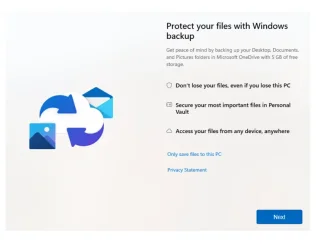
I think MS should have included this screen during the initial install and setup of your first user account.

1786138686865.webp


This screen, IS the screen you get if you take a box that is currently setup with a local user, and you create a new user account which IS a Microsoft account and you log in the first time. You GET the option to use OneDrive which is default, but you have the option to tick the box to "Only save files to this PC".

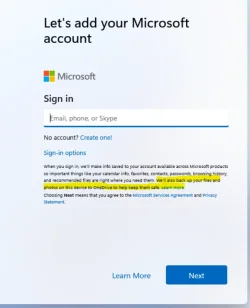
I just clean installed under Hyper-V to verify that this dialog box is indeed NOT present during the clean install and initial user setup.
 
Last edited:

My Computers My Computers

  • At a glance

    Windows 11 ProIntel Core i5-8279u32GB DDR4 2666MhzIntel Iris Plus 655
    OS
    Windows 11 Pro
    Computer type
    PC/Desktop
    Manufacturer/Model
    Beelink SEI8
    CPU
    Intel Core i5-8279u
    Motherboard
    AZW SEI
    Memory
    32GB DDR4 2666Mhz
    Graphics Card(s)
    Intel Iris Plus 655
    Sound Card
    Intel SST
    Monitor(s) Displays
    Asus ProArt PA278QV
    Screen Resolution
    2560x1440
    Hard Drives
    512GB NVMe
    PSU
    NA
    Case
    NA
    Cooling
    NA
    Keyboard
    NA
    Mouse
    NA
    Internet Speed
    500/50
    Browser
    Edge
    Antivirus
    Defender
    Other Info
    Mini PC used for testing Windows 11.
  • At a glance

    Windows 10 ProRyzen 9 5900x64GB DDR4-3600EVGA GeForce 3080 FT3 Ultra
    Operating System
    Windows 10 Pro
    Computer type
    PC/Desktop
    Manufacturer/Model
    Custom
    CPU
    Ryzen 9 5900x
    Motherboard
    Asus Rog Strix X570-E Gaming
    Memory
    64GB DDR4-3600
    Graphics card(s)
    EVGA GeForce 3080 FT3 Ultra
    Sound Card
    Onboard
    Monitor(s) Displays
    ASUS TUF Gaming VG27AQ. ASUS ProArt Display PA278QV 27” WQHD
    Screen Resolution
    2560x1440
    Hard Drives
    2TB WD SN850 PCI-E Gen 4 NVMe
    2TB Sandisk Ultra 2.5" SATA SSD
    PSU
    Seasonic Focus 850
    Case
    Fractal Meshify S2 in White
    Cooling
    Dark Rock Pro CPU cooler, 3 x 140mm case fans
    Keyboard
    Corsiar K65 RGB Lux
    Mouse
    Logitech G9 Laser Mouse
    Internet Speed
    500/50
    Browser
    Chrome
    Antivirus
    Defender.
One does wonder if it's such a good deal, what does Microsoft gain out of the deal. 🤔
From me Microsoft gains $99.99 every year like clockwork. Multiply that by millions of OneDrive users.
 

My Computers My Computers

  • At a glance

    Windows 11 ProIntel Series 3 Core Ultra X9 388H64GB LPDDR5x 9600 MT/sIntel Arc graphics B390 Panther Lake
    OS
    Windows 11 Pro
    Computer type
    Laptop
    Manufacturer/Model
    Dell XPS 16 DA16260
    CPU
    Intel Series 3 Core Ultra X9 388H
    Memory
    64GB LPDDR5x 9600 MT/s
    Graphics Card(s)
    Intel Arc graphics B390 Panther Lake
    Monitor(s) Displays
    16" 3.2K Tandem OLED Infinity Edge
    Screen Resolution
    3200 x 2000 16:10 236 PPI
    Hard Drives
    1 Terabyte M.2 PCIe NVMe SSD
    Case
    Black Anodized Aluminum
    Cooling
    Vapor Chamber Cooling
    Mouse
    None
    Internet Speed
    942 Mbps Netgear Mesh + 2 Satellites
    Browser
    Microsoft Edge (Chromium)
    Antivirus
    Windows Security (Defender)
    Other Info
    NPU delivering 67 TOPS
    Microsoft 365 subscription
    Microsoft Office 365
    Microsoft OneDrive 1TB Cloud
    Microsoft Visual Studio
    Microsoft Visual Studio Code
    Microsoft Sysinternals Suite
    Microsoft BitLocker
    Microsoft Copilot
    Dell Support Assist
    Dell Command | Update
    Macrium Reflect X subscription
    1Password Password Manager
    Amazon Kindle for PC
    Lightroom/Photoshop subscription
    Interactive Brokers Trader Workstation
  • At a glance

    Windows 11 ProSnapdragon® X Elite (12 Core) with Hexagon NP...32GB LPDDR5x 8448 MT/sIntegrated Adreno GPU
    Operating System
    Windows 11 Pro
    Computer type
    Laptop
    Manufacturer/Model
    Microsoft Surface Laptop 7
    CPU
    Snapdragon® X Elite (12 Core) with Hexagon NPU delivering 45 TOPS
    Memory
    32GB LPDDR5x 8448 MT/s
    Graphics card(s)
    Integrated Adreno GPU
    Sound Card
    Omnisonic speakers with Dolby Atmos spatial sound
    Monitor(s) Displays
    13.8″ PixelSense Flow touchscreen 120 Hz 600 NIT
    Screen Resolution
    2304 × 1536 (201 PPI), 3:2 aspect ratio
    Hard Drives
    1 TB PCIe NVMe Gen 4 SSD
    Case
    Black Anodized Aluminum
    Cooling
    Vapor Chamber Cooling
    Mouse
    None
    Internet Speed
    942 Mbps Netgear Mesh + 2 Satellites
    Browser
    Microsoft Edge (Chromium)
    Antivirus
    Windows Security (Defender)
    Other Info
    Microsoft 365 subscription (Office)
    Microsoft Office 365
    Microsoft OneDrive 1TB Cloud
    Microsoft Visual Studio 2026
    Microsoft Visual Studio Code
    Interactive Brokers Trader Workstation
    Lightroom/Photoshop subscription
    1Password Password Manager
    Microsoft Sysinternals
    Amazon Kindle for PC
    Microsoft BitLocker
    Microsoft Copilot
So why wasn't windows 10 effected if the problem was in WinRE/TPM Windows 10 have that secure boot function bitlocker too.
"YellowKey" only impaced Windows 11 (24H2, 25H2 and 26H1) and Server 2025 because the vulnerable code path only exists in the new WinRE/Bitlocker trust chain. Windows 10 and older recovery environments does not have the same code that YellowKey exploited.
exactly (convenience versus a security tradeoff) encryption is not meant for convenience its meant for pure security... period.. no buts.. either you have security or you dont.
You dont get something to be "almost secure".... or do you?
Sure. You want it truly secure, don't even give the end user access to a recovery key period. they lose the password, they are 100% done. But we don't do that either.

How likely is it that microsoft get hacked and everyone's onedrive data ends up on darknet.. its darn small chance.
But with state backed hackers and AI powered hacking (as we have read in the news how AI broke out from Anthropic labs and hacked websites) how much have the risk percentage gone up just the last year for a state backed bad actor to actually be able to hack cloud services?
Risk also exists that somebodies private data at home is also exposed and at risk. The risks have gone up and will always continue to go up. But we also saw what happened in the old XP days when Microsoft made everybody administrator on their box too.....adware, spyware, malware, viruses...all ran absolutely rampant. Because so many people don't have any idea how to keep themselves safe.

I do agree that Microsoft is a much bigger target and hackers and the like will exploit that like crazy to steal everything versus coming just for my machine. But just because I stored it and didn't put it on the cloud, doesn't guarantee it's safety.
Gambling with security is like russian roulette.. its not likely something goes bad... but if it does, it will become a catastrophic
Correct. And also reason why I don't put everything in the cloud. If my grocery list gets out, or pictures from the concert that I went to, or my screenshots for setting up OneDrive get out, it probably won't be a catastrophe.
 

My Computers My Computers

  • At a glance

    Windows 11 ProIntel Core i5-8279u32GB DDR4 2666MhzIntel Iris Plus 655
    OS
    Windows 11 Pro
    Computer type
    PC/Desktop
    Manufacturer/Model
    Beelink SEI8
    CPU
    Intel Core i5-8279u
    Motherboard
    AZW SEI
    Memory
    32GB DDR4 2666Mhz
    Graphics Card(s)
    Intel Iris Plus 655
    Sound Card
    Intel SST
    Monitor(s) Displays
    Asus ProArt PA278QV
    Screen Resolution
    2560x1440
    Hard Drives
    512GB NVMe
    PSU
    NA
    Case
    NA
    Cooling
    NA
    Keyboard
    NA
    Mouse
    NA
    Internet Speed
    500/50
    Browser
    Edge
    Antivirus
    Defender
    Other Info
    Mini PC used for testing Windows 11.
  • At a glance

    Windows 10 ProRyzen 9 5900x64GB DDR4-3600EVGA GeForce 3080 FT3 Ultra
    Operating System
    Windows 10 Pro
    Computer type
    PC/Desktop
    Manufacturer/Model
    Custom
    CPU
    Ryzen 9 5900x
    Motherboard
    Asus Rog Strix X570-E Gaming
    Memory
    64GB DDR4-3600
    Graphics card(s)
    EVGA GeForce 3080 FT3 Ultra
    Sound Card
    Onboard
    Monitor(s) Displays
    ASUS TUF Gaming VG27AQ. ASUS ProArt Display PA278QV 27” WQHD
    Screen Resolution
    2560x1440
    Hard Drives
    2TB WD SN850 PCI-E Gen 4 NVMe
    2TB Sandisk Ultra 2.5" SATA SSD
    PSU
    Seasonic Focus 850
    Case
    Fractal Meshify S2 in White
    Cooling
    Dark Rock Pro CPU cooler, 3 x 140mm case fans
    Keyboard
    Corsiar K65 RGB Lux
    Mouse
    Logitech G9 Laser Mouse
    Internet Speed
    500/50
    Browser
    Chrome
    Antivirus
    Defender.
There is actually cloud storage that is total end-to-end encrypted, so only you have access to the data.. Not even the company that has physical access can hand over the data in readable form even if the police has a warrant for it. 😉

Where?

And how much?

And no matter what, you always have a choice to save your data in a location other than OneDrive.

But newbies and the non-savvy, don't know that. If MS cared about that, they would leave it off by default.

I still remember a time before the cloud when computing was able to get by without it. When Windows came without the cloud. When you didn't have to initially supply an email address in order to sign in. That only was enforced when Windows 10 came out and that wasn't that long ago.
 

My Computers My Computers

  • At a glance

    Windows 11 Pro 25H2 build: (26200.7623)32GB
    OS
    Windows 11 Pro 25H2 build: (26200.7623)
    Computer type
    Laptop
    Manufacturer/Model
    Microsoft Surface Pro
    Memory
    32GB
  • At a glance

    Microsoft 25H2 ProIntel Core Ultra 764GBIntel Integrated Graphics
    Operating System
    Microsoft 25H2 Pro
    Computer type
    Laptop
    Manufacturer/Model
    Dell Pro 14 - PC14250
    CPU
    Intel Core Ultra 7
    Memory
    64GB
    Graphics card(s)
    Intel Integrated Graphics
    Hard Drives
    Micron 1TB SSD
But newbies and the non-savvy, don't know that. If MS cared about that, they would leave it off by default.
but newbies and non-savvy would also not understand how to turn it on, would also not take the time to backup any of their data and be likely to lose everything in the event that they lost their computer. Microsoft by enabling OneDrive was able to at least provide a mechanism for them to have their data in 2 places at once without them having to lift a finger. Those who are more savvy, will figure out how to work around it.

There are always 2 sides to that coin.
I still remember a time before the cloud when computing was able to get by without it. When Windows came without the cloud. When you didn't have to initially supply an email address in order to sign in. That only was enforced when Windows 10 came out and that wasn't that long ago.
Yeah, up until quite recently I only did text messages on my android phone. When I moved to Google messages, I realized that I could also do them from a browser on my windows machines. That's super convenient. I keep up much better with my text messages when I am at home and work

However, I'm considering getting a new phone and an iPhone might make a lot of sense since I have a MacMini, and a Macbook Air, and an iPad.....but I cannot do my text messages on a browser in my computer so that's super inconvenient. Ah, the concerns of a tech nerd.
 

My Computers My Computers

  • At a glance

    Windows 11 ProIntel Core i5-8279u32GB DDR4 2666MhzIntel Iris Plus 655
    OS
    Windows 11 Pro
    Computer type
    PC/Desktop
    Manufacturer/Model
    Beelink SEI8
    CPU
    Intel Core i5-8279u
    Motherboard
    AZW SEI
    Memory
    32GB DDR4 2666Mhz
    Graphics Card(s)
    Intel Iris Plus 655
    Sound Card
    Intel SST
    Monitor(s) Displays
    Asus ProArt PA278QV
    Screen Resolution
    2560x1440
    Hard Drives
    512GB NVMe
    PSU
    NA
    Case
    NA
    Cooling
    NA
    Keyboard
    NA
    Mouse
    NA
    Internet Speed
    500/50
    Browser
    Edge
    Antivirus
    Defender
    Other Info
    Mini PC used for testing Windows 11.
  • At a glance

    Windows 10 ProRyzen 9 5900x64GB DDR4-3600EVGA GeForce 3080 FT3 Ultra
    Operating System
    Windows 10 Pro
    Computer type
    PC/Desktop
    Manufacturer/Model
    Custom
    CPU
    Ryzen 9 5900x
    Motherboard
    Asus Rog Strix X570-E Gaming
    Memory
    64GB DDR4-3600
    Graphics card(s)
    EVGA GeForce 3080 FT3 Ultra
    Sound Card
    Onboard
    Monitor(s) Displays
    ASUS TUF Gaming VG27AQ. ASUS ProArt Display PA278QV 27” WQHD
    Screen Resolution
    2560x1440
    Hard Drives
    2TB WD SN850 PCI-E Gen 4 NVMe
    2TB Sandisk Ultra 2.5" SATA SSD
    PSU
    Seasonic Focus 850
    Case
    Fractal Meshify S2 in White
    Cooling
    Dark Rock Pro CPU cooler, 3 x 140mm case fans
    Keyboard
    Corsiar K65 RGB Lux
    Mouse
    Logitech G9 Laser Mouse
    Internet Speed
    500/50
    Browser
    Chrome
    Antivirus
    Defender.
I went back to look at the clean install and setup oobe really closely. it does tell you it's going to do it, in the fine print, but no real way I can see to work around it. Unlike setting up the account after the machine is up and running and getting the option to save your files directly on the PC instead.

1786140896517.webp
 

My Computers My Computers

  • At a glance

    Windows 11 ProIntel Core i5-8279u32GB DDR4 2666MhzIntel Iris Plus 655
    OS
    Windows 11 Pro
    Computer type
    PC/Desktop
    Manufacturer/Model
    Beelink SEI8
    CPU
    Intel Core i5-8279u
    Motherboard
    AZW SEI
    Memory
    32GB DDR4 2666Mhz
    Graphics Card(s)
    Intel Iris Plus 655
    Sound Card
    Intel SST
    Monitor(s) Displays
    Asus ProArt PA278QV
    Screen Resolution
    2560x1440
    Hard Drives
    512GB NVMe
    PSU
    NA
    Case
    NA
    Cooling
    NA
    Keyboard
    NA
    Mouse
    NA
    Internet Speed
    500/50
    Browser
    Edge
    Antivirus
    Defender
    Other Info
    Mini PC used for testing Windows 11.
  • At a glance

    Windows 10 ProRyzen 9 5900x64GB DDR4-3600EVGA GeForce 3080 FT3 Ultra
    Operating System
    Windows 10 Pro
    Computer type
    PC/Desktop
    Manufacturer/Model
    Custom
    CPU
    Ryzen 9 5900x
    Motherboard
    Asus Rog Strix X570-E Gaming
    Memory
    64GB DDR4-3600
    Graphics card(s)
    EVGA GeForce 3080 FT3 Ultra
    Sound Card
    Onboard
    Monitor(s) Displays
    ASUS TUF Gaming VG27AQ. ASUS ProArt Display PA278QV 27” WQHD
    Screen Resolution
    2560x1440
    Hard Drives
    2TB WD SN850 PCI-E Gen 4 NVMe
    2TB Sandisk Ultra 2.5" SATA SSD
    PSU
    Seasonic Focus 850
    Case
    Fractal Meshify S2 in White
    Cooling
    Dark Rock Pro CPU cooler, 3 x 140mm case fans
    Keyboard
    Corsiar K65 RGB Lux
    Mouse
    Logitech G9 Laser Mouse
    Internet Speed
    500/50
    Browser
    Chrome
    Antivirus
    Defender.
"YellowKey" only impaced Windows 11 (24H2, 25H2 and 26H1) and Server 2025 because the vulnerable code path only exists in the new WinRE/Bitlocker trust chain. Windows 10 and older recovery environments does not have the same code that YellowKey exploited.
YellowKey was patched in the June Patch Tuesday Windows Update and is no longer a BitLocker vulnerability.
 

My Computers My Computers

  • At a glance

    Windows 11 ProIntel Series 3 Core Ultra X9 388H64GB LPDDR5x 9600 MT/sIntel Arc graphics B390 Panther Lake
    OS
    Windows 11 Pro
    Computer type
    Laptop
    Manufacturer/Model
    Dell XPS 16 DA16260
    CPU
    Intel Series 3 Core Ultra X9 388H
    Memory
    64GB LPDDR5x 9600 MT/s
    Graphics Card(s)
    Intel Arc graphics B390 Panther Lake
    Monitor(s) Displays
    16" 3.2K Tandem OLED Infinity Edge
    Screen Resolution
    3200 x 2000 16:10 236 PPI
    Hard Drives
    1 Terabyte M.2 PCIe NVMe SSD
    Case
    Black Anodized Aluminum
    Cooling
    Vapor Chamber Cooling
    Mouse
    None
    Internet Speed
    942 Mbps Netgear Mesh + 2 Satellites
    Browser
    Microsoft Edge (Chromium)
    Antivirus
    Windows Security (Defender)
    Other Info
    NPU delivering 67 TOPS
    Microsoft 365 subscription
    Microsoft Office 365
    Microsoft OneDrive 1TB Cloud
    Microsoft Visual Studio
    Microsoft Visual Studio Code
    Microsoft Sysinternals Suite
    Microsoft BitLocker
    Microsoft Copilot
    Dell Support Assist
    Dell Command | Update
    Macrium Reflect X subscription
    1Password Password Manager
    Amazon Kindle for PC
    Lightroom/Photoshop subscription
    Interactive Brokers Trader Workstation
  • At a glance

    Windows 11 ProSnapdragon® X Elite (12 Core) with Hexagon NP...32GB LPDDR5x 8448 MT/sIntegrated Adreno GPU
    Operating System
    Windows 11 Pro
    Computer type
    Laptop
    Manufacturer/Model
    Microsoft Surface Laptop 7
    CPU
    Snapdragon® X Elite (12 Core) with Hexagon NPU delivering 45 TOPS
    Memory
    32GB LPDDR5x 8448 MT/s
    Graphics card(s)
    Integrated Adreno GPU
    Sound Card
    Omnisonic speakers with Dolby Atmos spatial sound
    Monitor(s) Displays
    13.8″ PixelSense Flow touchscreen 120 Hz 600 NIT
    Screen Resolution
    2304 × 1536 (201 PPI), 3:2 aspect ratio
    Hard Drives
    1 TB PCIe NVMe Gen 4 SSD
    Case
    Black Anodized Aluminum
    Cooling
    Vapor Chamber Cooling
    Mouse
    None
    Internet Speed
    942 Mbps Netgear Mesh + 2 Satellites
    Browser
    Microsoft Edge (Chromium)
    Antivirus
    Windows Security (Defender)
    Other Info
    Microsoft 365 subscription (Office)
    Microsoft Office 365
    Microsoft OneDrive 1TB Cloud
    Microsoft Visual Studio 2026
    Microsoft Visual Studio Code
    Interactive Brokers Trader Workstation
    Lightroom/Photoshop subscription
    1Password Password Manager
    Microsoft Sysinternals
    Amazon Kindle for PC
    Microsoft BitLocker
    Microsoft Copilot
That's gonna chew up a lot of bandwidth.

Then do it in parts.

Besides, how much massive uploads do you do, anyway? Video? Audio?

All my important documents only take up about 750mb total. Texts, pdf, Word documents, etc. Plus I have also have a local paper backup for most of them.

For something like tax returns, medical records, will's, power of attorney paperwork, deeds to your house...stuff like that...I absolutely agree that something like this you want to encrypt before you upload it.


(y)

And use something like VeraCrypt. Something that's open source and independent.

For things like my notes on how to format and install Mac OS Sequoia on my M1 Mac from scratch....don't see a reason this really needs to be encrypted.

I keep stuff like that locally, on a separate drive. If it's important enough, I'll back it up with a second local drive. And as I mentioned earlier, it's not that big.
 
Last edited:

My Computers My Computers

  • At a glance

    Windows 11 Pro 25H2 build: (26200.7623)32GB
    OS
    Windows 11 Pro 25H2 build: (26200.7623)
    Computer type
    Laptop
    Manufacturer/Model
    Microsoft Surface Pro
    Memory
    32GB
  • At a glance

    Microsoft 25H2 ProIntel Core Ultra 764GBIntel Integrated Graphics
    Operating System
    Microsoft 25H2 Pro
    Computer type
    Laptop
    Manufacturer/Model
    Dell Pro 14 - PC14250
    CPU
    Intel Core Ultra 7
    Memory
    64GB
    Graphics card(s)
    Intel Integrated Graphics
    Hard Drives
    Micron 1TB SSD
but newbies and non-savvy would also not understand how to turn it on, would also not take the time to backup any of their data and be likely to lose everything in the event that they lost their computer

Well not everybody is as smart as you are. Tell them that next time they visit this forum. :winkt:

Microsoft by enabling OneDrive was able to at least provide a mechanism for them to have their data in 2 places at once without them having to lift a finger. Those who are more savvy, will figure out how to work around it.

They could provide that without turning it on by default, too. They can also do away with requiring an email address to sign in. Even Apple doesn't require that, and historically Apple has always been more strict about things.
 

My Computers My Computers

  • At a glance

    Windows 11 Pro 25H2 build: (26200.7623)32GB
    OS
    Windows 11 Pro 25H2 build: (26200.7623)
    Computer type
    Laptop
    Manufacturer/Model
    Microsoft Surface Pro
    Memory
    32GB
  • At a glance

    Microsoft 25H2 ProIntel Core Ultra 764GBIntel Integrated Graphics
    Operating System
    Microsoft 25H2 Pro
    Computer type
    Laptop
    Manufacturer/Model
    Dell Pro 14 - PC14250
    CPU
    Intel Core Ultra 7
    Memory
    64GB
    Graphics card(s)
    Intel Integrated Graphics
    Hard Drives
    Micron 1TB SSD
Then do it in parts.

Besides, how much massive uploads do you do, anyway? Video? Audio?

All my important documents only take up about 750mb total. Texts, pdf, Word documents, etc. Plus I have also have a local paper backup for most of them.

The point is that the file is a container. If you put 1 new file into the container, it has to upload the entire container again. It's not able to just sync the delta's of the file. So, if you veracrypt file is say 500MB in size, and you add in a 40k text file, it will need to upload the entire 500MB container again.

I have about 165GB of space on OneDrive between my files, and pictures.
I keep stuff like that locally, on a separate drive. If it's important enough, I'll back it up with a second local drive. And as I mentioned earlier, it's not that big.
For some things, it's more than how important the file is, but rather the convenience of getting to it. For example, I have a file for each car we own. I track all the maintenance we have done on the car in this file.

When I take the car in for service and they say, "you should replace your coolant", I'm able to access OneDrive from my phone, pull up the file and say, We just did the coolant 2 years ago at 85,000 miles. When I'm shopping at the store picking up spices to make my BBQ Rib Rub mix, and I cannot remember exactly what ingredients I use in mine, I can pull it up and look at it. I find it super convenient that I can get to my files whether I am at home, at work, on Windows, in Linux, on my Mac, using my Tablet, on my phone, etc.
 

My Computers My Computers

  • At a glance

    Windows 11 ProIntel Core i5-8279u32GB DDR4 2666MhzIntel Iris Plus 655
    OS
    Windows 11 Pro
    Computer type
    PC/Desktop
    Manufacturer/Model
    Beelink SEI8
    CPU
    Intel Core i5-8279u
    Motherboard
    AZW SEI
    Memory
    32GB DDR4 2666Mhz
    Graphics Card(s)
    Intel Iris Plus 655
    Sound Card
    Intel SST
    Monitor(s) Displays
    Asus ProArt PA278QV
    Screen Resolution
    2560x1440
    Hard Drives
    512GB NVMe
    PSU
    NA
    Case
    NA
    Cooling
    NA
    Keyboard
    NA
    Mouse
    NA
    Internet Speed
    500/50
    Browser
    Edge
    Antivirus
    Defender
    Other Info
    Mini PC used for testing Windows 11.
  • At a glance

    Windows 10 ProRyzen 9 5900x64GB DDR4-3600EVGA GeForce 3080 FT3 Ultra
    Operating System
    Windows 10 Pro
    Computer type
    PC/Desktop
    Manufacturer/Model
    Custom
    CPU
    Ryzen 9 5900x
    Motherboard
    Asus Rog Strix X570-E Gaming
    Memory
    64GB DDR4-3600
    Graphics card(s)
    EVGA GeForce 3080 FT3 Ultra
    Sound Card
    Onboard
    Monitor(s) Displays
    ASUS TUF Gaming VG27AQ. ASUS ProArt Display PA278QV 27” WQHD
    Screen Resolution
    2560x1440
    Hard Drives
    2TB WD SN850 PCI-E Gen 4 NVMe
    2TB Sandisk Ultra 2.5" SATA SSD
    PSU
    Seasonic Focus 850
    Case
    Fractal Meshify S2 in White
    Cooling
    Dark Rock Pro CPU cooler, 3 x 140mm case fans
    Keyboard
    Corsiar K65 RGB Lux
    Mouse
    Logitech G9 Laser Mouse
    Internet Speed
    500/50
    Browser
    Chrome
    Antivirus
    Defender.
They can also do away with requiring an email address to sign in. Even Apple doesn't require that, and historically Apple has always been more strict about things.
Yeah, I've never understood why they are so adamant that they want everybody to log in with their Microsoft account rather than a local account. I have Windows Pro licensing, so I tell it that i am joining a domain so that I can use a local account. Then I just tie in my OneDrive account with my Microsoft account and viola....it just works. I've never trusted that I wouldn't have some sort of a SAM account database problem and need to boot form a local tool to reset a password to get back into my computer. I don't trust I would be able to do that using a Microsoft account.

I understand "some" people wanting to use the same account so that they can keep their browsing history, or OneDrive data, etc. But trying to eliminate every possibility of using a local account just confounds me.
 

My Computers My Computers

  • At a glance

    Windows 11 ProIntel Core i5-8279u32GB DDR4 2666MhzIntel Iris Plus 655
    OS
    Windows 11 Pro
    Computer type
    PC/Desktop
    Manufacturer/Model
    Beelink SEI8
    CPU
    Intel Core i5-8279u
    Motherboard
    AZW SEI
    Memory
    32GB DDR4 2666Mhz
    Graphics Card(s)
    Intel Iris Plus 655
    Sound Card
    Intel SST
    Monitor(s) Displays
    Asus ProArt PA278QV
    Screen Resolution
    2560x1440
    Hard Drives
    512GB NVMe
    PSU
    NA
    Case
    NA
    Cooling
    NA
    Keyboard
    NA
    Mouse
    NA
    Internet Speed
    500/50
    Browser
    Edge
    Antivirus
    Defender
    Other Info
    Mini PC used for testing Windows 11.
  • At a glance

    Windows 10 ProRyzen 9 5900x64GB DDR4-3600EVGA GeForce 3080 FT3 Ultra
    Operating System
    Windows 10 Pro
    Computer type
    PC/Desktop
    Manufacturer/Model
    Custom
    CPU
    Ryzen 9 5900x
    Motherboard
    Asus Rog Strix X570-E Gaming
    Memory
    64GB DDR4-3600
    Graphics card(s)
    EVGA GeForce 3080 FT3 Ultra
    Sound Card
    Onboard
    Monitor(s) Displays
    ASUS TUF Gaming VG27AQ. ASUS ProArt Display PA278QV 27” WQHD
    Screen Resolution
    2560x1440
    Hard Drives
    2TB WD SN850 PCI-E Gen 4 NVMe
    2TB Sandisk Ultra 2.5" SATA SSD
    PSU
    Seasonic Focus 850
    Case
    Fractal Meshify S2 in White
    Cooling
    Dark Rock Pro CPU cooler, 3 x 140mm case fans
    Keyboard
    Corsiar K65 RGB Lux
    Mouse
    Logitech G9 Laser Mouse
    Internet Speed
    500/50
    Browser
    Chrome
    Antivirus
    Defender.
Where?

And how much?


But newbies and the non-savvy, don't know that. If MS cared about that, they would leave it off by default.

I still remember a time before the cloud when computing was able to get by without it. When Windows came without the cloud. When you didn't have to initially supply an email address in order to sign in. That only was enforced when Windows 10 came out and that wasn't that long ago.
Proton drive is one of them, there is a few more.
key things what you should search after is "zero-knowledge encryption" cloud storage so its a true end-to-end encryption.. Sometimes they also refer this as client-side encryption as the data is encrypted and decrypted by you as the user.

If you want to read more about what it is and what it means.. Proton has written a good article about it

Or ask AI: what is Zero-knowledge encrypted cloud storage?
Then ask: what top 10 zero-knowledge cloud providers is there now year 2026 that seem reliable?


I only know of Proton so i can have a real opinion.. i have it myself.. and i have read the local laws for Switzerland where its located and i have also heard about proton from several security researchers that actually have spoken directly face to face with the CEO Andy Yen of Proton.
The other company's might be really-really good too. :-) But as i dont have a first hand experience of them.. i can only read online what their reputation is and its hard to give a real opinion then. :-)

So search online and use AI to search online to fish for specifics, so you can get your own opinion instead of trusting me blindly, that you never have met IRL and dont know for years and years back. ;-)
 

My Computers My Computers

  • At a glance

    Linux: Debian, Kali-linux, Alma, Win:7,10IoT,...i3, i5 and i7 From 2gen to 9th gen... Server ...
    OS
    Linux: Debian, Kali-linux, Alma, Win:7,10IoT,2012R
    Manufacturer/Model
    HP Elitebook 840, AsusX53, Aspire E1-572. AsusUX32A, HP Pro3130mt+3010mt, HP Proliant ML150, 3xCustom-PC, i3, i5, i7
    CPU
    i3, i5 and i7 From 2gen to 9th gen... Server dual Xenon
    Hard Drives
    Sata, M.2, SAS
  • At a glance

    Retro: 2003server.XPpro, Win2000, Win98SE, Wi...Oldest intel 8088 up to P4 dual core
    Operating System
    Retro: 2003server.XPpro, Win2000, Win98SE, Win95, Win3.11, MS-DOS, IBM-DOS
    Manufacturer/Model
    Commodore, AST, Fujitsu, Compaq, etc etc. etc Around 15 desktops and 20 laptops in the collection
    CPU
    Oldest intel 8088 up to P4 dual core
    Hard Drives
    MFM, IDE, SCSI
Yep, same. You could smash my work laptop right now and I would lose nothing.* When I get a new laptop, it takes me about 30 minutes to install my apps via winget, sign into a couple of things, and I'm back in business.

* : Although I would have some questions about why you did that.
Unlike my personal laptops, for my work laptop, I have it setup to be 100% OneDrive-synced for my data.

That is, when I get a new work laptop--for whatever reason--I immediately change my data folder locations (i.e., Documents, Downloads, my own custom data folders, etc.) from C:\<whatever> to their respective OneDrive folder locations that I had created. This is all I ever need to do to get started on my replacement work laptop because the apps will already be pre-installed by IT and all my data are on OneDrive. It literally takes 1-2 minutes to re-point those directories to OneDrive and then I'm fully back up and running on my new laptop!

I don't stress about my data if my work laptop crashes or there's some sort of system issue that made me request a replacement because all my data are on OneDrive; the only stress is the shipment and how soon the replacement laptop will get delivered to me! 😁

I am completely baffled with some of my colleagues who don't use OneDrive and are storing all sorts of stuff on their C:\ drive. 🤦‍♂️
 

My Computer My Computer

At a glance

Windows 11 Pro32GB
OS
Windows 11 Pro
Computer type
Laptop
Manufacturer/Model
Microsoft Surface Laptop Studio
Memory
32GB
Monitor(s) Displays
Three (3) Dell U3223QE
Screen Resolution
Surface: 2400x1600; Dells: 3840x2160
Hard Drives
1TB
"YellowKey" only impaced Windows 11 (24H2, 25H2 and 26H1) and Server 2025 because the vulnerable code path only exists in the new WinRE/Bitlocker trust chain. Windows 10 and older recovery environments does not have the same code that YellowKey exploited.

Sure. You want it truly secure, don't even give the end user access to a recovery key period. they lose the password, they are 100% done. But we don't do that either.


Risk also exists that somebodies private data at home is also exposed and at risk. The risks have gone up and will always continue to go up. But we also saw what happened in the old XP days when Microsoft made everybody administrator on their box too.....adware, spyware, malware, viruses...all ran absolutely rampant. Because so many people don't have any idea how to keep themselves safe.

I do agree that Microsoft is a much bigger target and hackers and the like will exploit that like crazy to steal everything versus coming just for my machine. But just because I stored it and didn't put it on the cloud, doesn't guarantee it's safety.

Correct. And also reason why I don't put everything in the cloud. If my grocery list gets out, or pictures from the concert that I went to, or my screenshots for setting up OneDrive get out, it probably won't be a catastrophe.
You can use a yubikey, passkey or a long complicated password you can store in a password manager. With hardware keys like yubico then your backup plan is to have two register to the same service as hardware do break over time. Passkeys and complicated passwords is easier and its not accessable externally.
But yes.. if you loose the key, the data should be toasted as that is what the meaning of encryption should mean.

Yes.. malware on computers is well known.. Windows is the biggest target of all OS's do to its market-share.. as smaller, the smaller risk it is..
Linux is not so much more secure then windows if you harden windows.. But as its so few desktop users on Linux, then hackers dont spend time developing malware to target 3% of the world population.. when 2% of those 3% is nerds with security in mind.. so only 1% is a good target.
With windows then its a 98% good target as only 2% of windows users are nerds like we are in here that knows to not download bad things and not to click on bad links that makes a bad target to go after.

Hackers only target interesting targets.. you are rich, famous, an CEO, an politician or you have a job so they see you as the steppingstone in to a interesting company.
((The exception of this rule is if you are a security researcher, then they see you as a challenge to hack.. or you have pissed of a hacker or someone that know how to hire an hacker and has the money to pay that bill.))
But 99% of all hacks/intrusions is self inflicted hacks.. users clicking on links, or downloads a cracked game or cracked software etc.

So i agree... real sensitive data should be kept offline when not actively using the data.. and encrypted is also good thing if its really-really sensitive as someone can break in to your home and get physical access.

Sometimes you might have to get sensitive data from one place to another, then a zero-knowledge encrypted cloud service can be usable.
Say you work as a journalist in a hostile country and you need to get the data out and you know you will be search at the border and they will confiscate your devices if they cant read the data .. or you work with human rights in hostile countries and need to get data out to another countries.
If you then have a open cloud provider that can access the data,, that hostile country government can then send in a legal warrant to the cloud provider to hand out the data... and that is bad.

 

My Computers My Computers

  • At a glance

    Linux: Debian, Kali-linux, Alma, Win:7,10IoT,...i3, i5 and i7 From 2gen to 9th gen... Server ...
    OS
    Linux: Debian, Kali-linux, Alma, Win:7,10IoT,2012R
    Manufacturer/Model
    HP Elitebook 840, AsusX53, Aspire E1-572. AsusUX32A, HP Pro3130mt+3010mt, HP Proliant ML150, 3xCustom-PC, i3, i5, i7
    CPU
    i3, i5 and i7 From 2gen to 9th gen... Server dual Xenon
    Hard Drives
    Sata, M.2, SAS
  • At a glance

    Retro: 2003server.XPpro, Win2000, Win98SE, Wi...Oldest intel 8088 up to P4 dual core
    Operating System
    Retro: 2003server.XPpro, Win2000, Win98SE, Win95, Win3.11, MS-DOS, IBM-DOS
    Manufacturer/Model
    Commodore, AST, Fujitsu, Compaq, etc etc. etc Around 15 desktops and 20 laptops in the collection
    CPU
    Oldest intel 8088 up to P4 dual core
    Hard Drives
    MFM, IDE, SCSI

Latest Support Threads

Back
Top Bottom