
Sharing/permissions/saving problems on both Word and Excel files


Fishmill

Well-known member
Member
VIP
Local time
1:05 PM
Posts
154
OS
Windows 11 Pro
I rebuilt my PC a couple of days ago and moved from 10 Pro to 11 Pro. Had a struggle getting it activated, but I supposedly am now.

In the last few hours, I've experienced several types of sharing/permissions/saving problems on both Word and Excel files (Office 2010). This was unheard of on my just retired older PC.

Not on all files for whatever reason, but on many important ones. I'm on Excel pretty much all my waking hours daily.

Particularly spooky is an error forbidding me from even saving a extremely important financial file, even when I have made no changes to it at all.

I've fumbled around looking at security and permissions details on various individual files and folders. I've never encountered this so don't what I should even ATTEMPT to do. All the files in question are on a separate D drive and of course I'm hoping there is some type of "global" solution.

Perhaps most importantly.....I need to avoid digging a deeper hole so don't want to do harm.

I'm the ONLY human who touches this PC...no other "users". So this business of 4 or 5 "groups or user names" in security details is way over my head.

Any guidance appreciated.
 

My Computer

System One

  • OS
    Windows 11 Pro
    Computer type
    PC/Desktop
    Manufacturer/Model
    Fishmill Special
    CPU
    Intel 265K
    Motherboard
    MSI Pro Z890-A
    Memory
    G Skill DDR5 2 x 16 kit 6000/36
    Graphics Card(s)
    none
    Sound Card
    none
    Monitor(s) Displays
    Dell 2316H
    Screen Resolution
    1600 x 900
    Hard Drives
    WD SN770 NVME 500 GB boot; Intel 660p NVME 2 TB and WD Green 3 TB storage
    PSU
    Be Quiet 13M 750 ATX 3.1
    Case
    Lancool PC-K65
    Cooling
    Noctua U12S
    Keyboard
    Logitech K120 Wired
    Mouse
    Dell MS-116
    Browser
    Chrome
    Antivirus
    Microsoft Defender and Malwarebytes
Office 2010
Which Edition of MSOffice 2010 is it?
Is it, by any chance, MSOffice Starter Edition? That's tied to the first computer it is installed on [pre-installed on, in all cases].

Are you able to save other files [say, Notepad files] in the folders you have had problems with?


Denis
 

My Computer

System One

  • OS
    Windows 11 Home x64 Version 25H2 Build 26200.8037
Thanks for the reply.

It's Home and Student. I've been using 32 bit Office. Has worked flawlessly for over 10 years on Win 7 and 10. No dice in the last 48 hours on 11.

Since my original post, I've done this:

Did a repair install; no help.

Did an uninstall.

Then a reinstall of 64 bit version, thinking that might make a difference. No change.

Less than 10 minutes ago, I tried the new 64 bit version on my most critical Excel file.

It opened normally.

I then entered 765fr or something like that in a random single cell and tried to resave. Failed....with a sharing violation, telling me to save to another location and it will try to repair the file. I said OK and within 10 seconds got a second error "unable to save the file" or to that effect.

It doesn't seem to happen on all files.

Opened a simple 1 page Word file and entered an "H" at a random spot and tried to resave....NO CAN DO.

Some errors refer to permissions, some to sharing, whether I actually make a change in the file or not.

I'll go back to 10 if this persists. But for all I know, it will now fail on 10 also.
 

My Computer

System One

  • OS
    Windows 11 Pro
    Computer type
    PC/Desktop
    Manufacturer/Model
    Fishmill Special
    CPU
    Intel 265K
    Motherboard
    MSI Pro Z890-A
    Memory
    G Skill DDR5 2 x 16 kit 6000/36
    Graphics Card(s)
    none
    Sound Card
    none
    Monitor(s) Displays
    Dell 2316H
    Screen Resolution
    1600 x 900
    Hard Drives
    WD SN770 NVME 500 GB boot; Intel 660p NVME 2 TB and WD Green 3 TB storage
    PSU
    Be Quiet 13M 750 ATX 3.1
    Case
    Lancool PC-K65
    Cooling
    Noctua U12S
    Keyboard
    Logitech K120 Wired
    Mouse
    Dell MS-116
    Browser
    Chrome
    Antivirus
    Microsoft Defender and Malwarebytes
Depending on how you upgraded from 10 to 11, account and associated file permissions (or lack thereof) might be the problem;
Take ownership of the affected folders.
 

My Computer

System One

  • OS
    Win11Pro 24H2 (26100.7462)
    Computer type
    PC/Desktop
    Manufacturer/Model
    self-built
    CPU
    i7-12700f
    Motherboard
    gigabyte auros b660
    Memory
    32gb ddr4
    Graphics Card(s)
    nvidia rtx3060ti
    Sound Card
    onboard realtek
    Monitor(s) Displays
    1 x benq, 2 x lg
    Screen Resolution
    1 at 2560x1080, 2 at 1920x1080
    Hard Drives
    nvme 1tb crucial ssd
    sata 1tb samsung ssd
    1tb HDD, 3tb HDD
    PSU
    corsair rm750
    Case
    NZXT H710
    Cooling
    BeQuiet Dark Rock
    Keyboard
    steelseries apex 3
    Mouse
    generic usb
    Internet Speed
    500 down 20 up
    Browser
    librewolf
    Antivirus
    eset nod32
I don't have many .txt files. I'll try a few:

Just looked at half a dozen at random. They seem to be OK, if you can judge from 6.

I also did a virus scan of all files on both drives. Nothing found. It ran through about a million files in maybe 20 minutes...so I guess this new critter's speed is worth something.

But 11 is not looking good.
 

My Computer

System One

  • OS
    Windows 11 Pro
    Computer type
    PC/Desktop
    Manufacturer/Model
    Fishmill Special
    CPU
    Intel 265K
    Motherboard
    MSI Pro Z890-A
    Memory
    G Skill DDR5 2 x 16 kit 6000/36
    Graphics Card(s)
    none
    Sound Card
    none
    Monitor(s) Displays
    Dell 2316H
    Screen Resolution
    1600 x 900
    Hard Drives
    WD SN770 NVME 500 GB boot; Intel 660p NVME 2 TB and WD Green 3 TB storage
    PSU
    Be Quiet 13M 750 ATX 3.1
    Case
    Lancool PC-K65
    Cooling
    Noctua U12S
    Keyboard
    Logitech K120 Wired
    Mouse
    Dell MS-116
    Browser
    Chrome
    Antivirus
    Microsoft Defender and Malwarebytes
A quick way to test the above is to copy one of the affected files to a FAT32 formatted USB drive or partition and see if you can save or modify the copy without issues.
 

My Computer

System One

  • OS
    Win11Pro 24H2 (26100.7462)
    Computer type
    PC/Desktop
    Manufacturer/Model
    self-built
    CPU
    i7-12700f
    Motherboard
    gigabyte auros b660
    Memory
    32gb ddr4
    Graphics Card(s)
    nvidia rtx3060ti
    Sound Card
    onboard realtek
    Monitor(s) Displays
    1 x benq, 2 x lg
    Screen Resolution
    1 at 2560x1080, 2 at 1920x1080
    Hard Drives
    nvme 1tb crucial ssd
    sata 1tb samsung ssd
    1tb HDD, 3tb HDD
    PSU
    corsair rm750
    Case
    NZXT H710
    Cooling
    BeQuiet Dark Rock
    Keyboard
    steelseries apex 3
    Mouse
    generic usb
    Internet Speed
    500 down 20 up
    Browser
    librewolf
    Antivirus
    eset nod32
Hughbris....

I did not "upgrade" in that sense.

Clean install.

Have you personally ever followed what it says in your link?

"Affected folders" may well be hundreds or thousands. I have 35,000 folders on 2 drives.

I could run a lot of commands on folders, but I'm reluctant to just try stuff on speculation for fear of making a bad situation worse.
 

My Computer

System One

  • OS
    Windows 11 Pro
    Computer type
    PC/Desktop
    Manufacturer/Model
    Fishmill Special
    CPU
    Intel 265K
    Motherboard
    MSI Pro Z890-A
    Memory
    G Skill DDR5 2 x 16 kit 6000/36
    Graphics Card(s)
    none
    Sound Card
    none
    Monitor(s) Displays
    Dell 2316H
    Screen Resolution
    1600 x 900
    Hard Drives
    WD SN770 NVME 500 GB boot; Intel 660p NVME 2 TB and WD Green 3 TB storage
    PSU
    Be Quiet 13M 750 ATX 3.1
    Case
    Lancool PC-K65
    Cooling
    Noctua U12S
    Keyboard
    Logitech K120 Wired
    Mouse
    Dell MS-116
    Browser
    Chrome
    Antivirus
    Microsoft Defender and Malwarebytes
A quick way to test the above is to copy one of the affected files to a FAT32 formatted USB drive or partition and see if you can save or modify the copy without issues.


Just did that. Using my most important Excel file.

No errors. Edited and resaved without issue. Don't know if you can extrapolate that to all other files, but it's a start.

That signifies what exactly?
 

My Computer

System One

  • OS
    Windows 11 Pro
    Computer type
    PC/Desktop
    Manufacturer/Model
    Fishmill Special
    CPU
    Intel 265K
    Motherboard
    MSI Pro Z890-A
    Memory
    G Skill DDR5 2 x 16 kit 6000/36
    Graphics Card(s)
    none
    Sound Card
    none
    Monitor(s) Displays
    Dell 2316H
    Screen Resolution
    1600 x 900
    Hard Drives
    WD SN770 NVME 500 GB boot; Intel 660p NVME 2 TB and WD Green 3 TB storage
    PSU
    Be Quiet 13M 750 ATX 3.1
    Case
    Lancool PC-K65
    Cooling
    Noctua U12S
    Keyboard
    Logitech K120 Wired
    Mouse
    Dell MS-116
    Browser
    Chrome
    Antivirus
    Microsoft Defender and Malwarebytes

With a fresh install your existing files and folders on another drive will still have the security identifier and permissions from your old Windows 10 account, unless you take ownership of the files and folders while logged into your new Win 11 user account.
I've done the ownership thing countless times, across backups and OS changes, all sorts of situations.
If you want to be ultra safe, copy all the data you have to the aforementioned FAT32 device (if there's space) which will wipe all the permissions and allow you to start afresh, if you're wary of just going ahead with the ownership step across hundreds of files.

Given that I'm sure you'll want to retain the same folder structure with the corrected permissions, at some point you will need to take ownership of the existing files and folders to rename or move them so that you can create the folders anew, with the correct permissions and /then/ put the copied files back.

It sounds more complicated than it is, in practice.

Oh copying to FAT32 removes all the permissions, FAT32 doesn't support them.
 

My Computer

System One

  • OS
    Win11Pro 24H2 (26100.7462)
    Computer type
    PC/Desktop
    Manufacturer/Model
    self-built
    CPU
    i7-12700f
    Motherboard
    gigabyte auros b660
    Memory
    32gb ddr4
    Graphics Card(s)
    nvidia rtx3060ti
    Sound Card
    onboard realtek
    Monitor(s) Displays
    1 x benq, 2 x lg
    Screen Resolution
    1 at 2560x1080, 2 at 1920x1080
    Hard Drives
    nvme 1tb crucial ssd
    sata 1tb samsung ssd
    1tb HDD, 3tb HDD
    PSU
    corsair rm750
    Case
    NZXT H710
    Cooling
    BeQuiet Dark Rock
    Keyboard
    steelseries apex 3
    Mouse
    generic usb
    Internet Speed
    500 down 20 up
    Browser
    librewolf
    Antivirus
    eset nod32
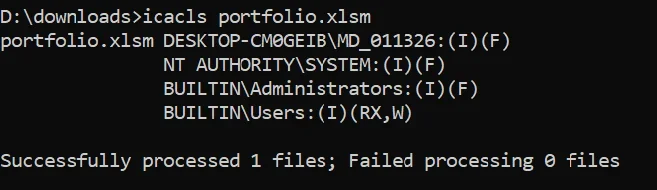
Sounds like permission problems. Can you show us the permissions on one file, e.g. icacls "D:\CIS-RAM-Version-1.0.pdf" should yield something like this:

Code:
D:\CIS-RAM-Version-1.0.pdf BUILTIN\Administrators:(I)(F)
                           NT AUTHORITY\SYSTEM:(I)(F)
                           NT AUTHORITY\Authenticated Users:(I)(M)
                           BUILTIN\Users:(I)(RX)
 

My Computer

System One

  • OS
    Windows 11 Pro 25H2
    Computer type
    PC/Desktop
    Manufacturer/Model
    Intel NUC12WSHi7
    CPU
    12th Gen Core i7-1260P
    Motherboard
    NUC12WSBi7
    Memory
    64 GB Micron PC4-25600
    Graphics Card(s)
    Intel Iris Xe Graphics
    Sound Card
    on-board Realtek HD Audio
    Monitor(s) Displays
    Dell U3219Q
    Screen Resolution
    3840 x 2160
    Hard Drives
    Samsung SSD 990 PRO 1TB
    Crucial MX500 2 TB
    Antivirus
    Microsoft Defender
I rebuilt my PC a couple of days ago and moved from 10 Pro to 11 Pro. Had a struggle getting it activated, but I supposedly am now.

In the last few hours, I've experienced several types of sharing/permissions/saving problems on both Word and Excel files (Office 2010). This was unheard of on my just retired older PC.

Not on all files for whatever reason, but on many important ones. I'm on Excel pretty much all my waking hours daily.

Particularly spooky is an error forbidding me from even saving a extremely important financial file, even when I have made no changes to it at all.

I've fumbled around looking at security and permissions details on various individual files and folders. I've never encountered this so don't what I should even ATTEMPT to do. All the files in question are on a separate D drive and of course I'm hoping there is some type of "global" solution.

Perhaps most importantly.....I need to avoid digging a deeper hole so don't want to do harm.

I'm the ONLY human who touches this PC...no other "users". So this business of 4 or 5 "groups or user names" in security details is way over my head.

Any guidance appreciated.
FWIW, in my Office 2010 install (and it's likely the same in other MS Office versions beyond 2010), I must set its "Trusted Locations" to give me full access to my files. Below are my (somewhat cryptic) notes of how to do it in Word.

Set Trust Center Options:
File -> Options -> Trust Center -> Microsoft Word Trust Center -> Trust Center Settings 'box' -> Trusted Locations -> Add new location -> Browse to: 'C:\Users\(user name)\Documents' -> Click 'OK' three times to go back to Word -> Test.

Good luck
 

My Computers

System One System Two

  • OS
    Windows 11 Professional
    Computer type
    PC/Desktop
    Manufacturer/Model
    Homebuilt
    CPU
    AMD Ryzen 7 5700G
    Motherboard
    Gigabyte B550 Gaming X V2 MOBO (Rev 1.4)
    Memory
    32GB DDR4
    Graphics Card(s)
    AMD Radeon On-board Graphics
    Sound Card
    Realtek High Definition Audio (on board)
    Monitor(s) Displays
    Jlink FHD 32 Inch & VIZIO M322I - 32 Inch
    Screen Resolution
    1920 X 1080
    Hard Drives
    Samsung 990 PRO 1TB M.2 NVME
    Samsung 990 EVO Plus 4TB M.2 NVME
    960 GB SanDisk Ultra II SSD - Internal
    3 TB Western Digital Green WDC 30EZRX-00DC0B0 HDD - Internal
    4 TB Seagate IronWolf HDD - Internal
    PSU
    Seasonic S12III
    Case
    Antec GX 500
    Cooling
    AMD 'Boxed' OEM CPU Fan
    Keyboard
    Dell Milti Media Wired
    Mouse
    Logitech M720 Triathlon Wireless Mouse
    Internet Speed
    480 Mbps
    Browser
    Chrome
    Antivirus
    Windows Defender
  • Operating System
    Windows 11 Professional
    Computer type
    Laptop
    Manufacturer/Model
    Lenovo ThinkPad E595 20NF 15.6"
    CPU
    AMD Ryzen 5 - 3500U
    Motherboard
    Lenovo
    Memory
    32GB DDR4
    Graphics card(s)
    AMD Radeon Vega 8
    Sound Card
    AMD High Definition Audio
    Monitor(s) Displays
    16:9 IPS
    Screen Resolution
    1920 x 1080
    Hard Drives
    256 GB Samsung NVMe M.2 SSD
    Crucial 2TB SSD
    PSU
    Lenovo
    Case
    Lenovo
    Cooling
    Lenovo
    Keyboard
    Lenovo
    Mouse
    Wireless hand held trackball
    Internet Speed
    400 Mbps
    Browser
    Chrome
    Antivirus
    Windows Defender
in my Office 2010 install (and it's likely the same in other MS Office versions beyond 2010), I must set its "Trusted Locations" to give me full access to my files. Below are my (somewhat cryptic) notes of how to do it in Word.

Set Trust Center Options:
File -> Options -> Trust Center -> Microsoft Word Trust Center -> Trust Center Settings 'box' -> Trusted Locations -> Add new location -> Browse to: 'C:\Users\(user name)\Documents' -> Click 'OK' three times to go back to Word -> Test.
That's for trusting Word VBA code. The OP has not mentioned that.


All the best,
Denis
 

My Computer

System One

  • OS
    Windows 11 Home x64 Version 25H2 Build 26200.8037
1768850375442.webp
 

My Computer

System One

  • OS
    Windows 11 Pro
    Computer type
    PC/Desktop
    Manufacturer/Model
    Fishmill Special
    CPU
    Intel 265K
    Motherboard
    MSI Pro Z890-A
    Memory
    G Skill DDR5 2 x 16 kit 6000/36
    Graphics Card(s)
    none
    Sound Card
    none
    Monitor(s) Displays
    Dell 2316H
    Screen Resolution
    1600 x 900
    Hard Drives
    WD SN770 NVME 500 GB boot; Intel 660p NVME 2 TB and WD Green 3 TB storage
    PSU
    Be Quiet 13M 750 ATX 3.1
    Case
    Lancool PC-K65
    Cooling
    Noctua U12S
    Keyboard
    Logitech K120 Wired
    Mouse
    Dell MS-116
    Browser
    Chrome
    Antivirus
    Microsoft Defender and Malwarebytes

Hope the above pic is helpful. I'm a klutz with Paint.

That's one file I had problems with.

I've been up all night literally fighting this.

Gonna crash and re-examine after I wake up.

You guys have been great so far. Appreciated.
 

My Computer

System One

  • OS
    Windows 11 Pro
    Computer type
    PC/Desktop
    Manufacturer/Model
    Fishmill Special
    CPU
    Intel 265K
    Motherboard
    MSI Pro Z890-A
    Memory
    G Skill DDR5 2 x 16 kit 6000/36
    Graphics Card(s)
    none
    Sound Card
    none
    Monitor(s) Displays
    Dell 2316H
    Screen Resolution
    1600 x 900
    Hard Drives
    WD SN770 NVME 500 GB boot; Intel 660p NVME 2 TB and WD Green 3 TB storage
    PSU
    Be Quiet 13M 750 ATX 3.1
    Case
    Lancool PC-K65
    Cooling
    Noctua U12S
    Keyboard
    Logitech K120 Wired
    Mouse
    Dell MS-116
    Browser
    Chrome
    Antivirus
    Microsoft Defender and Malwarebytes

That's for trusting Word VBA code. The OP has not mentioned that.
Yup, but the example file for which OP showed permissions is an xlsm. The plot thickens.
 

My Computer

System One

  • OS
    Windows 11 Pro 25H2
    Computer type
    PC/Desktop
    Manufacturer/Model
    Intel NUC12WSHi7
    CPU
    12th Gen Core i7-1260P
    Motherboard
    NUC12WSBi7
    Memory
    64 GB Micron PC4-25600
    Graphics Card(s)
    Intel Iris Xe Graphics
    Sound Card
    on-board Realtek HD Audio
    Monitor(s) Displays
    Dell U3219Q
    Screen Resolution
    3840 x 2160
    Hard Drives
    Samsung SSD 990 PRO 1TB
    Crucial MX500 2 TB
    Antivirus
    Microsoft Defender
OK. Slept like a log and back at it.

Are there any other ideas?

Which is the better idea?

Copy all data files on my D drive (30,000 totaling about 1 TB) to a FAT 32 drive, which strips them of permissions. Then copy them back to D, which gives them new problem-free permissions.

Or

Run certain commands direct on my original files on D.

Or something else?

More confusion: I just copied 30 or 40 random files from random folders (jpg, Excel, PDF, Word, MP3,) to a "test" folder. I was then able to view, manipulate, edit, and resave all of them without incident. Included in this was my most critical file. It's fine today, but I could not resave it at all 12 hours ago.

I don't understand why only some of my 150,000 personal data files appear to be affected and apparently intermittently?
 

My Computer

System One

  • OS
    Windows 11 Pro
    Computer type
    PC/Desktop
    Manufacturer/Model
    Fishmill Special
    CPU
    Intel 265K
    Motherboard
    MSI Pro Z890-A
    Memory
    G Skill DDR5 2 x 16 kit 6000/36
    Graphics Card(s)
    none
    Sound Card
    none
    Monitor(s) Displays
    Dell 2316H
    Screen Resolution
    1600 x 900
    Hard Drives
    WD SN770 NVME 500 GB boot; Intel 660p NVME 2 TB and WD Green 3 TB storage
    PSU
    Be Quiet 13M 750 ATX 3.1
    Case
    Lancool PC-K65
    Cooling
    Noctua U12S
    Keyboard
    Logitech K120 Wired
    Mouse
    Dell MS-116
    Browser
    Chrome
    Antivirus
    Microsoft Defender and Malwarebytes

I eventually solved this by changing ownership and ensuring that my account had full control.

Took several hours to get it right and practice how to do it.

It was spooky and had 8 or 10 different things that had to be just right in the permissions area. I honed my technique on a few dispensable files and eventually moved to larger and larger folders until I had done my entire D drive operating OK.

Be sure your account is an "administrator".
 
Last edited:

My Computer

System One

  • OS
    Windows 11 Pro
    Computer type
    PC/Desktop
    Manufacturer/Model
    Fishmill Special
    CPU
    Intel 265K
    Motherboard
    MSI Pro Z890-A
    Memory
    G Skill DDR5 2 x 16 kit 6000/36
    Graphics Card(s)
    none
    Sound Card
    none
    Monitor(s) Displays
    Dell 2316H
    Screen Resolution
    1600 x 900
    Hard Drives
    WD SN770 NVME 500 GB boot; Intel 660p NVME 2 TB and WD Green 3 TB storage
    PSU
    Be Quiet 13M 750 ATX 3.1
    Case
    Lancool PC-K65
    Cooling
    Noctua U12S
    Keyboard
    Logitech K120 Wired
    Mouse
    Dell MS-116
    Browser
    Chrome
    Antivirus
    Microsoft Defender and Malwarebytes

Back
Top Bottom