
- Local time
- 9:30 AM
- Posts
- 804
- OS
- W11 Pro Future Platform 29600 branch latest build
I created a shortcut to open the Libraries screen directly, something I've done on all W10 installs without issue, however W11 will not let me drag this one to the Taskbar. When I try and attach it the 'no entry' symbol appears.
A shortcut I created in exactly the same way for the Snipping Tool attaches perfectly.
I've tried a default shortcut without custom icon and that is the same, it won't attach. The filepath I'm using for the shortcut is this and the shortcut in itself works fine, it just is blocked from being attached:
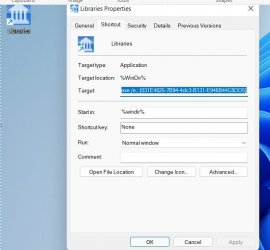
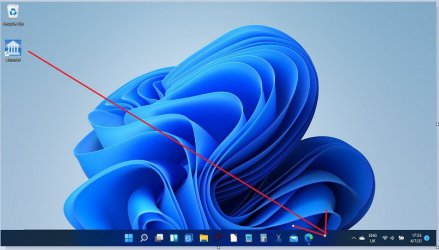
A shortcut I created in exactly the same way for the Snipping Tool attaches perfectly.
I've tried a default shortcut without custom icon and that is the same, it won't attach. The filepath I'm using for the shortcut is this and the shortcut in itself works fine, it just is blocked from being attached:
Code:
%WinDir%\explorer.exe /e,::{031E4825-7B94-4dc3-B131-E946B44C8DD5}My Computer
At a glance
W11 Pro Future Platform 29600 branch latest b...Intel i58GbIntel HD Graphics
- OS
- W11 Pro Future Platform 29600 branch latest build
- Computer type
- Laptop
- Manufacturer/Model
- Dell 7760 Mobile Precision 17"
- CPU
- Intel i5
- Motherboard
- Unknown
- Memory
- 8Gb
- Graphics Card(s)
- Intel HD Graphics
- Sound Card
- Realtek
- Monitor(s) Displays
- Internal
- Hard Drives
- 2 x 256Gb SSD
- PSU
- Dell 240 watt
- Mouse
- Dell Premier Bluetooth
- Internet Speed
- 50Mbps
- Browser
- Edge
- Antivirus
- Default Microsoft Security






