JavaScript is disabled. For a better experience, please enable JavaScript in your browser before proceeding.
You are using an out of date browser. It may not display this or other websites correctly.
You should upgrade or use an
alternative browser .
slightly OT: How do you hide your cable tangles that have to be on your desktop (the physical one).
Microsoft 365 Basic
Pro User
VIP
This tangle makes my desk look cluttered and messy.
That depends, whether you are looking for something practical or just to avoid an eye sore.
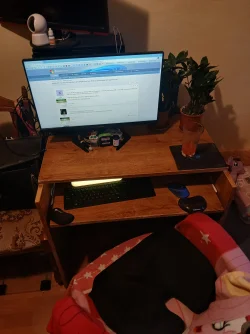
I look at the monitor, not on the desktop. I have cables behind the monitor or around the chair.
RUID30e1ea7f3d4941c5a0abc17fa085b68a.webp
697.6 KB
· Views: 6
Home2FH2Can AMD Ryzen 5 8600G (07/24) 2x32GB Kingston FURY DDR5 5600 MHz CL36 @5200... ASROCK Radeon RX 6600 Challenger D 8G @48FPS ... Home2FH2Can PC/Desktop AMD Ryzen 5 8600G (07/24) ASROCK B650M-HDV/M.2 (07/24) BIOS 4.43 AGESA ComboAM5 1.3.0.1b Patch A (07/26) 2x32GB Kingston FURY DDR5 5600 MHz CL36 @5200 CL40 (07/24) ASROCK Radeon RX 6600 Challenger D 8G @48FPS (08/24) Creative Sound BlasterX AE-5 Plus (05/24) 24" Philips 24M1N3200ZS/00 (05/24) 1920×1080@165Hz via DP1.4 Kingston KC3000 NVMe 2TB (05/24) Seasonic Core GM 550 Gold (04/24) Fractal Design Define 7 Mini with 3x Noctua NF-P14s/12@555rpm (04/24) Noctua NH-U12S with Noctua NF-P12 (04/24) HP Pavilion Wired Keyboard 300 (07/24) + Rabalux 76017 Parker (01/24) Logitech M330 Silent Plus (07/26) 500/100 Mbps via RouterOS (05/21) & TCP Optimizer Edge, Brave for YouTube, LibreWolf for FB NextDNS blocking 50% Traffic Phone: Motorola Moto G86 (02/26)
Well-known member
Member
VIP
What about cable clips of some sort?
I like to tape a strip of Velcro to the edge of a table and attach Velcro ties to my cables, those little ones that attach to the cable using a smaller-width, tongue-like strip. Instead of bundling the cable up or securing to other cables, I wrap the wider part around itself, and I use it to attach to the strips fixed to the table.
For cables that run along the same path, like my monitor power and HDMI cable, I drilled a couple holes in my AnthroCart desk to run them through, filling the holes with a nice 2" grommet, and I use this cable tubing through the hole and up my monitor arm, which is also mounted through the desktop:
I use that stuff everywhere, and I also like this zippered cloth sleeve for certain purposes:
Well-known member
Power User
VIP
Thread Starter
That depends, whether you are looking for something practical or just to avoid an eye sore.
That is one neat desktop.
By any chance is that a 35 mm film canister next to the green object on front of your monitor base?
Windows 11 2H25 AMD 9900X 64 GB AMD 9070 XT Windows 11 2H25 PC/Desktop DIY AMD 9900X MSI X870E Carbon 64 GB AMD 9070 XT built-in Dell 24" Sabrent 1 TB NVMe, 4 x SSD (need to check models), 4 x 3.5" HDD, 8-16 TB, all WD Seasonic 850 Fractal Design North XL (which I likw) Corsair AIO for CPU, fans for case Das Keyboard 4 Corsair M65 (white) 1 TB download Firefox Bitdefender Also have Lenovo T14S laptop (me) and Lenovo Slim 71 (wife)
I detest a rat's nest of cables and with PCs there's only so much one can do, especially if one has multiple devices on his desk as I do. I use an assortment of things.
For cables I use regularly I have desk clips similar to Edwin.
For all those extra usb cables I use every once in a while they're in a basket and color coded on both ends with these. I can find the one I need in seconds simply by the color.
Silicone colored cable protectors
For cables permanently connected to my PCs, I also use those same organizers to color code each end of cables at the rear of each of my PCs as well as the end of what they are plugged into. Each PC has a dedicated color, even power cables.
Note these work great for their intended purpose which is for the ends of phone and ipad charging cables. It prevents the ends from crimping and wearing.
For cables I use regularly I use clips attached to my desk similar to what Edwin uses.
I use these under/behind my desk to take slack out of cables and keep them off the floor as well as binding cables together to keep each PC's cables together.
Amazon.com
Windows 11 Pro 26H2 26300.9457 i9-10900 10 core 20 threads 32 gb none-Intel UHD Graphics 630 Windows 11 Pro 26H2 26300.9457 PC/Desktop Dell Optiplex 7080 i9-10900 10 core 20 threads DELL 0J37VM 32 gb none-Intel UHD Graphics 630 Integrated Realtek Benq 27 2560x1440 2x1tb Solidigm m.2 nvme /External drives 512gb Samsung m.2 sata+2tb Kingston m2.nvme 500w MT Dell Premium Logitech wired Logitech wireless so slow I'm too embarrassed to tell #1 Edge #2 Firefox Defender+MWB Premium
Windows 11 Pro 24H2 26200.9457 AMD Ryzen 7 6800U 32 gb integrated Windows 11 Pro 24H2 26200.9457 PC/Desktop Beelink Mini PC SER5 AMD Ryzen 7 6800U 32 gb integrated integrated Benq 27 2560x1440 1TB Crucial nvme Logitech wired Logitech wireless still too embarrassed to tell Firefox Defender
System 3 is non compliant Dell 9020 i7-4770/24gb ram Win11 PRO 26200.9457
Jack of all trades
Power User
VIP
Ive got about 13 feet of desk space so I don't always tuck in all the cables. My GPS sports watch charge cable is always out as well as my headphone cable and external backup drive power supply. You dont want to be too tidy.
Windows 11 (up to date) Intel i5 12400 Corsair Vengeance LPX 16GB On Board the Z690 Windows 11 (up to date) PC/Desktop Custom Intel i5 12400 Gigabyte Z690 UA Corsair Vengeance LPX 16GB On Board the Z690 On Board 43" Samsung tu7000 2560 x 1440 SAMSUNG SSD 1TB NVMe M.2 Thermaltake smart 500w 80+ LIAN LANCOOL_205M Bunch of fans . . . :o) (lights dont work) Unicomp: Ultra Classic White Buckling Spring USB M510 50mbps on Ethernet Fire Fox Windows Love this computer but I still prefer Win-7 like I love my old Lazy Boy Recliner . . . it just feels better.
WIN-7-64BIT and Win-11 pro for testing on uns... i5-3570K CPU @ 3.40GHz, 3801 Mhz, 4 Core(s), ... 16 GB - Crucial Ballistick 4GB PC3-14900 DDR3... NVIDIA GeForce GTX 1050 WIN-7-64BIT and Win-11 pro for testing on unsupported hardware PC/Desktop Home built i5-3570K CPU @ 3.40GHz, 3801 Mhz, 4 Core(s), 4 Logical Processor(s) GA-Z77-HD3 16 GB - Crucial Ballistick 4GB PC3-14900 DDR3-1333 MHz NVIDIA GeForce GTX 1050 On Board ASUS VP278 1920 x 1080 4 - internal Samsung 2.5" SSD, 1 WD HDD 7200 and some external drives EVGA 550w Old Gygabyte Tower Yes Unicomp - UNIOP4A USB (like the old IBM Model H that I started with) M510 50mbps Firefox Windows The only thing it lack is USB-3.2 on the front face but it has 3.0 on the back
Well-known member
Power User
VIP
Thread Starter
Ive got about 13 feet of desk space
I'm jealous. I have much less than that.
so I don't always tuck in all the cables.
Is that because your tower is just to the left of your monitor?
Windows 11 2H25 AMD 9900X 64 GB AMD 9070 XT Windows 11 2H25 PC/Desktop DIY AMD 9900X MSI X870E Carbon 64 GB AMD 9070 XT built-in Dell 24" Sabrent 1 TB NVMe, 4 x SSD (need to check models), 4 x 3.5" HDD, 8-16 TB, all WD Seasonic 850 Fractal Design North XL (which I likw) Corsair AIO for CPU, fans for case Das Keyboard 4 Corsair M65 (white) 1 TB download Firefox Bitdefender Also have Lenovo T14S laptop (me) and Lenovo Slim 71 (wife)
Jack of all trades
Power User
VIP
I'm jealous. I have much less than that.
I could not live with the tower under the desk or where my subwoofer is. Ive never not had it there.
I bought this desk when I was 23 years old 48 years ago and my first computer 33 years ago.
Windows 11 (up to date) Intel i5 12400 Corsair Vengeance LPX 16GB On Board the Z690 Windows 11 (up to date) PC/Desktop Custom Intel i5 12400 Gigabyte Z690 UA Corsair Vengeance LPX 16GB On Board the Z690 On Board 43" Samsung tu7000 2560 x 1440 SAMSUNG SSD 1TB NVMe M.2 Thermaltake smart 500w 80+ LIAN LANCOOL_205M Bunch of fans . . . :o) (lights dont work) Unicomp: Ultra Classic White Buckling Spring USB M510 50mbps on Ethernet Fire Fox Windows Love this computer but I still prefer Win-7 like I love my old Lazy Boy Recliner . . . it just feels better.
WIN-7-64BIT and Win-11 pro for testing on uns... i5-3570K CPU @ 3.40GHz, 3801 Mhz, 4 Core(s), ... 16 GB - Crucial Ballistick 4GB PC3-14900 DDR3... NVIDIA GeForce GTX 1050 WIN-7-64BIT and Win-11 pro for testing on unsupported hardware PC/Desktop Home built i5-3570K CPU @ 3.40GHz, 3801 Mhz, 4 Core(s), 4 Logical Processor(s) GA-Z77-HD3 16 GB - Crucial Ballistick 4GB PC3-14900 DDR3-1333 MHz NVIDIA GeForce GTX 1050 On Board ASUS VP278 1920 x 1080 4 - internal Samsung 2.5" SSD, 1 WD HDD 7200 and some external drives EVGA 550w Old Gygabyte Tower Yes Unicomp - UNIOP4A USB (like the old IBM Model H that I started with) M510 50mbps Firefox Windows The only thing it lack is USB-3.2 on the front face but it has 3.0 on the back
Microsoft 365 Basic
Pro User
VIP
By any chance is that a 35 mm film canister next to the green object on front of your monitor base?
Nuh, that is a canister for glucose sticks to measure blood sugar to deal with prediabetes.
Home2FH2Can AMD Ryzen 5 8600G (07/24) 2x32GB Kingston FURY DDR5 5600 MHz CL36 @5200... ASROCK Radeon RX 6600 Challenger D 8G @48FPS ... Home2FH2Can PC/Desktop AMD Ryzen 5 8600G (07/24) ASROCK B650M-HDV/M.2 (07/24) BIOS 4.43 AGESA ComboAM5 1.3.0.1b Patch A (07/26) 2x32GB Kingston FURY DDR5 5600 MHz CL36 @5200 CL40 (07/24) ASROCK Radeon RX 6600 Challenger D 8G @48FPS (08/24) Creative Sound BlasterX AE-5 Plus (05/24) 24" Philips 24M1N3200ZS/00 (05/24) 1920×1080@165Hz via DP1.4 Kingston KC3000 NVMe 2TB (05/24) Seasonic Core GM 550 Gold (04/24) Fractal Design Define 7 Mini with 3x Noctua NF-P14s/12@555rpm (04/24) Noctua NH-U12S with Noctua NF-P12 (04/24) HP Pavilion Wired Keyboard 300 (07/24) + Rabalux 76017 Parker (01/24) Logitech M330 Silent Plus (07/26) 500/100 Mbps via RouterOS (05/21) & TCP Optimizer Edge, Brave for YouTube, LibreWolf for FB NextDNS blocking 50% Traffic Phone: Motorola Moto G86 (02/26)