Slow Windows Explorer, and file date stamps automatically being reset. Please help!


SSaurus

New member
Local time
12:13 PM
Posts
5
OS
Windows 10 and Windows 11
I’m at my wit’s end, and ready to yank Win 11 off my system and put Win 10 back on.

Windows Explorer is stupid slow much of the time. ThE worst part is, all my original files on my external drives, and all my saved files on my other internal drives, are being date stamped with the date of whenever win 11 scans them for the first time.

I just recently installed Win 11 23H2 (build 22631.6060, Oct 2025) on my 6 yr old i7 10-700. Too many online checks and software updates were starting to complain about my old Win 10 20h2 system being unsupported. I installed Win 11, 23h2. I tried 25h2 at first, but it was just too boggy and slow. All that AI crap was totally turning me off. 25H2 was messing up my files too.

Anyhoo, this date stamp overwriting issue is a SERIOUS PROBLEM for me. Rar files and zip files are ok, but folders and exe files are not retaining their original date stamps. Both the “originally created” and “last modified” date stamps are being jiggered by WinBlows! The issue happens to ALL exe files (and most folders) on the various drives & partitions in my desktop, and also my external drives.

I have been researching and have implemented the few, scant proposed fixes that I found online, but thus far, nothing has worked. And no, it is not any kind of virus or malware issue. I know my files are clean. It’s been suggested that since the files are from “unknown” sources, that it is Microsoft’s new “MoTW”, or disk optimization causing it. I have disk indexing turned off. I have classic search enabled. I keep my system OFFLINE as much as possible. It’s mostly used for home studio recording and music production.

This issue is much more than annoying - it’s frigging up my files’ date stamps irrevocably.

Off topic, but what is up with blinkin’ Windows Explorer constantly communicating with cloud servers? I use NetLimiter, and it is constantly alerting me that explorer.exe is trying to reach MS servers.
 

My Computer My Computer

At a glance

Windows 10 and Windows 11
OS
Windows 10 and Windows 11
Computer type
PC/Desktop
Manufacturer/Model
ASUS and Gigabyte
Hello @SSaurus and welcome to ElevenForum.

A lot of issues in one post.

Ok... let's do these things...

1. Do a clean install of 25H2. Follow ALL the instructions. I recommend using MS's Media Creation Tool to create your installtion media (USB stick). Step #15 shows you how to install with a LOCAL account. You can change to MS account later if desired.


2. As soon as 25H2 is installed, disconnect wireless or wired internet.
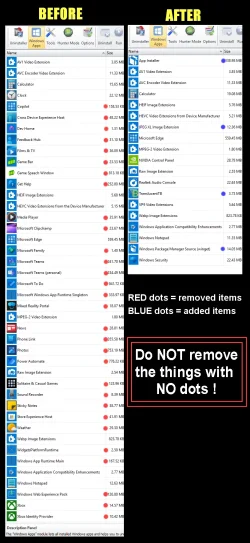
3. Use REVO Uninstaller (free) to remove any MS bloatware, you don't want.


These are the things I removed. You can choose to remove anything you want.
Each time you remove something, make sure to use the "Scan" for leftovers button, and delete all that stuff as well.

00000 REVO Junk Removal.webp


4. As for the rest... see the links below. Get Windows 11 tweaked the way you want, and make a backup, using 3rd party backup software.

Here's some things that you may find useful...


5. When you get all that done... be calm, and post any issues you may still have. Please fill out your computer specs as well.


My Computers My Computers

  • At a glance

    Win 11 Home ♦♦♦26300.9550 ♦♦♦♦♦♦♦26H2AMD Ryzen 7 3700XG.Skill (F4-3200C14D-16GTZKW)EVGA RTX 2070 (08G-P4-2171-KR)
    OS
    Win 11 Home ♦♦♦26300.9550 ♦♦♦♦♦♦♦26H2
    Computer type
    PC/Desktop
    Manufacturer/Model
    Built by Ghot® [May 2020]
    CPU
    AMD Ryzen 7 3700X
    Motherboard
    Asus Pro WS X570-ACE (BIOS 5302)
    Memory
    G.Skill (F4-3200C14D-16GTZKW)
    Graphics Card(s)
    EVGA RTX 2070 (08G-P4-2171-KR)
    Sound Card
    Realtek ALC1220P / ALC S1220A
    Monitor(s) Displays
    Dell U3011 30"
    Screen Resolution
    2560 x 1600
    Hard Drives
    2x Samsung 860 EVO 500GB,
    WD 4TB Black FZBX - SATA III,
    WD 8TB Black FZBX - SATA III,
    DRW-24B1ST CD/DVD Burner
    PSU
    PC Power & Cooling 750W Quad EPS12V
    Case
    Cooler Master ATCS 840 Tower
    Cooling
    CM Hyper 212 EVO (push/pull)
    Keyboard
    Ducky DK9008 Shine II Blue LED
    Mouse
    Logitech Optical M-100
    Internet Speed
    300/300
    Browser
    Firefox (latest)
    Antivirus
    Bitdefender Total Security
    Other Info
    Speakers: Klipsch Pro Media 2.1
  • At a glance

    Windows XP Pro 32bit w/SP3AMD Athlon 64 X2 5000+ (OC'd @ 3.2Ghz)TWIN2X2048-6400C4DHX (2 x 1GB, DDR2 800)EVGA 256-P2-N758-TR GeForce 8600GT SSC
    Operating System
    Windows XP Pro 32bit w/SP3
    Computer type
    PC/Desktop
    Manufacturer/Model
    Built by Ghot® (not in use)
    CPU
    AMD Athlon 64 X2 5000+ (OC'd @ 3.2Ghz)
    Motherboard
    ASUS M2N32-SLI Deluxe Wireless Edition
    Memory
    TWIN2X2048-6400C4DHX (2 x 1GB, DDR2 800)
    Graphics card(s)
    EVGA 256-P2-N758-TR GeForce 8600GT SSC
    Sound Card
    Onboard
    Monitor(s) Displays
    ViewSonic G90FB Black 19" Professional (CRT)
    Screen Resolution
    up to 2048 x 1536
    Hard Drives
    WD 36GB 10,000rpm Raptor SATA
    Seagate 80GB 7200rpm SATA
    Lite-On LTR-52246S CD/RW
    Lite-On LH-18A1P CD/DVD Burner
    PSU
    PC Power & Cooling Silencer 750 Quad EPS12V
    Case
    Generic Beige case, 80mm fans
    Cooling
    ZALMAN 9500A 92mm CPU Cooler
    Keyboard
    Logitech Classic Keybooard 200
    Mouse
    Logitech Optical M-BT96a
    Internet Speed
    300/300
    Browser
    Firefox 3.x ??
    Antivirus
    Symantec (Norton)
    Other Info
    Still assembled, still runs. Haven't turned it on for 15 years?
Thanks for the suggestions, Ghot.
 

My Computer My Computer

At a glance

Windows 10 and Windows 11
OS
Windows 10 and Windows 11
Computer type
PC/Desktop
Manufacturer/Model
ASUS and Gigabyte
I suggest you get to the root of the timestamp issue before dealing with the any issues with explorer. While it might help in your slow explorer problem, IMO a clean install and even removing bloatware is not the cause of your timestamp/datestamp problem. If NTFS metadata is inconsistent or a security component is touching EXEs, reinstalling Windows won’t stop it. You have to disable or remove the cause.

The only legitimate mechanisms that can rewrite timestamps are:
  • AV / SmartScreen / MoTW unblocking When Windows applies or removes MoTW, it may rewrite ADS streams, but it should not rewrite Created/Modified timestamps.
  • File system metadata repair CHKDSK or storage drivers can rewrite timestamps if metadata is corrupted.
  • Third‑party tools touching files Backup tools, sync engines, or indexing services can rewrite timestamps.

The most likely culprits are:
1. Corrupted NTFS metadata on external drives, especially if they were used for years on Windows 10 and then accessed by a fresh Windows 11 install. NTFS will “fix” metadata silently when inconsistencies are detected.
I would check data integrity on the external drives. chkdsk X: /f /r (where X is drive letter)

2. Smartscreen/MoTW reclassification of these files.
Windows 11 aggressively scans EXEs from external drives. If the OS flags them as “from the internet,” Explorer may apply MoTW, which can cause metadata updates. Disable Smartscreen to see if the issue is resolved. Control Panel → Security → App & Browser Control. Turn off SmartScreen for apps and files.

3. Security Policies
Windows 11 25H2 introduced expanded Smart App Control and reputation checks.Even 23H2 has more aggressive background scanning than Windows 10 had. In Windows Security, disable Smart App Control if its enabled.

4. Cloud hooks in Explorer that cause the outbound traffic you are seeing.
Explorer.exe now integrates with:
OneDrive
Microsoft Account presence
Widgets
Copilot
Cloud‑based metadata lookups. You can eliminate some of this by using the tutorials in the forum tutorial section to disable.

5.Update Intel Rapid Storage Controller Driver. Old IRST driver can cause metadata rewriting on external drives.

6. Anything that scans or syncs files - Check any Backup/sync tools that might be touching files & rewriting metadata. (Google Drive, Dropbox, an imaging app, even Onedrive)
 

My Computers My Computers

  • At a glance

    Windows 11 Pro 25H2 26200.9457i9-10900 10 core 20 threads32 gbnone-Intel UHD Graphics 630
    OS
    Windows 11 Pro 25H2 26200.9457
    Computer type
    PC/Desktop
    Manufacturer/Model
    Dell Optiplex 7080
    CPU
    i9-10900 10 core 20 threads
    Motherboard
    DELL 0J37VM
    Memory
    32 gb
    Graphics Card(s)
    none-Intel UHD Graphics 630
    Sound Card
    Integrated Realtek
    Monitor(s) Displays
    Benq 27
    Screen Resolution
    2560x1440
    Hard Drives
    2x1tb Solidigm m.2 nvme /External drives 512gb Samsung m.2 sata+2tb Kingston m2.nvme
    PSU
    500w
    Case
    MT
    Cooling
    Dell Premium
    Keyboard
    Logitech wired
    Mouse
    Logitech wireless
    Internet Speed
    so slow I'm too embarrassed to tell
    Browser
    #1 Edge #2 Firefox
    Antivirus
    Defender+MWB Premium
  • At a glance

    Windows 11 Pro 24H2 26200.9457AMD Ryzen 7 6800U32 gbintegrated
    Operating System
    Windows 11 Pro 24H2 26200.9457
    Computer type
    PC/Desktop
    Manufacturer/Model
    Beelink Mini PC SER5
    CPU
    AMD Ryzen 7 6800U
    Memory
    32 gb
    Graphics card(s)
    integrated
    Sound Card
    integrated
    Monitor(s) Displays
    Benq 27
    Screen Resolution
    2560x1440
    Hard Drives
    1TB Crucial nvme
    Keyboard
    Logitech wired
    Mouse
    Logitech wireless
    Internet Speed
    still too embarrassed to tell
    Browser
    Firefox
    Antivirus
    Defender
  • System 3 is non compliant Dell 9020 i7-4770/24gb ram Win11 PRO 26200.9457
I don't believe adding or removing MOTW will change a file's timestamp. MOTW is applied to a file's Alternate Data Stream, which is external to the file itself, and so NTFS doesn't consider this a change a reason to change the timestamp.
 

My Computer My Computer

At a glance

Windows 7
OS
Windows 7
Dear @glasskuter, thanks for your excellent input — greatly appreciated! I appreciate the former suggestions about clean installing, etc., but as someone who formally worked as a professional tech for 30 years, the general “start from scratch” methodology really didn’t offer me a feasible path of resolution that I was willing to blithely follow just yet . I agree with everything you wrote, but having been out of the tech game over the past 10 or 15 years, I wasn’t sure how to deep dive the issue(s).

I completely yanked OneDrive outta my system. As a matter of fact, it wasn’t even installed. Neither was Edge, and many other bloated, invasive MS Slops. Just to make sure that Defender wasn’t being the skallywag, I sedated it and removed it as well.

As regards the “time-stamperry-messing-about-isms”, and the profuse explorer sluggishness, I am convinced that they are directly related. Explorer is speedy enough while accessing any newly created files (including Windows 11’s own files). I perhaps was remiss to have not mentioned that these ntfs (and a couple of exFAT drives & partitions) have also been shared with my dual-booted Linux system (Kubuntu 25.10).

Speaking of the exFAT USB devices . .

We know that this wonky computer problem of mine can’t be directly tied to NTFS corruption solely, since the exFAT doodles aren’t using that file system. Hmmm. Things that make a fella go, “hmmm.”
 

My Computer My Computer

At a glance

Windows 10 and Windows 11
OS
Windows 10 and Windows 11
Computer type
PC/Desktop
Manufacturer/Model
ASUS and Gigabyte
I don't believe adding or removing MOTW will change a file's timestamp. MOTW is applied to a file's Alternate Data Stream, which is external to the file itself, and so NTFS doesn't consider this a change a reason to change the timestamp.
Thanks, G. I agree. Nevertheless, for good measure, I’m vested in mitigating MoTW on my system anyway. ;)
 

My Computer My Computer

At a glance

Windows 10 and Windows 11
OS
Windows 10 and Windows 11
Computer type
PC/Desktop
Manufacturer/Model
ASUS and Gigabyte
I hope you solve your problem. I also hope that in your "Yanking", the proper procedures were taken. For certain things like Onedrive, uninstalling is not enough in some cases.
I stay away from exfat unless I have a need to directly access files across cross-platform devices.

The fact you say neither Edge nor Onedrive was installed leads me to believe you are definitely not running a standard windows installation.
 

My Computers My Computers

  • At a glance

    Windows 11 Pro 25H2 26200.9457i9-10900 10 core 20 threads32 gbnone-Intel UHD Graphics 630
    OS
    Windows 11 Pro 25H2 26200.9457
    Computer type
    PC/Desktop
    Manufacturer/Model
    Dell Optiplex 7080
    CPU
    i9-10900 10 core 20 threads
    Motherboard
    DELL 0J37VM
    Memory
    32 gb
    Graphics Card(s)
    none-Intel UHD Graphics 630
    Sound Card
    Integrated Realtek
    Monitor(s) Displays
    Benq 27
    Screen Resolution
    2560x1440
    Hard Drives
    2x1tb Solidigm m.2 nvme /External drives 512gb Samsung m.2 sata+2tb Kingston m2.nvme
    PSU
    500w
    Case
    MT
    Cooling
    Dell Premium
    Keyboard
    Logitech wired
    Mouse
    Logitech wireless
    Internet Speed
    so slow I'm too embarrassed to tell
    Browser
    #1 Edge #2 Firefox
    Antivirus
    Defender+MWB Premium
  • At a glance

    Windows 11 Pro 24H2 26200.9457AMD Ryzen 7 6800U32 gbintegrated
    Operating System
    Windows 11 Pro 24H2 26200.9457
    Computer type
    PC/Desktop
    Manufacturer/Model
    Beelink Mini PC SER5
    CPU
    AMD Ryzen 7 6800U
    Memory
    32 gb
    Graphics card(s)
    integrated
    Sound Card
    integrated
    Monitor(s) Displays
    Benq 27
    Screen Resolution
    2560x1440
    Hard Drives
    1TB Crucial nvme
    Keyboard
    Logitech wired
    Mouse
    Logitech wireless
    Internet Speed
    still too embarrassed to tell
    Browser
    Firefox
    Antivirus
    Defender
  • System 3 is non compliant Dell 9020 i7-4770/24gb ram Win11 PRO 26200.9457
I hope you solve your problem. I also hope that in your "Yanking", the proper procedures were taken. For certain things like Onedrive, uninstalling is not enough in some cases.
I stay away from exfat unless I have a need to directly access files across cross-platform devices.

The fact you say neither Edge nor Onedrive was installed leads me to believe you are definitely not running a standard windows installation.
Well, the ISO I used was official. I used Tiny11 to remove the extras, and Edge. After installation, I used a zoicware PowerShell utility to deal with Defender. I only used the so-called "proven" tools - not just any ol' ps1 script found on the Git . . . ;)
 

My Computer My Computer

At a glance

Windows 10 and Windows 11
OS
Windows 10 and Windows 11
Computer type
PC/Desktop
Manufacturer/Model
ASUS and Gigabyte
have you run sfc /scannow in a admin command prompt just to check the system files.
best of luck Steve ..
 

My Computers My Computers

  • At a glance

    Windows 11 HomeRyzen 7 5825u64GB DDR4 3200Ryzen 7 5825u
    OS
    Windows 11 Home
    Computer type
    PC/Desktop
    Manufacturer/Model
    HP 24" AiO
    CPU
    Ryzen 7 5825u
    Motherboard
    HP
    Memory
    64GB DDR4 3200
    Graphics Card(s)
    Ryzen 7 5825u
    Sound Card
    Realtek External 5w speaker bar.
    Monitor(s) Displays
    24" HP AiO
    Screen Resolution
    1920 x 1080 @60 Hz
    Hard Drives
    1TB WD Blue SN580 M2 SSD Partitioned C:/D: drives.
    2x 1TB USB HDD External Backup/Storage.
    all VeraCrypt encrypted.
    PSU
    90W external power brick
    Case
    24" All in One
    Cooling
    Default Air Cooling
    Keyboard
    Dell WiFi UK extended
    Mouse
    Dell WiFi 3 Button
    Internet Speed
    1GB full fibre
    Browser
    Vivaldi Browser/Email/Calendar
    Antivirus
    AVG Internet Security/Windows Defender
    Other Info
    Mainly Open Source Software
  • At a glance

    Ubuntu 22.04.5 LTSi5 7200u16GB DDR4Intel
    Operating System
    Ubuntu 22.04.5 LTS
    Computer type
    Laptop
    Manufacturer/Model
    Dell 13" Latitude 2017
    CPU
    i5 7200u
    Motherboard
    Dell
    Memory
    16GB DDR4
    Graphics card(s)
    Intel
    Sound Card
    Intel
    Monitor(s) Displays
    13" Dell Laptop
    Hard Drives
    250GB Crucial 2.5" SSD
    Mouse
    Generic WiFi 3 button
    Internet Speed
    WiFi only
    Browser
    Firefox
    Antivirus
    ClamAV TK
    Other Info
    Mainly Open Source Software
Back
Top Bottom