
EpicGamerGuy749
Member
- Local time
- 6:27 PM
- Posts
- 3
- OS
- Windows 11 (x64)
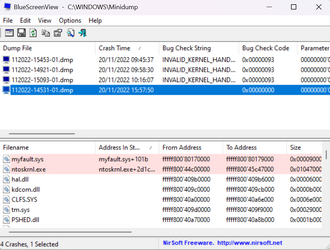
Why did I get this BSoD? Anyways I was just watching YouTube and I got a BSoD, error code 0x00000000.
Can someone explain why it was just a blank hexadecimal code on a system blue screen?
(It seems to be caused by myfault.sys btw)
Thanks for your help!
EDIT: I just searched up hexadecimal error code 0x0 and it means "operation completed successfully." So how did my system crash because of an operation completing successfully.
I thought blue screens were errors. (Well clearly not)
Can someone explain why it was just a blank hexadecimal code on a system blue screen?
(It seems to be caused by myfault.sys btw)
Thanks for your help!
EDIT: I just searched up hexadecimal error code 0x0 and it means "operation completed successfully." So how did my system crash because of an operation completing successfully.
I thought blue screens were errors. (Well clearly not)
- Windows Build/Version
- Windows 11 22H2 Stable
Attachments
Last edited:
My Computer
At a glance
Windows 11 (x64)Intel i5-105G78GBIntel(R) Iris Plus Graphics (Integrated)
- OS
- Windows 11 (x64)
- Computer type
- Laptop
- Manufacturer/Model
- Microsoft Surface Laptop 3
- CPU
- Intel i5-105G7
- Motherboard
- N/A
- Memory
- 8GB
- Graphics Card(s)
- Intel(R) Iris Plus Graphics (Integrated)
- Sound Card
- Realtek High Definition Audio(SST)
- Monitor(s) Displays
- N/A
- Screen Resolution
- 2256 x 1504
- Hard Drives
- Integrated Solid State Drive
- PSU
- N/A
- Case
- N/A
- Cooling
- N/A
- Keyboard
- Integrated
- Mouse
- Trackpad (Integrated)
- Internet Speed
- Download: 300Mbps Upload: 300Mbps
- Browser
- Google Chrome, Opera GX
- Antivirus
- Windows Defender






