
Solved Some text bars and icons are not showing in desktop and outlook


liamfm

New member
Local time
2:29 AM
Posts
4
OS
windows
I recently updated my windows 11 and some bugs appeared regarding icons and text bars:

1. as shown in the file attached, when pressing "show more options" button after right click i get this invisible bar, i CAN press the options but everything is invisible.
2. When using outlook and i cant see icons and text bars such as the flag and paperclip icons next to messages, pressing the "..." button in messages gives me the same invisible bar as shown in the file attached. not sure if its related to same issue, but i would like to know since both of these problems came out around the same time.
 

Attachments
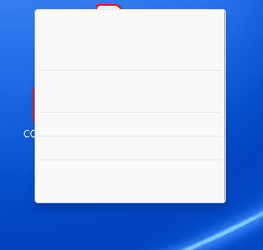
  • error.png
    error.png
    6.5 KB · Views: 2

My Computer My Computer

At a glance

windows
OS
windows
I have a few suspicions, however...,
it would be helpful if you could mount Explorer and Outlook, etc. side by side and try to capture some of the offending anomalies in a full screen desktop screenshot and post it.
Also, could you pop explorer shell:::{ED834ED6-4B5A-4bfe-8F11-A626DCB6A921} into a Run box and show what theme you are running.
3rd: Are you running any 3rd party apps/tweaks that alter the native GUI?
 

My Computers My Computers

  • At a glance

    Windows 11 Pro
    OS
    Windows 11 Pro
    Computer type
    PC/Desktop
    Manufacturer/Model
    ASUS ROG Strix
  • At a glance

    Windows 11 Pro
    Operating System
    Windows 11 Pro
    Computer type
    Laptop
    Manufacturer/Model
    ASUS VivoBook
  • ASUS VivoBook 'Lite' ~ Windows 11 Home
I have a few suspicions, however...,
it would be helpful if you could mount Explorer and Outlook, etc. side by side and try to capture some of the offending anomalies in a full screen desktop screenshot and post it.
Also, could you pop explorer shell:::{ED834ED6-4B5A-4bfe-8F11-A626DCB6A921} into a Run box and show what theme you are running.
3rd: Are you running any 3rd party apps/tweaks that alter the native GUI?
Hey!

eventually the issue became urgent so I tried restoring an older build and it worked.
anyway thanks for the willingness to help!
best regards.
 

My Computer My Computer

At a glance

windows
OS
windows
eventually the issue became urgent so I tried restoring an older build and it worked.
anyway thanks for the willingness to help!
best regards.
like.png
 

My Computers My Computers

  • At a glance

    Windows 11 Pro
    OS
    Windows 11 Pro
    Computer type
    PC/Desktop
    Manufacturer/Model
    ASUS ROG Strix
  • At a glance

    Windows 11 Pro
    Operating System
    Windows 11 Pro
    Computer type
    Laptop
    Manufacturer/Model
    ASUS VivoBook
  • ASUS VivoBook 'Lite' ~ Windows 11 Home
the issue came back
I have a few suspicions, however...,
it would be helpful if you could mount Explorer and Outlook, etc. side by side and try to capture some of the offending anomalies in a full screen desktop screenshot and post it.
Also, could you pop explorer shell:::{ED834ED6-4B5A-4bfe-8F11-A626DCB6A921} into a Run box and show what theme you are running.
3rd: Are you running any 3rd party apps/tweaks that alter the native GUI?
the issue is back again, here is the theme i've been ruinning, though i tried changing it and nothing happened... i have no idea about any 3rd party programs. Im pretty sure the issue started after and update, and when i rolled back it worked fine but eventually the auto update and the roll back option caused the issue to come back1667477071167.png
 

My Computer My Computer

At a glance

windows
OS
windows
Upgrade your drivers. If possible download the latest graphics drivers directly from manufacturer, not Windows Update. Then there are several commands to fix any issues in system files. The most common is sfc /scannow. Right-click on the start button and select to open Terminal or Powershell as Administrator. Then type the above command and press ENTER to execute. This will find any issues and fix them. Next is to use the dism command, but I don't remember the syntax. Anyone else please?
 

My Computers My Computers

  • At a glance

    Windows 11 Pro 23H2 (5699), 25H2 (8655)Mobile DualCore Intel Core 2 Duo T7250, 2000 MHz4GBMobile Intel(R) GMA 4500M (Mobile 4 series)
    OS
    Windows 11 Pro 23H2 (5699), 25H2 (8655)
    Computer type
    Laptop
    Manufacturer/Model
    Acer Extensa 5630EZ
    CPU
    Mobile DualCore Intel Core 2 Duo T7250, 2000 MHz
    Motherboard
    Acer Extensa 5630
    Memory
    4GB
    Graphics Card(s)
    Mobile Intel(R) GMA 4500M (Mobile 4 series)
    Sound Card
    Realtek ALC268 @ Intel 82801IB ICH9 - High Definition Audio Controller
    Monitor(s) Displays
    1
    Screen Resolution
    1280x800
    Hard Drives
    Samsung SSD 850 EVO 250GB SATA Device (250 GB, SATA-III)
    Internet Speed
    VDSL 50 Mbps
    Browser
    MICROSOFT EDGE
    Antivirus
    WINDOWS DEFENDER
    Other Info
    Legacy MBR installation, no TPM, no Secure Boot, no WDDM 2.0 graphics drivers, no SSE4.2, cannot get more unsupported ;) This is only my test laptop. I had installed Windows 11 here before upgrading my main PC. For my main PC I use everyday see my 2nd system specs.
  • At a glance

    Windows 11 Pro v25H2 (build 26200.8655)Intel Core-i7 3770 3.40GHz s1155 (3rd generat...2x Kingston Hyper-X Blu 8GB DDR3-1600GIGABYTE GeForce RTX 3050 WINDFORCE OC V2 6GB...
    Operating System
    Windows 11 Pro v25H2 (build 26200.8655)
    Computer type
    PC/Desktop
    Manufacturer/Model
    Custom-built PC
    CPU
    Intel Core-i7 3770 3.40GHz s1155 (3rd generation)
    Motherboard
    Asus P8H61 s1155 ATX
    Memory
    2x Kingston Hyper-X Blu 8GB DDR3-1600
    Graphics card(s)
    GIGABYTE GeForce RTX 3050 WINDFORCE OC V2 6GB (GV-N3050WF2OCV2-6GD)
    Sound Card
    Realtek HD audio (ALC887)
    Monitor(s) Displays
    Sony Bravia KDL-19L4000 19" LCD TV via VGA
    Screen Resolution
    1440x900 32-bit 60Hz
    Hard Drives
    WD Blue SA510 2.5 1000GB SSD as system disk, Western Digital Caviar Purple 4TB SATA III (WD40PURZ) as second
    PSU
    Thermaltake Litepower RGB 550W Full Wired
    Case
    SUPERCASE MIDI-TOWER
    Cooling
    Deepcool Gamma Archer CPU cooler, 1x 8cm fan at the back
    Keyboard
    Mitsumi 101-key PS/2
    Mouse
    Sunnyline OptiEye PS/2
    Internet Speed
    100Mbps
    Browser
    Microsoft Edge, Mozilla Firefox
    Antivirus
    Microsoft Windows Defender
    Other Info
    Legacy BIOS (MBR) installation, no TPM, no Secure Boot, WDDM 3.0 graphics drivers, WEI score 7.4
Upgrade your drivers. If possible download the latest graphics drivers directly from manufacturer, not Windows Update. Then there are several commands to fix any issues in system files. The most common is sfc /scannow. Right-click on the start button and select to open Terminal or Powershell as Administrator. Then type the above command and press ENTER to execute. This will find any issues and fix them. Next is to use the dism command, but I don't remember the syntax. Anyone else please?
Im either gonna try this and if it doesnt work ill reinstall windows, thanks for the help!
 

My Computer My Computer

At a glance

windows
OS
windows
Back
Top Bottom




